Isolated Rotor Modeling and Analysis
R2026bThis example shows how to use the Blade Element Theory, Dynamic Inflow (Finite-State), and Rigid Blade (Flap and Lag) blocks to build a coupled rotor model that captures blade-level aerodynamics, inflow distribution, and structural dynamics. Use this approach when you need spanwise force distributions, spatially resolved inflow, or blade structural response — effects that a single lumped-thrust model (such as the Rotor block) cannot capture. The example progressively demonstrates:
Collective pitch step response — coupled thrust, flap, and inflow response to collective pitch input
Spanwise loads — effect of blade twist on load distribution
Inflow distribution — spatial distribution of the inflow on the rotor disk in hover and forward flight
Cyclic pitch and disk tilt — analysis of blade response to pitch input
Modal analysis — flap-lag dynamics analysis using linearization
Set Up the Rotor Model
Define rotor geometry, inertial properties, and operating conditions. configureRotor returns a parameter struct and sets the corresponding block parameters on the Simulink model. Three configurations are available: (1) mid-size 4-blade rotor (default block settings) based on Hammond [1], (2) small 2-blade test rotor based on Knight & Hefner [2], (3) 3-blade rotor based on Ormiston [3] for dynamics and modal analysis.
%% Initialize Rotor Parameters
rotorParams = configureRotor(1);
modelName = "isolatedRotorDynamics";
open_system(modelName);

% block paths
betPath = modelName + "/Blade Element Theory";
fsPath = modelName + "/Dynamic Inflow (Finite-State)";
rbPath = modelName + "/Rigid Blade (Flap and Lag)";

% Lock number (gamma): ratio of aerodynamic to inertial forces on the blade.
% Higher gamma means aerodynamic damping dominates blade dynamics.
% Configuration 1 uses relatively high blade inertia, resulting in a low
% Lock number — typical values for full-scale helicopters range from 5 to 10.
gamma = rotorParams.Cl_alpha * rotorParams.rho * rotorParams.c * rotorParams.R^4 / rotorParams.Ib_flap;
tip_speed = rotorParams.Omega * rotorParams.R;

% Set workspace variables consumed by Simulink model (hover defaults)
configureInputs(rotorParams);
Omega = rotorParams.Omega;        % Rotor angular velocity [rad/s]

fprintf("Rotor Configuration:\n" + ...
    "  Solidity (σ):              %.3f\n" + ...
    "  Lock number (γ):           %.2f\n" + ...
    "  Collective pitch (θ₀):     %.1f deg\n" + ...
    "  Tip speed:                 %.0f m/s\n\n", ...
    rotorParams.sigma, gamma, rotorParams.theta0 * 180/pi, tip_speed);
Rotor Configuration:
  Solidity (σ):              0.080
  Lock number (γ):           1.37
  Collective pitch (θ₀):     8.0 deg
  Tip speed:                 210 m/s
The model couples three blocks in a feedback loop:
Blade Element Theory — Computes aerodynamic lift and drag at each radial station from the local angle of attack, which depends on pitch input, blade motion, and induced velocity. Outputs spanwise forces.
Dynamic Inflow (Finite-State)— Converts spanwise forces into an induced velocity field across the rotor disk. Outputs inflow at each element.
Rigid Blade (Flap and Lag)— Solves flap and lag equations of motion for each blade under the same spanwise forces. Outputs blade angles and rates.
The coupling is bidirectional: inflow modifies the angle of attack seen by Blade Element Theory, and blade motion changes the velocity at each element. Together they capture spanwise load redistribution, inflow nonuniformity, and blade dynamic response — effects invisible to a single lumped-thrust model.
Collective Pitch Step — Coupled Response
To observe the coupled dynamics, a 1° collective step is applied after 15 revolutions, allowing the inflow startup transient to fully decay. The plot captures both the startup phase (rotor starting from rest with zero induced velocity) and the step response from equilibrium.
The Rigid Blade block outputs individual blade flap angles . These decompose into coning (all blades together) and disk tilt (differential) components. For a collective input in hover, only coning responds; disk tilts remain zero by symmetry.
% Collective pitch step parameters
tRev = 2*pi / Omega;              % One revolution period [s]
nRevSettle = 15;                  % Revolutions to let inflow settle
nRevPost = 25;                    % Revolutions after step
tSim = (nRevSettle + nRevPost) * tRev; % Total simulation time [s]

configureInputs(rotorParams, ...
    "theta0_initial", 8*pi/180, ...
    "theta0_final", 9*pi/180, ...
    "theta0_step_time", nRevSettle * tRev);

% Run simulation
maxStep = num2str(tRev/36);
simOut = sim(modelName, "StopTime", num2str(tSim), "MaxStep", maxStep);

% Extract results
time = simOut.tout;
beta = simOut.logsout.get("beta").Values;       % Flap angles [rad]
Fhub = simOut.logsout.get("Fhub").Values;       % Hub forces [N]
thrust = Fhub.Data(:,3);                        % Rotor thrust [N]
lambda_i = simOut.logsout.get("lambdai").Values; % Induced velocity ratio

rotorExampleUtils.plotCollectiveResponse(time, beta, thrust, lambda_i, theta0_step_time);
![Figure contains 3 axes objects. Axes object 1 with title Blade Flap Response to Collective Pitch Step, ylabel Flap Angle [deg] contains 3 objects of type line, constantline. These objects represent Blade 1, Coning Angle (\beta_0). Axes object 2 with title Rotor Thrust Response, ylabel Thrust [kN] contains 2 objects of type line, constantline. Axes object 3 with title Induced Velocity Ratio, xlabel Time [s], ylabel \lambda_{i_0} (Mean Inflow) contains 2 objects of type line, constantline.](../examples/aeroblks_rotorcraft/IsolatedRotorExample_01.png)
Interpreting the Results
The response shows two distinct phases:
Startup transient ( to s): The rotor begins with no induced velocity, so each blade element sees the full geometric angle of attack, producing initial thrust far exceeding steady state. As the dynamic inflow model develops the induced velocity field, effective angle of attack decreases and the system converges through coupled oscillations: thrust drives inflow, inflow reduces thrust, until a self-consistent equilibrium is reached. Blade coning () tracks the thrust throughout.
Step response ( s onward): When collective pitch steps from 8° to 9°, thrust spikes before settling to a new equilibrium. The spike occurs because the pitch increase is instantaneous but the inflow has its own time constant. The blade momentarily sees higher pitch with the old (lower) inflow, producing more lift than the new steady state requires. As inflow adjusts upward, thrust settles.
Key observations:
Thrust and coning increase proportionally to the collective change, with overshoot set by the inflow time constant.
Mean inflow ratio increases consistent with , confirming the coupled Blade Element Theory and inflow model reproduces momentum-theory scaling.
Spanwise Load Distribution — Blade Element Theory
To examine how blade twist shapes the spanwise distribution of lift and drag, this section compares three twist configurations at the same thrust. The Blade Element Theory block computes aerodynamic forces at each radial station, giving the full spanwise distribution along the blade.
Three twist configurations are compared, each trimmed to the same rotor thrust ():
No twist: Uniform geometric pitch along the span (θ determined by collective alone).
Linear twist: , with root pitch higher than tip, a common utility helicopter design.
Ideal twist: , which produces theoretically uniform induced velocity in hover.
The collective pitch for each case was trimmed to produce the same rotor thrust (), so that differences in the spanwise distributions are due solely to twist geometry. An initial estimate of the required collective comes from closed-form Blade Element Momentum Theory (BEMT) integration (momentum theory inflow, ). A secant method then corrects this estimate by running the full coupled model until the simulated thrust converges to the target within 1%.
%% Configure Rotor
rotorParams = configureRotor(1);
configureInputs(rotorParams);
Omega = rotorParams.Omega;

%% Configure Twist Cases and Trim Collectives
% Compute trim collective for T = W using BEMT (momentum theory inflow)
%   C_T = (sigma*Cl_a/2) * integral_0^1 [theta(r)*r^2 - lambda*r] dr
%   lambda = sqrt(C_T / 2)
C_T_target = rotorParams.W / (rotorParams.rho * pi * rotorParams.R^2 * (rotorParams.Omega * rotorParams.R)^2);
lambda_h = sqrt(C_T_target / 2);

% Case 1: No twist — theta(r) = theta0
%   C_T = (sigma*Cl_a/2) * [theta0/3 - lambda/2]
theta0_noTwist = 3 * (2*C_T_target/(rotorParams.sigma * rotorParams.Cl_alpha) + lambda_h/2);

% Case 2: Linear twist — theta(r) = theta0 + thetaRoot + thetaTwist*r
%   C_T = (sigma*Cl_a/2) * [(theta0+thetaRoot)/3 + thetaTwist/4 - lambda/2]
thetaRoot_lin = rotorParams.theta_root;
thetaTwist_lin = rotorParams.twist;
theta0_linTwist = 3 * (2*C_T_target/(rotorParams.sigma * rotorParams.Cl_alpha) + lambda_h/2 - thetaTwist_lin/4) - thetaRoot_lin;

% Case 3: Ideal twist — theta(r) = theta0 + thetaTip/r
%   C_T = (sigma*Cl_a/2) * [theta0/3 + thetaTip/2 - lambda/2]
thetaTip_ideal = rotorParams.thetaTip;
theta0_idealTwist = 3 * (2*C_T_target/(rotorParams.sigma * rotorParams.Cl_alpha) + lambda_h/2 - thetaTip_ideal/2);

twistCases = struct( ...
    "name",      {"No Twist", "Linear twist", "Ideal twist"}, ...
    "type",      {"Linear", "Linear", "Ideal"}, ...
    "thetaRoot", {0, thetaRoot_lin, 0}, ...
    "thetaTwist",{0, thetaTwist_lin, 0}, ...
    "thetaTip",  {0, 0, thetaTip_ideal}, ...
    "theta0",    {theta0_noTwist, theta0_linTwist, theta0_idealTwist});

nCases = numel(twistCases);
bladeSegments = rotorParams.bladeElements;
r_mid = (bladeSegments(1:end-1) + bladeSegments(2:end)) / 2;
Simulate and Compare Spanwise Load Distributions
For each case, set the Blade Element Theory block twist parameters and collective pitch to the target thrust, then simulate in hover until the model reaches steady state. The normal force () and tangential force () distributions along with the hub force () are extracted at the final time step. The resulting thrust values confirm convergence to the target within 1% tolerance, but the spanwise distribution differs significantly.
%% Run Simulations and Plot Spanwise Loads
tRev = 2*pi / Omega;              % One revolution period [s]
nRevSettle = 60;                  % Revolutions to reach steady state
tSim_loads = nRevSettle * tRev;

fz_dist = zeros(nCases, length(r_mid));
fx_dist = zeros(nCases, length(r_mid));
T_cases = zeros(1, nCases);

for k = 1:nCases
    % Set twist parameters on Blade Element Theory block
    set_param(betPath, "twistType", twistCases(k).type);
    if twistCases(k).type == "Linear"
        set_param(betPath, "thetaRoot", num2str(twistCases(k).thetaRoot));
        set_param(betPath, "thetaTwist", num2str(twistCases(k).thetaTwist));
    else
        set_param(betPath, "thetaTip", num2str(twistCases(k).thetaTip));
    end

    % Trim collective to T = W and simulate at trimmed condition
    [twistCases(k).theta0, simOut_k] = rotorExampleUtils.trimAndSimulate(modelName, rotorParams, twistCases(k).theta0, tSim_loads);

    % Extract steady-state forces (last time step, average across blades)
    fz_data = simOut_k.logsout.get("fz").Values.Data;
    fx_data = simOut_k.logsout.get("fx").Values.Data;
    fz_dist(k,:) = mean(fz_data(:,:,end), 1);
    fx_dist(k,:) = mean(fx_data(:,:,end), 1);

    % Thrust from hub force output (z-component at final time step)
    Fhub_k = simOut_k.logsout.get("Fhub").Values.Data;
    T_cases(k) = Fhub_k(end,3);
end

fprintf("Thrust per case:  %s\n", sprintf("%.0f N  ", T_cases))
Thrust per case: 45198 N 45122 N 45056 N
rotorExampleUtils.plotSpanwiseLoads(r_mid, fz_dist, fx_dist, twistCases);
![Figure contains 2 axes objects. Axes object 1 with title f_z using Blade Element Theory block using Blade Element Theory block, ylabel Normal Force, f_z [N/m] contains 3 objects of type line. These objects represent No Twist, Linear twist, Ideal twist. Axes object 2 with title f_x using Blade Element Theory block using Blade Element Theory block, xlabel Radial Station, r/R, ylabel Tangential Force, f_x [N/m] contains 3 objects of type line. These objects represent No Twist, Linear twist, Ideal twist.](../examples/aeroblks_rotorcraft/IsolatedRotorExample_02.png)
% Restore default twist configuration
set_param(betPath, "twistType", "Linear", ...
    "thetaRoot", "rotorParams.theta_root", ...
    "thetaTwist", "rotorParams.twist");
Interpreting the Distributions
Normal force () — top panel:
No twist: Load concentrates heavily at the tip, with inboard sections producing negative lift. Without twist, the uniform pitch is dominated by the large inflow angle at low radius. Where rotational velocity is small relative to induced velocity, the effective angle of attack goes negative.
Linear twist: The root pitch offset redistributes loading inboard, still tip-loaded but less extreme. This is the practical compromise between hover efficiency and forward-flight performance found on most utility helicopters.
Ideal twist: The distribution produces the most uniform loading. All stations carry positive lift. The outboard rise occurs because ideal twist is designed to produce uniform inflow under momentum theory assumptions, whereas the finite-state model captures radial variation in inflow.
Tangential force () — bottom panel:
The tangential force drives rotor torque (). For untwisted and linearly-twisted blades, grows outboard where induced drag is highest. Ideal twist produces more uniform inflow and therefore lower induced losses — approaching the theoretical minimum induced power in hover.
The key insight: Blade Element Theory provides the full distribution, not just the integral. This is essential for structural sizing (root bending moments), performance optimization (twist design), and understanding the aerodynamic environment along the blade.
Spatial Inflow Distribution — Dynamic Inflow (Finite-State)
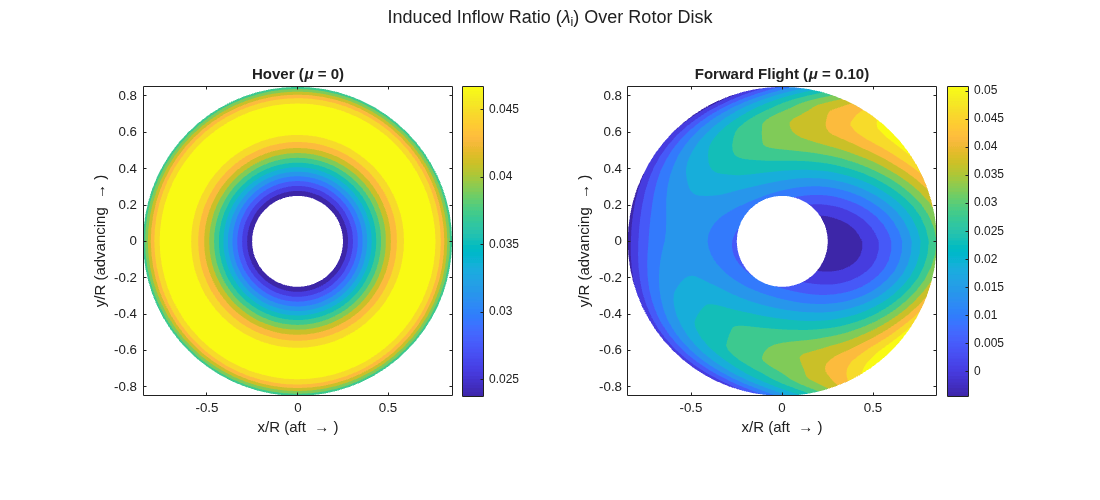
To visualize the spatial structure of the induced velocity field, this section reconstructs the full-disk inflow distribution by collecting the block output across one rotor revolution and mapping each sample to its (r, ψ) location on the disk.
The Dynamic Inflow (Finite-State)block represents the induced velocity distribution over the rotor disk as a series expansion in Legendre polynomials (radially) and trigonometric functions (azimuthally). This structure allows the model to capture both radial nonuniformity and higher-harmonic azimuthal content with a finite number of states.
Two flight conditions reveal the inflow model's spatial content:
Hover (): The induced velocity field is axisymmetric, with radial variation resolved by the finite-state model.
Forward flight (, untrimmed): The inflow becomes strongly asymmetric, with a dominant fore-aft gradient due to wake skew. No cyclic trim is applied — the asymmetry arises purely from the forward flight velocity skewing the wake.
The disk resolution depends on the rotor configuration and simulation time step. Radially, the blade element boundaries define the spanwise stations where inflow is computed. Azimuthally, the block samples inflow at each solver time step as the blades rotate. Each time step provides azimuthal samples (one per blade position). Collecting samples over one full revolution builds up dense azimuthal coverage of the disk.
This section uses Configuration 2 — a small, untwisted 2-blade rotor (R = 0.762 m, 960 RPM) with small hinge offset. The simple geometry isolates the inflow structure without complications from twist.
Note: This section uses the finite-state inflow model, which resolves higher-harmonic radial and azimuthal structure. The same analysis can be performed with the Dynamic Inflow (3-State) block, which provides first-harmonic azimuthal inflow at lower computational cost. The choice depends on whether the application requires detailed inflow distribution across the disk or only first-harmonic azimuthal content.
%% Configure Rotor
rotorParams = configureRotor(2);
Omega = rotorParams.Omega;

% The blade element distribution defines the aerodynamic span — the Blade Element Theory block
% computes forces only at these stations. The innermost element should be at or
% beyond the root cutout (rc = 0.167 for this rotor). Elements inboard of the
% cutout have no contribution and should be excluded.
rotorParams.bladeElements = [0.2 0.3 0.4 0.5 0.6 0.7 0.8 0.9];
bladeSegments = rotorParams.bladeElements;
r_mid = (bladeSegments(1:end-1) + bladeSegments(2:end)) / 2;

set_param(betPath, "bladeElements", "rotorParams.bladeElements");

% Finite-State inflow settings (override defaults from configureRotor)
indexHarmonics = 4;               % Number of harmonics (M_max)
methodSpatialModes = "Consistently upgraded"; % "Consistently upgraded" or "Constant"

set_param(fsPath, "indexHarmonics", num2str(indexHarmonics));
set_param(fsPath, "methodSpatialModes", methodSpatialModes);
Simulate Hover and Forward Flight, Reconstruct Inflow Disk
The model is run for a large number of revolutions so the finite-state inflow reaches steady state. At steady state, each blade sweeps through all azimuths — collecting over one revolution and computing each blade's azimuth from gives a dense set of (r, , ) samples covering the entire disk. The forward flight case is untrimmed (no cyclic input), so the distribution is representative but not a trimmed condition.
Hub frame convention: The Blade Element Theory block uses a hub-fixed frame where points aft (ψ = 0 direction), points starboard, and points up. To convert from a standard body-frame velocity (NED: = forward, = right, = down):
%% Simulate, Extract, and Plot Inflow Disk
tRev = 2*pi / Omega;              % One revolution period [s]
nRevSettle = 90;                  % Revolutions to reach steady state
tSim_inflow = nRevSettle * tRev;  % Settle time [s]
maxStepInflow = num2str(tRev/50); % Dense output for disk reconstruction (~50 steps/rev)

% Hover
configureInputs(rotorParams, ...
    "theta0_initial", 8*pi/180, ...
    "theta0_final", 8*pi/180);
simOut_hover_fs = sim(modelName, "StopTime", num2str(tSim_inflow), "MaxStep", maxStepInflow);

% Forward flight (mu ~ 0.10)
V_fwd = 0.10 * Omega * rotorParams.R;  % mu = 0.10
T_hub_body = diag([-1 1 -1]);
V_body = [V_fwd; 0; 0];
Vhub_fwd = (T_hub_body * V_body)';
configureInputs(rotorParams, ...
    "Vhub", Vhub_fwd, ...
    "theta0_initial", 8*pi/180, ...
    "theta0_final", 8*pi/180);
simOut_fwd_fs = sim(modelName, "StopTime", num2str(tSim_inflow), "MaxStep", maxStepInflow);

% Restore hover defaults
configureInputs(rotorParams);

% Reconstruct disk from last revolution and plot
Nb = rotorParams.Nb;
[r_hover_fs, psi_hover_fs, lam_hover_fs] = rotorExampleUtils.extractLastRevolution(simOut_hover_fs, Omega, Nb, bladeSegments, tRev);
[r_fwd_fs, psi_fwd_fs, lam_fwd_fs] = rotorExampleUtils.extractLastRevolution(simOut_fwd_fs, Omega, Nb, bladeSegments, tRev);
mu_fwd = V_fwd / (Omega * rotorParams.R);
rotorExampleUtils.plotInflowDisk(r_mid, psi_hover_fs, r_hover_fs, lam_hover_fs, ...
    psi_fwd_fs, r_fwd_fs, lam_fwd_fs, mu_fwd);
Interpreting the Inflow Fields
Hover: The induced velocity is axisymmetric (no azimuthal variation), but shows radial variation reflecting the non-uniform blade loading for this twist and collective setting.
Forward flight: The forward flight velocity skews the wake, producing a non-uniform inflow field with a dominant fore-aft gradient. The finite-state model captures both this gradient and finer radial and azimuthal structure (higher harmonics and spatial modes). In forward flight, the fore-aft inflow gradient causes the disk to tilt, which must be balanced by cyclic pitch inputs to maintain trimmed flight.
Effect of Number of Harmonics on Radial Inflow Profile
The finite-state model decomposes the induced velocity into azimuthal harmonics (Fourier) and radial shape functions (Legendre polynomials). Increasing (the number of harmonics considered in the inflow model) adds spatial detail. The following sweep compares the radial inflow shape across harmonic counts. The steady-state BEMT solution () is plotted as a familiar reference.
%% Sweep Harmonics and Compare Radial Profiles
sigma = rotorParams.sigma;
a = rotorParams.Cl_alpha;

% BEMT hover trim estimate (no twist: theta(r) = theta0)
C_T_target = rotorParams.W / (rotorParams.rho * pi * rotorParams.R^2 * (rotorParams.Omega * rotorParams.R)^2);
lambda_h = sqrt(C_T_target / 2);
theta0_inflow = 3 * (2*C_T_target/(sigma * a) + lambda_h/2);

r_bemt = linspace(0.2, 0.9, 50);
lambda_bemt = (sigma*a/16) * (sqrt(1 + 32*theta0_inflow.*r_bemt/(sigma*a)) - 1);

configureInputs(rotorParams, ...
    "theta0_initial", theta0_inflow, ...
    "theta0_final", theta0_inflow);

M_values = [0 2 4 6];
nM = length(M_values);
lambda_radial = zeros(nM, length(r_mid));
set_param(fsPath, "methodSpatialModes", "Consistently upgraded");

for idx = 1:nM
    set_param(fsPath, "indexHarmonics", num2str(M_values(idx)));
    simOut_conv = sim(modelName, "StopTime", num2str(tSim_inflow), "MaxStep", maxStepInflow);

    [r_conv, ~, lam_conv] = rotorExampleUtils.extractLastRevolution(simOut_conv, Omega, Nb, bladeSegments, tRev);

    % Average inflow over all azimuths at each radial station
    for jR = 1:length(r_mid)
        mask_r = abs(r_conv - r_mid(jR)) < 0.01;
        lambda_radial(idx, jR) = mean(lam_conv(mask_r));
    end
end

% Restore symbolic parameter references
set_param(fsPath, "indexHarmonics", "rotorParams.indexHarmonics");
set_param(fsPath, "methodSpatialModes", rotorParams.methodSpatialModes);

rotorExampleUtils.plotInflowRadialProfiles(r_mid, lambda_radial, M_values, r_bemt, lambda_bemt);
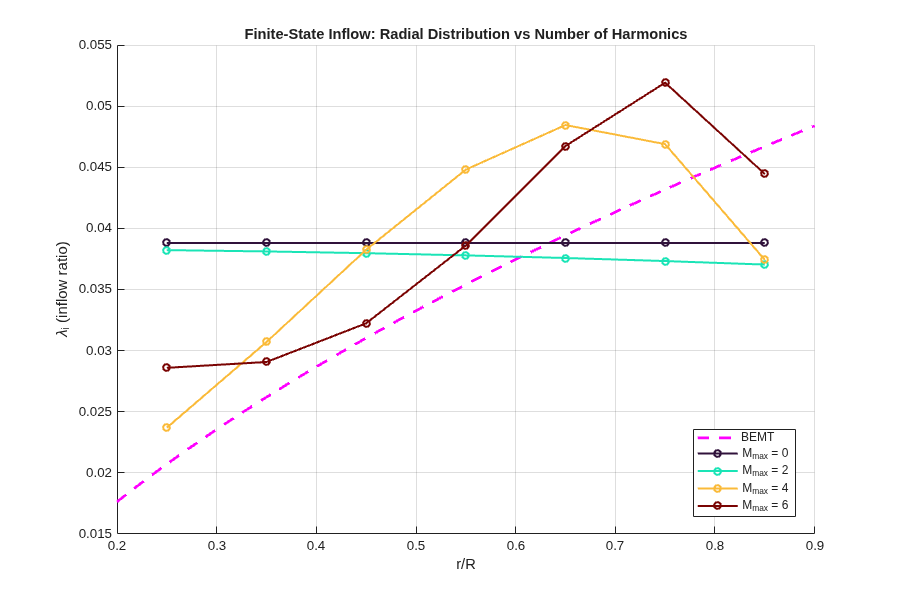
Higher harmonic counts resolve finer radial structure in the induced velocity distribution, particularly near the blade tip. The appropriate setting depends on the application, the level of spatial detail required, and the available computation time. A similar study can be performed for radial resolution by setting the spatial mode method to "Constant" and varying the "Number of spatial modes per harmonic" parameter at a fixed harmonic count.
Cyclic Pitch and Disk Tilt — Rigid Blade (Flap and Lag)
The Rigid Blade (Flap and Lag) block models each blade as a rigid body free to rotate about flap and lag hinges. The block outputs the flap angle for each blade, the out-of-plane deflection driven by the balance among aerodynamic lift, centrifugal restoring force, and inertia.
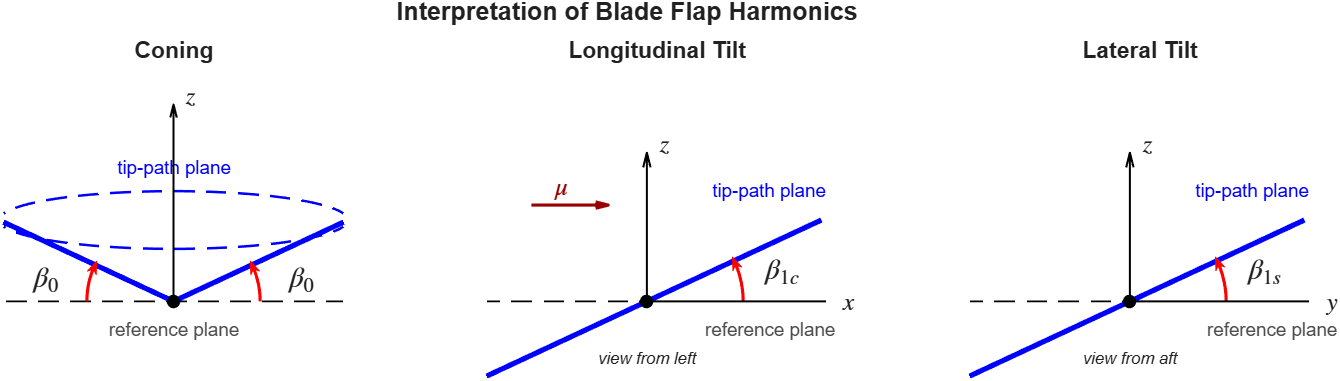
While individual blade angles are useful for visualizing motion, the physically meaningful quantities for flight mechanics are obtained by a Fourier harmonic decomposition [4] of the individual blade angles, applicable to rotors with three or more equally spaced blades (). This decomposition separates the collective (all blades moving together) from the differential (disk tilting) response:
Here is the coning angle (average upward deflection under thrust), while and describe the tip-path-plane tilt, the orientation of the disk in space [4]. These are the quantities that determine the direction of the rotor thrust vector and hence the helicopter's flight path.
A fundamental result in rotor dynamics is the relationship between cyclic pitch and disk tilt. For a centrally-hinged rotor (, no hinge offset or flap spring), the quasi-steady flap equations reduce to:
This is the "90° phase lag" result: the disk does not tilt in the direction where pitch is applied — it tilts 90° later in azimuth. For example, applying lateral cyclic () produces longitudinal tilt (), not lateral tilt.
Helicopter directional control relies on this pitch-to-tilt mapping: cyclic pitch inputs tilt the tip-path plane, which reorients the rotor thrust vector. Understanding how the tilt magnitude and phase change with hinge offset and rotor speed is central to flight control design.
This section verifies this relationship with the coupled model, first for the centrally-hinged case () and then for a rotor with non-unity flap frequency ().
%% Configure for Cyclic Response Analysis
rotorParams = configureRotor(3);
configureInputs(rotorParams);

Omega = rotorParams.Omega;
Nb = rotorParams.Nb;
tRev = 2*pi / Omega;
nRevSettle = 15;   % Revolutions before step input
nRevPost = 25;     % Revolutions after step input
tSim_mbc = (nRevSettle + nRevPost) * tRev;
stepTime_mbc = nRevSettle * tRev;
maxStep_mbc = num2str(tRev/36);

thetac_block = modelName + "/thetac";
thetas_block = modelName + "/thetas";
load_system("simulink");
Centrally-Hinged Rotor (): 90° Phase Lag
The nondimensional flap frequency is , where is the flap hinge offset as a fraction of blade radius. With zero hinge offset (), this gives — the blade flaps at exactly 1/rev. In this case, the quasi-steady flap balance is entirely between aerodynamic forcing and aerodynamic damping (no spring restoring force), and the 90° phase relationship holds regardless of Lock number.
%% Run Centrally-Hinged Case (nu_beta = 1)
% Temporarily set nu_beta = 1 to verify the 90 deg phase lag result
set_param(rbPath, "flapHingeOffset", "0", "flapFrequency", "1");
set_param(betPath, "flapHingeOffset", "0");

% Lateral cyclic step (theta_1c: 0 -> 2 deg)
configureInputs(rotorParams, theta0_initial=8*pi/180, theta0_final=8*pi/180, ...
    theta0_step_time=tSim_mbc + 1);

replace_block(modelName, "Name", "thetac", "simulink/Sources/Step", "noprompt");
set_param(thetac_block, "Time", num2str(stepTime_mbc), "Before", "0", ...
    "After", "2*pi/180", "SampleTime", "0");
simOut_ideal_lat = sim(modelName, "StopTime", num2str(tSim_mbc), "MaxStep", maxStep_mbc);
replace_block(modelName, "Name", "thetac", "simulink/Sources/Constant", "noprompt");
set_param(thetac_block, "Value", "thetac_init");

% Longitudinal cyclic step (theta_1s: 0 -> 2 deg)
replace_block(modelName, "Name", "thetas", "simulink/Sources/Step", "noprompt");
set_param(thetas_block, "Time", num2str(stepTime_mbc), "Before", "0", ...
    "After", "2*pi/180", "SampleTime", "0");
simOut_ideal_lon = sim(modelName, "StopTime", num2str(tSim_mbc), "MaxStep", maxStep_mbc);
replace_block(modelName, "Name", "thetas", "simulink/Sources/Constant", "noprompt");
set_param(thetas_block, "Value", "thetas_init");

% Restore non-unity flap frequency
set_param(rbPath, "flapHingeOffset", "rotorParams.e_flap", ...
    "flapFrequency", "rotorParams.nu_beta");
set_param(betPath, "flapHingeOffset", "rotorParams.e_flap");

%% Verify Classic 90 deg Phase Lag
[phase_from_theta1c, db1c_from_theta1c, db1s_from_theta1c] = rotorExampleUtils.computePhaseLag(simOut_ideal_lat, Omega, Nb, stepTime_mbc);
[phase_from_theta1s, db1c_from_theta1s, db1s_from_theta1s] = rotorExampleUtils.computePhaseLag(simOut_ideal_lon, Omega, Nb, stepTime_mbc);
phase_from_theta1s = phase_from_theta1s - 90;

fprintf("Centrally-hinged rotor (nu_beta = 1):\n" + ...
    "  theta_1c = 2 deg  -->  beta_1s = %+.3f deg, beta_1c = %+.3f deg  (phase = %.1f deg)\n" + ...
    "  theta_1s = 2 deg  -->  beta_1c = %+.3f deg, beta_1s = %+.3f deg  (phase = %.1f deg)\n", ...
    db1s_from_theta1c, db1c_from_theta1c, phase_from_theta1c, ...
    db1c_from_theta1s, db1s_from_theta1s, phase_from_theta1s);
Centrally-hinged rotor (nu_beta = 1):
  theta_1c = 2 deg  -->  beta_1s = +2.027 deg, beta_1c = +0.025 deg  (phase = 89.3 deg)
  theta_1s = 2 deg  -->  beta_1c = -2.027 deg, beta_1s = +0.025 deg  (phase = 89.3 deg)
Both cyclic axes confirm the theoretical result: and with approximately 90° phase lag. The disk tilts perpendicular to the applied cyclic input, and the two axes are symmetric.
Non-Unity Flap Frequency (): Phase Departure
Config 3 has a flap spring that gives at the nominal rotor speed. The non-unity frequency ratio introduces a restoring force that modifies the phase relationship (quasi-steady, uniform inflow):
When , both and respond to each cyclic input — the phase lag departs from 90°. The full simulation includes dynamic inflow coupling, which further modifies the response.
%% Run Non-Unity Flap Frequency Case
% Collective step
configureInputs(rotorParams, theta0_initial=8*pi/180, theta0_final=9*pi/180, ...
    theta0_step_time=stepTime_mbc);
simOut_coll = sim(modelName, "StopTime", num2str(tSim_mbc), "MaxStep", maxStep_mbc);

% Lateral cyclic step
configureInputs(rotorParams, theta0_initial=8*pi/180, theta0_final=8*pi/180, ...
    theta0_step_time=tSim_mbc + 1);
replace_block(modelName, "Name", "thetac", "simulink/Sources/Step", "noprompt");
set_param(thetac_block, "Time", num2str(stepTime_mbc), "Before", "0", ...
    "After", "2*pi/180", "SampleTime", "0");
simOut_latcyc = sim(modelName, "StopTime", num2str(tSim_mbc), "MaxStep", maxStep_mbc);
replace_block(modelName, "Name", "thetac", "simulink/Sources/Constant", "noprompt");
set_param(thetac_block, "Value", "thetac_init");

%% Harmonic Decomposition and Phase Extraction
[t_coll, b0_coll, b1c_coll, b1s_coll] = rotorExampleUtils.computeBladeHarmonics(simOut_coll, Omega, Nb);
[t_latcyc, b0_latcyc, b1c_latcyc, b1s_latcyc] = rotorExampleUtils.computeBladeHarmonics(simOut_latcyc, Omega, Nb);

rotorExampleUtils.plotBladeHarmonics(t_coll, b0_coll, b1c_coll, b1s_coll, ...
    t_latcyc, b0_latcyc, b1c_latcyc, b1s_latcyc, ...
    stepTime_mbc, rotorParams.nu_beta);
![Figure contains 2 axes objects. Axes object 1 with title Collective Step ( theta indexOf 0 baseline : 8 ° rightarrow 9 °), ylabel [deg] contains 4 objects of type line, constantline. These objects represent \beta_0, \beta_{1c}, \beta_{1s}. Axes object 2 with title Lateral Cyclic Step ( theta indexOf 1 c baseline : 0 ° rightarrow 2 °), xlabel Time [s], ylabel [deg] contains 4 objects of type line, constantline. These objects represent \beta_0, \beta_{1c}, \beta_{1s}.](../examples/aeroblks_rotorcraft/IsolatedRotorExample_06.png)
phase_lag = rotorExampleUtils.computePhaseLag(simOut_latcyc, Omega, Nb, stepTime_mbc);

fprintf("nu_beta = %.2f:  theta_1c = 2 deg  -->  phase lag = %.1f deg\n", ...
    rotorParams.nu_beta, phase_lag);
nu_beta = 1.10: theta_1c = 2 deg --> phase lag = 69.3 deg
The phase lag departs from 90° because the spring restoring force () redistributes the response between and . The longitudinal cyclic response is orthogonal by the same angle.
Interpreting the Results
Centrally-hinged rotor (): The simulation confirms the kinematic result and with approximately 90° phase lag. The disk tilts perpendicular to the applied cyclic input.
Rotor with flap spring (): With non-unity flap frequency, the spring restoring force couples both and to each cyclic input. The phase lag departs from 90° and the tilt magnitude per degree of cyclic is reduced. The two cyclic responses remain approximately orthogonal, preserving controllability.
In both cases, the blade flap response to cyclic pitch is the mechanism by which the pilot controls the orientation of the rotor thrust vector. The swashplate prescribes a once-per-rev pitch variation; the blades respond by flapping to a new equilibrium, tilting the tip-path plane and redirecting the thrust. The phase and magnitude of this pitch-to-flap transfer function, governed by flap frequency, Lock number, and inflow dynamics, determines the helicopter's control sensitivity and cross-coupling characteristics.
Flap-Lag Analysis with Linearization
Aerodynamic forces can couple the flap and lag degrees of freedom, and under certain conditions this coupling drives an instability that can be revealed using a linear stability analysis. Linearizing the system at equilibrium and examining eigenvalues exposes the modal frequencies, damping ratios, and stability boundaries directly.
This section linearizes the same coupled model (Blade Element Theory + Dynamic Inflow + Rigid Blade) used in the previous sections, sweeps rotor speed, and extracts modal frequencies and damping for the Config 3 rotor (3-blade, zero lag damping).
The workflow uses Simulink Control Design™:
Define linearization I/O points (
linio(Simulink Control Design))Simulate to steady state (
sim) and extract the operating point (findop(Simulink Control Design))Linearize at that operating point (
linearize(Simulink Control Design)) to obtain the state-space modelCompute eigenvalues (
eig) and plot modal frequencies and damping in the non-rotating frame (via Multi-blade Coordinate transformation) to assess flap-lag stability
Frequency Coalescence
When the flap and lag modal frequencies approach each other, aerodynamic cross-coupling can transfer energy between the modes and drive one unstable. This condition is referred to as frequency coalescence. Away from coalescence, the frequency separation weakens the coupling and the system remains stable [3].
Config 3 is a representative configuration for demonstrating this:
Zero mechanical lag damping () to isolate the aerodynamic stability boundary
Lock number and collective pitch rad to produce meaningful aerodynamic coupling
%% Configure Stability Model (Config 3)
rotorParams = configureRotor(3);
configureInputs(rotorParams);
Omega = rotorParams.Omega;

% Define linearization I/O points (hover trim: only collective, no cyclic)
linio_in = linio(modelName + "/Collective Pitch Step", 1, "input");
linio_out = linio(modelName + "/Rigid Blade (Flap and Lag)", 1, "output");
nRevsTrim = 20;
Modal Frequency and Damping vs. Rotor Speed
Sweep rotor speed from 25 to 600 RPM. At each operating point, update the block parameters, simulate the model to reach steady state, extract the operating point with findop. Then linearize using linearize from Simulink Control Design™ toolbox. The resulting A matrix is then transformed to the nonrotating frame using the Multi-blade Coordinate (MBC) transformation (convertToMBCLinear) before extracting eigenvalues.
This transformation is necessary because the linearized system in rotating coordinates has azimuth-dependent coupling between blade and inflow states, and the non-rotating frame eigenvalues are the physically meaningful stability indicators [4].
The results here are qualitatively consistent with [3], though a direct numerical match is not expected because this model uses dynamic inflow and a detailed Blade Element Theory formulation rather than the quasi-steady aerodynamic assumptions in the original analysis.
%% Modal Frequency and Damping — Config 3
OmegaRPM = [25:25:225 250:10:350 375:25:600];
nOmega = length(OmegaRPM);
nStates = 18;

allEigs = zeros(nStates, nOmega);

for k = 1:nOmega
    OmegaK = OmegaRPM(k) * 2*pi/60;
    nu_beta_k = sqrt(1 + rotorParams.kFlap / (rotorParams.Ib_flap * OmegaK^2));
    nu_zeta_k = sqrt(rotorParams.kLag / (rotorParams.Ib_lag * OmegaK^2));

    % Update Simulink block parameters for this rotor speed
    set_param(betPath, "omega", num2str(OmegaK));
    set_param(fsPath, "omega", num2str(OmegaK));
    set_param(rbPath, "omega", num2str(OmegaK), ...
        "flapFrequency", num2str(nu_beta_k), ...
        "lagFrequency", num2str(nu_zeta_k));

    % Simulate to reach trim (start from zero each time to trim independently)
    T_rev = 2*pi / OmegaK;
    simTime = nRevsTrim * T_rev;
    set_param(modelName, "StopTime", num2str(simTime), "LoadInitialState", "off");
    sim(modelName);

    % Extract operating point and linearize
    opTrim = findop(modelName, simTime);
    sysLin = linearize(modelName, opTrim, [linio_in; linio_out]);

    % Apply MBC transformation to blade states (7:18) to get non-rotating frame.
    % Note: convertToMBCLinear is implemented for Nb = 3.
    % State ordering:
    %   1-6:   Dynamic Inflow states
    %   7-9:   flap angles  [beta_1, beta_2, beta_3]
    %   10-12: flap rates   [betaDot_1, betaDot_2, betaDot_3]
    %   13-15: lag angles   [zeta_1, zeta_2, zeta_3]
    %   16-18: lag rates    [zetaDot_1, zetaDot_2, zetaDot_3]
    A_nr = convertToMBCLinear(sysLin.A, OmegaK, rotorParams.Nb);

    ev = eig(A_nr);
    [~, sortIdx] = sort(abs(imag(ev))); % sort by frequency for consistent mode tracking
    ev = ev(sortIdx);

    allEigs(:,k) = ev;
end

% Restore symbolic parameter references after sweep
set_param(betPath, "omega", "rotorParams.Omega");
set_param(fsPath, "omega", "rotorParams.Omega");
set_param(rbPath, "omega", "rotorParams.Omega", ...
    "flapFrequency", "rotorParams.nu_beta", ...
    "lagFrequency", "rotorParams.nu_zeta");

% Track modes across RPM sweep and plot frequency/damping
rotorExampleUtils.plotModalAnalysis(OmegaRPM, allEigs);
![Figure contains 2 axes objects. Axes object 1 with title Modal Frequency (Non-Rotating Frame), ylabel Frequency [Hz] contains 19 objects of type line, constantline. Axes object 2 with title Modal Damping (Non-Rotating Frame), xlabel Rotor Speed [RPM], ylabel Damping (Real Part) [1/s] contains 20 objects of type line, constantline.](../examples/aeroblks_rotorcraft/IsolatedRotorExample_07.png)
Interpreting the Results
The frequency plot (top panel) is a fan diagram of the coupled flap-lag-inflow system. Each curve traces one mode across the RPM sweep. The three curves originating near the lag natural frequency ( Hz) at low RPM are lag modes, which diverge as rotor speed increases. Similarly, the three curves starting near the flap natural frequency ( Hz) are flap modes. The remaining curves are inflow modes from the finite-state wake model — these are heavily damped and not of primary interest here.
Since detailed mode identification requires eigenvector participation analysis (beyond the scope of this example), all modes are plotted in the same color. The focus is on the frequency coalescence near 310 RPM, where flap and lag branches converge.
Correspondingly, the damping plot (bottom panel) shows that near the coalescence RPM, one of the blade modes' damping crosses zero and becomes positive — indicating instability.
The physical mechanism: when collective pitch is applied, aerodynamic forces create cross-coupling between flap and lag. A lag perturbation changes the in-plane velocity (and thus angle of attack), driving a flap response; the flap response generates a Coriolis force that feeds back into lag. This coupling is present whenever , but only drives instability near frequency coalescence — where the coupled modal frequencies converge and the flap and lag motions are phased so that net positive work is done per cycle.
Lag dampers are a standard component of articulated rotors, and even a small amount of mechanical lag damping is sufficient to stabilize this configuration.
This analysis demonstrates that the coupled Simulink model (Blade Element Theory + Dynamic Inflow + Rigid Blade) captures the classical flap-lag coupling dynamics. The workflow (sim → findop → linearize) provides a path from nonlinear simulation to linear stability assessment.
Customize the Model
Solver selection — This model uses variable-step ode45 (Dormand-Prince). The appropriate solver and step size depend on rotor parameters and the inflow model configuration (number of harmonics, spatial modes). Higher harmonic counts introduce faster dynamics that may require a stiffer solver or smaller time step. Adjust solver settings if you observe slow convergence or oscillatory behavior.
Consistent parameters across blocks — Parameters such as rotor speed, radius, number of blades, hinge offsets, and blade element distribution must be identical across the Blade Element Theory, Dynamic Inflow, and Rigid Blade blocks. Mismatched values will produce incorrect coupling between aerodynamics, inflow, and blade dynamics.
Use custom radial distribution — Set the radial distribution source to "Custom distribution" in both the Dynamic Inflow and Rigid Blade blocks so that they inherit the same blade element stations defined in the Blade Element Theory block. This ensures the force distributions computed by Blade Element Theory are applied at the correct radial locations in the inflow and structural models.
Analyze a custom rotor — Add a new configuration case to
configureRotor.mwith the desired geometry, inertia, and aerodynamic parameters. The example workflow (trim, loads, inflow, blade response, stability) applies directly to any rotor configuration.computeBladeHarmonicsrequires — ThecomputeBladeHarmonicshelper extracts , , and from individual blade flap angles via Fourier harmonic decomposition. Resolving the first-harmonic cosine and sine components independently requires at least three equally spaced blades. For 2-blade rotors, only coning and a single teetering mode can be extracted.convertToMBCLinearlimited to — TheconvertToMBCLinearhelper constructs the state transformation matrix as [collective, cos, sin], which is square and invertible only for . For rotors with a different blade count, the transformation must be extended (e.g., an additional differential mode for ).
References
[1] Hammond, C. E., "An Application of Floquet Theory to Prediction of Mechanical Instability," Journal of the American Helicopter Society, Vol. 19, No. 4, 1974, pp. 14–23.
[2] Knight, M. and Hefner, R. A., "Static Thrust Analysis of the Lifting Airscrew," NACA TN-626, 1937.
[3] Ormiston, R. A. and Hodges, D. H., "Linear Flap-Lag Dynamics of Hingeless Helicopter Rotor Blades in Hover," Journal of the American Helicopter Society, Vol. 17, No. 2, 1972, pp. 2–14.
[4] Johnson, W., Helicopter Theory, Princeton University Press, 1980.
See Also
Rotor | Multirotor | Dynamic Inflow (Finite-State) | Blade Element Theory | Dynamic Inflow (3-State) | Rigid Blade (Flap and Lag)

