主要内容

velocityLoadFactorEnvelope

Plot airspeed versus load factor flight envelope

Since R2026a

Description

ax = velocityLoadFactorEnvelope(h,mass,S,C,Vne,CLLim,loadFactorLim) creates a plot axis object, ax, and plots the airspeed versus load factor (V-n) flight envelope given the flight altitude, mass, aircraft wing area, wing chord, never-exceed speed, lift coefficient limits, and load factor limits.

ax = velocityLoadFactorEnvelope(___,Name=Value) specifies options using one or more name-value arguments in addition to the input arguments in previous syntaxes.

velocityLoadFactorEnvelope(myAx,___) plots a boundary line on the specified axes myAx instead of the current axes. Create myAx with any axes function, such as gca or axes.

example

Examples

collapse all

Create a velocity versus load factor (V-N) flight envelope plot for a Cessna 172 aircraft flying at sea level.

ax = velocityLoadFactorEnvelope(0,1000,16.2,1.5,64.3, ...
  [-1.2,1.8],[-1.5,4])
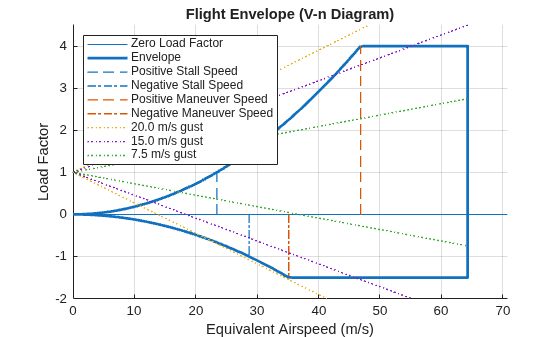
Figure contains an axes object. The axes object with title Flight Envelope (V-n Diagram), xlabel Equivalent Airspeed (m/s), ylabel Load Factor contains 9 objects of type line. These objects represent Zero Load Factor, Envelope, Positive Stall Speed, Negative Stall Speed, Positive Maneuver Speed, Negative Maneuver Speed, 20.0 m/s gust, 15.0 m/s gust, 7.5 m/s gust.

ax = 
  Axes (Flight Envelope (V-n Diagram)) with properties:

             XLim: [0 70.7300]
             YLim: [-2 4.5000]
           XScale: 'linear'
           YScale: 'linear'
    GridLineStyle: '-'
         Position: [0.1300 0.1127 0.7750 0.8123]
            Units: 'normalized'

  Show all properties

This example shows how to create a velocity versus load factor (V-N) flight envelope plot for a Boeing 737 aircraft flying at 30000 ft.

ax = velocityLoadFactorEnvelope(30000,175000,1340,12,500, ...
  [-0.4,1.2],[-1.5,5],Cla=5.5,Vcruise=430,Units="English (kts)", ...
  ColorOrder="reef")
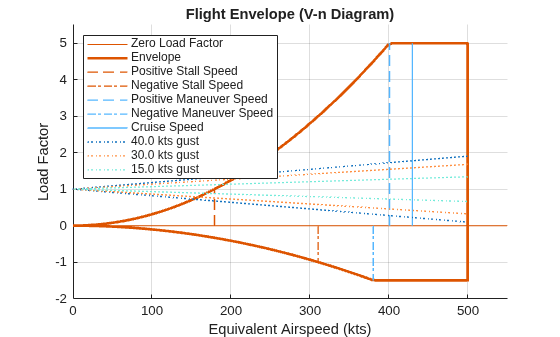
Figure contains an axes object. The axes object with title Flight Envelope (V-n Diagram), xlabel Equivalent Airspeed (kts), ylabel Load Factor contains 10 objects of type line. These objects represent Zero Load Factor, Envelope, Positive Stall Speed, Negative Stall Speed, Positive Maneuver Speed, Negative Maneuver Speed, Cruise Speed, 40.0 kts gust, 30.0 kts gust, 15.0 kts gust.

ax = 
  Axes (Flight Envelope (V-n Diagram)) with properties:

             XLim: [0 550]
             YLim: [-2 5.5000]
           XScale: 'linear'
           YScale: 'linear'
    GridLineStyle: '-'
         Position: [0.1300 0.1127 0.7750 0.8123]
            Units: 'normalized'

  Show all properties

Create three flight envelopes and plot them on tiled axes ax1, ax2, and ax3 using the tiledlayout and nexttile functions.

Create a figure specifying the left, bottom, width, and height positions.

figure('Units','inches','Position',[1,1,12,12]);

Create a 3-row, 1-column, loosely tiled chart layout using tiledlayout.

tiledlayout(3,1);

Set the first tile to ax1 using nexttile, and then create and plot the altitude versus airspeed flight envelope using the altitudeSpeedEnvelope function.

ax1 = nexttile;
altitudeSpeedEnvelope(ax1,1.8,8000,64.3,16.2,1000,MachLines=[0.05,0.1,0.15]);

Set the second tile to ax2 using nexttile and then create and plot the airspeed versus load factor flight envelope using velocityLoadFactorEnvelope.

ax2 = nexttile;
velocityLoadFactorEnvelope(ax2,0,1000,16.2,1.5,64.3,[-1.2,1.8],[-1.5,4],XAxis="EAS");

Set the third tile to ax3 using the nexttile function, and then create and plot the turn rate versus flight speed flight envelope using the turnRateAirspeedEnvelope function.

ax3 = nexttile;
turnRateAirspeedEnvelope(ax3,1.5,16.2,1000,3.8,84);
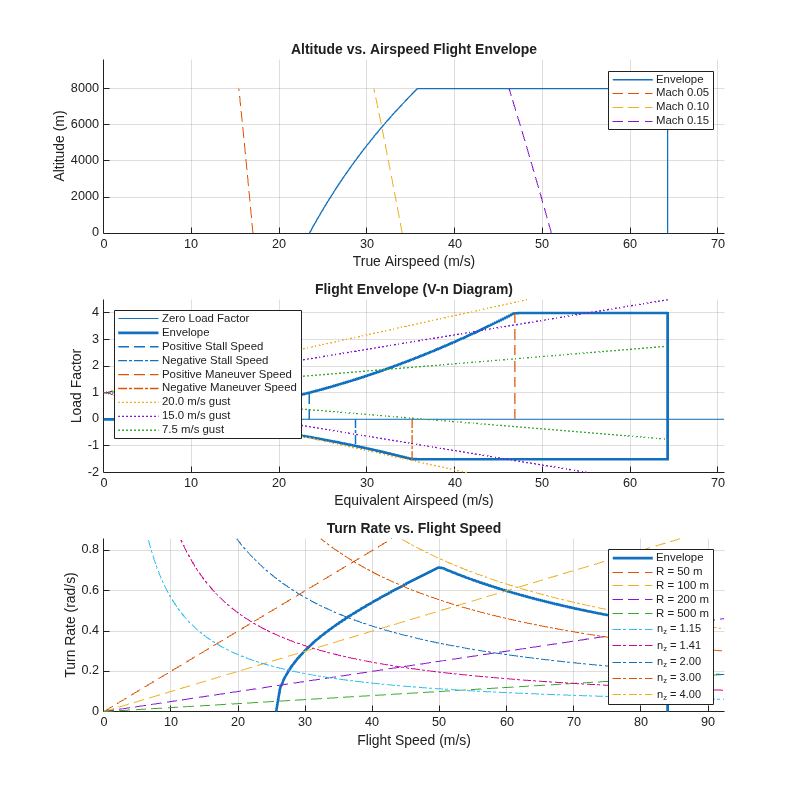
Figure contains 3 axes objects. Axes object 1 with title Altitude vs. Airspeed Flight Envelope, xlabel True Airspeed (m/s), ylabel Altitude (m) contains 4 objects of type line. These objects represent Envelope, Mach 0.05, Mach 0.10, Mach 0.15. Axes object 2 with title Flight Envelope (V-n Diagram), xlabel Equivalent Airspeed (m/s), ylabel Load Factor contains 9 objects of type line. These objects represent Zero Load Factor, Envelope, Positive Stall Speed, Negative Stall Speed, Positive Maneuver Speed, Negative Maneuver Speed, 20.0 m/s gust, 15.0 m/s gust, 7.5 m/s gust. Axes object 3 with title Turn Rate vs. Flight Speed, xlabel Flight Speed (m/s), ylabel Turn Rate (rad/s) contains 10 objects of type line. These objects represent Envelope, R = 50 m, R = 100 m, R = 200 m, R = 500 m, n_z = 1.15, n_z = 1.41, n_z = 2.00, n_z = 3.00, n_z = 4.00.

Input Arguments

collapse all

Flight altitude, specified as a scalar, in the units specified in Units.

Data Types: double

Aircraft mass, specified as a scalar, in the units specified in Units.

Data Types: double

Wing area, specified as a scalar in the units specified in Units.

Data Types: double

Average aircraft chord, specified as a scalar, in the units specified in Units.

Data Types: double

Never-exceed speed, specified as a scalar in the units specified in Units. The never-exceed speed is the maximum speed at which an aircraft can be safely operated. Exceeding Vne can cause structural damage or failure due to excessive aerodynamic forces.

Data Types: double

Minimum and maximum lift coefficient of aircraft, specified as a 2-element array. The minimum and maximum values must be less than or equal to and greater than or equal to zero, respectively.

Data Types: double

Minimum and maximum load factor of aircraft, specified as a 2-element array. The minimum and maximum values must be less than or equal to and greater than or equal to zero, respectively.

Data Types: double

Created axis handle, specified as a scalar. Create myAx with any axes function, such as gca or axes.

Name-Value Arguments

collapse all

Specify optional pairs of arguments as Name1=Value1,...,NameN=ValueN, where Name is the argument name and Value is the corresponding value. Name-value arguments must appear after other arguments, but the order of the pairs does not matter.

Example: ColorOrder="reef"

Input and plot units, specified as one of these values:

  • "Metric"

  • "English (kts)"

  • "English (ft/s)"

Lift-alpha slope, specified as a scalar.

Vertical gust to compute gust lines on the flight envelope, specified as a 1-by-n array, in the units specified in Units. The function recalculates the default array based on the units specified in Units.

  • [20, 15, 7.5] m/s — Units is "Metric"

  • [66, 50, 25] ft/s — Units is "English (ft/s)"

  • [40, 30, 15] kts — Units is "English (kts)"

Cruise speed, specified as a scalar. The function does not plot the cruise speed if Vcruise is not specified.

Acceleration due to gravity, specified as a scalar. The function recalculates the default value based on the units specified in Units.

Data Types: double

x-axis variable, specified as one of these values:

  • "EAS" — Equivalent airspeed

  • "TAS" — True airspeed

Atmospheric model to compute air properties at altitude, specified as one of these values:

  • "ISA" — International Standard Atmosphere

  • "COESA" — Committee on Extension to the Standard Atmosphere

Color palette for the output plot, specified as one of these values:

  • colorarray — Color array, specified as a matrix of RGB triplets or a color name.

  • palettename — Predefined colororder palette name, specified as "gem", "gem12", "glow", "glow12", "sail", "reef", "meadow", "dye", or "earth".

These values must be valid inputs for the colororder function. For more information, see colororder.

Data Types: double

Option to replace default line plot with boundaryline function to draw the envelope, specified as "on" to have velocityLoadFactorEnvelope draw the plot with hatches.

Data Types: double

Output Arguments

collapse all

Axes handle, returned as a scalar.

Version History

Introduced in R2026a