Amplifier
(Removed) Complex baseband model of amplifier with noise and nonlinearities
Amplifier has been removed. Use Memoryless Nonlinearity instead. (since R2023a) For information on updating your code, see Version History.
Libraries:
Communications Toolbox /
RF Impairments and Components
Description
The Amplifier block generates a complex baseband model of an amplifier with thermal noise. This block provides four nonlinearity models and three options to specify noise representation.
Examples
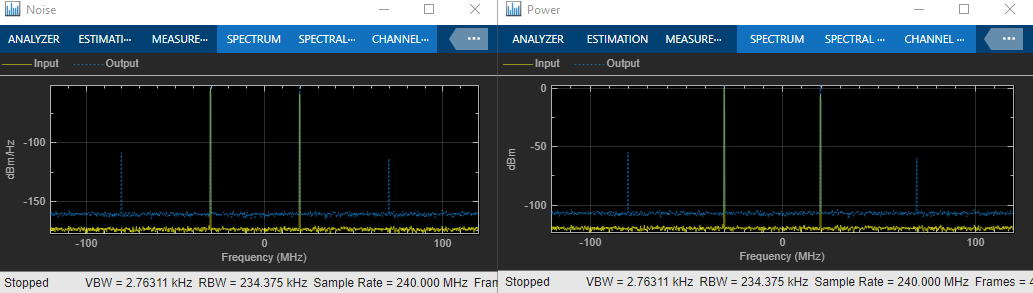
Idealized Baseband Amplifier with Nonlinearity and Noise
Use the idealized baseband library Amplifier block to amplify a signal with nonlinearity and noise.
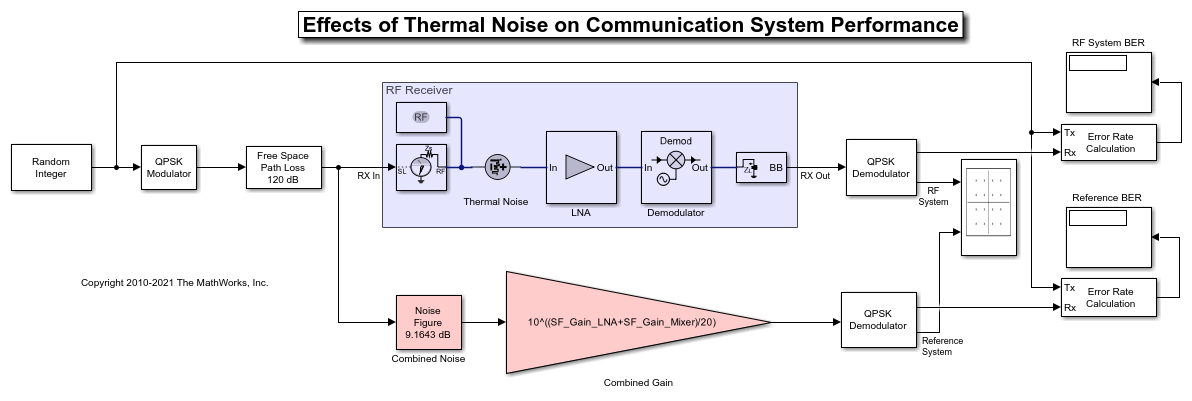
Impact of Thermal Noise on Communication System Performance
Use the RF Blockset™ Circuit Envelope library to model thermal noise in a super-heterodyne RF receiver and measure its effects on a communications system noise figure (NF) and bit error rate (BER).
Ports
Input
Input baseband signal, specified as a real scalar, real column, complex scalar, or complex column.
Data Types: double | single
Output
Output baseband signal, specified as a real scalar, real column, complex scalar, or complex column. The output port mimics the properties of the input port. For example, if the input baseband signal is specified as a real scalar with a data type double, then the output baseband signal is also specified as a real signal with the data type double.
Data Types: double | single
Parameters
Main Tab
Specify the amplifier nonlinearity model as one of the following:
Cubic polynomialAM/AM - AM/PMModified RappSaleh
For more information, see Nonlinearity Models in Idealized Amplifier Block (RF Blockset).
Linear gain, specified as a scalar in dB.
Third order nonlinearity type, specified as IIP3,
OIP3, IP1dB, OP1dB,
IPsat, or OPsat.
Input third-order intercept point, specified as a real positive number in dBm.
Dependencies
To enable this parameter, set Model to
Cubic polynomial and Type of
Non-Linearity to IIP3.
Output third-order intercept point, specified as a real positive number in dBm.
Dependencies
To enable this parameter, set Model to
Cubic polynomial and Type of
Non-Linearity to OIP3.
Input 1 dB compression point, specified as a real positive number in dBm.
Dependencies
To enable this parameter, set Model to
Cubic polynomial and Type of
Non-Linearity to IP1dB.
Output 1 dB compression point, specified as a real positive number in dBm.
Dependencies
To enable this parameter, set Model to
Cubic polynomial and Type of
Non-Linearity to OP1dB.
Input saturation point, specified as a real positive number in dBm.
Dependencies
To enable this parameter, set Model to
Cubic polynomial and Type of
Non-Linearity to IPsat.
Output saturation point, specified as a positive real number in dBm.
Dependencies
To enable this parameter, set Model to
Cubic polynomial and Type of
Non-Linearity to OPsat.
Reference load value in ohms, specified as a positive scalar. This value is used to convert between the voltage levels and the signal and noise power levels.
Tunable: Yes
Code generation– Simulate model using generated C code. The first time you run a simulation, Simulink® generates C code for the block. The C code is reused for subsequent simulations, as long as the model does not change. This option requires additional startup time, but the speed of the subsequent simulations is faster thanInterpreted execution.Interpreted execution– Simulate model using the MATLAB® interpreter. This option shortens startup time speed, but the speed of the subsequent simulations is slower thanCode generation. In this mode, you can debug the source code of the block.
This button plots the power characteristics based on the parameters specified on the Main tab.
For more information, see Plot Power Characteristics (RF Blockset).
Table lookup entries specified as a real M-by-3 matrix. This table expresses the model output power dBm level in matrix column 2 and the model phase change in degrees in matrix column 3 as related to the absolute value of the input signal power of matrix column 1 for the AM/AM - AM/PM model. The column 1 input power must increase monotonically.
Dependencies
To enable this parameter, set Model to
AM/AM - AM/PM.
Voltage output saturation level, specified as a real positive number in dBm.
Dependencies
To enable this parameter, set Model to
Modified Rapp.
Magnitude smoothness factor for the Modified Rapp amplifier
model AM/AM calculations, specified as a positive real number.
Dependencies
To enable this parameter, set Model to
Modified Rapp.
Phase gain for the Modified Rapp amplifier model AM/PM
calculations, specified as a real scalar in radians.
Dependencies
To enable this parameter, set Model to
Modified Rapp.
Phase saturation for the Modified Rapp amplifier model AM/PM
calculations, specified as a positive real number.
Dependencies
To enable this parameter, set Model to
Modified Rapp.
Phase smoothness factor for the Modified Rapp amplifier model
AM/PM calculations, specified as a positive real number.
Dependencies
To enable this parameter, set Model to
Modified Rapp.
Scaling factor for input signal level for the Saleh amplifier
model, specified as a nonnegative real number in dB.
Dependencies
To enable this parameter, set Model to
Saleh.
AM/AM two-tuple conversion parameters for Saleh amplifier
model, specified as a two-element vector of nonnegative real numbers.
Dependencies
To enable this parameter, set Model to
Saleh.
AM/PM two-tuple conversion parameters for
Saleh amplifier model, specified as a two-element vector of
nonnegative real numbers.
Dependencies
To enable this parameter, set Model to
Saleh.
Scaling factor for output signal level for Saleh amplifier
model, specified as nonnegative real number in dB.
Dependencies
To enable this parameter, set Model to
Saleh.
Noise Tab
Select this parameter to add system noise to the input signal. Once you select this parameter, the parameters associated with the Noise tab are displayed.
Noise descriptive type, specified as Noise temperature,
Noise figure, or Noise factor.
For more information, see Thermal Noise Simulations in Idealized Amplifier Block (RF Blockset).
Dependencies
To enable this parameter, select Include Noise.
Noise temperature to model noise in the amplifier, specified as a nonnegative real number in degrees (K).
Dependencies
To enable this parameter, select Include Noise and
set Specify noise type
to Noise temperature.
Noise figure to model noise in the amplifier, specified as a nonnegative real number in dB.
Dependencies
To enable this parameter, select Include Noise and
set Specify noise type
to Noise figure.
Noise factor to model noise in the amplifier, specified as a positive integer scalar greater than or equal to 1.
Dependencies
To enable this parameter, select Include Noise and
set Specify noise type
to Noise factor.
Source of initial seed used to prepare the Gaussian random number noise generator, specified as one of the following:
Auto- When Seed source is set toAuto, seeds for each amplifier instance are generated using a random number generator. The reset method of the instance has no effect.User specified- When Seed source is set toUser specified, the value provided in the Seed is used to initialize the random number generator and the reset method resets the random number generator using the Seed property value.
Seed for the random number generator, specified as a nonnegative integer less than 232. Use this value to initialize the random number generator.
Dependencies
To enable this parameter, click Include Noise
check box and choose User specified in the Seed source
parameter.
References
[1] Razavi, Behzad. “Basic Concepts “ in RF Microelectronics, 2nd edition, Prentice Hall, 2012.
[2] Rapp, C., “Effects of HPA-Nonlinearity on a 4-DPSK/OFDM-Signal for a Digital Sound Broadcasting System.” Proceedings of the Second European Conference on Satellite Communications, Liege, Belgium, Oct. 22-24, 1991, pp. 179-184.
[3] Saleh, A.A.M., “Frequency-independent and frequency-dependent nonlinear models of TWT amplifiers.” IEEE Trans. Communications, vol. COM-29, pp.1715-1720, November 1981.
[4] IEEE 802.11-09/0296r16. “TGad Evaluation Methodology.“ Institute of Electrical and Electronics Engineers.https://www.ieee.org/
[5] Kundert, Ken.“ Accurate and Rapid Measurement of IP2 and IP3,“ The Designer Guide Community, May 22, 2002.
Extended Capabilities
C/C++ Code Generation
Generate C and C++ code using Simulink® Coder™.
Version History
Introduced in R2020aThe Amplifier block has been removed. To compute model amplifier characteristics, use the Memoryless Nonlinearity block instead. If you want to include noise in your amplifier model also use the Receiver Thermal Noise block.
The Amplifier block will be removed in a future release. To compute model amplifier characteristics, use the Memoryless Nonlinearity block instead.
For models that use Amplifier with Include Noise not selected, the block is automatically replaced with the Memoryless Nonlinearity block.
For models that use Amplifier with Include Noise selected, run Upgrade Advisor (Simulink) and the block will be replaced by a Receiver Thermal Noise block plus a Memoryless Nonlinearity block.
You can now specify load resistance in ohms using the Reference load
parameter.
See Also
Blocks
Topics
MATLAB Command
You clicked a link that corresponds to this MATLAB command:
Run the command by entering it in the MATLAB Command Window. Web browsers do not support MATLAB commands.
选择网站
选择网站以获取翻译的可用内容,以及查看当地活动和优惠。根据您的位置,我们建议您选择:。
您也可以从以下列表中选择网站:
如何获得最佳网站性能
选择中国网站(中文或英文)以获得最佳网站性能。其他 MathWorks 国家/地区网站并未针对您所在位置的访问进行优化。
美洲
- América Latina (Español)
- Canada (English)
- United States (English)
欧洲
- Belgium (English)
- Denmark (English)
- Deutschland (Deutsch)
- España (Español)
- Finland (English)
- France (Français)
- Ireland (English)
- Italia (Italiano)
- Luxembourg (English)
- Netherlands (English)
- Norway (English)
- Österreich (Deutsch)
- Portugal (English)
- Sweden (English)
- Switzerland
- United Kingdom (English)

