rotate
R2026bSyntax
Description
Add-On Required: This feature requires the 3D Asset Processing Library for MATLAB add-on.
rotate(
rotates the mesh or scene object meshORsceneObj,angles)meshORsceneObj by the specified Euler
angles angles in radians.
rotate(
rotates the mesh or scene object meshORsceneObj,axis,angle)meshORsceneObj by
angle radians about the direction vector
axis.
rotate(
rotates the mesh or scene object meshORsceneObj,angles,Name=Value)meshORsceneObj using one or more
name-value arguments. For example, Sequence="ZYX" rotates the mesh using
the ZYX rotation sequence. You can use name-value arguments only with the
first syntax with input Euler angles angles.
Examples
Define a simple pyramid with 5 vertices and 6 triangular faces.
vertices = [0 0 0; 1 0 0; 1 1 0; 0 1 0; 0.5 0.5 1];
faces = [1 2 5; 2 3 5; 3 4 5; 4 1 5; 1 3 4; 1 2 3];
Create a mesh with per-face color.
faceColors = uint8([230 50  50;    % red - front
                    50  180 50;    % green - right
                    50  100 230;   % blue - back
                    230 180 25;    % yellow - left
                    150 75  200;   % purple - bottom 1
                    25  200 200]); % cyan - bottom 2
pyramidMesh = asset3d.Mesh(vertices,faces,FaceColors=faceColors);
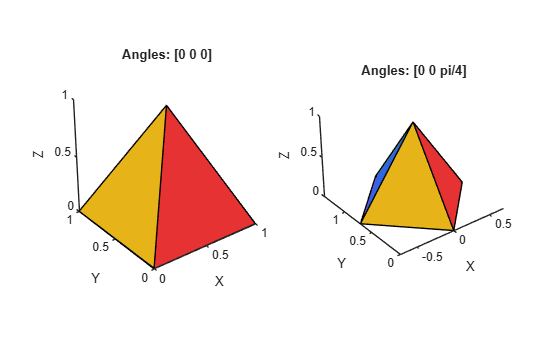
Rotate mesh 45 degrees about the Z-axis.
rotatedMesh = copy(pyramidMesh);
rotate(rotatedMesh,[0 0 pi/4])
Visualize the mesh rotated 45 degrees about the Z-axis compared to no rotation.
figure
subplot(1,2,1)
patch(pyramidMesh,EdgeColor="k")
axis equal
title("Angles: [0 0 0]")
subplot(1,2,2)
patch(rotatedMesh,EdgeColor="k")
axis equal
title("Angles: [0 0 pi/4]")
Input Arguments
Name-Value Arguments
Version History
Introduced in R2026b

