主要内容

Mesh

R2026b

Triangular mesh with geometry, materials, and visualization

Since R2026b

Description

Add-On Required: This feature requires the 3D Asset Processing Library for MATLAB add-on.

The Mesh object represents a triangular mesh composed of vertices and faces with optional colors, textures, and Physically Based Rendering (PBR) materials.

Use this object to store 3D geometry along with optional per-vertex or per-face colors, UV texture coordinates, and PBR materials. You can visualize the mesh in an interactive 3D viewer, convert it to a triangulation or patch object, and apply spatial transformations such as translate, rotate, scale, and resize.

Creation

Description

meshObj = asset3d.Mesh(vertices,faces) creates a triangular mesh object meshObj from the specified vertex positions vertices and face indices faces.

meshObj = asset3d.Mesh(vertices,faces,Name=Value) creates a triangular mesh object meshObj using one or more name-value arguments. For example, Material=material specifies the PBR material as material.

example

Input Arguments

expand all

Vertex positions, specified as an N-by-3 matrix. N is the number of vertices. Each row represents the x-, y-, and z-coordinates of a vertex.

This argument sets the Vertices property.

Data Types: double

Face vertex indices, specified as an M-by-3 matrix. M is the number of faces. Each row defines a triangle by referencing three vertex indices.

This argument sets the Faces property.

Data Types: int8 | int16 | int32 | int64

Name-Value Arguments

expand all

Specify optional pairs of arguments as Name1=Value1,...,NameN=ValueN, where Name is the argument name and Value is the corresponding value. Name-value arguments must appear after other arguments, but the order of the pairs does not matter.

Example: asset3d.Mesh(vertices,faces,FaceColors=colors) creates a mesh with per-face RGBA colors.

Normal vectors for each face, specified as an M-by-3 matrix. M is the number of faces. By default, the object computes unit face normals automatically from vertex positions.

This argument sets the FaceNormals property.

Data Types: double

Normal vectors for each vertex, specified as an N-by-3 matrix. N is the number of vertices. By default, the object computes unit vertex normals automatically by averaging adjacent face normals.

This argument sets the VertexNormals property.

Data Types: double

Per-face colors, specified as an M-by-3 matrix or M-by-4 matrix. M is the number of faces. Values are in the range [0, 255]. The object auto-expands RGB values to RGBA. If you specify a three-element vector or a four-element vector, the object applies the same color to all the faces.

This argument sets the FaceColors property.

Data Types: uint8

Per-vertex colors, specified as an N-by-3 matrix or N-by-4 matrix. N is the number of vertices. Values are in the range [0, 255]. The object auto-expands RGB values to RGBA. If you specify a three-element vector or a four-element vector, the object applies the same color to all the vertices.

This argument sets the VertexColors property.

Data Types: uint8

UV texture coordinates, specified as an N-by-2 matrix. N is the number of vertices.

This argument sets the UV property.

Data Types: double

PBR material for the mesh, specified as a Material object.

This argument sets the Material property.

Output Arguments

expand all

Triangular mesh object, returned as a Mesh object.

Properties

expand all

Vertex positions, specified as an N-by-3 matrix. N is the number of vertices. Each row represents the x-, y-, and z-coordinates of a vertex.

Data Types: double

Face vertex indices, specified as an M-by-3 matrix. M is the number of faces. Each row defines a triangle by referencing three vertex indices.

Data Types: double

UV texture coordinates, specified as an N-by-2 matrix. N is the number of vertices.

Data Types: double

PBR material for the mesh, specified as a Material object.

Per-vertex colors, specified as an N-by-4 matrix. N is the number of vertices. Values are in the range [0, 255]. The object auto-expands RGB values to RGBA.

Data Types: uint8

Per-face colors, specified as an M-by-4 matrix. M is the number of faces. Values are in the range [0, 255]. The object auto-expands RGB values to RGBA. If you specify a three-element vector or a four-element vector, the object applies the same color to all the faces.

Data Types: uint8

This property is read-only after object creation. To set this property, use the FaceNormals argument when calling the asset3d.Mesh function.

Normal vectors for each face, specified as an M-by-3 matrix. M is the number of faces. By default, the object computes unit face normals automatically from vertex positions.

Data Types: double

This property is read-only after object creation. To set this property, use the VertexNormals argument when calling the asset3d.Mesh function.

Normal vectors for each vertex, specified as an N-by-3 matrix. N is the number of vertices. By default, the object computes unit vertex normals automatically by averaging adjacent face normals.

Data Types: double

This property is read-only.

Total surface area of all triangles, represented as a scalar.

Data Types: double

This property is read-only.

Enclosed volume for watertight meshes, represented as a scalar. This value is applicable only for watertight meshes. The object computes volume using the divergence theorem. Use the IsWatertight property to verify whether a mesh is watertight.

Data Types: double

This property is read-only.

Area-weighted geometric center, represented as a three-element row vector of the form [x y z].

Data Types: double

This property is read-only.

Axis-aligned bounding box, represented as a 2-by-3 matrix of the form [min; max] where the three columns correspond to the x-, y-, and z-axes.

Data Types: double

This property is read-only.

Bounding box dimensions, represented as a three-element row vector of the form [dx dy dz].

Data Types: double

This property is read-only.

Up axis convention, represented as "X", "Y", or "Z". Use the setUpAxis function to change the up axis convention.

Data Types: string

This property is read-only.

Whether the mesh is watertight, represented as a logical 1 (true) or 0 (false). A mesh is watertight when every edge is shared by exactly two faces.

Data Types: logical

Object Functions

showDisplay mesh or scene object in interactive 3D viewer
patchConvert mesh or scene object to patch for visualization in axes
snapshotCapture snapshot of mesh or scene as image
triangulationConvert mesh to triangulation object
transformApply homogeneous transformation to mesh or scene object
rotateRotate mesh or scene object
translateTranslate mesh or scene object using translation vector
scaleScale mesh or scene object
resizeResize mesh or scene object to absolute dimensions in world units
setUpAxisChange up axis convention for mesh or scene object
copyCreate copy of mesh or scene object

Examples

collapse all

Define a simple pyramid with 5 vertices and 6 triangular faces.

vertices = [0 0 0; 1 0 0; 1 1 0; 0 1 0; 0.5 0.5 1];
faces = [1 2 5; 2 3 5; 3 4 5; 4 1 5; 1 3 4; 1 2 3];

Create a mesh with per-face color.

faceColors = uint8([230 50  50;    % red - front
                    50  180 50;    % green - right
                    50  100 230;   % blue - back
                    230 180 25;    % yellow - left
                    150 75  200;   % purple - bottom 1
                    25  200 200]); % cyan - bottom 2
pyramidMesh = asset3d.Mesh(vertices,faces,FaceColors=faceColors);

Display the mesh.

show(pyramidMesh,Background="#CCCCCC",Grid=true,Axes=true)
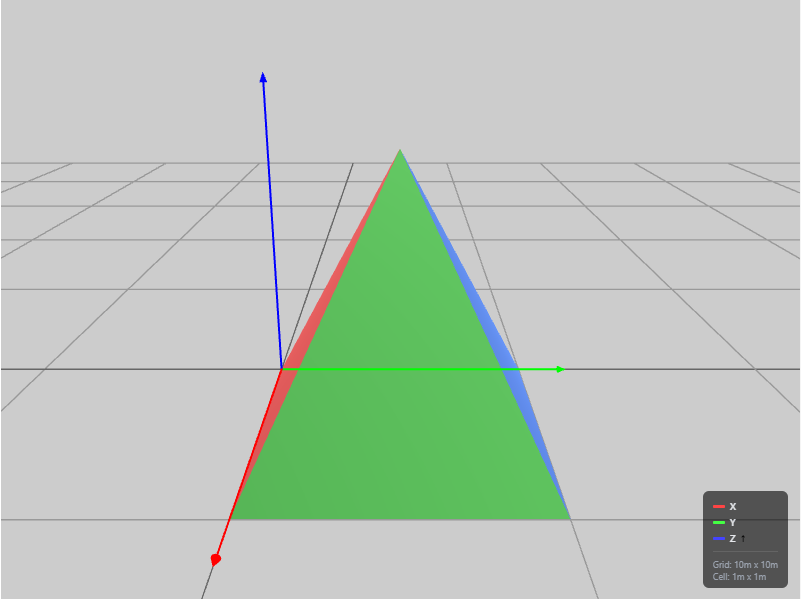
Displays a pyramid mesh with different face colors

Version History

Introduced in R2026b