Scene
R2026bDescription
Add-On Required: This feature requires the 3D Asset Processing Library for MATLAB add-on.
The asset3d.Scene object represents a collection of meshes
organized in a hierarchical transform graph.
Use this object to group multiple Mesh objects into a single scene with
parent-child relationships and per-node transformations. You can visualize the scene in an
interactive 3D viewer, inspect the hierarchy, extract sub-scenes, flatten the scene to
individual meshes, and apply spatial transformations that propagate through the graph.
Creation
Description
sceneObj = asset3d.Scene(geometries)sceneObj containing the specified meshes
geometries.
Input Arguments
Output Arguments
Properties
Object Functions
show | Display mesh or scene object in interactive 3D viewer |
dispGraph | Display scene hierarchy as text tree |
addMesh | Add mesh to scene |
removeMesh | Remove mesh from scene |
flatten | Flatten scene into meshes with transforms |
subscene | Extract sub-scene from specified node |
patch | Convert mesh or scene object to patch for visualization in axes |
snapshot | Capture snapshot of mesh or scene as image |
transform | Apply homogeneous transformation to mesh or scene object |
rotate | Rotate mesh or scene object |
translate | Translate mesh or scene object using translation vector |
scale | Scale mesh or scene object |
resize | Resize mesh or scene object to absolute dimensions in world units |
setUpAxis | Change up axis convention for mesh or scene object |
copy | Create copy of mesh or scene object |
Examples
Create two meshes, a big rectangle mesh and another small rectangle mesh.
faces = [1 2 3; 1 3 4; 5 7 6; 5 8 7; 1 5 6; 1 6 2; 2 6 7; 2 7 3; 3 7 8; 3 8 4; 4 8 5; 4 5 1];

bigVerts = [0 0 0; 4 0 0; 4 3 0; 0 3 0; 0 0 1; 4 0 1; 4 3 1; 0 3 1];
bigMesh = asset3d.Mesh(bigVerts,faces,FaceColors=uint8([70 130 180]));

smallVerts = [0 0 0; 2 0 0; 2 1.5 0; 0 1.5 0; 0 0 0.8; 2 0 0.8; 2 1.5 0.8; 0 1.5 0.8];
smallMesh = asset3d.Mesh(smallVerts,faces,FaceColors=uint8([200 80 80]));
Create an empty scene with a base frame name.
scene = asset3d.Scene(BaseFrame="scene_model");Add meshes to the scene with a big rectangle on the bottom and a small rectangle on top.
T = eye(4);
T(1:3,4) = [1; 0.75; 1];

addMesh(scene,bigMesh,Name="big_rect",NodeName="base")
addMesh(scene,smallMesh,Name="small_rect",NodeName="top",ParentNodeName="base",Transform=T)
Display the scene hierarchy. The |dispGraph| function shows the base frame name and the parent-child relationships between nodes.
dispGraph(scene)
scene_model
    └── base [Mesh: 12 faces]
        └── top [Mesh: 12 faces]
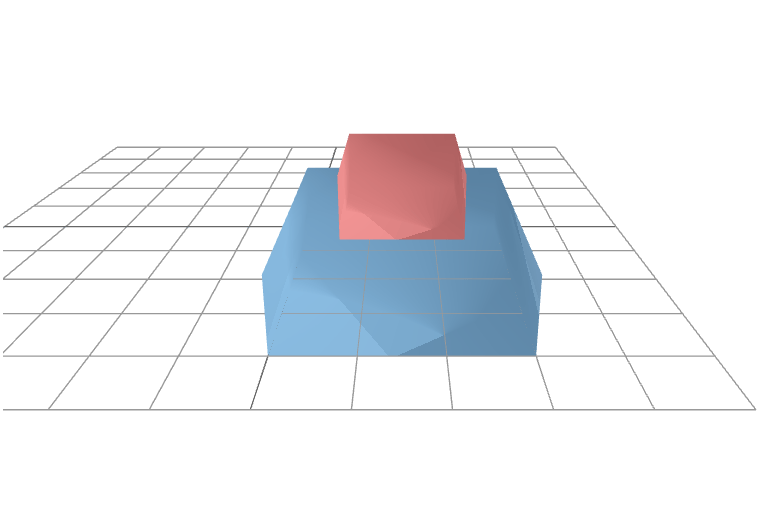
Display the scene.
show(scene,Grid=true)
Version History
Introduced in R2026b
See Also
Mesh | Material | trellis | Texture | asset3d.read | asset3d.write

