addMesh
R2026bDescription
Add-On Required: This feature requires the 3D Asset Processing Library for MATLAB add-on.
addMesh(
adds the mesh object sceneObj,meshObj,Name=Value)meshObj using one or more name-value arguments.
For example, Name="wheel" specifies the geometry name as
"wheel".
Examples
Create two meshes, a big rectangle mesh and another small rectangle mesh.
faces = [1 2 3; 1 3 4; 5 7 6; 5 8 7; 1 5 6; 1 6 2; 2 6 7; 2 7 3; 3 7 8; 3 8 4; 4 8 5; 4 5 1];

bigVerts = [0 0 0; 4 0 0; 4 3 0; 0 3 0; 0 0 1; 4 0 1; 4 3 1; 0 3 1];
bigMesh = asset3d.Mesh(bigVerts,faces,FaceColors=uint8([70 130 180]));

smallVerts = [0 0 0; 2 0 0; 2 1.5 0; 0 1.5 0; 0 0 0.8; 2 0 0.8; 2 1.5 0.8; 0 1.5 0.8];
smallMesh = asset3d.Mesh(smallVerts,faces,FaceColors=uint8([200 80 80]));
Create an empty scene with a base frame name.
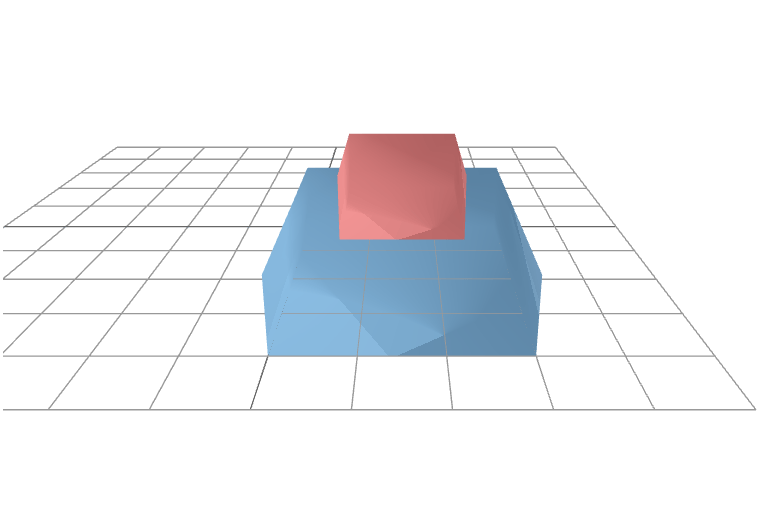
scene = asset3d.Scene(BaseFrame="scene_model");Add meshes to the scene with a big rectangle on the bottom and a small rectangle on top.
T = eye(4);
T(1:3,4) = [1; 0.75; 1];

addMesh(scene,bigMesh,Name="big_rect",NodeName="base")
addMesh(scene,smallMesh,Name="small_rect",NodeName="top",ParentNodeName="base",Transform=T)
Display the scene hierarchy. The |dispGraph| function shows the base frame name and the parent-child relationships between nodes.
dispGraph(scene)
scene_model
    └── base [Mesh: 12 faces]
        └── top [Mesh: 12 faces]
Display the scene.
show(scene,Grid=true)
Input Arguments
Name-Value Arguments
Version History
Introduced in R2026b
See Also
Scene | removeMesh | dispGraph | subscene | rigidtform3d

