Modularize Fault Tree Documents
R2026bThis example shows how to modularize a fault tree document and evaluate the modularized fault tree. Evaluating fault trees is computationally expensive because you must evaluate every section of the fault tree. To reduce this evaluation time, you can split fault tree sections, or subtrees, and save the subtrees in separate fault tree documents. You then use a callback to retrieve the failure properties from each subtree and assign them to basic events in the main document. After evaluating each subtree, you do not need to reevaluate the subtrees when evaluating the main tree, unless you change the subtree.
For more information on creating fault tree documents and fault tree organization, see Create Fault Trees in the Safety Analysis Manager and Organize Fault Trees in Fault Tree Documents.
Inspect the Fault Tree Documents
Open the engine_failure_tree.mldatx fault tree document and the Safety Analysis Manager.
safetyAnalysisMgr.openDocument("engine_failure_tree.mldatx");
safetyAnalysisManager
engine_failure_tree.mldatx is a fault tree for an engine failure. The fault tree includes three basic events, Fuel_System_Failure, Ignition_Failure, and Mechanical_Failure, that receive their failure properties from the fuel_system_failure_tree.mldatx, ignition_failure_tree.mldatx, and mechanical_failure_tree.mldatx, respectively.
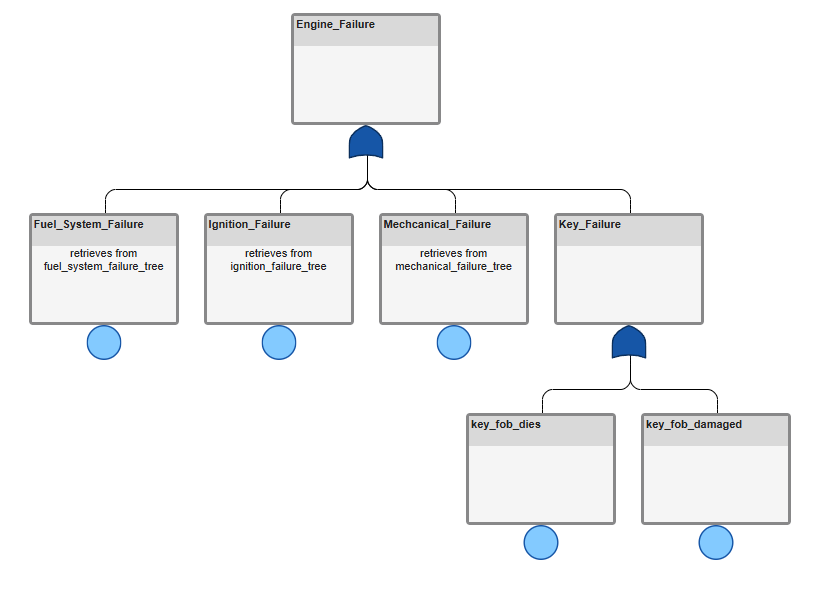
When you open engine_failure_tree.mldatx, a PreloadFcn callback loads the other fault tree documents. For more information on callbacks in fault tree documents, see Write Callbacks to Analyze Safety Analysis Manager Fault Tree Documents.
Examine Failure Model Properties
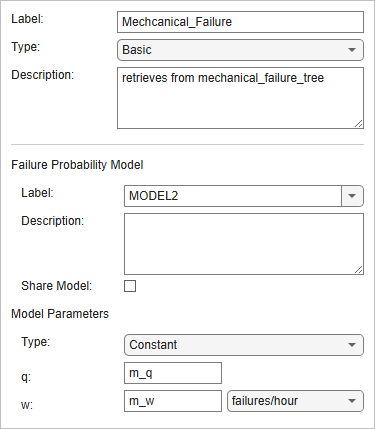
The Safety Analysis Manager retrieves the q and w failure property values at the top-level gates of each subtree and assigns them to workspace variables. The Fuel_System_Failure, Ignition_Failure, and Mechnical_Failure basic events then use these variables for their q and w parameters. To view the assignments in engine_failure_tree.mldatx, select one of the events. The assignment displays in the Properties pane.
View the Callback
To evaluate the subtrees and retrieve their properties, engine_failure_tree.mldatx uses the AnalyzeFcn callback. Open the callback:
In the Analyze section, click Edit Callbacks.
In the Callbacks Editor window, select AnalyzeFcn.
The callback script:
Opens the other fault tree documents if they are closed.
Checks whether the mission time of
engine_failure_tree.mldatxmatches the other fault tree documents. Because the fault tree documents only transfer the q and w failure properties, the mission times of the fault tree documents must be the same.Checks whether the other fault tree documents are evaluated. If they are not evaluated, the script evaluates them.
Retrieves the q and w failure properties from the top-level gate of each subtree and assigns them to the base workspace variables that each basic event in
engine_failure_tree.mldatxuses.
% Reopen subtrees if closed
fuel_ft = safetyAnalysisMgr.openDocument(...
        "fuel_system_failure_tree.mldatx");

ignition_ft = safetyAnalysisMgr.openDocument(...
        "ignition_failure_tree.mldatx");

mechanical_ft = safetyAnalysisMgr.openDocument(...
        "mechanical_failure_tree.mldatx");

% Check if mission time of subtrees is equal to engine_failure_tree
mTime = sfa_document.EvalConfig.MissionTime;

if fuel_ft.EvalConfig.MissionTime ~= mTime
    error("The fuel_system_failure_tree mission time ..." + ...
        "must match the engine_failure_tree mission time.")
elseif ignition_ft.EvalConfig.MissionTime ~= mTime
    error("The ignition_failure_tree mission time ..." + ...
        "must match the engine_failure_tree mission time.")
elseif mechanical_ft.EvalConfig.MissionTime ~= mTime
    error("The ignition_failure_tree mission time ..." + ...
        "must match the engine_failure_tree mission time.")
end

% Evaluate subtrees if they have not been and get q and w
if isempty(fuel_ft.Gates(1).FailureProperties)
    evaluate(fuel_ft)
end
fs_q = fuel_ft.Gates(1).FailureProperties.Q;
fs_w = fuel_ft.Gates(1).FailureProperties.W;

if isempty(ignition_ft.Gates(1).FailureProperties)
    evaluate(ignition_ft)
end
i_q = ignition_ft.Gates(1).FailureProperties.Q;
i_w = ignition_ft.Gates(1).FailureProperties.W;

if isempty(mechanical_ft.Gates(1).FailureProperties)
    evaluate(mechanical_ft)
end
m_q = mechanical_ft.Gates(1).FailureProperties.Q;
m_w = mechanical_ft.Gates(1).FailureProperties.W;
Retrieve Properties and Evaluate the Fault Tree Document
To evaluate the fault tree document, run the AnalyzeFcn callback by clicking Analyze Document , then evaluate the fault tree by clicking Evaluate  .
. engine_failure_tree.mldatx displays the q values in the events and top-level gate.
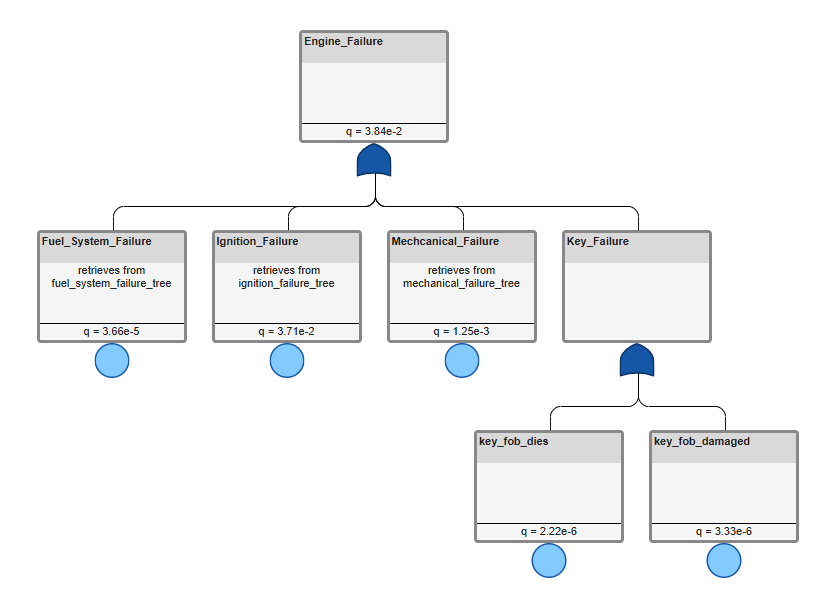
Do not evaluate the fault tree document before running the callback. If you evaluate the fault tree first, the fault tree document may evaluate the results by using stale q and w values. If the subtrees are not evaluated and the q and w values are not retrieved, the fault tree generates an error.
If you modify only engine_failure_tree.mldatx and rerun the callback, the script does not reevaluate the subtrees, because they are unchanged.

