主要内容

segmentObjectsFromEmbeddings

Segment objects in image using Segment Anything Model (SAM) feature embeddings

Since R2024a

Description

masks = segmentObjectsFromEmbeddings(sam,embeddings,imageSize,ForegroundPoints=pointPrompt) segments objects from an image of size imageSize using the SAM feature embeddings embeddings and the foreground point coordinates pointPrompt as a visual prompt.

example

masks = segmentObjectsFromEmbeddings(sam,embeddings,imageSize,BoundingBox=boxPrompt) segments objects from an image using bounding box coordinates boxPrompt as a visual prompt.

masks = segmentObjectsFromEmbeddings(___,Name=Value) specifies options using one or more name-value arguments in addition to any combination of input arguments from previous syntaxes. For example, ReturnMultiMask=true returns three masks for a segmented object.

[masks,scores,maskLogits] = segmentObjectsFromEmbeddings(___) returns the scores corresponding to each predicted object mask and the prediction mask logits maskLogits, using any combination of input arguments from previous syntaxes.

Note

To use any of the SAM 2 models, this functionality requires the Image Processing Toolbox™ Model for Segment Anything Model 2 add-on if you use any of the SAM 2 models. To use the base SAM model, this functionality requires the Image Processing Toolbox Model for Segment Anything Model add-on.

Examples

collapse all

Create a Segment Anything Model (SAM) for image segmentation.

sam = segmentAnythingModel;

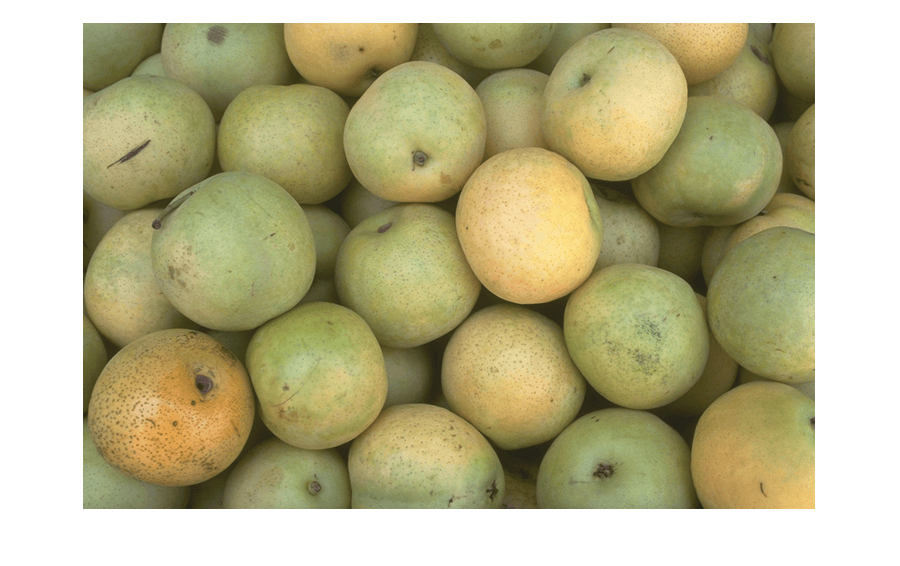
Read and display an image.

I = imread("pears.png");
imshow(I)
Calculate the image size.

imageSize = size(I);

Extract the feature embeddings from the image.

embeddings = extractEmbeddings(sam,I);

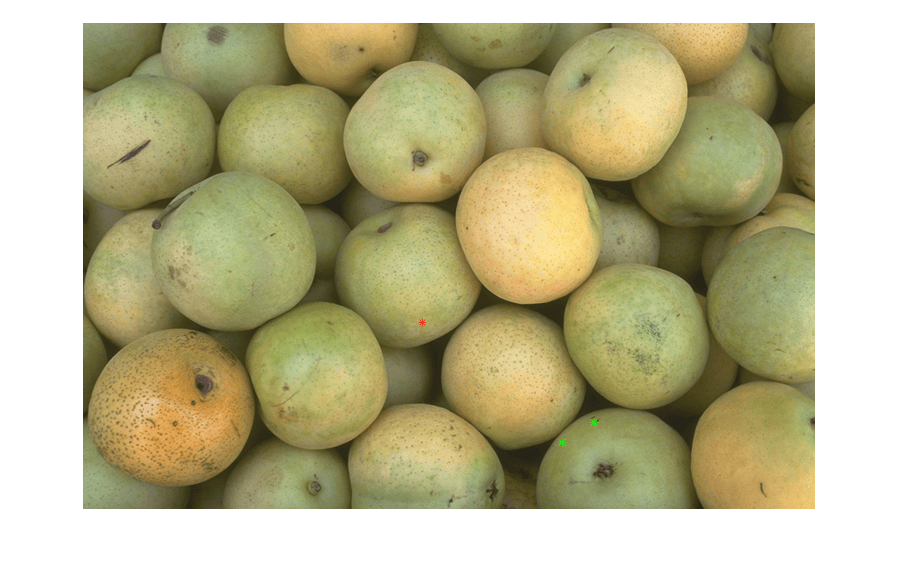
Specify visual prompts corresponding to the object that you want to segment, such as a pear along the bottom edge of the image. This example selects two foreground points within the pear. Refine the segmentation by including one background point outside the object to segment.

fore = [512 400; 480 420];
back = [340 300];

Overlay the foreground points in green and the background point in red.

hold on
plot(fore(:,1),fore(:,2),"g*",back(:,1),back(:,2),"r*",Parent=gca)
hold off
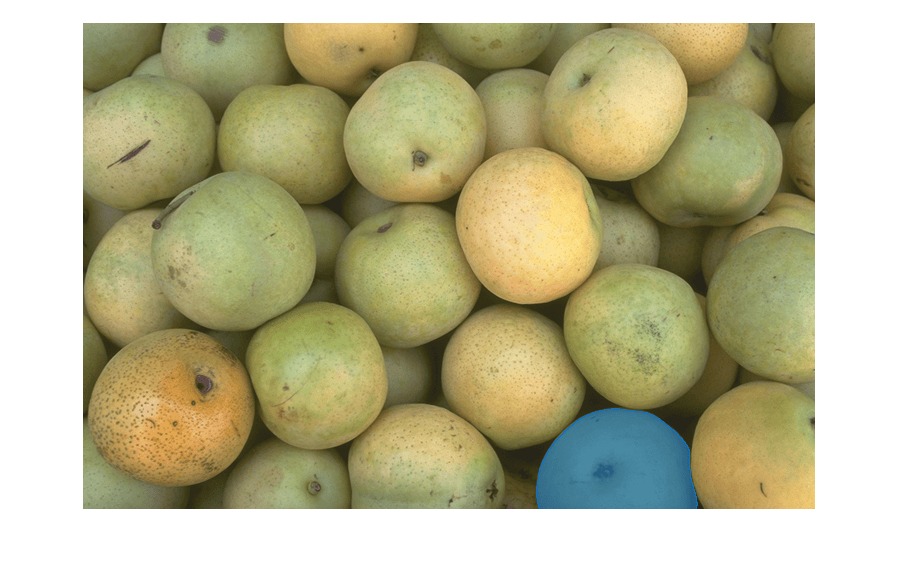
Segment an object in the image using SAM segmentation.

masks = segmentObjectsFromEmbeddings(sam,embeddings,imageSize, ...
    ForegroundPoints=fore,BackgroundPoints=back);

Overlay the detected object mask on the test image.

imMask = insertObjectMask(I,masks);
imshow(imMask)
Input Arguments

collapse all

Segment Anything Model for image segmentation, specified as a segmentAnythingModel object.

Image embeddings, specified as a numeric array or cell array, depending on the model variant and the number of input images. Get the embeddings for an image or a batch of images by using the extractEmbeddings object function.

If the segmentAnythingModel object sam uses the base SAM model, embeddings must be a 64-by-64-by-256 numeric array. If you extract embeddings for a batch of images using the extractEmbeddings function, select the embeddings for one image, with index i, from the batch.

embeddings = batchEmbeddings(:,:,:,i);

If the segmentAnythingModel object sam uses any of the SAM 2 models, embeddings must be a 1-by-3 cell array with the three cells containing a 64-by-64-by-256 array, a 256-by-256-by-32 array, and a 128-by-128-by-64 array, respectively. If you extract embeddings for a batch of images using the extractEmbeddings function, select the embeddings for one image, with index i, from the batch.

embeddings = {batchEmbeddings{1}(:,:,:,i) batchEmbeddings{2}(:,:,:,i) batchEmbeddings{3}(:,:,:,i)};

Size of the input image used to generate the embeddings, specified as a 1-by-3 vector of positive integers of the form [height width channels] or a 1-by-2 vector of positive integers of the form [height width], in pixels.

Points of the object to be segmented, or foreground points, specified as a P-by-2 matrix. Each row specifies the coordinates of a point in the form [x y]. P is the number of points.

Rectangular bounding box that contains the object to be segmented, specified as a 1-by-4 vector of the form [x y width height]. The coordinates x and y specify the upper-left corner of the box, and width and height are the width and height of the box, respectively.

Name-Value Arguments

collapse all

Specify optional pairs of arguments as Name1=Value1,...,NameN=ValueN, where Name is the argument name and Value is the corresponding value. Name-value arguments must appear after other arguments, but the order of the pairs does not matter.

Example: segmentObjectsFromEmbeddings(sam,embeddings,imageSize,ForegroundPoints=pointPrompt,BackgroundPoints=MyPoints) specifies the background point coordinates visual prompt as the matrix MyPoints.

Background points, specified as a P-by-2 matrix. Each row specifies the coordinates of a point in the form [x y]. P is the number of points. Use this argument to specify points in the image that are not part of the object to be segmented, as an additional visual prompt to foreground points or bounding boxes.

Mask prediction logits, specified as a 256-by-256 numeric matrix. Mask logits are unnormalized predictions generated by the model for each pixel in the image. Mask logits represent the probability that the pixel belongs to a particular instance or object class.

Use this argument to refine an existing mask when iteratively calling the segmentObjectsFromEmbeddings function. On the first call to the function, return the mask logits through the maskLogits output argument. Then, on the next call to the function, provide the mask logits through the MaskLogits name-value argument.

Data Types: single

Multiple segmentation masks, specified as a numeric or logical 0 (false) or 1 (true). Specify ReturnMultiMask as true to return three masks in place of the default single mask, where each mask is a page of an H-by-W-by-3 logical array. H and W are the height and width, respectively, of the input image I.

Use this argument to return three masks when you use ambiguous visual prompts, such as single points. You can choose one or a combination of the resulting masks to capture different subregions of the object.

Output Arguments

collapse all

Object masks, returned as one of these values:

  • H-by-W logical matrix – ReturnMultiMask is 0 (false).

  • H-by-W-by-3 logical array – ReturnMultiMask is 1 (true).

H and W are the height and width, respectively, of the input image I.

Data Types: logical

Prediction confidence scores for the segmentation, returned as one of these values:

  • Numeric scalar – ReturnMultiMask is 0 (false).

  • 1-by-3 numeric vector – ReturnMultiMask is 1 (true).

Data Types: single

Mask prediction logits, returned as one of these values:

  • 256-by-256 numeric matrix – ReturnMultiMask value is 0 (false).

  • 256-by-256-by-3 numeric array – ReturnMultiMask value is 1 (true).

You can specify this value to the MaskLogits name-value argument on subsequent segmentObjectsFromEmbeddings function calls to refine the output mask.

Data Types: single

References

[1] Kirillov, Alexander, Eric Mintun, Nikhila Ravi, Hanzi Mao, Chloe Rolland, Laura Gustafson, Tete Xiao, et al. "Segment Anything," April 5, 2023. https://doi.org/10.48550/arXiv.2304.02643.

[2] Ravi, Nikhila, Valentin Gabeur, Yuan-Ting Hu, Ronghang Hu, Chaitanya Ryali, Tengyu Ma, Haitham Khedr, et al. “SAM 2: Segment Anything in Images and Videos.” arXiv, October 28, 2024. https://doi.org/10.48550/arXiv.2408.00714.

Version History

Introduced in R2024a