islocalmax
R2026bFind local maxima
Syntax
Description
TF = islocalmax(A)true) if the
corresponding element in A is a local maximum. An element is a
local maximum if its value is greater than both the previous and next value in its
column or table variable.
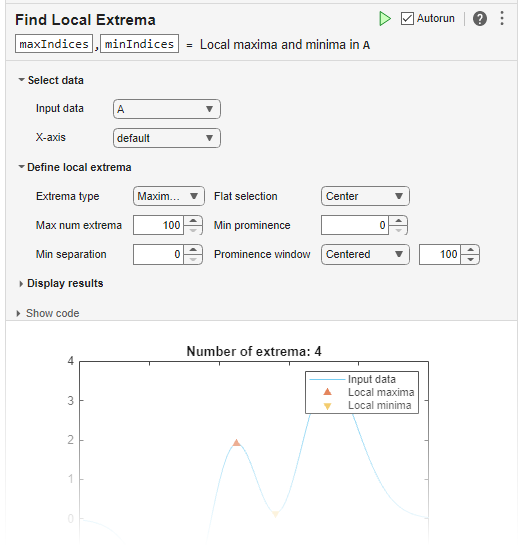
You can use islocalmax functionality interactively by adding
the Find Local
Extrema task to a live script.
TF = islocalmax(___,Name=Value)islocalmax(A,SamplePoints=t) finds local maxima of
A with respect to the time stamps contained in the time
vector t.
[
also returns the prominence corresponding to each element of TF,P] = islocalmax(___)A.
Examples
Compute and plot the local maxima of a vector of data.
x = 1:100;
A = (1-cos(2*pi*0.01*x)).*sin(2*pi*0.15*x);
TF = islocalmax(A);
plot(x,A,x(TF),A(TF),'r*')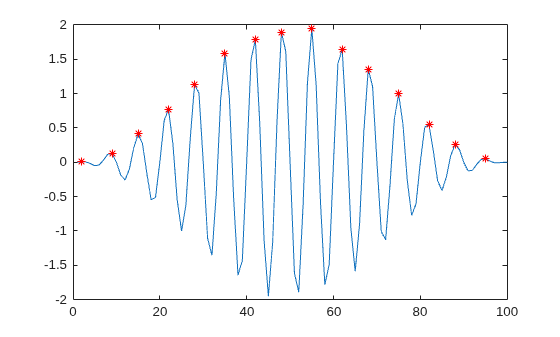
Create a matrix of data, and compute the local maxima for each row.
A = 25*diag(ones(5,1)) + rand(5,5);
TF = islocalmax(A,2)
TF = 5×5 logical array

   0   0   1   0   0
   0   1   0   0   0
   0   0   1   0   0
   0   1   0   1   0
   0   1   0   0   0
Compute the local maxima of a vector of data relative to the time stamps in the vector t. Compute maxima that are at least 45 minutes apart by specifying the MinSeparation name-value argument.
t = hours(linspace(0,3,15));
A = [2 4 6 4 3 7 5 6 5 10 4 -1 -3 -2 0];
TF = islocalmax(A,MinSeparation=minutes(45),SamplePoints=t);
plot(t,A,t(TF),A(TF),"r*")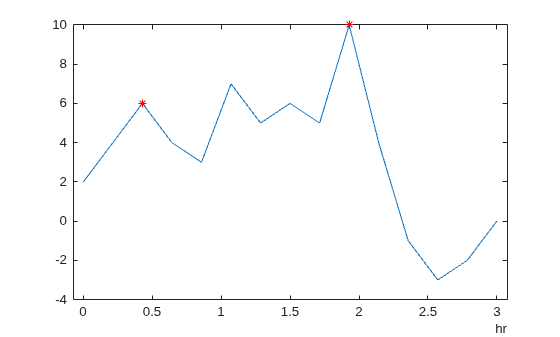
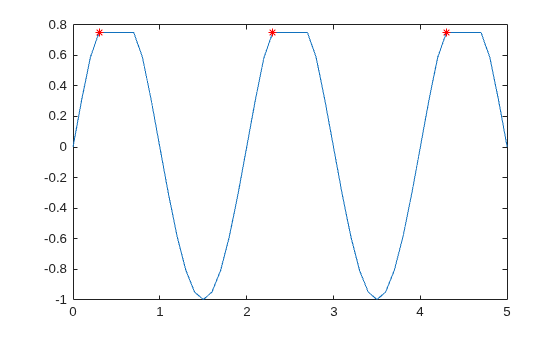
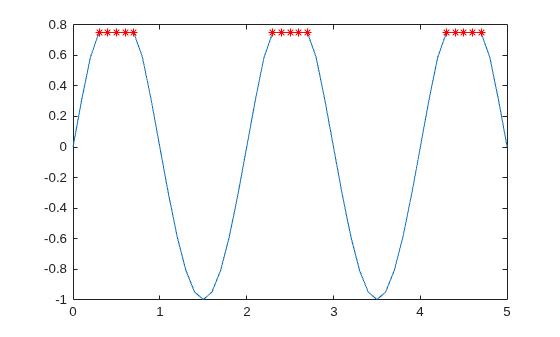
Specify a method for indicating consecutive maxima values.
Compute the local maxima of data that contains consecutive maxima values. Indicate the maximum of each flat region based on the first occurrence of that value.
x = 0:0.1:5;
A = min(0.75, sin(pi*x));
TF1 = islocalmax(A,FlatSelection="first");
plot(x,A,x(TF1),A(TF1),"r*")
Indicate the maximum of each flat region with all occurrences of that value.
TF2 = islocalmax(A,FlatSelection="all");
plot(x,A,x(TF2),A(TF2),"r*")
Select maxima based on their prominence.
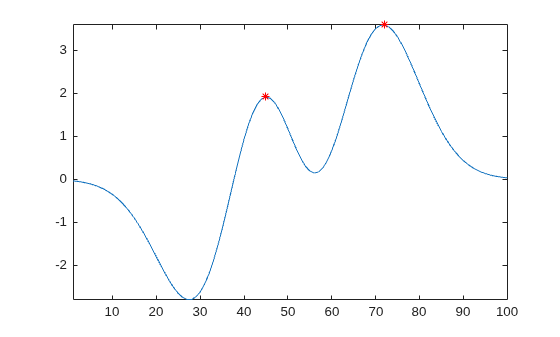
Compute the local maxima of a vector of data and their prominence, and then plot them with the data.
x = 1:100;
A = peaks(100);
A = A(50,:);
[TF1,P] = islocalmax(A);
P(TF1)
ans = 1×2

    1.7703    3.5548
plot(x,A,x(TF1),A(TF1),"r*")
axis tight
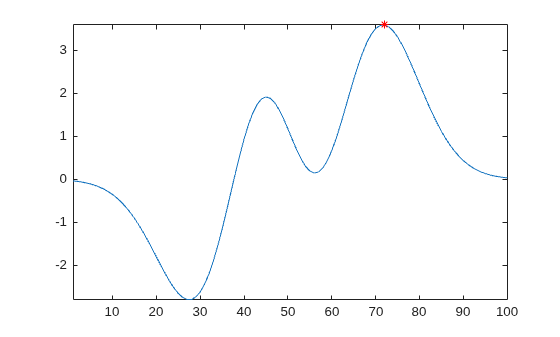
Compute only the most prominent maximum in the data by specifying a minimum prominence requirement.
TF2 = islocalmax(A,MinProminence=2);
plot(x,A,x(TF2),A(TF2),"r*")
axis tight
Input Arguments
Input data, specified as a vector, matrix, multidimensional array, or a table or timetable with numeric variables.
islocalmax ignores missing values when finding the
local maxima.
Data Types: single | double | int8 | int16 | int32 | int64 | uint8 | uint16 | uint32 | uint64 | table | timetable
Array dimension to operate along, specified as a positive integer scalar. If no value is specified, then the default is the first array dimension whose size does not equal 1.
Consider an m-by-n input matrix,
A:
islocalmax(A,1)computes local maxima according to the data in each column ofAand returns anm-by-nmatrix.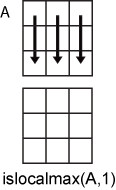
islocalmax(A,2)computes local maxima according to the data in each row ofAand returns anm-by-nmatrix.
For table or timetable input data, dim is not supported
and operation is along each table or timetable variable separately.
Name-Value Arguments
Output Arguments
Algorithms
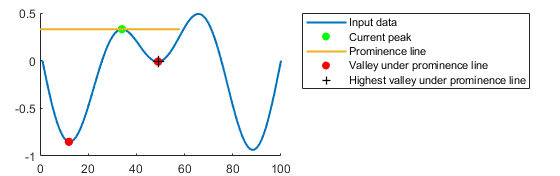
islocalmax identifies all local maxima (or peaks) in the input
data and follows these steps to compute the prominence of each local maximum. The
prominence of a local maximum measures how the peak stands out with respect to its
height and location relative to other peaks.
Draw a horizontal line to the left and right from the current peak. Stop drawing each segment of the horizontal line when it reaches the edge of the data or intersects the data.
Identify the valleys under the horizontal line.
Use the highest of those valleys as the basis value. The prominence is the absolute difference between the height of the current local maximum and the basis value.
Alternative Functionality
Live Editor Task
You can use islocalmax functionality interactively by adding
the Find Local
Extrema task to a live script.