copy
R2026bCopy lidar SLAM object
Description
newSlamObj = copy(slamObj)slamObj with the same properties.
Any changes made to newSlamObj are not reflected in
slamObj.
Examples
Create a lidarSLAM object.
slamObj = lidarSLAM
slamObj =
  lidarSLAM with properties:

                  PoseGraph: [1×1 poseGraph]
              MapResolution: 20
              MaxLidarRange: 8
            OptimizationFcn: @optimizePoseGraph
       LoopClosureThreshold: 100
    LoopClosureSearchRadius: 8
     LoopClosureMaxAttempts: 1
    LoopClosureAutoRollback: 1
       OptimizationInterval: 1
          MovementThreshold: [0 0]
     ScanRegistrationMethod: 'BranchAndBound'
     TranslationSearchRange: [4 4]
        RotationSearchRange: 1.5708
Create a copy of the lidar SLAM object.
slamObjNew = copy(slamObj)
slamObjNew =
  lidarSLAM with properties:

                  PoseGraph: [1×1 poseGraph]
              MapResolution: 20
              MaxLidarRange: 8
            OptimizationFcn: @optimizePoseGraph
       LoopClosureThreshold: 100
    LoopClosureSearchRadius: 8
     LoopClosureMaxAttempts: 1
    LoopClosureAutoRollback: 1
       OptimizationInterval: 1
          MovementThreshold: [0 0]
     ScanRegistrationMethod: 'BranchAndBound'
     TranslationSearchRange: [4 4]
        RotationSearchRange: 1.5708
Load laser scan data from a file.
load("offlineSlamData.mat");To set up the SLAM algorithm:
Specify the lidar range, map resolution, loop closure threshold, and search radius.
Tune these parameters for your specific robot and environment.
Create the
lidarSLAMobject with these parameters.
maxLidarRange = 8;
mapResolution = 20;
slamObj = lidarSLAM(mapResolution,maxLidarRange);
slamObj.LoopClosureThreshold = 210;
slamObj.LoopClosureSearchRadius = 8;
Add scans iteratively to the SLAM object.
for i = 1:numel(scans)
    addScan(slamObj,scans{i});
end
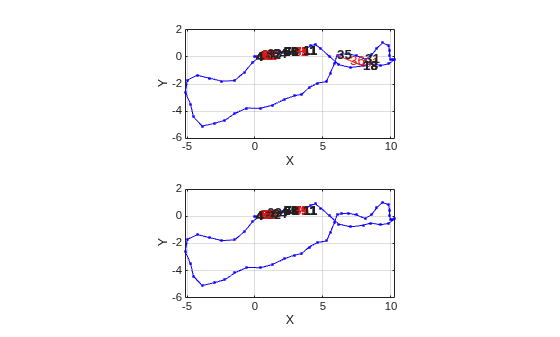
Create a copy of the SLAM object. Display the underlying pose graph of the SLAM object.
slamObj2 = copy(slamObj);
slamObj2.PoseGraph
ans =
  poseGraph with properties:

               NumNodes: 71
               NumEdges: 83
    NumLoopClosureEdges: 13
     LoopClosureEdgeIDs: [31 36 63 65 67 69 71 73 75 77 79 81 83]
        LandmarkNodeIDs: [1×0 double]
Remove the first two loop closures by specifying their edge IDs.
lcEdgeIDs = slamObj2.PoseGraph.LoopClosureEdgeIDs(1:2);
removeLoopClosures(slamObj2,lcEdgeIDs)
Plot the pose graphs of the SLAM object before and after removing the loop closures.
subplot(2,1,1)
show(slamObj.PoseGraph);
subplot(2,1,2)
show(slamObj2.PoseGraph);
Input Arguments
Output Arguments
Extended Capabilities
Version History
Introduced in R2019b

