polygonMonotonicity
R2026bFind sweep directions that enable efficient, backtrack-free coverage of a polygon
Since R2026a
Syntax
Description
The polygonMonotonicity function analyzes a 2-D polygon and
computes sweep directions that result in monotonic coverage of each region. A sweep direction
is monotonic if a sweep line moving in that direction can cover the entire region without
backtracking. Use this function to identify efficient sweep directions for use with the
polygonSweep
function.
For more information on polygon monotonicity, see Monotonicity. To visualize monotonic
intervals, use the plotMonotonicity
function.
[
finds monotonic angle intervals for the regions in the specified polygon
isMonotonic,monotonicIntervals] = polygonMonotonicity(poly)poly. The function returns the first monotonic angle interval it
finds for each region. isMonotonic indicates whether the regions have
any monotonic intervals.
[
specifies whether to return only the first monotonic interval, or all of the monotonic angle
intervals for each region.isMonotonic,monotonicIntervals] = polygonMonotonicity(poly,Intervals=intervals)
Examples
Define the geometry of a polygon as a polyshape object.
poly = polyshape([0 0 1.5 3 3 1.875 1.5 1.1250 0],[0 2 1.5 2 0 0 0.5 0 0]);
Check if any regions of the polygon are monotonic, and return the monotonic angle intervals for those regions.
[isMono,intervals] = polygonMonotonicity(poly);
Plot the monotonic intervals of the polygon.
hVis = plotMonotonicity(poly);
axis equal tight
title(["Polygon and Corresponding","Monotonic Intervals"])
legend("Polygon","Monotonic Intervals",Location="northeastoutside")
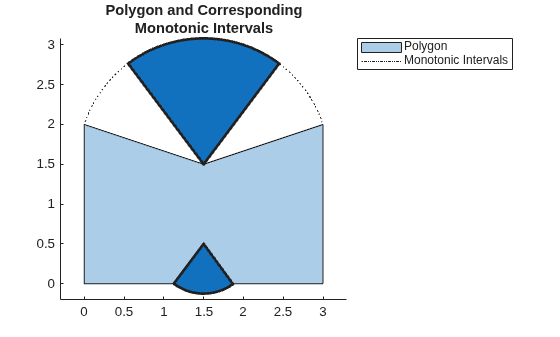
You can use these monotonic intervals to plan sweep paths. Sweeping in a monotonic interval ensures that you can fully sweep the corresponding region of a polygon in one direction, without needing to backtrack.
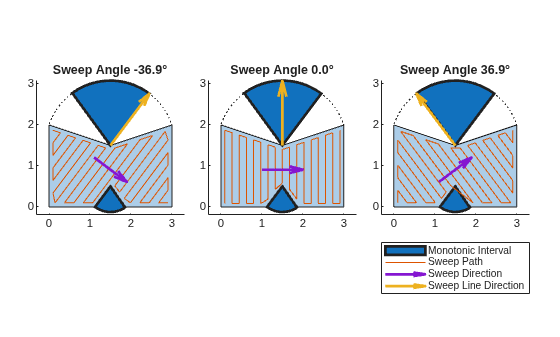
Store three sweep angles from within the first monotonic angle interval.
sweepAngles = [intervals(1,1) mean(intervals(1,:)) intervals(1,2)] - pi;
Define the geometry of the sweep tool. In this case, assume the tool is shaped like a regular pentagon.
tool = nsidedpoly(5,Radius=0.1);
Set up three subplots, for showing the sweep paths along the selected sweep angles.
t = tiledlayout(1,3,Padding="compact",TileSpacing="compact");
Generate and plot a sweep path for each of the stored sweep angles. Plot the sweep direction arrow and sweep line direction arrow to show their relationships to the sweep angle and path.
for i = 1:3
opts = polysweepoptsbous(SweepAngle=sweepAngles(i),BoundaryBehavior="inset",SweepToolGeometry=tool);
path = polygonSweep(poly,opts);

nexttile

hVis = plotMonotonicity(poly);

hold on
axis equal tight

% Plot the swept path
pathHandle = plot(path(:,1),path(:,2));

% Plot the sweep direction arrow and sweep line direction arrows to
% show their relationships to the sweep angle and path.
sweepLineDirHandle = exampleHelperHighlightInterval(hVis,sweepAngles(i)+pi/2);
sweepDirHandle = exampleHelperPlotSweepDirection(poly,sweepAngles(i));

% Add a title to the current tile
title("Sweep Angle " + num2str(rad2deg(sweepAngles(i)),"%.1f") + "°");

hold off
end

handles = [hVis.MonotoneIntervals.Children(1), ...
           pathHandle, ...
           sweepDirHandle, ...
           sweepLineDirHandle];

legend(handles,{"Monotonic Interval","Sweep Path","Sweep Direction","Sweep Line Direction"},Location="southoutside",Orientation="vertical");
Input Arguments
Output Arguments
More About
Polygon monotonicity is a geometric property that describes where you can cover a polygon by sweeping a line across it in a single direction without needing to reverse or backtrack. A polygon is monotone with respect to a sweep direction, L, if every line perpendicular to L intersects the polygon in one continuous segment. If any perpendicular line intersects the boundary of the polygon more than twice, the polygon is not monotone with respect to that sweep direction which indicates that you cannot sweep the entire polygon with that single sweep direction.
By definition, convex polygons are monotone with respect to every direction. In contrast, concave regions limit the directions in which a polygon is monotone, making monotonicity analysis especially useful for concave shapes.
In the figure, Ln is a valid sweep direction because every possible perpendicular intersects the polygon no more than twice. Lm, however, is not a valid sweep direction because some perpendiculars intersect the polygon more than twice.

By rotating the sweep direction L and checking for monotonicity at each angle, you can identify and plot the angular intervals in which the polygon is monotone.

Use the plotMonotonicity function to visualize these intervals.
plotMonotonicity offsets the intervals by 90 degrees and places the
intervals in the concave regions of the polygon. This shows how concave regions constrain
the set of valid sweep directions for a polyshape, and enables you to
select efficient paths for coverage.

Extended Capabilities
Version History
Introduced in R2026a

