GPU 上的模板操作
R2026b此示例使用康威的“生命游戏”来演示如何使用 GPU 执行模板操作。
许多数组操作可以表示为“模板操作”,其中输出数组的每个元素都依赖于输入数组的一小部分区域。示例包括有限差分、卷积、中值滤波和有限元方法。本示例以康威的生命游戏为例,演示了在 GPU 上执行模板运算的两种方法,其代码源自克利夫·莫勒 (Cleve Moler) 的电子书《Experiments in MATLAB》。
在“生命游戏”中,细胞排列在一个二维网格上。每个细胞处于两种状态之一,即活或死,且细胞的状态会随着若干时间步的推移而演变。在每个步骤中,每个单元的状态由其八个最近邻单元的状态决定:
如果一个活细胞的邻居少于两个,它就会死亡。
如果一个活细胞的邻居超过三个,它就会死亡。
如果一个死细胞恰好有三个邻居,它就会复活。
在其他所有配置下,电池的状态均保持不变。
该图说明了这些规则。仅考虑中心单元及其八个邻元的状态。
生成随机初始种群
在二维网格上生成初始细胞群体,其中约 25% 的位置处于存活状态。
gridSize = 500;
initialGrid = (rand(gridSize) < .25);
绘制初始网格
figure
imagesc(initialGrid)
colormap([1 1 1;0 0.5 0])
title("Initial Grid")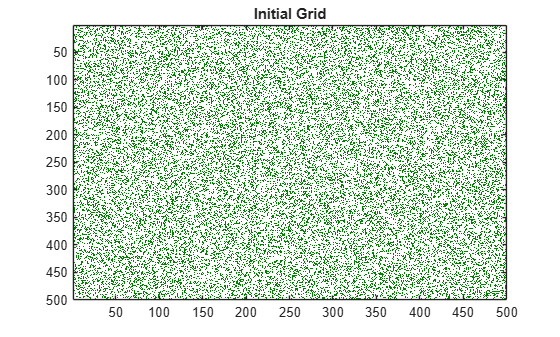
定义 CPU 函数
根据电子书《Experiments in MATLAB》中的实现,定义一个用于更新网格中单元格的函数。该版本已完全向量化,因为它在每一代中仅需一次迭代即可更新网格中的所有单元格。
function X = updateGrid(X,N)
p = [1 1:N-1];
q = [2:N N];
% Count how many of the eight neighbors are alive.
neighbors = X(:,p) + X(:,q) + X(p,:) + X(q,:) + ...
    X(p,p) + X(q,q) + X(p,q) + X(q,p);
% A live cell with two live neighbors, or any cell with
% three live neighbors, is alive at the next step.
X = (X & (neighbors == 2)) | (neighbors == 3);
end
运行“生命游戏”100 代。在每一代中,绘制整个网格以及一个 50×50 的子集。
currentGrid = initialGrid;
numGenerations = 100;

figure
t = tiledlayout(1,2,TileSpacing="compact",Padding="tight");

gridAx = nexttile;
colormap([1 1 1;0 0.5 0]);
im = imagesc(gridAx,currentGrid);
axis square

zoomedAx = nexttile;
zoomedIm = imagesc(zoomedAx,currentGrid(50:100,50:100));
colormap([1 1 1;0 0.5 0]);
axis square

% Loop through each generation updating the grid and displaying it
for generation = 1:numGenerations
    currentGrid = updateGrid(currentGrid,gridSize);

    im.CData = currentGrid;
    zoomedIm.CData = currentGrid(50:100,50:100);
    title(t,"Generation: " + generation)
    drawnow
    pause(0.2)
end
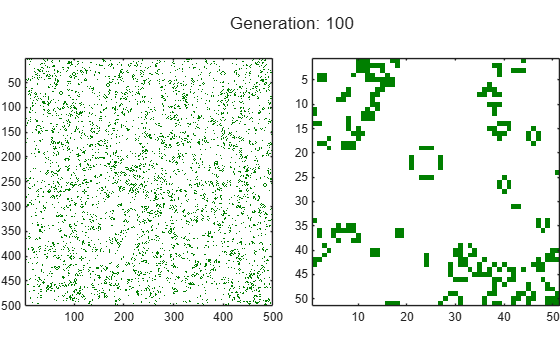
运行该游戏 1000 代,并测量每一代所需的时间。
currentGrid = initialGrid;
numGenerations = 1000;

tic
for generation = 1:numGenerations
    currentGrid = updateGrid(currentGrid,gridSize);
end
cpuTime = toc;
fprintf('Average time on the CPU: %2.3f ms per generation.\n', ...
    1000*cpuTime/numGenerations);
Average time on the CPU: 2.971 ms per generation.
将“生命游戏”移植到 GPU 上运行
通过使用gpuArray函数将初始网格发送至 GPU 内存,在 GPU 上运行“生命游戏”。算法保持不变。使用wait函数,以确保在停止计时器之前,GPU 已完成计算。
gpu = gpuDevice;
currentGrid = gpuArray(initialGrid);

tic
for generation = 1:numGenerations
    currentGrid = updateGrid(currentGrid,gridSize);
end

wait(gpu); % Only needed to ensure accurate timing
gpuSimpleTime = toc;

% Print out the average computation time and check the result is unchanged.
fprintf(['Average time on the GPU: %2.3f ms per generation ', ...
    '(%1.1fx faster).\n'], ...
    1000*gpuSimpleTime/numGenerations,cpuTime/gpuSimpleTime);
Average time on the GPU: 0.648 ms per generation (4.6x faster).
为 GPU 创建按元素处理的版本
updateGrid 函数对网格中的每个点独立地应用相同的操作。这表明,arrayfun(它会对 gpuArray 的每个元素应用一个函数)可以用于进行求值。然而,每个单元都需要了解它的八个邻居,从而破坏了元素间的独立性。换句话说,每个元素既需要能够访问整个网格,同时又能独立运行。
解决方案是使用嵌套函数。嵌套函数(即使是与arrayfun一起使用的函数)可以访问其父函数中声明的变量。这意味着每个单元都可以从前一个时间步骤读取整个网格并将其编入索引。
定义一个函数 updateGridArrayfun,其定义如下:
定义了一个嵌套函数
updateParentGrid,该函数根据自身状态及其邻居的状态来更新一个单元格。使用
arrayfun应用嵌套函数。
通过使用嵌套函数,updateParentGrid 函数能够访问 grid 变量,尽管该变量并未作为参量传递。
function grid = updateGridArrayfun(grid,gridSize,numGenerations)

    function X = updateParentGrid(row,col,N)
        % Take account of boundary effects
        rowU = max(1,row-1);  rowD = min(N,row+1);
        colL = max(1,col-1);  colR = min(N,col+1);
        % Count neighbors
        neighbors ...
            = grid(rowU,colL) + grid(row,colL) + grid(rowD,colL) ...
            + grid(rowU,col)                   + grid(rowD,col) ...
            + grid(rowU,colR) + grid(row,colR) + grid(rowD,colR);
        % A live cell with two live neighbors, or any cell with
        % three live neighbors, is alive at the next step.
        X = (grid(row,col) & (neighbors == 2)) | (neighbors == 3);
    end

cols = gpuArray.colon(1,gridSize);
rows = cols';

for generation = 1:numGenerations
    grid = arrayfun(@updateParentGrid,rows,cols,gridSize);
end
end

initialGrid = gpuArray(initialGrid);

tic
currentGrid = updateGridArrayfun(initialGrid,gridSize,numGenerations);
wait(gpu); % Only needed to ensure accurate timing
gpuArrayfunTime = toc;

% Print out the average computation time and check the result is unchanged.
fprintf(['Average time using GPU arrayfun: %2.3fms per generation ', ...
    '(%1.1fx faster).\n'], ...
    1000*gpuArrayfunTime/numGenerations,cpuTime/gpuArrayfunTime);
Average time using GPU arrayfun: 0.369ms per generation (8.0x faster).
该函数还利用了 arrayfun 的另一项功能:维度扩展。该函数仅将行向量和列向量作为输入传递给 arrayfun,后者会自动将其扩展为完整的网格。其效果就好像 arrayfun 调用了 meshgrid 函数一样。
[cols,rows] = meshgrid(cols,rows);
这既节省了计算资源,又减少了 CPU 内存与 GPU 内存之间的数据传输。
结论
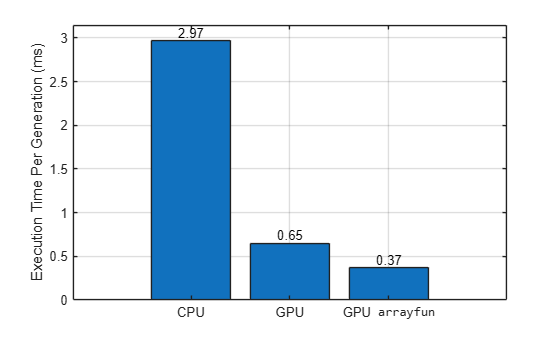
比较这三种方法的性能。
figure
b = bar( ["CPU" "GPU" "GPU \fontname{monospace}arrayfun"], ...
    [1000*cpuTime/numGenerations 1000*gpuSimpleTime/numGenerations 1000*gpuArrayfunTime/numGenerations]);
ylabel("Execution Time Per Generation (ms)")
grid on
b(1).Labels = round(b(1).YData,2);
fprintf(['CPU:          %2.3f ms per generation.\n' ...
    'Simple GPU:   %2.3f ms per generation (%1.1fx faster).\n' ...
    'Arrayfun GPU: %2.3f ms per generation (%1.1fx faster).\n'], ...
    1000*cpuTime/numGenerations, ...
    1000*gpuSimpleTime/numGenerations,cpuTime/gpuSimpleTime, ...
    1000*gpuArrayfunTime/numGenerations,cpuTime/gpuArrayfunTime);
CPU:          2.971 ms per generation.
Simple GPU:   0.648 ms per generation (4.6x faster).
Arrayfun GPU: 0.369 ms per generation (8.0x faster).
在此示例中,您将利用arrayfun以及在父函数中声明的变量,在 GPU 上实现一个简单的模板运算 -- 康威的生命游戏。您还可以使用此方法访问父函数中定义的查找表中的元素。
当您将本示例中描述的技术应用到您自己的代码中时,性能的提升将在很大程度上取决于您的硬件和您运行的代码。
另请参阅
gpuArray | mexcuda | gputimeit

