主要内容

addCamera

R2026b

Display camera in point cloud viewer

Since R2026b

    Description

    camera = addCamera(pcview,camPose) displays one or more cameras in the point cloud viewer pcview, with camera poses specified by camPoses. You can control the appearance and behavior of each camera using the properties of the corresponding Camera object in camera.

    camera = addCamera(___,Name=Value) specifies options using one or more name-value arguments in addition to the input arguments from the previous syntax. For example, Color="yellow" sets the color of each camera to yellow.

    Examples

    collapse all

    Load a point cloud and camera poses from MAT files. The three cameras are placed in orbit around the point cloud, each looking toward its center.

    load("object3d.mat");
    load("cameraPoses.mat");

    Display the point cloud in pcviewer and add the cameras using addCamera.

    pcview = pcviewer(ptCloud);
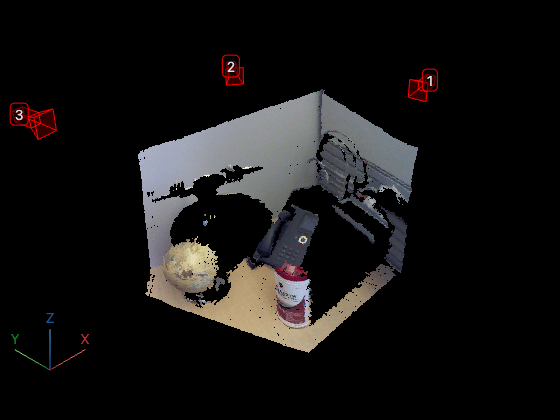
    cameras = addCamera(pcview,cameraPoses,Size=0.1,Color=[1 0 0],Label=[1 2 3]);

    Input Arguments

    collapse all

    Point cloud viewer in which to display camera, specified as a pcviewer object.

    Camera pose, specified as an M-element vector of rigidtform3d (Image Processing Toolbox) objects or an M-element vector of se3 (Computer Vision Toolbox) objects. M is the number of cameras to add to the viewer. The camera poses represent the position and orientation of each camera in the scene.

    Name-Value Arguments

    collapse all

    Specify optional pairs of arguments as Name1=Value1,...,NameN=ValueN, where Name is the argument name and Value is the corresponding value. Name-value arguments must appear after other arguments, but the order of the pairs does not matter.

    Example: Color="yellow" sets the color of each camera to yellow.

    Shape color, specified as an RGB triplet, a short color name, a long color name, or an M-by-3 matrix of RGB triplets. When you specify a single color, the function applies that color to all shapes. When you specify multiple colors, the number of colors must match the number of shapes specified by position.

    Camera size, specified as a positive scalar. The value controls the scale of the displayed camera representation in the viewer. The size applies uniformly to all cameras.

    Camera display style, specified as "camera" or "frustum".

    Camera label, specified as a string scalar or an M-element vector, where M is the number of cameras to add to the viewer.

    • Scalar value — Applies the same label to all added cameras.

    • M-element vector — Specifies a label for each added camera.

    If you specify numeric values, the function converts them to strings for display.

    Camera visibility, specified as "on" or "off", or as a numeric or logical 1 (true) or 0 (false). The visibility value applies to all cameras. A value of "on" is equivalent to true, and "off" is equivalent to false. Thus, you can use the value of the property set by this argument as a logical value. The value is stored as an on/off logical value of type OnOffSwitchState.

    Camera axis visibility, specified as "on" or "off", or as a numeric or logical 1 (true) or 0 (false). The visibility value applies to all cameras. A value of "on" is equivalent to true, and "off" is equivalent to false. Thus, you can use the value of the property set by this argument as a logical value. The value is stored as an on/off logical value of type OnOffSwitchState.

    Camera principal axes visibility, specified as "on" or "off", or as a numeric or logical 1 (true) or 0 (false). The visibility value applies to all cameras. A value of "on" is equivalent to true, and "off" is equivalent to false. Thus, you can use the value of the property set by this argument as a logical value. The value is stored as an on/off logical value of type OnOffSwitchState.

    Camera intrinsic parameters, specified as an M-element vector of cameraIntrinsics (Computer Vision Toolbox) objects. Use this argument when you specify Style as "frustum" to determine the field of view, aspect ratio, and far plane of the frustum. If you do not specify this argument, the function uses a field of view of 45 degrees and an aspect ratio of 1.

    Output Arguments

    collapse all

    Cameras added to the viewer, returned as an M-element vector of Camera objects. The returned objects represent the displayed cameras, and contain properties that control their appearance and behavior. The Camera object has these properties:

    • AbsolutePose

    • Size

    • Label

    • Color

    • Alpha

    • Visible

    • AxesVisible

    • PrincipalAxesVisible

    Version History

    Introduced in R2026b

    See Also

    Objects

    Functions