主要内容

risk.validation.kolmogorovSmirnovPlot

Plot Kolmogorov-Smirnov statistics

Since R2026a

    Description

    risk.validation.kolmogorovSmirnovPlot(Score,BinaryResponse) creates two data samples from Score and BinaryResponse, then plots their empirical cumulative distribution functions (CDF). The plot also includes dotted lines indicating the location of the empirical CDFs' largest absolute difference, which is the value of the Kolmogorov-Smirnov (KS) statistic.

    example

    risk.validation.kolmogorovSmirnovPlot(Sample1,Sample2) plots the empirical CDFs for the data in Sample1 and Sample2 together with dotted lines indicating the location of the empirical CDFs' largest absolute difference.

    risk.validation.kolmogorovSmirnovPlot(___,Name=Value) specifies additional options using one or more name-value arguments. For example, you can specify the direction in which to sort the distribution variable and whether to plot the absolute differences of the empirical CDFs.

    example

    risk.validation.kolmogorovSmirnovPlot(ax,___) plots into the axes specified by ax instead of into the current axes (gca). The argument ax can precede any of the input argument combinations in the previous syntaxes.

    h = risk.validation.kolmogorovSmirnovPlot(___) returns handles to the plotted graphics objects.

    Examples

    collapse all

    Load the CreditValidationData data.

    load CreditValidationData.mat

    The variables ScoreCardPD and Default in the PDModelsValidationData table, respectively, contain data for customer probability of default (PD) and whether the customer defaulted.

    Visualize the Kolmogorov-Smirnov (KS) statistic for the numeric data in ScoreCardPD, grouped by the logical data in Default.

    ScorecardPD = PDModelsValidationData.ScorecardPD;
    Default = PDModelsValidationData.Default;
    risk.validation.kolmogorovSmirnovPlot(ScorecardPD,Default)
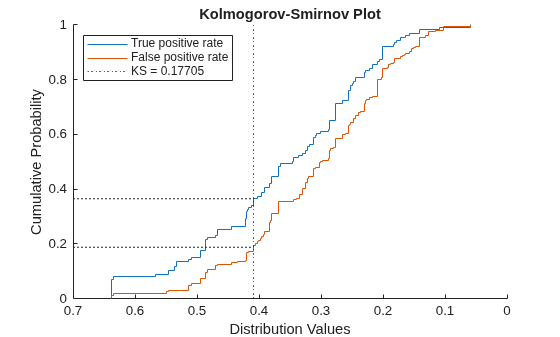
    Figure contains an axes object. The axes object with title Kolmogorov-Smirnov Plot, xlabel Distribution Values, ylabel Cumulative Probability contains 5 objects of type stair, constantline, line. These objects represent True positive rate, False positive rate, KS = 0.17705.

    The plot shows the empirical cumulative distribution function (CDF) for customers who defaulted in blue with the label True positive rate and the empirical CDF for the customers who did not default in orange with the label False positive rate. The horizontal axis represents the values in ScoreCardPD. The true and false positive rates correspond to different values in ScoreCardPD which, if used as a classification threshold, would result in the plotted true positive and false positive rates. The rates for each threshold assume that all values to the left are classified as 1 (defaulted) while values to the right are classified as 0 (not defaulted). The dotted lines indicate the largest absolute difference between the CDFs and the score associated with it. The largest absolute distance is the KS statistic.

    Load the profit and loss sample data.

    load("PandLValues.mat")

    The vectors HPL and RTPL contain hypothetical loss (HPL) and risk-theoretical loss (RTPL) data for 250 trading days, or one year, of a simulated portfolio.

    Plot the empirical CDFs for the data in HPL and RTPL together with the absolute difference between the CDFs.

    risk.validation.kolmogorovSmirnovPlot(RTPL,HPL,PlotDifferences=true)
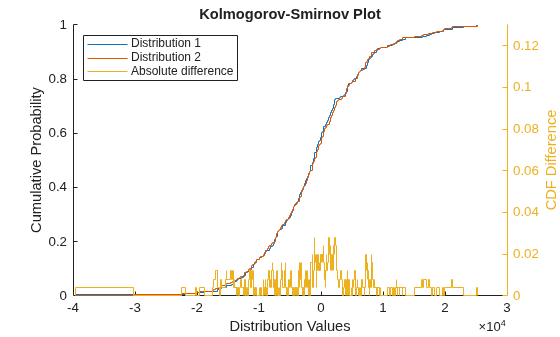
    Figure contains an axes object. The axes object with title Kolmogorov-Smirnov Plot, xlabel Distribution Values, ylabel Cumulative Probability contains 3 objects of type stair. These objects represent Distribution 1, Distribution 2, Absolute difference.

    The plot shows the CDFs together with their absolute difference for each value of HPL and RTPL. The absolute difference reaches a maximum of 0.028 near 0.

    Input Arguments

    collapse all

    Score values, specified as a numeric vector, containing values that indicate quantities such as rankings or predictions, PD, or LGD estimates. risk.validation.kolmogorovSmirnovPlot uses the BinaryResponse argument to separate the data in Score into two samples. The software then calculates and plots the empirical CDF for each sample.

    When you specify Score, risk.validation.kolmogorovSmirnovPlot uses BinaryResponse to label the empirical CDF for the sample corresponding to 1 as True positive rate and the empirical CDF for the sample corresponding to 0 as False positive rate.

    The true and false positive rates correspond to different values in Score that, if used as a classification threshold, would result in the plotted true positive and false positive rates. The rates for each threshold assume that all values to the left are classified as 1 (defaulted) while values to the right are classified as 0 (not defaulted).

    Data Types: single | double

    Binary response, specified as a numeric or logical vector, that contains values of 1 (true) or 0 (false). The binary response represents the target state for each value in Score. For example, you can use the binary response to represent a discretized LGD target, where ones indicate a high LGD value.

    When you specify BinaryResponse, risk.validation.kolmogorovSmirnovPlot labels empirical CDF for the sample corresponding to 1 as True positive rate and the empirical CDF for the sample corresponding to 0 as False positive rate.

    The true and false positive rates correspond to different values in Score that, if used as a classification threshold, would result in the plotted true positive and false positive rates. The rates for each threshold assume that all values to the left are classified as 1 (defaulted) while values to the right are classified as 0 (not defaulted).

    Sample data, specified as two numeric vectors. risk.validation.kolmogorovSmirnovPlot calculates and plots the empirical CDF for each sample. When you specify Sample1,Sample2, risk.validation.kolmogorovSmirnovPlot plots the empirical CDF for the samples with the labels Distribution 1 and Distribution 2.

    Example: normrnd(0,1,1,100),normrnd(5,2,1,100)

    Data Types: single | double

    Target axes, specified as an Axes object. If you do not specify the axes, then risk.validation.kolmogorovSmirnovPlot uses the current axes (gca).

    risk.validation.kolmogorovSmirnovPlot ignores ax when you also specify the Parent name-value argument.

    Name-Value Arguments

    collapse all

    Specify optional pairs of arguments as Name1=Value1,...,NameN=ValueN, where Name is the argument name and Value is the corresponding value. Name-value arguments must appear after other arguments, but the order of the pairs does not matter.

    Example: risk.validation.kolmogorovSmirnovPlot(Score,BinaryResponse,SortDirection="descending",PlotDifferences=true,) plots the empirical CDFs in ascending order of the variable in Scores together with the differences between the empirical CDFs.

    Sorting direction of the distribution variable, specified as "ascending" or "descending". When you specify Score and BinaryResponse, the default sort direction is "descending". When you specify Sample1,Sample2, the default sort direction is "ascending".

    If you are plotting credit scores, where low values commonly correspond to higher risk individuals, you can set the sorting direction to "ascending". This setting ensures that TruePositiveRate represents the proportion of defaulters. If you are plotting probability of default values, where higher values correspond to higher risk, sorting the values in descending order is common practice.

    Example: SortDirection="descending"

    Data Types: string | char

    Indicator to plot the absolute differences between the empirical CDFs, specified as 1 (true) or 0 (false). When you specify PlotDifferences, the plot does not include dotted lines indicating the location of the empirical CDFs' largest absolute difference.

    Example: PlotDifferences=1

    Axes for plot, specified as an Axes graphics object. If you do not specify the axes by using the ax input argument or the Parent name-value argument, the risk.validation.kolmogorovSmirnovPlot function plots into the current axes or creates an Axes object if one does not exist. For more information on creating an Axes graphics object, see axes and Axes Properties.

    If you specify both the Parent and ax arguments, risk.validation.kolmogorovSmirnovPlot ignores ax.

    Empirical CDF difference thresholds, specified as a positive numeric scalar or vector. When you specify DifferenceThresholds, risk.validation.kolmogorovSmirnovPlot plots a horizontal line or lines representing the threshold or thresholds.

    risk.validation.kolmogorovSmirnovPlot ignores DifferenceThresholds when PlotDifferences is false.

    Example: DifferenceThresholds=[0.25 0.5 0.75]

    Data Types: single | double

    Output Arguments

    collapse all

    Handles to plotted graphics objects, returned as a graphics array. Each element of h is either a Stairs, Line, or ConstantLine object.

    Algorithms

    To calculate the two-sample KS statistic, risk.validation.kolmogorovSmirnovPlot calculates the empirical CDF for each sample. The KS statistic is the largest absolute difference between the empirical CDFs.

    Alternative Functionality

    You can use the risk.validation.kolmogorovSmirnov function to calculate the KS statistic without visualization.

    References

    [1] Basel Committee on Banking Supervision, "Calculation of RWA for market risk." January, 2022. https://www.bis.org/basel_framework/chapter/MAR/32.htm?inforce=20220101&published=20191215.

    Version History

    Introduced in R2026a