Rigid Body Tree Check Collision
R2026brigid body tree check collision block block
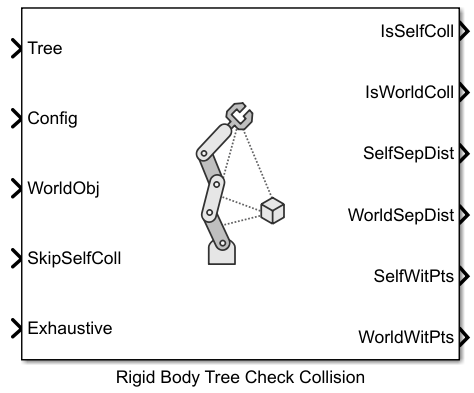
To add a block to a model, double-click the canvas and start typing the block name. Then, select the block from the list.
Libraries:
Robotics System Toolbox /
Collision Detection
Description
The Rigid Body Tree Check Collision block checks if the specified rigid body tree robot model is in collision with itself or a specified set of collision objects in the world.
Examples
Use the loadrobot function to load a robot model from the Robot Library and set up the collision environment.
robot = loadrobot("abbIrb120",DataFormat="row");
rad = 0.08;
len = 0.75;
pose1 = trvec2tform([0.4 -0.35 0.3]);
pose2 = trvec2tform([0 0.3 0.5]);
cylinder = collisionCylinder(rad,len,Pose=pose1);
sphere = collisionSphere(rad,Pose=pose2);
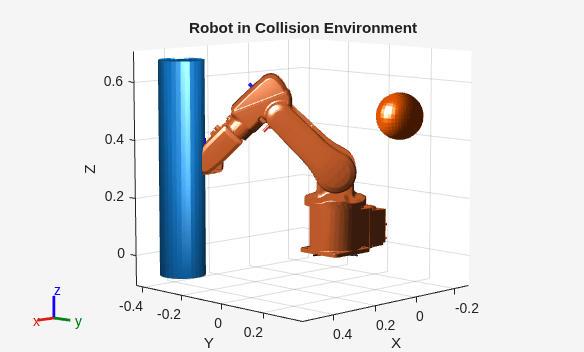
Show the robot with the collision environment. In this case, you can see the robot collides with the cylinder.
show(robot,[-pi/4 pi/4 0 0 -pi/4 0]);
hold on
showCollisionArray({cylinder,sphere});
title("Robot in Collision Environment")
hold on
open_system("RBTCheckCollisionModel");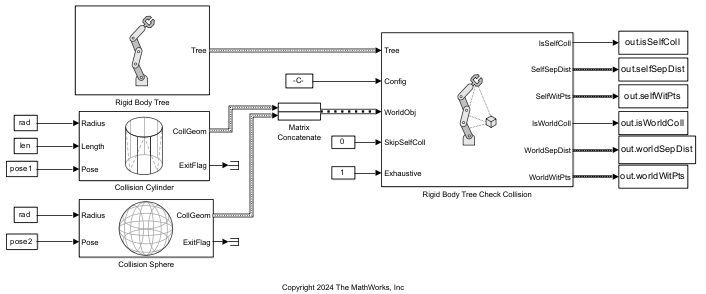
out = sim("RBTCheckCollisionModel");Self-Collision Data
Check the self-collision status for the robot at the first time step.
isSelfColliding = out.isSelfColl.Data(1)
isSelfColliding = logical
   0
Get the self-separation distance and self-witness points matrices for the first time step.
selfSepDist = out.selfSepDist.Data{1}selfSepDist = 9×9
Inf Inf Inf Inf Inf Inf Inf Inf Inf
Inf Inf Inf 0.1485 0.2616 0.2919 0.4135 Inf Inf
Inf Inf Inf Inf 0.0956 0.1848 0.2968 Inf 0.0401
Inf 0.1485 Inf Inf Inf 0.0730 0.1731 Inf 0.2777
Inf 0.2616 0.0956 Inf Inf Inf 0.0149 Inf 0.3136
Inf 0.2919 0.1848 0.0730 Inf Inf Inf Inf 0.3196
Inf 0.4135 0.2968 0.1731 0.0149 Inf Inf Inf 0.4398
Inf Inf Inf Inf Inf Inf Inf Inf Inf
Inf Inf 0.0401 0.2777 0.3136 0.3196 0.4398 Inf Inf
selfWitPts = out.selfWitPts.Data{1}selfWitPts = 27×18
Inf Inf Inf Inf Inf Inf Inf Inf Inf Inf Inf Inf Inf Inf Inf Inf Inf Inf
Inf Inf Inf Inf Inf Inf Inf Inf Inf Inf Inf Inf Inf Inf Inf Inf Inf Inf
Inf Inf Inf Inf Inf Inf Inf Inf Inf Inf Inf Inf Inf Inf Inf Inf Inf Inf
Inf Inf Inf Inf Inf Inf 0.0371 0.1129 0.0517 0.2244 0.0797 0.2790 0.0797 0.3625 Inf Inf Inf Inf
Inf Inf Inf Inf Inf Inf -0.0309 -0.1015 -0.0516 -0.2213 -0.0797 -0.2707 -0.0797 -0.3625 Inf Inf Inf Inf
Inf Inf Inf Inf Inf Inf 0.3377 0.4441 0.2877 0.3867 0.1909 0.2858 0.1909 0.2959 Inf Inf Inf Inf
Inf Inf Inf Inf Inf Inf Inf Inf 0.1695 0.2246 0.1579 0.2645 0.1752 0.3649 Inf Inf -0.0048 -0.0047
Inf Inf Inf Inf Inf Inf Inf Inf -0.1702 -0.2253 -0.1839 -0.2905 -0.1703 -0.3600 Inf Inf 0.0044 0.0044
Inf Inf Inf Inf Inf Inf Inf Inf 0.4586 0.4034 0.4608 0.3539 0.4644 0.3376 Inf Inf 0.1662 0.2062
Inf Inf 0.0371 0.1129 Inf Inf Inf Inf Inf Inf 0.2261 0.2645 0.2709 0.3649 Inf Inf 0.0638 0.1257
Inf Inf -0.0309 -0.1015 Inf Inf Inf Inf Inf Inf -0.2580 -0.2905 -0.2681 -0.3600 Inf Inf -0.0669 -0.1260
Inf Inf 0.3377 0.4441 Inf Inf Inf Inf Inf Inf 0.4067 0.3539 0.4501 0.3376 Inf Inf 0.1660 0.4302
Inf Inf 0.0517 0.2244 0.1695 0.2246 Inf Inf Inf Inf Inf Inf 0.3376 0.3481 Inf Inf 0.0634 0.2244
Inf Inf -0.0516 -0.2213 -0.1702 -0.2253 Inf Inf Inf Inf Inf Inf -0.3664 -0.3769 Inf Inf -0.0673 -0.2213
Inf Inf 0.2877 0.3867 0.4586 0.4034 Inf Inf Inf Inf Inf Inf 0.3147 0.3147 Inf Inf 0.1660 0.3867
⋮
Get the separation distance and corresponding witness points between link_1 and link_6. Use find and strcmp functions to get the indices of these bodies in the rigid body tree.
body1Idx = find(strcmp(robot.BodyNames,"link_1"));
body2Idx = find(strcmp(robot.BodyNames,"link_6"));
link1_link6_dist = selfSepDist(body1Idx,body2Idx)
link1_link6_dist =
0.4135
row = body1Idx*3-2; % body index * three dimensions (XYZ), -2 to get starting index of the submatrix
col = body2Idx*2-1; % body index * two witness points, -1 to get starting index of the submatrix
link1_link6_witpts = selfWitPts(row:row+2,col:col+1)
link1_link6_witpts = 3×2

    0.0797    0.3625
   -0.0797   -0.3625
    0.1909    0.2959
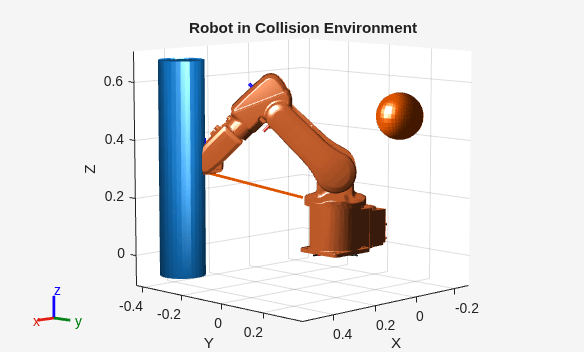
Plot a line between the witness points.
plot3(link1_link6_witpts(1,:),link1_link6_witpts(2,:),link1_link6_witpts(3,:),LineWidth=2);
World-Collision Data
Check the world-collision status for the robot at the first time step.
isWorldColliding = out.isWorldColl.Data(1)
isWorldColliding = logical
   1
Get the separation distances and witness points between the robot and the world objects for the first time step.
worldSepDist = out.worldSepDist.Data{1}worldSepDist = 9×2
Inf Inf
0.3385 0.1980
0.2003 0.1672
0.0647 0.3016
NaN 0.4826
NaN 0.5670
NaN 0.6898
Inf Inf
0.3279 0.3133
worldWitPts = out.worldWitPts.Data{1}worldWitPts = 27×4
Inf Inf Inf Inf
Inf Inf Inf Inf
Inf Inf Inf Inf
0.0920 0.3411 0.0122 0.0036
-0.0666 -0.2959 0.0726 0.2346
0.1634 0.1634 0.3405 0.4541
0.2018 0.3433 0.0258 0.0083
-0.1518 -0.2935 0.1245 0.2431
0.4918 0.4918 0.3278 0.4444
0.2819 0.3347 0.1426 0.0300
-0.2664 -0.3037 -0.0537 0.2259
0.4579 0.4579 0.4868 0.4972
NaN NaN 0.2664 0.0378
NaN NaN -0.1837 0.2312
NaN NaN 0.3924 0.4847
⋮
Get the separation distance and corresponding witness points between link_4 and the sphere collision geometry.
bodyIdx = find(strcmp(robot.BodyNames,"link_3"));
worldObjIdx = 2;
link2_sphere_dist = worldSepDist(bodyIdx,worldObjIdx)
link2_sphere_dist = 0.3016
row = bodyIdx*3-2;     % body index * three dimensions (XYZ), -2 to get starting index of the submatrix
col = worldObjIdx*2-1; % body index * two witness points, -1 to get starting index of the submatrix
link2_sphere_witpts = worldWitPts(row:row+2,col:col+1)
link2_sphere_witpts = 3×2

    0.1426    0.0300
   -0.0537    0.2259
    0.4868    0.4972
Plot a line between the witness points.
plot3(link2_sphere_witpts(1,:),link2_sphere_witpts(2,:),link2_sphere_witpts(3,:),LineWidth=2);
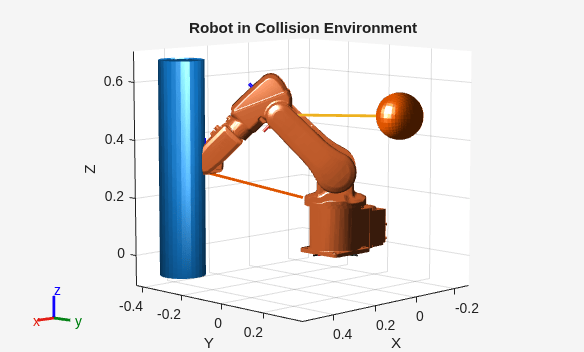
This example shows how to visualize and understand the separation distance and witness point matrices from collision checking. The example uses model from the Check Robot for Collisions between Itself and World example.
open_system("RBTCheckCollisionModel");
out = sim("RBTCheckCollisionModel");
Get the self-separation distance and self-witness points matrices for the first time step.
selfSepDist = out.selfSepDist.Data{1};
selfWitPts = out.selfWitPts.Data{1};
For readability and illustrative purposes, convert the self-collision distance and self-witness points matrices to tables. You can use this table format to understand how the separation distance matrix is structured.
bodyNames = [robot.BodyNames robot.BaseName];        % Define this to use for table variables and rows
selfDistTable = array2table(selfSepDist, ... % Convert to table for readability
    VariableNames=bodyNames, ...
    RowNames=bodyNames)
selfDistTable = 9×9 table
                 base    link_1      link_2      link_3      link_4      link_5      link_6     tool0    base_link
                 ____    _______    ________    ________    ________    ________    ________    _____    _________

    base         Inf         Inf         Inf         Inf         Inf         Inf         Inf     Inf          Inf
    link_1       Inf         Inf         Inf      0.1485      0.2616     0.29193     0.41354     Inf          Inf
    link_2       Inf         Inf         Inf         Inf    0.095562     0.18479     0.29681     Inf     0.040051
    link_3       Inf      0.1485         Inf         Inf         Inf    0.073013     0.17308     Inf      0.27774
    link_4       Inf      0.2616    0.095562         Inf         Inf         Inf    0.014859     Inf      0.31364
    link_5       Inf     0.29193     0.18479    0.073013         Inf         Inf         Inf     Inf      0.31957
    link_6       Inf     0.41354     0.29681     0.17308    0.014859         Inf         Inf     Inf      0.43981
    tool0        Inf         Inf         Inf         Inf         Inf         Inf         Inf     Inf          Inf
    base_link    Inf         Inf    0.040051     0.27774     0.31364     0.31957     0.43981     Inf          Inf
selfWitPtsCell = exampleHelperWitPtsMatrixToCellArray(selfWitPts);
selfWitPtsTable = array2table(selfWitPtsCell, ... % Convert to table for readability
    VariableNames=bodyNames, ...
    RowNames=bodyNames)
selfWitPtsTable = 9×9 table
                     base           link_1          link_2          link_3          link_4          link_5          link_6          tool0         base_link
                 ____________    ____________    ____________    ____________    ____________    ____________    ____________    ____________    ____________

    base         {3×2 double}    {3×2 double}    {3×2 double}    {3×2 double}    {3×2 double}    {3×2 double}    {3×2 double}    {3×2 double}    {3×2 double}
    link_1       {3×2 double}    {3×2 double}    {3×2 double}    {3×2 double}    {3×2 double}    {3×2 double}    {3×2 double}    {3×2 double}    {3×2 double}
    link_2       {3×2 double}    {3×2 double}    {3×2 double}    {3×2 double}    {3×2 double}    {3×2 double}    {3×2 double}    {3×2 double}    {3×2 double}
    link_3       {3×2 double}    {3×2 double}    {3×2 double}    {3×2 double}    {3×2 double}    {3×2 double}    {3×2 double}    {3×2 double}    {3×2 double}
    link_4       {3×2 double}    {3×2 double}    {3×2 double}    {3×2 double}    {3×2 double}    {3×2 double}    {3×2 double}    {3×2 double}    {3×2 double}
    link_5       {3×2 double}    {3×2 double}    {3×2 double}    {3×2 double}    {3×2 double}    {3×2 double}    {3×2 double}    {3×2 double}    {3×2 double}
    link_6       {3×2 double}    {3×2 double}    {3×2 double}    {3×2 double}    {3×2 double}    {3×2 double}    {3×2 double}    {3×2 double}    {3×2 double}
    tool0        {3×2 double}    {3×2 double}    {3×2 double}    {3×2 double}    {3×2 double}    {3×2 double}    {3×2 double}    {3×2 double}    {3×2 double}
    base_link    {3×2 double}    {3×2 double}    {3×2 double}    {3×2 double}    {3×2 double}    {3×2 double}    {3×2 double}    {3×2 double}    {3×2 double}
Get the separation distances and witness points between the robot and the world objects for the first time step.
worldSepDist = out.worldSepDist.Data{1};
worldWitPts = out.worldWitPts.Data{1};
For readability and illustrative purposes, convert the world-collision distance and world-witness points matrices to tables. You can see the world object columns are in the order that you specify to the Rigid Body Tree Check Collision block.
worldDistTable = array2table(worldSepDist, ... % Convert to table for readability
    VariableNames=["cylinder","sphere"], ...
    RowNames=bodyNames)
worldDistTable = 9×2 table
                 cylinder    sphere
                 ________    _______

    base             Inf         Inf
    link_1       0.33855     0.19803
    link_2       0.20029     0.16722
    link_3       0.06468     0.30162
    link_4           NaN     0.48262
    link_5           NaN     0.56702
    link_6           NaN     0.68978
    tool0            Inf         Inf
    base_link    0.32791      0.3133
worldWitPtsCell = exampleHelperWitPtsMatrixToCellArray(out.worldWitPts.Data{1});
worldWitPtsTable = array2table(worldWitPtsCell, ... % Convert to table for readability
    VariableNames=["cylinder","sphere"], ...
    RowNames=bodyNames)
worldWitPtsTable = 9×2 table
cylinder sphere
____________ ____________
base {3×2 double} {3×2 double}
link_1 {3×2 double} {3×2 double}
link_2 {3×2 double} {3×2 double}
link_3 {3×2 double} {3×2 double}
link_4 {3×2 double} {3×2 double}
link_5 {3×2 double} {3×2 double}
link_6 {3×2 double} {3×2 double}
tool0 {3×2 double} {3×2 double}
base_link {3×2 double} {3×2 double}
Ports
Input
Output
Parameters
Extended Capabilities
The Rigid Body Tree Check Collision block supports code generation with dynamic memory allocation disabled. For more information about disabling dynamic memory allocation, see Dynamic memory allocation in MATLAB functions (Simulink).
Note
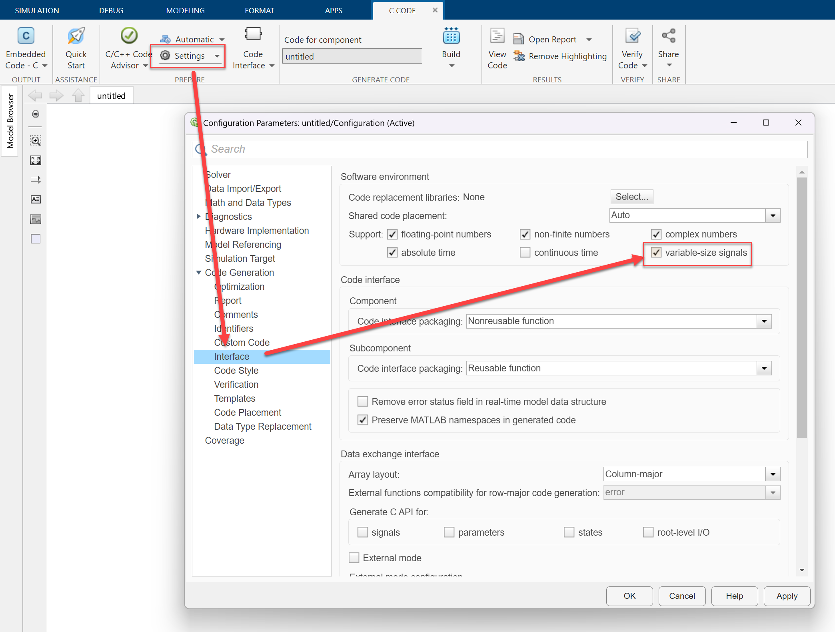
To deploy code to real-time targets containing this block using Embedded Coder®, you must select the variable-size signals parameter in the Configuration Parameters dialog box.
Version History
Introduced in R2026a

