cascade
Description
cascades dOut = cascade(d1,d2,...,dn)n digital filters into a digital filter cascade, dOut. You can cascade between 2 and
15 digitalFilter objects.
Examples
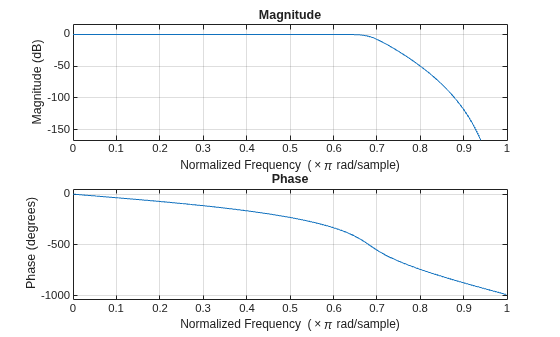
Design a lowpass IIR filter with passband and stopband frequencies of 0.65π rad/sample and 0.80π rad/sample, respectively. The passband ripple is 1 dB and the stopband attenuation is 50 dB. Plot the filter response.
d1 = designfilt("lowpassiir", ... PassbandFrequency=0.65,StopbandFrequency=0.80, ... PassbandRipple=1,StopbandAttenuation=50); freqz(d1)
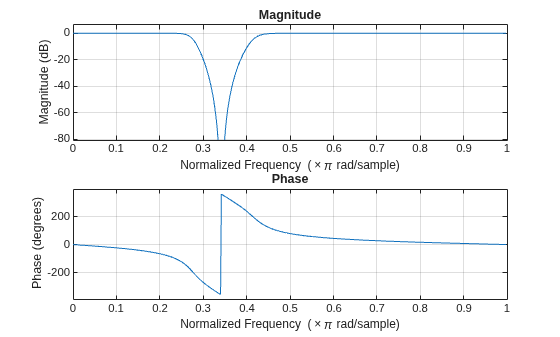
Design a bandstop IIR filter with passband ripples of 1 dB and stopband attenuation of 50 dB. The passband frequencies are 0.25π rad/sample and 0.34π rad/sample. The stopband frequencies are 0.36π rad/sample and 0.45π rad/sample. Plot the filter response.
d2 = designfilt("bandstopiir", ... PassbandFrequency1=0.25,StopbandFrequency1=0.34, ... StopbandFrequency2=0.36,PassbandFrequency2=0.45, ... PassbandRipple1=1,StopbandAttenuation=50, ... PassbandRipple2=1); freqz(d2)
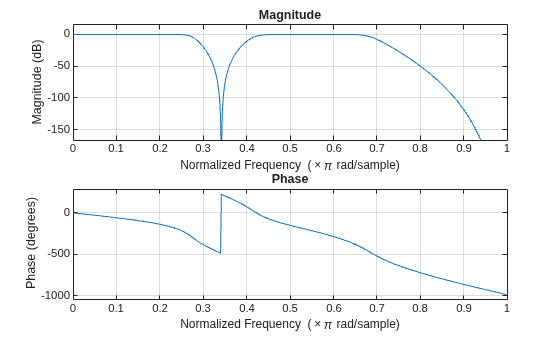
Cascade the lowpass IIR and bandstop IIR filters to form a cascaded filter. Plot the filter response.
d3Norm = cascade(d1,d2)
d3Norm =
digitalFilter cascade with properties:
Stages:
Stage1: [1×1 digitalFilter]
Stage2: [1×1 digitalFilter]
Specifications:
NormalizedFrequency: 1
Use filterAnalyzer to visualize filter
Use filter to filter data
freqz(d3Norm)
Set the sample rate to 20 Hz and cascade the lowpass IIR and bandstop IIR filters to form a cascaded filter.
Fs = 20; d3Freq = cascade(d1,d2,SampleRate=Fs)
d3Freq =
digitalFilter cascade with properties:
Stages:
Stage1: [1×1 digitalFilter]
Stage2: [1×1 digitalFilter]
Specifications:
NormalizedFrequency: 0
SampleRate: 20
Use filterAnalyzer to visualize filter
Use filter to filter data
Input Arguments
Digital filter, specified as a digitalFilter object. Use designfilt to generate a digital filter based on frequency-response
specifications.
Example: d = designfilt("lowpassiir",FilterOrder=3,HalfPowerFrequency=0.5)
specifies a third-order Butterworth filter with normalized 3 dB frequency 0.5π
rad/sample.
Sample rate of the cascaded filter, specified as one of these:
"auto"—cascadeautomatically sets the sample rate of the cascaded filter.If all the digital filter inputs use normalized frequency, then
cascadesets all the stages ofdOutto use normalized frequency.If some of the digital filter inputs have a common sample rate of Fs Hz and the rest of them use normalized frequency, then
cascadeuses Fs to set the sample rate ofdOut.If at least two of the digital filter inputs have a different sample rate,
cascadeerrors out.
"normalized"—cascadesets all the stages ofdOutto use normalized frequency.Positive scalar —
cascadeuses the value specified in this argument to set the sample rate ofdOut, in Hz.
Data Types: char | string | single | double
Output Arguments
Digital filter cascade, returned as a digitalFilter object.
More About
A digital filter can be represented as a
single stage or as a cascade of multiple stages. Accordingly, a
digitalFilter object can represent either a single-stage digital filter
or a cascade of digital filters (digital filter cascade).
Assume these filters: a bandstop FIR filter
d1, bandpass IIR filter d2, and a Hilbert
transformer FIR filter d3. The following block diagram represents the
digital filter cascade d, which has three stages: d1,
d2, and d3.
To create a digital filter cascade, use the cascade
function. For example, the following code creates a digital filter cascade with stages
d1, d2, and d3 from their
corresponding digitalFilter
objects.
d = cascade(d1,d2,d3);
You can cascade filters in multiple
hierarchy levels. That way, you can get a multi-level digital filter cascade. In a
multi-level digital filter cascade, each stage can have multiple substages. For example, the
bandpass IIR filter d2 can be represented as a cascade of a lowpass IIR
filter d21 and a highpass IIR filter d22. The
following code creates a two-level cascaded filter with stages d1,
d2, and d3, where d2 is a
digital filter cascade with stages d21 and d22. All
the inputs are digitalFilter
objects.
d2 = cascade(d21,d22); d = cascade(d1,d2,d3);
Version History
Introduced in R2026a
See Also
MATLAB Command
You clicked a link that corresponds to this MATLAB command:
Run the command by entering it in the MATLAB Command Window. Web browsers do not support MATLAB commands.
选择网站
选择网站以获取翻译的可用内容,以及查看当地活动和优惠。根据您的位置,我们建议您选择:。
您也可以从以下列表中选择网站:
如何获得最佳网站性能
选择中国网站(中文或英文)以获得最佳网站性能。其他 MathWorks 国家/地区网站并未针对您所在位置的访问进行优化。
美洲
- América Latina (Español)
- Canada (English)
- United States (English)
欧洲
- Belgium (English)
- Denmark (English)
- Deutschland (Deutsch)
- España (Español)
- Finland (English)
- France (Français)
- Ireland (English)
- Italia (Italiano)
- Luxembourg (English)
- Netherlands (English)
- Norway (English)
- Österreich (Deutsch)
- Portugal (English)
- Sweden (English)
- Switzerland
- United Kingdom (English)