setExtractorParameters
R2026bSet nondefault parameter values for feature extractor object
The function has changed. For more information, see Version History.
Syntax
Description
setExtractorParameters(
sets the parameters specified in freqFE,freqFeatureName,freqFeatureParams)freqFeatureParams to the
frequency-domain feature specified in freqFeatureName. The feature
extractor object freqFE uses the specified parameters to set up
feature extraction.
setExtractorParameters(
sets the parameters specified in tfFE,tfAnalysisName,tfAnalysisParams)tfAnalysisParams to the
time-frequency analysis method specified in tfAnalysisName. The
feature extractor object tfFE uses the specified parameters to set up
feature extraction.
setExtractorParameters(
sets the parameters specified in tfFE,tfFeatureName,tfFeatureParams)tfFeatureParams to the
time-frequency feature specified in tfFeatureName. The feature
extractor object tfFE uses the specified parameters to set up feature
extraction.
Examples
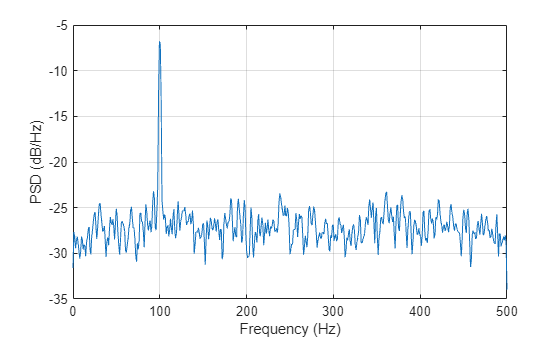
Create a signalFrequencyFeatureExtractor object to extract the Welch power spectral density (PSD) estimate of a signal consisting of a 100 Hz sinusoid in additive N(0,1) white noise. The sample rate is 1 kHz and the signal has a duration of 5 seconds.
Fs = 1000;
t = 0:1/Fs:5-1/Fs;
x = cos(2*pi*100*t) + randn(size(t));

sFE = signalFrequencyFeatureExtractor(SampleRate=Fs,WelchPSD=true);
For the PSD computation, set the OverlapLength to 25 samples and the FFTLength to 512 samples. Call the getExtractorParameters function on the object to view the PSD parameters.
setExtractorParameters(sFE,"WelchPSD",OverlapLength=25,FFTLength=1024)
params = getExtractorParameters(sFE,"WelchPSD")
params = struct with fields:
          FFTLength: 1024
    FrequencyVector: []
      OverlapLength: 25
             Window: []
Use the extract function to extract the Welch's PSD estimate of the signal. Plot the result.
psdFeature = extract(sFE,x);

f = linspace(0,Fs/2,length(psdFeature));
plot(f,pow2db(abs(psdFeature)))

xlabel("Frequency (Hz)")
ylabel("PSD (dB/Hz)")
grid
Input Arguments
Frequency Domain
Frequency feature extractor, specified as a signalFrequencyFeatureExtractor object.
Name of frequency feature, specified as one of these values:
"OccupiedBandwidth"— Occupied bandwidth"PowerBandwidth"— Power bandwidth"PeakAmplitude"— Amplitudes of spectral peaks"PeakLocation"— Locations of spectral peaks"WelchPSD"— Welch's power spectral density estimate
Data Types: char | string
Parameters for frequency feature, specified as name-value arguments or as a struct array. Use this argument to set the parameters to extract the feature
specified in freqFeatureName.
This table lists the parameters that you can set for frequency-domain signal features. You can specify multiple parameters for a feature at a time. The order of the specified parameters does not matter.
| Feature Name | Parameter Name | Parameter Value |
|---|---|---|
"OccupiedBandwidth" | Percentage — Power percentage |
|
For more information, see | ||
"PowerBandwidth" | RelativeAmplitude — Power level drop, in dB |
|
For more information, see | ||
"PeakAmplitude""PeakLocation" | PeakType — Type of peak |
|
MaxNumExtrema — Maximum number of peaks |
| |
MinProminence — Minimum prominence |
| |
MinSeparation — Minimum peak separation |
| |
FlatSelection — Element of a flat region to indicate
as peak |
| |
For more information about these
parameters, see | ||
"WelchPSD" | Window — Window to partition input signal into
segments | Integer scalar | vector |
OverlapLength — Number of overlapping
samples | Positive integer scalar | |
FFTLength — Number of DFT points | Positive integer scalar | |
FrequencyVector — Frequencies at which to estimate
PSD | Real-valued vector
| |
For more information about these
parameters, see | ||
Example: setExtractorParameters(freqFE,"PeakAmplitude",PeakType="maxima",MaxNumExtrema=2)
specifies the peak type and the maximum number of extrema parameters for the
PeakAmplitude feature using name-value arguments.
Example: PeakAmplitudeParams = struct(PeakType="maxima",MaxNumExtrema=2);
setExtractorParameters(freqFE,"PeakAmplitude",PeakAmplitudeParams)
specifies the peak type and the maximum number of extrema parameters for the
PeakAmplitude feature using a struct
array.
Data Types: string | struct
Time-Frequency Domain
Time-frequency feature extractor, specified as a signalTimeFrequencyFeatureExtractor object.
Name of time-frequency analysis method, specified as one of these values:
"spectrogram"— Short-time Fourier transform"synchrosqueezedspectrogram"— Fourier synchrosqueezed transform"emd"— Empirical mode decomposition"vmd"— Variational mode decomposition"scalogram"— Continuous wavelet transform magnitude"synchrosqueezedscalogram"— Wavelet synchrosqueezed transform"wavelet"— Maximal overlap discrete wavelet transform"waveletpacket"— Maximal overlap discrete wavelet packet transform
Data Types: char | string
Parameters for time-frequency analysis method, specified as name-value arguments or
as a struct array. Use this argument to set the
parameters to extract the feature specified in
tfAnalysisName.
This table lists the parameters that you can set for time-frequency analysis methods. You can specify multiple parameters for an analysis method at a time. The order of the specified parameters does not matter.
| Feature Name | Parameter Name | Parameter Value |
|---|---|---|
"spectrogram" | Leakage — Spectral leakage |
|
OverlapPercent — Overlap between adjoining
segments | Positive scalar less than 100 | |
TimeResolution — Time resolution | Scalar greater than 1 and less than signal duration | |
For more information about these
parameters, see | ||
"synchrosqueezedspectrogram" | Window — Window for partitioning input signal into
segments | Vector of nonnegative scalars |
For more information, see | ||
"emd" | Interpolation — Interpolation method to construct
envelope |
|
MaxEnergyRatio — Signal to residual energy
ratio |
| |
MaxNumExtrema — Maximum number of extrema in
residual signal |
| |
MaxNumIMF — Maximum number of intrinsic mode
functions |
| |
For more information about these
parameters, see | ||
"vmd" | CentralFrequencies — Initial central IMF
frequencies | Vector of |
InitializeMethod — Method to initialize central
frequencies |
| |
NumIMFs — Number of intrinsic mode functions |
| |
PenaltyFactor — Penalty factor |
| |
For more information about these
parameters, see | ||
"scalogram" |
|
|
Frequencylimits — Frequency limits | Two-element row vector of real-valued scalars | |
VoicesPerOctave — Number of voices per
octave |
| |
Wavelet — Name of analytic wavelet |
| |
WaveletParameters — Symmetry and time-bandwidth
product of the Morse wavelet |
| |
For more information about these
parameters, see | ||
"synchrosqueezedscalogram" |
|
|
VoicesPerOctave — Number of voices per
octave |
| |
Wavelet — Name of analytic wavelet |
| |
For more information about these
parameters, see | ||
"wavelet" | HighPass — Wavelet (highpass)
filterLowPass — Scaling (lowpass)
filter | Even-length real-valued vectors You must specify
|
Level — Transform level | Positive integer scalar less than or equal to
| |
Reflection — Option to use reflection boundary
handling |
| |
Wname — Wavelet name |
| |
For more information about these
parameters, see | ||
"waveletpacket" | FullTree — Option to return full wavelet packet
tree |
|
HighPass — Wavelet (highpass)
filterLowPass — Scaling (lowpass)
filter | Even-length real-valued vectors You must specify
| |
Level — Transform level | Positive integer scalar less than or equal to
| |
Wname — Wavelet name |
| |
For more information about these
parameters, see | ||
Example: setExtractorParameters(tfFE,"emd",Interpolation="spline",MaxNumExtrema=2)
specifies the interpolation method and the maximum number of extrema parameters for the
empirical mode decomposition (EMD) analysis method using name-value
arguments.
Example: emdParams = struct(Interpolation="spline",MaxNumExtrema=2);
setExtractorParameters(tfFE,"emd",emdParams) specifies the interpolation
method and the maximum number of extrema parameters for the EMD analysis method using a
struct array.
Data Types: string | struct
Name of time-frequency feature, specified as one of these values:
"SpectralEntropy"— Spectral entropy"TFRidges"— Time-frequency ridges"InstantaneousBandwidth"— Instantaneous bandwidth"InstantaneousFrequency"— Instantaneous frequency"InstantaneousEnergy"— Instantaneous energy"WaveletEntropy"— Wavelet entropy"TimeSpectrum"— Time spectrum"ScaleSpectrum"— Scale spectrum
Data Types: char | string
Parameters for time-frequency feature, specified as name-value arguments or as a
struct array. Use this argument to set the
parameters to extract the feature specified in
tfFeatureName.
This table lists the parameters that you can set for time-frequency signal features. You can specify multiple parameters for a feature at a time. The order of the specified parameters does not matter.
| Feature Name | Parameter Name | Parameter Value |
|---|---|---|
"SpectralEntropy" | Range — Frequency range, in Hz | Two-element row vector of nonnegative scalars |
For more information, see | ||
"TFRidges" | NumRidges — Number of time-frequency ridges |
|
NumFrequencyBins — Number of bins to remove when
extracting multiple ridges |
| |
Penalty — Penalty for changing frequency | Nonnegative real-valued scalar | |
For more information about these
parameters, see | ||
"InstantaneousBandwidth" | FrequencyLimits — Frequency range, in Hz | Two-element row vector of real-valued scalars |
ScaleFactor — Scaling factor for spectral
moment |
| |
For more information about these
parameters, see | ||
Note This feature supports the | FrequencyLimits — Frequency range, in Hz | Two-element row vector of real-valued scalars |
FrequencyResolution — Frequency resolution to
discretize frequency limits |
| |
MinThreshold — Minimum threshold value of Hilbert
spectrum | Real-valued scalar | |
Note This feature supports extraction parameters for these analysis
methods: | FrequencyLimits — Frequency limits to compute
Hilbert spectrum | Two-element row vector of real-valued scalars |
FrequencyResolution — Frequency resolution to
discretize frequency limits |
| |
MinThreshold — Minimum threshold value of Hilbert
spectrum | Real-valued scalar | |
For more information about these
parameters, see | ||
"WaveletEntropy" | Entropy — Entropy measure |
|
Exponent — Exponent for Renyi and Tsallis
entropy |
| |
Distribution — Normalization method for empirical
probability distribution and wavelet transform coefficients |
| |
Scaled — Option to scale wavelet entropy |
| |
For more information about these
parameters, see | ||
"TimeSpectrum" | Normalization — Normalization method for
time-averaged wavelet spectrum |
|
SpectrumType — Type of wavelet spectrum |
| |
TimeLimits — Time limits for averaging wavelet
spectrum | Two-element vector of real-valued scalars | |
For more information about these
parameters, see | ||
"ScaleSpectrum" | Normalization — Normalization method for
time-averaged wavelet spectrum |
|
SpectrumType — Type of wavelet spectrum |
| |
FrequencyLimits — Frequency limits for averaging
magnitude-squared scalogram | Two-element vector of real-valued scalars | |
For more information about these
parameters, see | ||
Example: setExtractorParameters(tfFE,"TFRidges",NumRidges=3,NumFrequencyBins=10)
specifies the number of ridges and number of frequency bins parameters for the
TFRidges feature using name-value arguments.
Example: tfRidgesParams = struct(NumRidges=3,NumFrequencyBins=10);
setExtractorParameters(tfFE,"TFRidges",tfRidgesParams) specifies the
number of ridges and number of frequency bins parameters for the
TFRidges feature using a struct
array.
Data Types: string | struct
Tips
Use the
getExtractorParametersfunction to get the list of available parameters to use when extracting the features that you enabled when creating the feature extractor object.
Extended Capabilities
The setExtractorParameters
function fully supports thread-based environments. For more information, see Run MATLAB Functions in Thread-Based Environment.
Version History
Introduced in R2021bYou can use setExtractorParameters in thread-based
environments. For more information, see Run MATLAB Functions in Thread-Based Environment.
The setExtractorParameters function introduces support for the
Boundary extraction parameter for the "scalogram"
and "synchrosqueezedscalogram" time-frequency analysis methods.
For the "synchrosqueezedscalogram" analysis method, the
Boundary parameter replaces the ExtendSignal
parameter. This table list the updates that you must make to your code.
| Analysis Method | Name-Value Argument in R2025b or Earlier | Updated Name-Value Argument in R2026a |
|---|---|---|
"synchrosqueezedscalogram" | ExtendSignal=0 | Boundary="periodic" |
ExtendSignal=1 | Boundary="reflection" | |
| N/A | Boundary="zeropad" |
See Also
Objects
Functions
MATLAB Command
You clicked a link that corresponds to this MATLAB command:
Run the command by entering it in the MATLAB Command Window. Web browsers do not support MATLAB commands.


选择网站
选择网站以获取翻译的可用内容,以及查看当地活动和优惠。根据您的位置,我们建议您选择:。
您也可以从以下列表中选择网站:
如何获得最佳网站性能
选择中国网站(中文或英文)以获得最佳网站性能。其他 MathWorks 国家/地区网站并未针对您所在位置的访问进行优化。
美洲
- América Latina (Español)
- Canada (English)
- United States (English)
欧洲
- Belgium (English)
- Denmark (English)
- Deutschland (Deutsch)
- España (Español)
- Finland (English)
- France (Français)
- Ireland (English)
- Italia (Italiano)
- Luxembourg (English)
- Netherlands (English)
- Norway (English)
- Österreich (Deutsch)
- Portugal (English)
- Sweden (English)
- Switzerland
- United Kingdom (English)