主要内容

renameElementOfPort

R2026b

Rename element of model or subsystem port

Since R2026b

Description

renameElementOfPort(sys,port,element,newname) renames the element specified by element of the bus element port specified by port in the model or subsystem specified by sys. The new name is specified by newname.

example

Examples

collapse all

Suppose you have an element named speed at a bus element port named InBus in a model named MyModel.
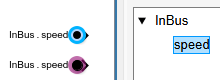
Two In Bus Element blocks labeled InBus.speed and the corresponding bus hierarchy in the Property Inspector

Rename the element from speed to VehicleSpeed.

renameElementOfPort("MyModel","InBus","speed","VehicleSpeed")

The function changes the element name at the port.
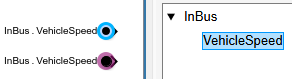
Two In Bus Element blocks labeled InBus.VehicleSpeed and the corresponding bus hierarchy in the Property Inspector

For comparison, if you change the element accessed by a bus element port block, the change affects only that block.

set_param("MyModel/In Bus Element",Element="TurtleSpeed")
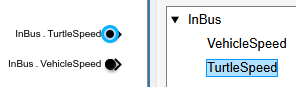
One In Bus Element block labeled InBus.VehicleSpeed and another labeled InBus.TurtleSpeed and the corresponding bus hierarchy in the Property Inspector. InBus now contains two elements instead of one.

Suppose you have an element named sensorA in a bus named sensors at a bus element port named Input in a model named MassSpringDamper.
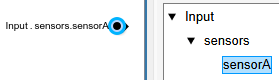
In Bus Element block labeled Input.sensors.sensorA and the corresponding bus hierarchy in the Property Inspector

Rename the element from sensorA to displacement.

renameElementOfPort("MassSpringDamper","Input","sensors.sensorA","displacement")

The function changes the element name at the port.
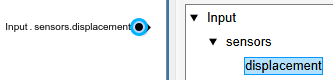
In Bus Element block labeled Input.sensors.displacement and the corresponding bus hierarchy in the Property Inspector

Input Arguments

collapse all

Parent model or subsystem, specified as a string or character vector.

To specify a model, put the model name in quotes. To specify a subsystem, put the subsystem block path in quotes.

Data Types: char | string

Name of bus element port, specified as a string or character vector.

For more information about bus element ports, see Simplify Subsystem and Model Interfaces with Bus Element Ports.

Data Types: char | string

Element path, specified as a string or character vector.

For elements of nested buses, use dots to indicate each level of bus hierarchy. For example, to specify an element named sine in a nested bus named sinusoidal, specify sinusoidal.sine.

Data Types: char | string

New element name, specified as a string or character vector.

The new element name must not include dots, which indicate different levels of bus hierarchy.

Data Types: char | string

Version History

Introduced in R2026b