主要内容

padv.Preferences

(To be removed) Specify settings for build system

    Description

    There are several settings that you can use to customize the behavior of the build system. These behaviors impact how the Process Advisor app and runprocess function run tasks. For example, you can use settings to use incremental builds, enable model caching, and customize other behaviors. The build system saves these settings in padv.Preferences. You can use the preferences, padv.Preferences, to specify settings for the Process Advisor app and settings for how the runprocess function runs builds.

    Note

    The padv.Preferences class will be removed in a future release. Use the new classes padv.ProjectSettings and padv.UserSettings instead. The new classes allow you to programmatically control the settings for incremental builds, build system logging, and other behaviors, without needing to create a project startup script to persist run-time settings.

    For information, see the Version History for padv.Preferences.

    Creation

    Syntax

    Description

    <syntaxdescription>

    P = padv.Preferences() gets the handle to the global preferences object, P. There is only one set of preference properties.

    The padv.Preferences class is a handle class.

    example </syntaxdescription>

    Properties

    expand all

    Project Settings

    These settings are stored in the project and are shared with everyone using the project.

    Automatically detect changes and mark task results as outdated, specified as a numeric or logical 1 (true) or 0 (false).

    When IncrementalBuild is true and you make a change to an artifact in your project, the build system marks impacted task results as outdated.

    This property is equivalent to the Incremental build setting in the Process Advisor Settings dialog box.

    Example: true

    Data Types: logical

    Allow the build system to cache models during a build, specified as a numeric or logical 1 (true) or 0 (false).

    If you specify the property EnableModelCaching as true, you allow the build system to cache models instead of reloading the same models multiple times within a build. For more information, see Cache Models and Other Artifacts Used During Build.

    This property is equivalent to the Enable model caching setting in the Process Advisor Settings dialog box.

    Example: true

    Data Types: logical

    Maximum number of models in the model cache, specified as a positive value.

    Example: 2

    Maximum number of test results in the cache, specified as a positive value.

    Example: 30

    Suppress command-line output from Process Advisor during interactive MATLAB® sessions, specified as a numeric or logical 1 (true) or 0 (false).

    You can use this setting to suppress command-line outputs from the build system, such as the build log and task execution messages from Process Advisor and the runprocess function.

    Note that the build system automatically ignores this setting when you run MATLAB in batch mode, which is typically the case for CI systems.

    This property is equivalent to the Suppress outputs to command window setting in the Process Advisor Settings dialog box.

    Example: true

    Data Types: logical

    Run-Time Settings

    Setting that controls whether the build system generates an error message when multiple tasks attempt to write to the same output file, specified as a numeric or logical 1 (true) or 0 (false).

    By default, the build system generates an error if multiple tasks attempt to write to the same output file.

    This property is equivalent to the Detect duplicate outputs setting in the Process Advisor Settings dialog box.

    Example: false

    Data Types: logical

    Setting for automatically cleaning task results for tasks and artifacts that do not match current process model or project, specified as a numeric or logical 1 (true) or 0 (false).

    By default, when you use the build system, the build system cleans task results that are not relevant for the current process model or project. For example, if you had task results from a specific task and then you remove that task from the process model, the build system automatically deletes the task results associated with the task. If you had task results associated with a specific project artifact and then you removed that artifact from the project, the build system automatically deletes the task results associated with the artifact. Note that the build system does not delete generated artifacts like generated code.

    If you specify GarbageCollectTaskOutputs as false, the build system does not automatically clean task results associated with tasks and artifacts that are not in the current process model or project.

    This property is equivalent to the Garbage collect task outputs setting in the Process Advisor Settings dialog box.

    Example: false

    Data Types: logical

    List of filtered digital thread messages, specified as a string.

    By default, Process Advisor and the build system do not display certain messages from the digital thread. You can add or remove messages in the list, or reset the list of filtered messages, by using the padv.Preferences object functions. For information, see the Object Functions for padv.Preferences.

    Data Types: string

    Setting to show more information in error messages, specified as a numeric or logical 0 (false) or 1 (true).

    By default, error messages from the build system are not verbose.

    If you specify ShowDetailedErrorMessages as true, the build system shows full stack traces in error messages. You might want to see full stack traces when you are debugging a process model.

    This property is equivalent to the Show detailed error messages setting in the Process Advisor Settings dialog box.

    Example: true

    Data Types: logical

    Setting for tracking changes to process model, specified as a numeric or logical 1 (true) or 0 (false).

    By default, if you make a change to the process model file, the build system marks each task status and task result as outdated because the tasks in the updated process model might not match the tasks that generated the task results from the previous version of the process model. For example, if you ran the built-in task padv.builtin.task.RunModelStandards with the default Model Advisor configuration, updated the process model to specify a different Model Advisor configuration file for the task, and then ran the task again, the task results are now outdated because they are the task results from the default configuration.

    If you specify TrackProcessModel as false and make a change to the process model, the build system will not mark the task statuses and task results as outdated.

    This property is equivalent to the Add process model as dependency setting in the Process Advisor Settings dialog box.

    Example: false

    Data Types: logical

    Object Functions

    • addFilteredDigitalThreadMessages(obj, IssueId) adds the message, specified by the issue ID IssueId, to the list of filtered messages in the property FilteredDigitalThreadMessages.

      To get a list of issue messages and issue IDs, use the function getArtifactIssues:

      metric_engine = metric.Engine();
      issues = getArtifactIssues(metric_engine)
      issuesMessages = issues.IssueMessage
      issueIDs = issues.IssueId

      Suppose that you want to filter out the issue message associated with the issue ID "alm:artifact_service:CannotResolveElement". You can use the function addFilteredDigitalThreadMessages to add the issue message to the list of filtered messages:

      p = padv.Preferences;
      addFilteredDigitalThreadMessages(p,...
      "alm:artifact_service:CannotResolveElement")

    • removeFilteredDigitalThreadMessages(obj, IssueId) removes the message, specified by messageID, to the list of filtered messages in the property FilteredDigitalThreadMessages.

      For example:

      p = padv.Preferences;
      removeFilteredDigitalThreadMessages(p,...
      "alm:simulink_handlers:ModelCallbacksDeactivated")

    • resetFilteredDigitalThreadMessages(obj) resets the list of filtered messages in the property FilteredDigitalThreadMessages.

      For example:

      p = padv.Preferences;
      resetFilteredDigitalThreadMessages(p)

    Examples

    collapse all

    Use padv.Preferences to specify preferences for the Process Advisor app and build system.

    Create a padv.Preferences object.

    PREF = padv.Preferences

    Specify IncrementalBuild as 0.

    PREF.IncrementalBuild = 0;
    Now, when you run tasks, incremental builds are disabled and the build system forces tasks to run, even if the tasks have up to date results.

    Alternative Functionality

    App

    In Process Advisor, in the toolstrip, click Settings to access and change the settings for the build system.
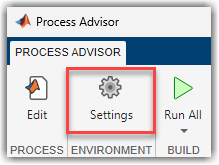
    Settings button in Process Advisor toolstrip

    Version History

    expand all