Export Partitions and Data Sets from Classification Learner or Regression Learner
R2026bThis example shows how to export the partitions used to compute validation and test metrics, as well as the training and test data sets, from the current Classification Learner or Regression Learner session to a structure variable in the MATLAB® workspace. You can use the exported structure to reproduce the training results outside Classification Learner and Regression Learner. For more information about validation partitions and test data sets, see Select Validation Scheme in Classification Learner or Regression Learner and Test Trained Models in Classification Learner or Regression Learner.
Export Partitions and Data Sets from App Session
You can export partitions and data sets from your current session in either the Classification Learner App or the Regression Learner App.
In the MATLAB Command Window, load the
carbigdata set, which contains measurements of cars made in the 1970s and early 1980s.load carbigCreate a table containing the predictor variables
Acceleration,Displacement,Horsepower, andMPG, as well as the response variableCylinders.cars = table(Acceleration,Displacement,Horsepower,MPG,Cylinders);
On the Apps tab, in the Machine Learning and Deep Learning group, click Classification Learner or Regression Learner.
On the Learn tab, in the File section, select New Session > From Workspace Data.
In the New Session from Workspace Data dialog box, select the
carstable from the Data Set Variable list. The app selects the response and predictor variables. The default response variable isCylinders. The default validation scheme is 5-fold cross-validation, to protect against overfitting.In the Test section of the dialog box, select Set aside a percentage of the data as test data. The default option sets aside 10 percent of the imported data.
To accept the options and continue, click Start Session.
In the Export section of the Learn tab, select Export > Export Partitions and Data Sets. The Export Partitions and Data Sets dialog box opens.
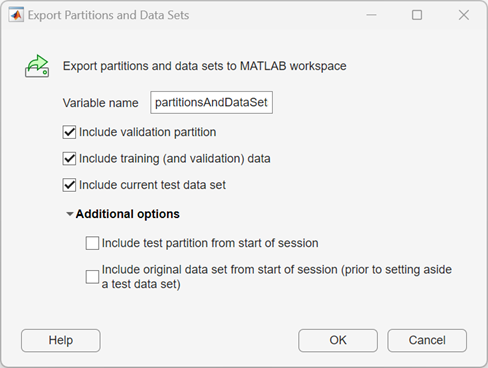
In the Variable name box, edit the name of the exported variable, if necessary. By default, the exported structure includes the validation partition, training (and validation) data, and test data set from the current session.
Because you chose to set aside a portion of the original data set as a test data set at the start of the session, you can additionally include the test partition and the original data set in the exported structure. Click Additional options and select both check boxes.
Click OK to export the structure to the workspace.
The exported structure contains the following fields:
ValidationPartition—cvpartitionobject that defines the partitions of the current session's training data set that are used to compute validation metricsTrainingDataSet— Structure that contains the current session's training data set, which is used to train the final version of each modelTestDataSet— Structure that contains the current session's test data setTestPartition—cvpartitionobject that defines the partition of the original data set (from the start of the session) which you set aside to create the test data setOriginalDataSet— Structure that contains the original data set from the start of the session, prior to setting aside the test data setAbout— String that contains information about the app and MATLAB version used to export the structure
Extract Data Sets from Exported Structure Variable
You can use the exported structure variable
partitionsAndDataSets to extract the training, validation,
and test data sets from the app session at the MATLAB command line.
Extract Training Data Set
Display the training data set structure.
partitionsAndDataSets.TrainingDataSet
ans = struct with fields:
              Data: [366×5 table]
    PredictorNames: {'Acceleration'  'Displacement'  'Horsepower'  'MPG'}
      ResponseName: {'Cylinders'}
Create a table variable named trainingSet that contains the
training
data.
trainingSet = partitionsAndDataSets.TrainingDataSet.Data;
Extract Validation Fold Data Sets
Display the validation partition object properties and values.
partitionsAndDataSets.ValidationPartition
ans =
K-fold cross validation partition
    NumObservations: 366
        NumTestSets: 5
          TrainSize: [293 292 293 293 293]
           TestSize: [73 74 73 73 73]
           IsCustom: 0
          IsGrouped: 0
       IsStratified: 0


  Properties, Methods
NumObservations
value is equal to the number of training data set observations. The
NumTestSets value indicates that the partition object has
five cross-validation folds. The TestSize value contains the
number of observations from the training data set that are in each fold. For
more information about cross-validation folds, see Select Validation Scheme in Classification Learner or Regression Learner.Use the test function to create an array
named index1 containing the row indices of the training data
set that are in the first validation
fold.
index1 = test(partitionsAndDataSets.ValidationPartition,1);
validationFold1 that contains the data
in the first validation
fold.validationFold1 = trainingSet(index1,:);
Extract Test Data Set
Display the test data set structure.
partitionsAndDataSets.TestDataSet
ans = struct with fields:
              Data: [40×5 table]
    PredictorNames: {'Acceleration'  'Displacement'  'Horsepower'  'MPG'}
      ResponseName: {'Cylinders'}
Create a table variable named testSet that contains the
test data
set.
testSet = partitionsAndDataSets.TestDataSet.Data;
Extract Original Data Set and Test Data from Start of Session
The TestDataSet field of
partitionsAndDataSets contains the current test data set
when you export the structure variable. If you set aside a test data set when
you start the session, and then load a new test data set during the session, you
can extract the original data set and test data set from the start of the
session.
Create a table originalData that contains the original data
set from the start of the session (prior to setting aside the test data
set).
originalData = partitionsAndDataSets.OriginalDataSet.Data;
indexTest containing the row indices of the
original data set that were set aside as test data at the start of the
session.indexTest = test(partitionsAndDataSets.TestPartition);
originalTestSet containing the data set aside
for testing at the start of the
session.originalTestSet = originalData(indexTest,:);
testSet and
originalTestSet are identical, because you did not load a
new test data set during the session.
