systemcomposer.io.ModelBuilder
R2026a用于 System Composer 架构模型的模型生成器
描述
使用 systemcomposer.io.ModelBuilder 对象建立 System Composer™ 模型。通过组件及其在架构层次中的位置、端口及其与组件的映射、组件间通过端口的连接、架构模型中的接口及其与端口的映射,建立 System Composer 模型。
创建对象
builder = systemcomposer.io.ModelBuilder(profile)
属性
示例
使用 systemcomposer.io.ModelBuilder 实用工具类将架构规范导入 System Composer™。这些架构规范可以在外部源(例如 Excel® 文件)中定义。
在 System Composer 中,架构由以下四组信息完整定义:
组件及其在架构层次结构中的位置
端口以及端口与组件的映射关系
组件之间通过端口的连接关系
架构模型中的接口以及接口与端口的映射关系
此示例使用 systemcomposer.io.ModelBuilder 类传递上述所有架构信息,包括来自外部源的接口数据定义,并导入一个 System Composer 模型。
在此示例中,我们在一个 Excel 电子表格中定义了一个小型无人机系统的架构信息,用它来创建 System Composer 架构模型。
外部源文件
Architecture.xlsx- 此 Excel 文件包含架构模型的层次结构信息。此示例将外部源数据映射到 System Composer 模型元素。这些信息以列名称的形式映射到 System Composer 模型元素。
     # Element    : Name of the element. Either can be component or port name.
     # Parent     : Name of the parent element.
     # Class      : Can be either component or port(Input/Output direction of the port).
     # Domain     : Mapped as component property. Property "Manufacturer" defined in the
                    profile UAVComponent under Stereotype PartDescriptor maps to Domain values
                    in excel source file.
     # Kind       : Mapped as component property. Property "ModelName" defined in the
                    profile UAVComponent under Stereotype PartDescriptor maps to Kind values
                    in excel source file.
     # InterfaceName : If class is of port type. InterfaceName maps to name of the interface
                       linked to port.
     # ConnectedTo : In case of port type, it specifies the connection to
                     other port defined in format "ComponentName::PortName".
DataDefinitions.xlsx- 此 Excel 文件包含模型的接口数据定义。此示例假设 Excel 源文件中的数据定义与 System Composer 中的接口层次结构之间的映射如下。
     # Name        : Name of the interface or element.
     # Parent      : Name of the parent interface Name(Applicable only for elements).
     # Datatype    : Datatype of element. Can be another interface in format
                     Bus: InterfaceName
     # Dimensions  : Dimensions of the element.
     # Units       : Unit property of the element.
     # Minimum     : Minimum value of the element.
     # Maximum     : Maximum value of the element.
步骤 1:实例化 ModelBuilder 类
您可以使用配置文件名称来实例化 ModelBuilder 类。
[stat,fa] = fileattrib(pwd);
if ~fa.UserWrite
    disp('This script must be run in a writable directory');
    return;
end
指定要构建的模型的名称。
modelName = 'scExampleModelBuilder';指定配置文件的名称。
profile = 'UAVComponent';指定要读取架构信息的源文件的名称。
architectureFileName = 'Architecture.xlsx';实例化 ModelBuilder。
builder = systemcomposer.io.ModelBuilder(profile);
步骤 2:构建接口数据定义
读取外部源文件 DataDefinitions.xlsx 中的信息,以构建接口数据模型。
从 Excel 源文件创建 MATLAB® 表。
opts = detectImportOptions('DataDefinitions.xlsx');
opts.DataRange = 'A2';
强制 readtable 从第二行开始读取信息。
definitionContents = readtable('DataDefinitions.xlsx',opts);systemcomposer.io.IdService 类为给定键生成唯一的 ID。
idService = systemcomposer.io.IdService();

for rowItr =1:numel(definitionContents(:,1))
    parentInterface = definitionContents.Parent{rowItr};
    if isempty(parentInterface)
对于接口,将接口名称添加到模型构建器中。
interfaceName = definitionContents.Name{rowItr};获取唯一接口 ID。
getID(container,key) 会为指定容器内的输入键生成或返回(如果键已存在)相同的值。
interfaceID = idService.getID('interfaces',interfaceName);使用 builder.addInterface 将接口添加到数据字典中。
        builder.addInterface(interfaceName,interfaceID);
    else
对于元素,读取元素属性,并将元素添加到父接口中。
        elementName  = definitionContents.Name{rowItr};
        interfaceID = idService.getID('interfaces',parentInterface);
ElementID 在同一接口内是唯一的。为统一格式,在 ID 前加上 E。为输入元素生成的 ID 在以父接口名称作为容器的范围内是唯一的。
elemID = idService.getID(parentInterface,elementName,'E');设置元素的数据类型、维度、单位、最小值和最大值属性。
        datatype = definitionContents.DataType{rowItr};
        dimensions = string(definitionContents.Dimensions(rowItr));
        units = definitionContents.Units(rowItr);
确保构建器实用工具函数的输入始终为字符串。
        if ~ischar(units)
            units = '';
        end
        minimum = definitionContents.Minimum{rowItr};
        maximum = definitionContents.Maximum{rowItr};
使用 builder.addElementInInterface 在接口中添加一个带有属性的元素。
        builder.addElementInInterface(elementName,elemID,interfaceID,datatype,dimensions,...
            units,'real',maximum,minimum);
    end
end
步骤 3:构建架构规范
架构规范由 Excel 源文件中的 MATLAB 表创建。
excelContents = readtable(architectureFileName);
遍历表中的每一行。
for rowItr =1:numel(excelContents(:,1))读取 Excel 文件中的每一行和每一列。
    class = excelContents.Class(rowItr);
    Parent = excelContents.Parent(rowItr);
    Name = excelContents.Element{rowItr};
填充表内容。
    if strcmp(class,'component')
        ID = idService.getID('comp',Name);
Root ID 默认设置为零。
        if strcmp(Parent,'scExampleSmallUAV')
            parentID = "0";
        else
            parentID = idService.getID('comp',Parent);
        end
使用 builder.addComponent 添加组件。
builder.addComponent(Name,ID,parentID);
读取属性值。
        kind = excelContents.Kind{rowItr};
        domain = excelContents.Domain{rowItr};
使用 builder.setComponentProperty 设置构造型和属性值。
        builder.setComponentProperty(ID,'StereotypeName','UAVComponent.PartDescriptor',...
            'ModelName',kind,'Manufacturer',domain);
    else
在此示例中,通过串联端口名称和父组件名称作为键,生成端口的唯一 ID。
portID = idService.getID('port',strcat(Name,Parent));对于根架构上的端口,假定 compID 为 0。
        if strcmp(Parent,'scExampleSmallUAV')
            compID = "0";
        else
            compID = idService.getID('comp',Parent);
        end
使用 builder.addPort 添加端口。
builder.addPort(Name,class,portID,compID );
InterfaceName 指定与端口关联的接口的名称。
interfaceName = excelContents.InterfaceName{rowItr};获取接口 ID。
getID 将返回在步骤 2 中添加接口时已生成的相同 ID。
interfaceID = idService.getID('interfaces',interfaceName);使用 builder.addInterfaceToPort 将接口映射到端口。
builder.addInterfaceToPort(interfaceID,portID);
读取 ConnectedTo 信息,建立组件之间的连接。
connectedTo = excelContents.ConnectedTo{rowItr};ConnectedTo 的格式为:
(DestinationComponentName::DestinationPortName)
在此示例中,将当前端口视为连接的源端口。
        if ~isempty(connectedTo)
            connID = idService.getID('connection',connectedTo);
            splits = split(connectedTo,'::');
获取连接端口的端口 ID。
在此示例中,端口 ID 由端口名称和父组件名称串联生成。如果端口 ID 已生成,则 getID 函数会为输入键返回相同的 ID。
connectedPortID = idService.getID('port',strcat(splits(2),splits(1))); 填充连接表。
            sourcePortID = portID;
            destPortID = connectedPortID;
使用 builder.addConnection 添加连接。
            builder.addConnection(connectedTo,connID,sourcePortID,destPortID);
        end
    end
end
步骤 3:使用 builder.build 函数从填充好的表导入模型
[model,importReport] = builder.build(modelName);
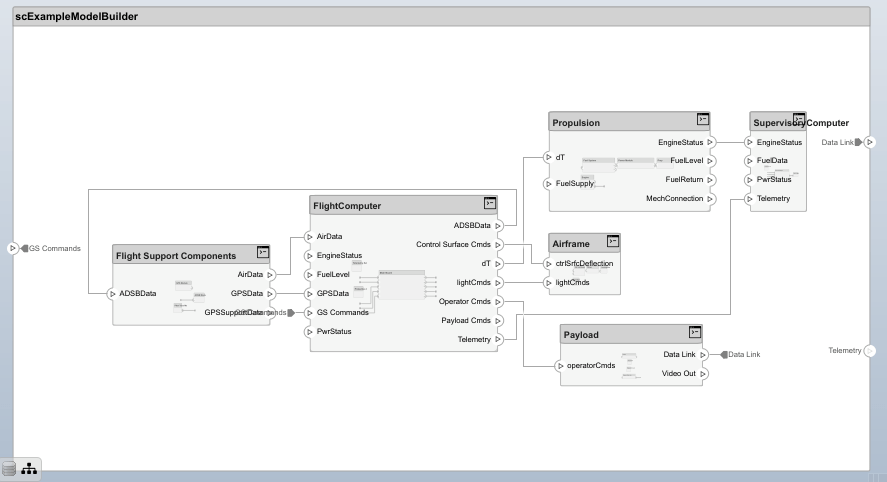
注意:接口兼容性检查会将不匹配接口的连接器突出显示为黄色。
清理生成的临时文件。
cleanUp
Copyright 2020 The MathWorks, Inc.
详细信息
算法
| 组件 | 描述 |
|---|---|
addComponent(compName,ID,ParentID) | 添加具有指定名称和 ID 的组件,作为 ID 为 ParentID 的组件的子组件。如果是根,则 ParentID 为 0。 |
setComponentProperty(ID,varargin) | 为具有指定 ID 的组件设置构造型。可将构造型中定义的属性名和值的键值对作为输入。在此示例中 builder.setComponentProperty(ID,'StereotypeName',... 'UAVComponent.PartDescriptor','ModelName',kind,'Manufacturer',domain) ModelName 和 Manufacturer 是构造型 PartDescriptor 下的属性。 |
| 端口 | 描述 |
|---|---|
addPort(portName,direction,ID,compID) | 向 ID 为 compID 的组件添加具有指定名称、ID 和方向(输入或输出)的端口。 |
setPropertyOnPort(ID,varargin) | 为具有指定 ID 的端口设置构造型。属性名称和构造型中定义的值的键值对可作为输入传递。 |
| 连接 | 描述 |
|---|---|
addConnection(connName,ID,sourcePortID,destPortID) | 在端口表中定义的源端口 sourcePortID(方向:输出)和目标端口 destPortID(方向:输入)之间添加具有指定名称和 ID 的连接 |
setPropertyOnConnection(ID,varargin) | 为具有指定 ID 的连接设置构造型。属性名称和构造型中定义的值的键值对可作为输入传递。 |
| 接口 | 描述 |
|---|---|
addInterface(interfaceName,ID) | 将具有指定名称和 ID 的接口添加到数据字典中。 |
addElementInInterface(elementName,ID,interfaceID,datatype,dimensions,units,complexity,Maximum,Minimum) | 在 ID 为 interfaceID 的接口下添加具有指定名称和 ID 的元素。数据类型、维度、单位、复杂度以及最大值和最小值是元素的属性。这些属性指定为字符串。 |
addAnonymousInterface(ID,datatype,dimensions,units,complexity, Maximum,Minimum) | 添加具有指定 ID 和元素属性(如数据类型、维度、单位、复杂度、最大值和最小值)的匿名接口。专属接口的数据类型不能是另一个接口的名称。专属接口不像其他接口那样拥有元素。 |
| 接口和端口 | 描述 |
|---|---|
addInterfaceToPort(interfaceID,portID) | 将指定 ID (InterfaceID) 的接口连接到指定 ID (PortID) 的端口。 |
| 模型 | 描述 |
|---|---|
build(modelName) | 以输入的模型名称建立模型。 |
| 记录和报告 | 描述 |
|---|---|
getImportErrorLog | 获取导入模型时生成的 ErrorLogs。在 build 函数之后调用。 |
getImportReport | 获取导入报告。在 build 函数之后调用。 |
版本历史记录
在 R2019b 中推出

