导入和导出架构模型
R2026a要构建 System Composer™ 模型,您可以使用 MATLAB® 表对象以预定义格式导入有关组件、端口和连接的信息。您可以扩展这些表,并添加应用构造型、属性值、链接模型引用、变体组件、接口、需求链接和参数等信息。
同样,您可以导出有关组件、组件层次结构、组件端口、组件之间的连接、链接模型引用、变体、元素构造型、接口、需求链接和参数的信息。
提示
要了解更多关于 System Composer 概念在系统工程设计中的应用,请参阅System Composer 概念。
定义基本架构
System Composer 模型所需的最低结构包括以下信息集:
组件表
端口表
连接表
要导入其他元素,您需要向表中添加列,并为这些元素添加特定值。
组件表
组件的相关信息作为值传递到 MATLAB 表中,与预定义的列名相对应,其中:
Name是组件名称。ID是用户定义的 ID,用于映射子组件并将端口添加到组件。ParentID是父组件 ID。
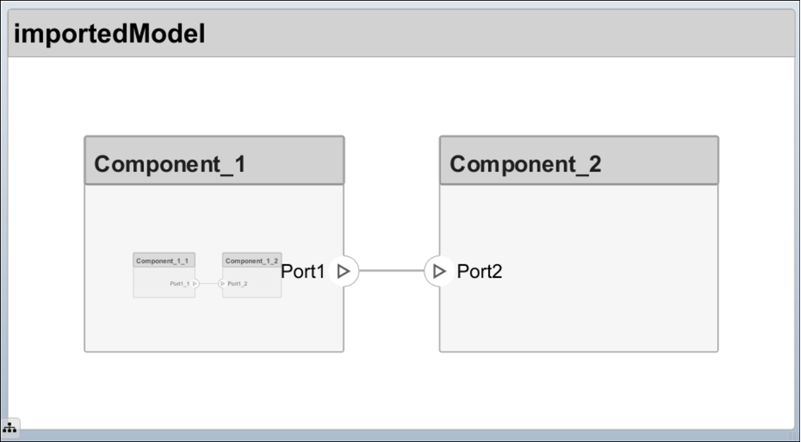
例如,Component_1_1 和 Component_1_2 是 Component_1 的子节点。
| 名称 | ID | ParentID |
|---|---|---|
root | 0 | |
Component_1 | 1 | 0 |
Component_1_1 | 2 | 1 |
Component_1_2 | 3 | 1 |
Component_2 | 4 | 0 |
Name = {'root';'Component_1';'Component_1_1';'Component_1_2';'Component_2'};
ID = {'0';'1';'2';'3';'4'};
ParentID = {'';'0';'1';'1';'0'};
components = table(Name,ID,ParentID)
components =
5×3 table
Name ID ParentID
_________________ _____ __________
{'root' } {'0'} {0×0 char}
{'Component_1' } {'1'} {'0' }
{'Component_1_1'} {'2'} {'1' }
{'Component_1_2'} {'3'} {'1' }
{'Component_2' } {'4'} {'0' }端口表
端口信息作为值传递到 MATLAB 表中,与预定义的列名相对应,其中:
Name是端口名称。Direction可以是Input、Output或Physical中的一个。ID是用户定义的端口 ID,用于将端口映射到端口连接。CompID是添加端口的组件的 ID。它是组件表中传递的组件。
| 名称 | Direction | ID | CompID |
|---|---|---|---|
Port1 | Output | 1 | 1 |
Port2 | Input | 2 | 4 |
Port1_1 | Output | 3 | 2 |
Port1_2 | Input | 4 | 3 |
Name = {'Port1';'Port2';'Port1_1';'Port1_2'};
Direction = {'Output';'Input';'Output';'Input'};
ID = {'1';'2';'3';'4'};
CompID = {'1';'4';'2';'3'};
ports = table(Name,Direction,ID,CompID)
ports =
4×4 table
Name Direction ID CompID
___________ __________ _____ ______
{'Port1' } {'Output'} {'1'} {'1'}
{'Port2' } {'Input' } {'2'} {'4'}
{'Port1_1'} {'Output'} {'3'} {'2'}
{'Port1_2'} {'Input' } {'4'} {'3'} 连接表
连接信息作为值传递到 MATLAB 表中,与预定义的列名相对应,其中:
Name是连接名称。ID是用于在导入过程中检查连接是否正确创建的连接 ID。Kind是由Data默认指定的连接类型,或由Physical指定的连接类型。Kind列是可选的,如果未定义,则默认为Data。SourcePortID是源端口的 ID。DestPortID是目标端口的 ID。PortIDs是支持非方向性连接的物理端口的端口 ID 的逗号分隔列表。
| 名称 | Kind | ID | SourcePortID | DestPortID | PortID |
|---|---|---|---|---|---|
Conn1 | Data | 1 | 1 | 2 | |
Conn2 | Data | 2 | 3 | 4 |
Name = {'Conn1';'Conn2'};
Kind = {'Data';'Data'};
ID = {'1'; '2'};
SourcePortID = {'1';'3'};
DestPortID = {'2';'4'};
PortIDs = {'';''};
connections = table(Name,Kind,ID,SourcePortID,DestPortID,PortIDs)
connections =
2×6 table
Name Kind ID SourcePortID DestPortID PortIDs
_________ ________ _____ ____________ __________ __________
{'Conn1'} {'Data'} {'1'} {'1'} {'2'} {0×0 char}
{'Conn2'} {'Data'} {'2'} {'3'} {'4'} {0×0 char} 导入基本架构
使用函数 importModel 将基本架构从上面创建的表导入到 MATLAB 命令行窗口中的 System Composer。
systemcomposer.importModel("importedModel",components,ports,connections);基本架构模型随即打开。
提示
表中不包括有关模型视觉布局的信息。您可以手动排列组件,或使用 格式 > 布局 > 自动排列。
扩展基本架构导入
您可以将其他模型元素导入基本结构表中。
导入数据接口并将端口映射到接口
要定义数据接口,请在 ports 表中添加接口名称,以将端口与相应的 portInterfaces 表关联起来。创建一个与 components、ports 和 connections 类似的表。接口名称、相关元素名称以及数据类型、维度、单位、复杂程度、最小值和最大值等信息以如下表格式传递给 importModel 函数。
| Name | ID | ParentID | DataType | Dimensions | Units | Complexity | Minimum | Maximum |
|---|---|---|---|---|---|---|---|---|
interface1 | 1 | DataInterface | ||||||
elem1 | 2 | 1 | interface2 | |||||
interface2 | 3 | DataInterface | ||||||
elem2 | 4 | 1 | double | 1 | "" | real | "[]" | "[]" |
elem3 | 5 | 1 | valueType | 3 | cm | real | 0 | 100 |
valueType | 6 | int32 | 3 | cm | real | 0 | 100 | |
interface3 | 7 | PhysicalInterface | ||||||
elec | 8 | 7 | Connection: foundation.electrical.electrical | |||||
mech | 9 | 7 | Connection: foundation.mechanical.mechanical.rotational |
数据接口 interface1 和 interface2 使用数据元素 elem1 和 elem2 在 interface1 下定义。数据元素 elem2 由 interface2 类型化,继承其结构。有关详细信息,请参阅嵌套接口以重用数据。
注意
专属接口不能嵌套。您不能将专属接口定义为数据元素的数据类型。有关详细信息,请参阅定义端口本地的专属接口。
该数据接口 interface1 包括一个数据元素 elem3,该元素由值类型 valueType 类型化,并继承其属性。有关详细信息,请参阅创建值类型作为接口。
该物理接口 interface3 包括物理元素 elec 和 mech,它们在各自的物理域下进行类型化。有关详细信息,请参阅指定端口上的物理接口。
要将添加的数据接口映射到端口,请在 ports 表中添加列 InterfaceID,并指定要链接的数据接口。例如,interface1 被映射为 Port1,如下所示。
| 名称 | Direction | ID | CompID | InterfaceID |
|---|---|---|---|---|
Port1 | Output | 1 | 1 | interface1 |
Port2 | Input | 2 | 4 | interface2 |
Port1_1 | Output | 3 | 2 | "" |
Port1_2 | Input | 4 | 3 | interface1 |
导入变体组件、Stateflow 行为或引用组件
您可以像添加 components 表中的其他组件一样添加变体组件,只是需要指定活动变体的名称。将选择项作为子组件添加到变体组件。在 VariantControl 列中以字符串值指定变体选择项。您可以在 VariantCondition 列中输入表达式。有关详细信息,请参阅创建变体。
使用组件类型 Variant 添加变体组件 VarComp,并选择 Choice1 和 Choice2 作为选择项。将 Choice2 设置为活动选择项。
要添加引用的 Simulink® 模型,请将组件类型更改为 Behavior,并指定引用模型名称 simulink_model。
要在组件上添加 Stateflow® 图行为,请将组件类型更改为 StateflowBehavior。如果 System Composer 未检测到 Stateflow 的许可证或安装,则会导入 Composition 组件。
| 名称 | ID | ParentID | ReferenceModelName | ComponentType | ActiveChoice | VariantControl | VariantCondition |
|---|---|---|---|---|---|---|---|
root | 0 | ||||||
Component1 | C1 | 0 | simulink_model | Behavior | |||
VarComp | V2 | 0 | Variant | Choice2 | |||
Choice1 | C6 | V2 | petrol | ||||
Choice2 | C7 | V2 | diesel | ||||
Component3 | C3 | 0 | StateflowBehavior | ||||
Component1_1 | C4 | C1 | |||||
Component1_2 | C5 | C1 |
将修改后的 components 表与 ports 和 connections 表一起传递给 importModel 函数。
在导入的模型上应用构造型并设置属性值
要将构造型应用于组件、端口和连接,请在 components 表中添加一个 StereotypeNames 列。要设置构造型的属性,请添加一个列,其名称使用配置文件名称、构造型名称和属性名称定义。例如,将 UAVComponent 配置文件、OnBoardElement 构造型和 Mass 属性命名为 UAVComponent_OnboardElement_Mass。
您以 value{units} 的格式设置属性值。单位和值从加载的配置文件中定义的默认值中填充。有关详细信息,请参阅在配置文件中定义和设置构造型。
| 名称 | ID | ParentID | StereotypeNames | UAVComponent_OnboardElement_Mass | UAVComponent_OnboardElement_Power |
|---|---|---|---|---|---|
root | 0 | ||||
Component_1 | 1 | 0 | UAVComponent.OnboardElement | 0.93{kg} | 0.65{mW} |
Component_1_1 | 2 | 1 | |||
Component_1_2 | 3 | 1 | UAVComponent.OnboardElement | 0.93{kg} | "" |
Component_2 | 4 | 0 |
在导入的模型上分配需求链接
要将需求链接分配给模型,请添加一个包含以下必填列的 requirementLinks 表:
Label是需求名称。ID是需求的 ID。SourceID是需求所附着的架构元素。DestinationType是需求保存的类型。DestinationID是需求所在的位置。Type是需求类型。
有关详细信息,请参阅管理需求。
| Label | ID | SourceID | DestinationType | DestinationID | 类型 |
|---|---|---|---|---|---|
rset#1 | 1 | components:1 | linktype_rmi_slreq | C:\Temp\rset.slreqx#1 | Implement |
rset#2 | 2 | components:0 | linktype_rmi_slreq | C:\Temp\rset.slreqx#2 | Implement |
rset#3 | 3 | ports:1 | linktype_rmi_slreq | C:\Temp\rset.slreqx#3 | Implement |
rset#4 | 4 | ports:3 | linktype_rmi_slreq | C:\Temp\rset.slreqx#4 | Implement |
需要 Requirements Toolbox™ 许可证才能将需求链接导入到 System Composer 架构模型中。
指定架构端口上的元素
在 connections 表中,您可以指定不同类型的信号接口元素作为源元素或目标元素。连接可以从根架构端口到组件端口、从组件端口到根架构端口,或者在同一架构的两个根架构端口之间形成。
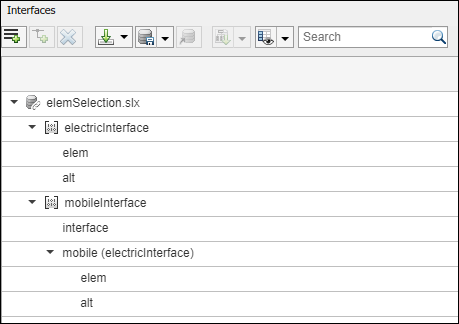
嵌套接口元素 mobile.elem 是架构端口与组件端口之间连接的源元素。嵌套元素 mobile.alt 是架构端口与组件端口之间的连接的目标元素。接口元素 mobile 和嵌套元素 mobile.alt 是同一架构中两个架构端口之间的连接源元素。
有关详细信息,请参阅使用端口元素访问接口元素。
| Name | ID | SourcePortID | DestPortID | SourceElement | DestinationElement |
|---|---|---|---|---|---|
RootToComp1 | 1 | 5 | 4 | mobile.elem | |
RootToComp2 | 2 | 5 | 1 | mobile.alt | |
Comp1ToRoot | 3 | 2 | 6 | interface | |
Comp2ToRoot | 4 | 3 | 6 | mobile.alt | |
RootToRoot | 5 | 5 | 6 | mobile,mobile.alt |
带参数值类型导入参数
在 parameters 表中,您可以指定参数及其值。参数可以存在于组件的架构中,然后被提升到模型的根架构。
对于 Reference Component 模块上的参数,parameters 表显示了最小的列集,因为完整的参数值类型在引用的模型上已定义。最小的列集应包括:
Name,参数的名称。ID,参数的标识符。Parent,父类型(Component或Architecture)后跟冒号,然后是父类型标识符。Value,参数值。
有关详细信息,请参阅在 System Composer 中使用参数编辑器编写参数。
| Name | ID | Parent | Value | Units | Type | Complexity | Minimum | Maximum | PromotedTo |
|---|---|---|---|---|---|---|---|---|---|
Pressure | 1 | Component:1 | 20 | psi | double | real | 0 | 100 | Component:0 |
定义软件架构的架构域
要指定要导入的架构为软件架构,请将导入结构的域字段指定为 "Software"。有关详细信息,请参阅导入和导出软件架构。
导出架构
要导出模型,需将模型名称作为参量传递给 exportModel 函数。该函数返回一个包含以下表的结构体:components、ports、connections、portInterfaces、requirementLinks 和 parameters,以及字段 domain,该字段是一个字符向量,表示要导出的架构类型。domain 的值对于架构模型为 'System',对于软件架构模型为 'Software'。
exportedSet = systemcomposer.exportModel(modelName)
您可以将该设置导出到 MATLAB 表,然后将这些表转换为外部文件格式,包括 Microsoft® Excel® 或数据库。
exportedSet =

  struct with fields:

          components: [3×4 table]
               ports: [3×5 table]
         connections: [1×4 table]
      portInterfaces: [3×9 table]
    requirementLinks: [4×15 table]
          parameters: [6×9 table]
              domain: 'System'
如果您使用外部文件将需求导入模型,为了导出和重新导入这些需求,请重新定向模型中的引用需求链接。
您可以使用 System Composer 中的 systemcomposer.updateLinksToReferenceRequirements 函数,使需求链接指向导入的引用需求,而不是外部文档。
另请参阅
App
函数
importModel|exportModel|systemcomposer.io.ModelBuilder|systemcomposer.updateLinksToReferenceRequirements

