Track Objects Across Multiple Cameras Using Ground-Plane Fusion
R2026bThis example shows how to track vehicles and pedestrians across two calibrated cameras. A pretrained RTMDet detector finds objects, and a multi-camera tracker fuses their ground-plane projections to maintain globally consistent track IDs.
Overview
Multi-camera tracking systems must solve the fundamental correspondence problem, where multiple cameras observe the same scene and a tracker must associate detections as a single physical object. Ground-plane fusion addresses this by projecting all detections from image coordinates into a shared world coordinate system using camera intrinsics and extrinsics. A tracker assigns these projected detections based on physical proximity rather than visual similarity. Visual similarity without a well-trained model is unreliable across cameras due to viewpoint, lighting, and sensor differences that alter appearance.
Ground-plane fusion relies on two assumptions:
Each camera's intrinsics (focal length, principal point) and extrinsics (position and orientation in world coordinates) are known.
Objects contact a known reference plane (typically z=0, the road surface).
Given these assumptions, a single pixel in any camera maps to a unique point on the reference plane, providing a world-coordinate measurement that the tracker can fuse across cameras.
Common applications include:
Video surveillance and security: Fixed cameras monitoring public spaces use ground-plane fusion to track individuals across both non-overlapping and overlapping views. Continuous trajectories support crowd density estimation and forensic review while eliminating blind-spots.
Autonomous driving and traffic monitoring: Vehicle-mounted or infrastructure cameras track vehicles, pedestrians and cyclists to build a unified scene model. Ground-plane projection extends to building a bird's-eye-view (BEV) around a vehicle using the multi-camera geometry of autonomous vehicles. See the Create 360° Bird's-Eye-View Image Around a Vehicle (Automated Driving Toolbox) example for more details.
Load Synchronized Camera Sequences
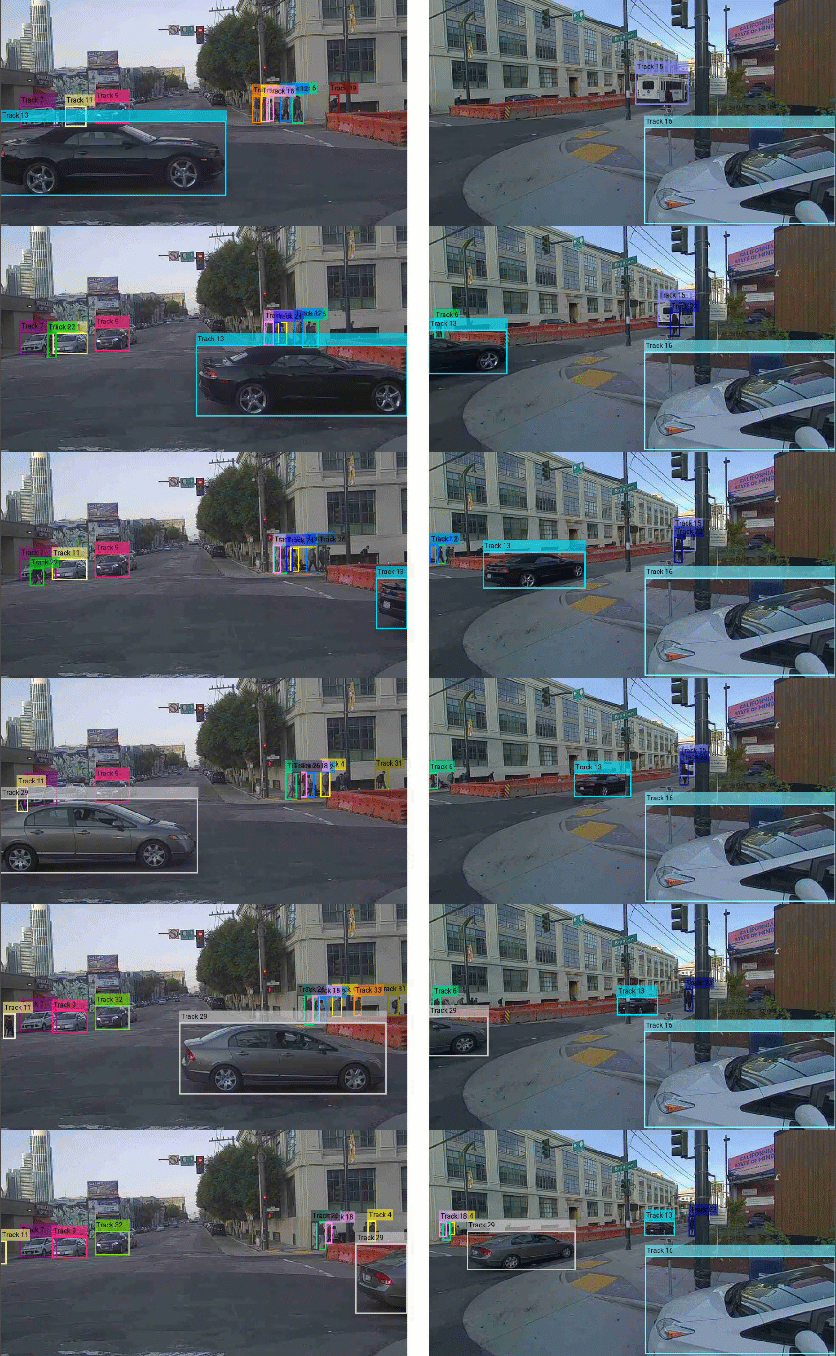
This example uses two synchronized cameras from the PandaSet dataset: the front-facing camera (cam 1) and the front-right camera (cam 2). These cameras have partially overlapping fields of view and capture at 10 fps.
To prepare the dataset, unzip the camera data folders and set the frame parameters.
if ~isfolder("front_camera")
    unzip("cameraData.zip");
end
datastoreCam1 = imageDatastore("front_camera");
datastoreCam2 = imageDatastore("front_right_camera");
frameRate = 10;
numFrames = min(numel(datastoreCam1.Files), numel(datastoreCam2.Files));
Load Camera Intrinsics and Extrinsics
The pixel-to-ground projection requires both intrinsics (focal length, principal point) and extrinsics (rotation, translation). Together they define the 2-D pixel to 3-D ground-plane mapping. helperLoadPandaSetIntrinsics loads the PandaSet-provided intrinsics. helperLoadPandaSetPose loads the raw poses and creates a rigidtform3d object to capture the camera-to-world transform.
frameSize = [540 960];
intrinsicsCam1 = helperLoadPandaSetIntrinsics("front_camera/intrinsics.json", frameSize);
intrinsicsCam2 = helperLoadPandaSetIntrinsics("front_right_camera/intrinsics.json", frameSize);
poseCam1 = helperLoadPandaSetPose("front_camera/poses.json");
poseCam2 = helperLoadPandaSetPose("front_right_camera/poses.json");
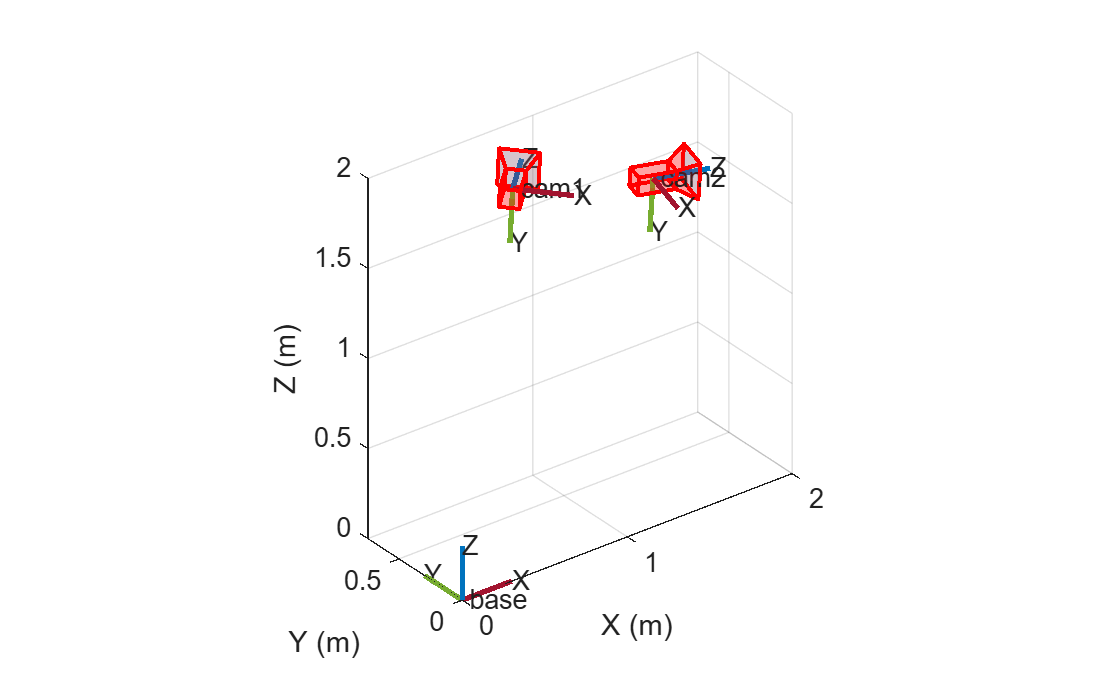
Create a multiSensorParameters object using the calibrated camera mounting poses and visualize the sensor poses.
cameras = multiSensorParameters;
cameras = addSensor(cameras, "cam1", "camera", poseCam1, Intrinsics=intrinsicsCam1);
cameras = addSensor(cameras, "cam2", "camera", poseCam2, Intrinsics=intrinsicsCam2);
plot(cameras)
Configure Object Detector
Configure the rtmdetObjectDetector and define the target classes. A detection threshold of 0.45 recovers partially occluded detections. A maximum range limit discards projections beyond 35 meters where ground-plane geometry becomes unreliable. The minimum bounding box height of 30 pixels filters out far-field detections whose bottom edges do not contact the ground.
detector = rtmdetObjectDetector("large-network-coco");
targetClasses = ["person", "car", "truck", "bus", "motorcycle", "bicycle"];
minBoundingBoxHeight = 30;
detectionThreshold = 0.45;
maxRange = 35;
Configure Multi-Camera Tracker
Use trackerGNN (Sensor Fusion and Tracking Toolbox) for global nearest-neighbor assignment in 2-D world space, with initcvkf (Sensor Fusion and Tracking Toolbox) initializing a constant-velocity Kalman filter for each new track. To accept detections from both cameras, set MaxNumSensors to 2. For detection-to-track gating, set AssignmentThreshold to [15 60]. The 15 keeps near-range matches tight; the 60 lets unmatched detections seed new tracks instead of forcing bad assignments. To confirm a track after 2 detections within 4 updates, set ConfirmationThreshold to [2 4]. To let tracks coast through brief occlusions, set DeletionThreshold to [7 7].
tracker = trackerGNN( ...
    FilterInitializationFcn=@initcvkf, ...
    MaxNumTracks=100, ...
    MaxNumSensors=2, ...
    AssignmentThreshold=[15 60], ...
    ConfirmationThreshold=[2 4], ...
    DeletionThreshold=[7 7]);
Track Objects Across Both Cameras
To track objects across both cam 1 and cam 2, do the following:
Detect and project target classes in each camera.
Create
objectDetection(Sensor Fusion and Tracking Toolbox) objects from each projected detection.Sequentially update the tracker with
objectDetectionobject from cam 1, then cam 2.
The first step projects the bottom-center of each bounding box approximates where the object contacts the ground. Projecting this point onto the ground plane gives a world-coordinate measurement. This projection's accuracy depends on range and visibility. Nearby objects with clear ground contact produce accurate positions, while distant or partially occluded objects (e.g., pedestrians behind barricades) produce noisier measurements.
Cam 2 observes the same pedestrians at greater range and with their ground contact often occluded, which increases measurement noise. Feeding both cameras simultaneously makes the joint cost matrix ambiguous and risks assigning a cam 2 detection to the wrong track. Sequential updates resolve this, as cam 1's accurate detections refine the tracker first before associating cam 2's noisier detections to object tracks.
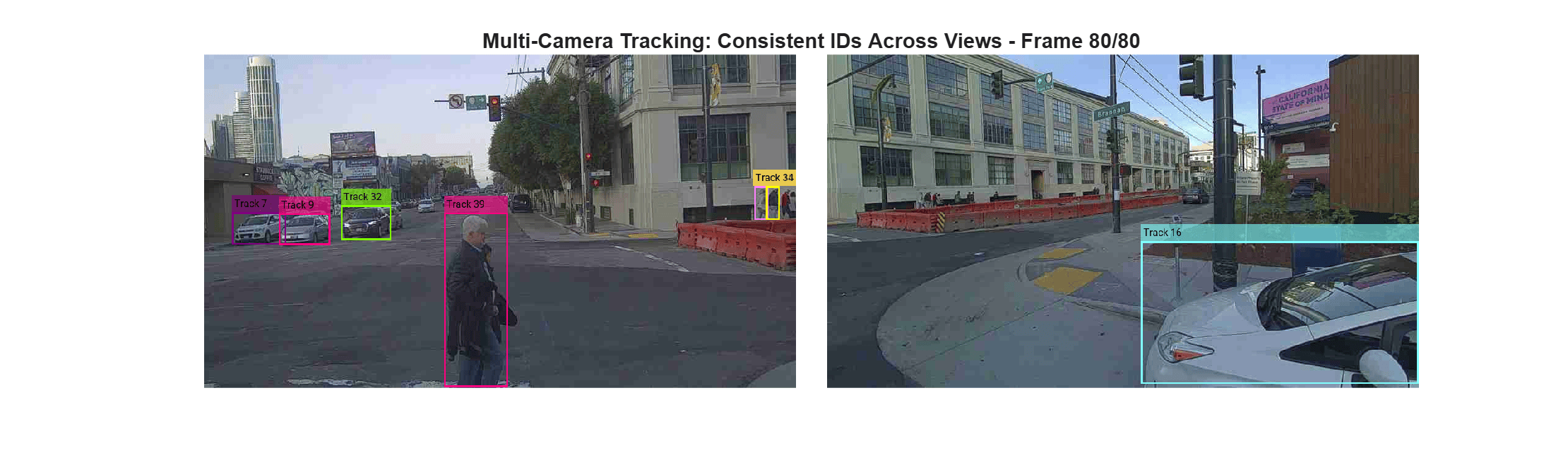
Each confirmed track carries the bounding box from its latest detection, so the annotation step draws only confirmed tracks with persistent IDs. To prevent stale boxes after an object exists a view, suppress per-camera annotations after 3 frames without a detection.
colorPalette = colorcube(30);
trajectories = configureDictionary("uint32", "cell");
combinedFrames = cell(numFrames, 1);
lastSeen = configureDictionary("string", "double");
annotationMaxAge = 3;

for frameIndex = 1:numFrames
    frameCam1 = readimage(datastoreCam1, frameIndex);
    frameCam2 = readimage(datastoreCam2, frameIndex);
    currentTime = (frameIndex - 1) / frameRate; % seconds

    % Detect objects on the current frame. Project the bounding boxes
    % that meet the minimum size requirement for the target classes onto
    % ground plane. Discard projections that are beyond the maximum range
    % or behind the camera.
    [projDetectionsCam1, boxesCam1] = helperDetectAndProject(detector, frameCam1, ...
        targetClasses, detectionThreshold, cameras, "cam1", minBoundingBoxHeight, maxRange);
    [projDetectionsCam2, boxesCam2] = helperDetectAndProject(detector, frameCam2, ...
        targetClasses, detectionThreshold, cameras, "cam2", minBoundingBoxHeight, maxRange);

    % Create objectDetection reports for each valid detection with distance-scaled noise.
    objectDetectionsCam1 = helperBuildObjectDetections(projDetectionsCam1, boxesCam1, 1, currentTime);
    objectDetectionsCam2 = helperBuildObjectDetections(projDetectionsCam2, boxesCam2, 2, currentTime + 0.001);

    % Sequential update: cam1 first (near-field, accurate), then cam2.
    [tracks, assignmentInfo1, assignmentInfo2] = helperUpdateTracksSequentially( ...
        tracker, currentTime, objectDetectionsCam1, objectDetectionsCam2);

    % Annotate per-camera frames with confirmed tracks (suppressing stale
    % annotations) and montage them side-by-side.
    [combinedFrames{frameIndex}, lastSeen] = helperAnnotateAndMontage(tracks, lastSeen, frameIndex, ...
        annotationMaxAge, colorPalette, frameCam1, assignmentInfo1, frameCam2, assignmentInfo2);

    % Store ground-plane positions for trajectory animation.
    trajectories = helperUpdateTrajectories(trajectories, tracks, frameIndex);
end
Visualize Multi-Camera Object Tracking
The annotated side-by-side view shows targeted classes maintaining their track IDs as they transition from cam 1 to cam 2.
figure(Position=[100 100 1200 350])
for frameIndex = 1:numFrames
    imshow(combinedFrames{frameIndex})
    title("Multi-Camera Tracking: Consistent IDs Across Views - " + "Frame " + num2str(frameIndex) + "/" + num2str(numFrames))
    drawnow
end
Visualize Object Tracks On Ground Plane
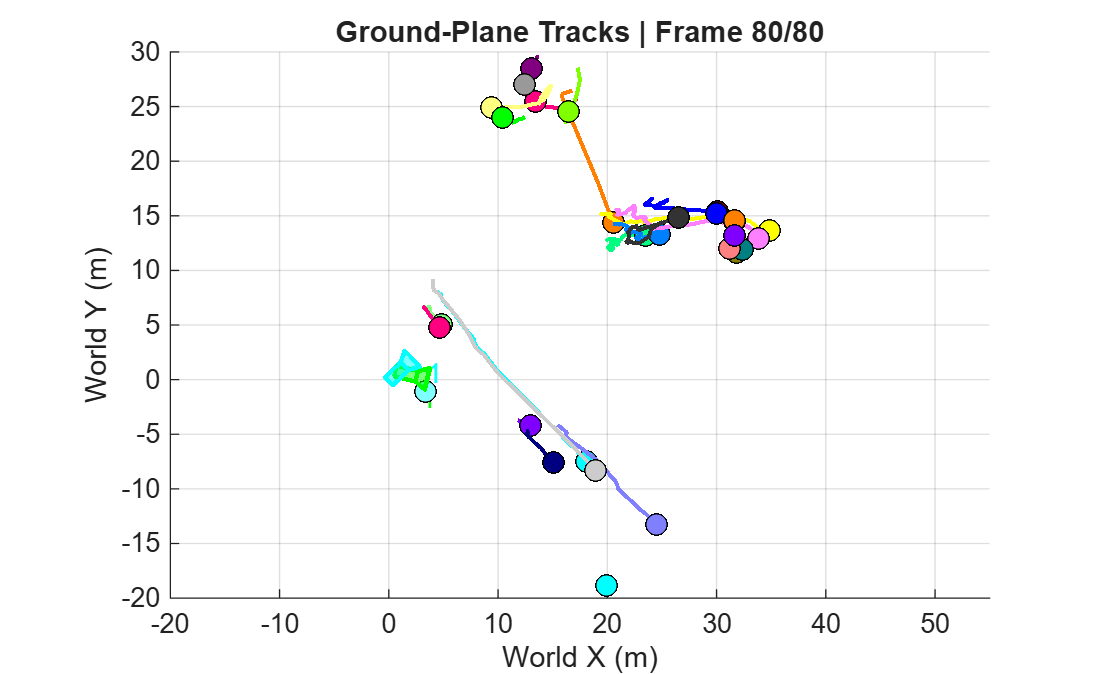
The constant-velocity filter produces smooth trajectories even when individual detections jitter due to bounding box noise at range. The animation shows tracks growing over time as the tracker fuses detections from both cameras.
figure
trackIDs = keys(trajectories);
for frameIndex = 1:numFrames
    cla
    hold on
    % Draw each track's trajectory up to the current frame.
    for idx = 1:numel(trackIDs)
        trackID = trackIDs(idx);
        data = trajectories{trackID}; % [x, y, frameIndex]
        visible = data(:,3) <= frameIndex;
        if ~any(visible), continue; end
        positions = data(visible, 1:2);
        colorIndex = mod(double(trackID)-1, size(colorPalette,1)) + 1;
        trackColor = colorPalette(colorIndex, :);
        if size(positions,1) > 1
            plot(positions(:,1), positions(:,2), "-", Color=[trackColor 0.6], LineWidth=1.5)
        end
        plot(positions(end,1), positions(end,2), "o", MarkerSize=8, ...
            MarkerFaceColor=trackColor, MarkerEdgeColor="k", LineWidth=0.5)
    end

    % Show camera positions for spatial reference.
    plotCamera(poseCam1, Color=[0 1 1], Opacity=0.3)
    plotCamera(poseCam2, Color=[0 1 0], Opacity=0.3)
    hold off
    xlabel("World X (m)"); ylabel("World Y (m)")
    title(sprintf("Ground-Plane Tracks | Frame %d/%d", frameIndex, numFrames))
    axis equal; grid on
    xlim([-20 55]); ylim([-20 30])
    drawnow
end
Tracking Limitations
The trajectory plot exposes these limitations of ground-plane tracking in these camera sequences.
Far-field object tracks exhibit poor constant-velocity characteristics and are short lived. Pedestrians in cam 2 are behind the construction barricade. Their bounding box bottoms clip to the barricade top edge instead of their feet due to this occlusion. This breaks the assumption of a visible ground contact point per detection. At 25 to 35 meters, far-field geometry amplifies this bias. A 1 pixel shift maps to about 0.5 meters on the ground plane.
Distance-scaled measurement noise reduces the filter’s trust in these detections. However, tracks in this region still degrade. Losing far-range pedestrians on cam 2 remains an accepted limitation, since projection is most reliable within about 20 meters.
Position alone for data association does not utilize all information present in the image data. This example uses only bounding box position data to associate detections to object tracks. This approach relies heavily on highly confident close detections with a clear point-of-contact with the ground. The image sequences used here do not strictly adhere to this requirement.
A mitigation strategy for camera sequences that do not follow this rigid prerequisite is to introduce a reidentificationNetwork (ReID) network. A ReID network extracts appearance embeddings for each detection. A tracker will then combines position and appearance similarity for assignment. This combined metric resolves ambiguities that geometric gating cannot. The method requires a trained ReID model, but it generalizes across viewpoints. It also handles dense pedestrian scenes where ground-plane projection fails. For an example of tracking with appearance features on a single camera, see Multi-Object Tracking with DeepSORT.
Summary and Next Steps
This example demonstrated multi-camera tracking using calibrated cameras and ground-plane fusion. Ground-plane projection mapped detections to a shared world plane, and a tracker associated the projection from each camera sequentially. A failure mode was demonstrated to provide understanding of the limitations of purely positional multi-camera tracking.
Next, try out other camera sequences or look to extend to more than just two cameras. Provide image sequences with clear ground contact for all detections, or train a ReID network with trainReidentificationNetwork and leverage appearances on more challenging sequences.
Helper Functions
helperLoadPandaSetIntrinsics - Load camera intrinsics from a PandaSet JSON and scale them from native resolution to the working frame size.
function intrinsicsObj = helperLoadPandaSetIntrinsics(jsonPath, frameSize)
    % Read fx, fy, cx, cy from JSON and package them inside a
    % cameraIntrinsics object.
    raw = jsondecode(fileread(jsonPath));
    intrinsicsObj = cameraIntrinsics([raw.fx, raw.fy], [raw.cx, raw.cy], frameSize);
end
helperLoadPandaSetPose - Read a quaternion-and-position pose from a PandaSet JSON and return it as a rigidtform3d camera-to-world transform.
function cameraPose = helperLoadPandaSetPose(jsonPath)
    % Read the first pose entry from a JSON pose log and convert it to a
    % rigidtform3d camera-to-world transform. rotmat(q,"point") returns the
    % camera-to-world rotation.
    poses = jsondecode(fileread(jsonPath));
    pose = poses(1);
    quat = quaternion(pose.heading.w, pose.heading.x, pose.heading.y, pose.heading.z);
    rotationCameraToWorld = rotmat(quat, "point");
    translationWorld = [pose.position.x, pose.position.y, pose.position.z];
    cameraPose = rigidtform3d(rotationCameraToWorld, translationWorld);
end
helperDetectAndProject - Run the detector on a frame, filter by target class and minimum height, and project detections onto the ground plane.
function [validDetections, validBoxes] = helperDetectAndProject(detector, frame, targetClasses, detectionThreshold, cameras, sensorName, minBoundingBoxHeight, maxRange)
    % Run detector on a frame. Filter detections by target classes, minimum
    % bounding box height, and distance from the camera.

    % Obtain the intrinsics and extrinsics from the multiSensorParameters
    % object.
    [camIntrinsics, camExtrinsics] = helperGetCameraCalibration(cameras, sensorName);

    % Run the detector on the frame.
    [boxes, ~, labels] = detect(detector, frame, Threshold=detectionThreshold);

    % Determine the far-field and target class detections.
    isFarField = boxes(:,4) < minBoundingBoxHeight;
    isTargetClass = ismember(labels, targetClasses);

    % Filter out the far-field bounding boxes and non-target classes.
    boxes = boxes(~isFarField & isTargetClass, :);

    % Project the bottom center of the bounding box into the ground plane.
    boxesBottomCenter = [boxes(:,1) + boxes(:,3)/2, boxes(:,2) + boxes(:,4)];
    projectedDetections = img2world2d(boxesBottomCenter, camExtrinsics, camIntrinsics);

    % Filter out unreliable detections.
    nanDetections = isnan(projectedDetections);
    invalidDetections = any(nanDetections, 2);
    inRangeDetections = vecnorm(projectedDetections, 2, 2) < maxRange;
    validDetections = projectedDetections(~invalidDetections & inRangeDetections, :);
    validBoxes = boxes(~invalidDetections & inRangeDetections, :);

        function [intrinsicsObj, extrinsics] = helperGetCameraCalibration(cameras, sensorName)
            % Look up cameraIntrinsics, world->camera extrinsics, and the
            % camera-to-world pose for a named sensor in a multiSensorParameters
            % object. Reconstruct the mounting transform.
            intrinsicsObj = intrinsics(cameras, sensorName);
            [angles, location] = mountingPose(cameras, sensorName);
            poseSE3 = se3(deg2rad(angles), "eul", "ZYX", location);
            cameraPose = rigidtform3d(poseSE3.rotm, poseSE3.trvec);
            extrinsics = pose2extr(cameraPose);
        end
end
helperBuildObjectDetections - Package projected ground-plane detections as objectDetection objects with distance-scaled measurement noise.
function objectDetections = helperBuildObjectDetections(projectedPoints, boxes, cameraIndex, timestamp)
    % Package projected detections as objectDetection objects for the
    % tracker. Measurement noise scales with distance from the camera and
    % assists in decided tracker assignments.
    objectDetections = {};
    distances = vecnorm(projectedPoints, 2, 2);
    noiseScale = max(1, (distances/12).^2);

    % Create each objectDetection for the tracker.
    for detIdx = 1:numel(distances)
        objectDetections{end+1} = objectDetection(timestamp, projectedPoints(detIdx,:)', ...
            MeasurementNoise=noiseScale(detIdx) * eye(2), ...
            SensorIndex=cameraIndex, ...
            ObjectAttributes={struct(BBox=boxes(detIdx,:), CamIdx=cameraIndex)});
    end
end
helperUpdateTracksSequentially - Update the tracker sequentially with each camera's detections to avoid cross-camera assignment ambiguity.
function [tracks, varargout] = helperUpdateTracksSequentially(tracker, currentTime, varargin)
    % Sequentially update the tracker for each camera's set of
    % objectDetection objects.
    allObjectDetections = varargin;
    timeShift = 0.001;
    for camIdx = 1:numel(allObjectDetections)
        objectDetections = allObjectDetections{camIdx};
        if ~isempty(objectDetections)
            [tracks, ~, ~, assignmentInfo] = tracker(objectDetections, ...
                currentTime + (camIdx-1) * timeShift);
        elseif isLocked(tracker)
            [tracks, ~, ~, assignmentInfo] = tracker({}, ...
                currentTime + (camIdx-1) * timeShift);
        else
            tracks = [];
            assignmentInfo = struct(Assignments=zeros(0,2));
        end
        varargout{camIdx} = assignmentInfo;
    end
end
helperAnnotateAndMontage - Annotate each camera frame with recently-detected tracks and horizontally montage the results.
function [combinedFrame, lastSeen] = helperAnnotateAndMontage(tracks, lastSeen, frameIndex, annotationMaxAge, colorPalette, frames, assignments)
    % Annotate tracks on each camera frame and horizontally montage the results.
    % Suppresses annotations for tracks not detected within annotationMaxAge
    % frames. Accepts repeating (frame, assignmentInfo) pairs for N cameras.
    arguments
        tracks
        lastSeen
        frameIndex (1,1) double
        annotationMaxAge (1,1) double
        colorPalette
    end
    arguments (Repeating)
        frames
        assignments
    end

    numCams = numel(frames);

    for camIdx = 1:numCams
        % Update lastSeen for tracks assigned a detection this frame.
        assigned = assignments{camIdx}.Assignments;
        for aIdx = 1:size(assigned, 1)
            lastSeen(assigned(aIdx,1) + "_" + camIdx) = frameIndex;
        end

        % Annotate tracks recently seen by this camera.
        boxes = [];
        colors = [];
        labels = string.empty;
        for tIdx = 1:numel(tracks)
            trackID = tracks(tIdx).TrackID;
            key = trackID + "_" + camIdx;
            if ~isKey(lastSeen, key) || (frameIndex - lastSeen(key)) > annotationMaxAge
                continue
            end
            for aIdx = 1:numel(tracks(tIdx).ObjectAttributes)
                if tracks(tIdx).ObjectAttributes(aIdx).CamIdx ~= camIdx
                    continue
                end
                boxes(end+1,:) = tracks(tIdx).ObjectAttributes(aIdx).BBox;
                paletteIdx = mod(double(trackID)-1, size(colorPalette,1)) + 1;
                colors(end+1,:) = 255 * colorPalette(paletteIdx,:);
                labels(end+1) = "Track " + trackID;
            end
        end

        if ~isempty(boxes)
            frames{camIdx} = insertObjectAnnotation(frames{camIdx}, "rectangle", ...
                boxes, labels, LineWidth=3, Color=colors, FontSize=16);
        end
    end

    % Montage frames together.
    gap = 50;
    [h, ~, c] = size(frames{1});
    separator = ones(h, gap, c, "like", frames{1}) .* 255;
    combinedFrame = frames{1};
    for camIdx = 2:numCams
        combinedFrame = cat(2, combinedFrame, separator, frames{camIdx});
    end
end
helperUpdateTrajectories - Append each confirmed track's current ground-plane position to the trajectory dictionary for animation.
function trajectories = helperUpdateTrajectories(trajectories, tracks, frameIndex)
    % Append each confirmed track's current ground plane position to the
    % trajectory dictionary for later animation.
    for trackIdx = 1:numel(tracks)
        trackID = uint32(tracks(trackIdx).TrackID);
        entry = [tracks(trackIdx).State(1), tracks(trackIdx).State(3), frameIndex];
        if isKey(trajectories, trackID)
            trajectories(trackID) = {[trajectories{trackID}; entry]};
        else
            trajectories(trackID) = {entry};
        end
    end
end
See Also
multiSensorParameters | rtmdetObjectDetector | trackerGNN (Sensor Fusion and Tracking Toolbox) | objectDetection (Sensor Fusion and Tracking Toolbox)
Topics
- Multi-Object Tracking with DeepSORT
- Create 360° Bird's-Eye-View Image Around a Vehicle (Automated Driving Toolbox)

