来自外部平台的预训练网络
R2026b使用来自外部深度学习平台的预训练网络有两种方法:导入模型;使用协同执行来训练和测试外部模型。在可能的情况下,首选方法是导入模型。
Deep Learning Toolbox™ 支持从 TensorFlow™ 2、TensorFlow-Keras、Keras 3、PyTorch®、ONNX™(开放式神经网络交换)模型格式和 Caffe 导入神经网络。您可以使用深度网络设计器以交互方式导入网络,也可以使用命令行函数以编程方式导入网络。该 App 会生成一个导入报告,总结导入过程,并突出显示任何需要采取的操作。有关详细信息,请参阅预训练的深度神经网络和Interoperability Between Deep Learning Toolbox, TensorFlow, PyTorch, and ONNX。
Deep Learning Toolbox 中的导入函数需要特定的支持包。如果未安装所需的支持包,则每个函数都会在附加功能资源管理器中提供对应支持包的下载链接。请将支持包下载到当前使用的 MATLAB® 版本的默认位置。支持包也可以直接下载:
importNetworkFromONNX需要 Deep Learning Toolbox Converter for ONNX Model Format。要下载支持包,请转至 https://www.mathworks.com/matlabcentral/fileexchange/67296-deep-learning-toolbox-converter-for-onnx-model-format。importNetworkFromPyTorch需要 Deep Learning Toolbox Converter for PyTorch Models。要下载支持包,请转至 https://www.mathworks.com/matlabcentral/fileexchange/111925-deep-learning-toolbox-converter-for-pytorch-models。importNetworkFromTensorFlow和importNetworkFromKeras需要 Deep Learning Toolbox Converter for TensorFlow Models。要下载支持包,请转至 https://www.mathworks.com/matlabcentral/fileexchange/64649-deep-learning-toolbox-converter-for-tensorflow-models。
MATLAB 与外部深度学习平台之间的互操作
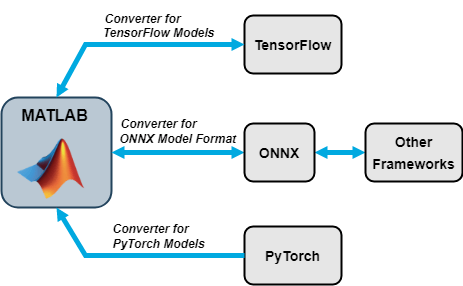
如果无法导入预训练网络,您可以使用协同执行来运行外部模型。基于 Python® 的模型支持协同执行,包括 TensorFlow、ONNX、PyTorch 和自定义 Python 模型。对于 PyTorch 模型,您可以使用 PyTorchModel 对象直接在 MATLAB 中运行模型。此对象充当包装器,通过 MATLAB–Python 接口在 Python 中执行模型,从而无需导入模型即可实现集成。您还可以使用 arrayToTorchTensor 函数和 torchTensorToArray 函数在 MATLAB 数值数组与 PyTorch 张量之间进行转换。
App
| 深度网络设计器 | 设计和可视化深度学习网络 |
函数
对象
PyTorchModel | Reference to a PyTorch model for Python execution (自 R2026b 起) |
主题
导入
- Use PyTorch and MATLAB for Deep Learning Workflows
Learn how to use PyTorch models with MATLAB and Simulink® for deep learning workflows. - Interoperability Between Deep Learning Toolbox, TensorFlow, PyTorch, and ONNX
Learn how to import networks from TensorFlow, Keras 3, PyTorch, and ONNX and use the imported networks for common Deep Learning Toolbox workflows. Learn how to export networks to TensorFlow and ONNX. - Tips on Importing Models from TensorFlow, PyTorch, and ONNX
Tips on importing Deep Learning Toolbox networks from TensorFlow, Keras, PyTorch, and ONNX. - Import PyTorch Model Using Deep Network Designer
This example shows how to import a PyTorch® model interactively by using the Deep Network Designer app. (自 R2023b 起) - 预训练的深度神经网络
了解如何下载和使用预训练的卷积神经网络进行分类、迁移学习和特征提取。 - Inference Comparison Between TensorFlow and Imported Networks for Image Classification
Perform prediction in TensorFlow with a pretrained network, import the network into MATLAB usingimportTensorFlowNetwork, and then compare inference results between TensorFlow and MATLAB networks. - Inference Comparison Between ONNX and Imported Networks for Image Classification
Perform prediction in ONNX with a pretrained network, import the network into MATLAB usingimportONNXNetwork, and then compare inference results between ONNX and MATLAB networks. - Classify Images in Simulink with Imported TensorFlow Network
Import a pretrained TensorFlow network usingimportTensorFlowNetwork, and then use the Predict block for image classification in Simulink. - Deploy Imported TensorFlow Model with MATLAB Compiler
Import third-party pretrained networks and deploy the networks using MATLAB Compiler™. - View Autogenerated Custom Layers Using Deep Network Designer
This example shows how to import a pretrained TensorFlow™ network and view the autogenerated layers in Deep Network Designer. - Verify Robustness of Imported ONNX Network
This example shows how to verify the adversarial robustness of an imported ONNX™ deep neural network. (自 R2024a 起)
Simulink 模块的 Python 协同执行
- Classify Images Using TensorFlow Model Predict Block
Classify images using TensorFlow Model Predict block. - Classify Images Using ONNX Model Predict Block
Classify images using ONNX Model Predict block. - Classify Images Using PyTorch Model Predict Block
Classify images using PyTorch Model Predict block. - Predict Responses Using TensorFlow Model Predict Block
Predict Responses Using TensorFlow Model Predict block. - Predict Responses Using ONNX Model Predict Block
Predict Responses Using ONNX Model Predict block. - Predict Responses Using PyTorch Model Predict Block
Predict Responses Using PyTorch Model Predict block. - Predict Responses Using Custom Python Model in Simulink (Statistics and Machine Learning Toolbox)
This example shows how to use the Custom Python Model Predict (Statistics and Machine Learning Toolbox) block for prediction in Simulink®. - Set Up Python Environment for Deep Learning with PyTorch Workflows
Configure Python and install PyTorch for use with MATLAB deep learning workflows.
MATLAB 命令行中的 PyTorch 协同执行
- Offline Training and Testing of PyTorch Model for CSI Feedback Compression (5G Toolbox)
Train an autoencoder-based PyTorch neural network offline and test for CSI compression. (自 R2025a 起)
自定义层
- 定义自定义深度学习层
了解如何定义自定义深度学习层。
相关信息
- https://www.mathworks.com/matlabcentral/fileexchange/67296-deep-learning-toolbox-converter-for-onnx-model-format
- https://www.mathworks.com/matlabcentral/fileexchange/64649-deep-learning-toolbox-converter-for-tensorflow-models
- https://www.mathworks.com/matlabcentral/fileexchange/111925-deep-learning-toolbox-converter-for-pytorch-models
- https://www.mathworks.com/matlabcentral/fileexchange/61735-deep-learning-toolbox-importer-for-caffe-models

