fnoNetwork
R2026bDescription
creates a Fourier neural operator (FNO) network with the specified input and output sizes.
FNOs learn mappings between function spaces using spectral convolution layers, which
perform learned transformations in the frequency domain. FNOs are useful for solving parametric partial
differential equations (PDEs).net = fnoNetwork(inputSize,outputSize)
specifies additional options using one or more name-value arguments. For example,
net = fnoNetwork(inputSize,outputSize,Name=Value)Dimension=1 creates a 1-D FNO network.
Examples
Create a 2-D Fourier neural operator (FNO) network with three input channels and one output channel.
inputSize = 3; outputSize = 1; net = fnoNetwork(inputSize,outputSize)
net =
dlnetwork with properties:
Layers: [4×1 nnet.cnn.layer.Layer]
Connections: [3×2 table]
Learnables: [20×3 table]
State: [0×3 table]
InputNames: {'input'}
OutputNames: {'projection'}
Initialized: 1
View summary with summary.
Visualize the network in a plot.
figure tiledlayout("flow") nexttile plot(net) axis off title("2-D Fourier Neural Operator") nexttile plot(net.Layers(2).Network) axis off title("Lift Subnetwork") nexttile plot(net.Layers(3).Network) axis off title("Fourier Layers") nexttile plot(net.Layers(4).Network) axis off title("Projection Subnetwork")
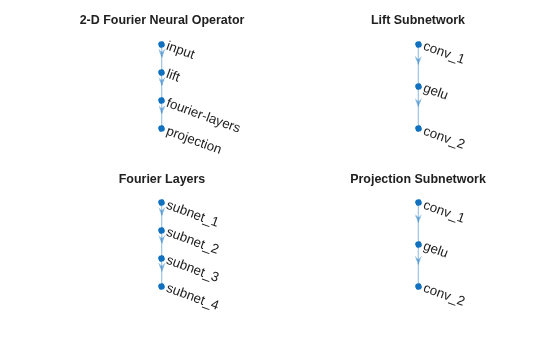
The network has three components: the lift subnetwork, the Fourier layers, and the projection subnetwork.
The lift network has two linear layers, represented as convolution layers with a filter size of 1, with a GELU activation between them.
There are four subnetworks that represent the four Fourier layers.
The projection subnetwork contains two linear layers, represented as convolution layers with a filter size of 1, with a GELU activation between them.
Input Arguments
Number of input channels, specified as a positive integer.
The input channels correspond to the number of input variables in the function that
the FNO learns to map. For example, if you want to model a function that has two inputs
(such as the x-velocity and y-velocity of a fluid), set inputSize to
2.
Data Types: single | double | int8 | int16 | int32 | int64 | uint8 | uint16 | uint32 | uint64
Number of output channels, specified as a positive integer.
The output channels correspond to the number of output variables in the function
that the FNO learns to map. For example, if you want to model a function that has one
output (such as the temperature of a point), set outputSize to
1.
Data Types: single | double | int8 | int16 | int32 | int64 | uint8 | uint16 | uint32 | uint64
Name-Value Arguments
Specify optional pairs of arguments as
Name1=Value1,...,NameN=ValueN, where Name is
the argument name and Value is the corresponding value.
Name-value arguments must appear after other arguments, but the order of the
pairs does not matter.
Example: net =
fnoNetwork(inputSize,outputSize,Dimension=1) creates a 1-D FNO
network.
Number of spatial dimensions, specified as 1,
2, or 3.
The network uses the corresponding dimensionality of spectral convolution layers.
For example, if the Dimension argument value is
2, then the network uses spectralConvolution2dLayer objects.
Data Types: single | double | int8 | int16 | int32 | int64 | uint8 | uint16 | uint32 | uint64
Number of Fourier modes to retain in each spectral convolution layer, specified as one of these:
Positive integer — Use the specified number of modes for each spatial dimension. The value must be at most
floor(sz/2)+1, whereszis the smallest spatial size of the input data.Vector of
Dimensionpositive integers — Use a different number of modes for each spatial dimension. UseNumModes(k)for spatial dimensionk. For each spatial dimension, the value must be at mostfloor(sz/2)+1, whereszis the corresponding spatial size of the input data.
The spectral convolution layers transform the input to the frequency domain and retain only the lowest-frequency Fourier modes. The number of retained modes controls the resolution of the learned operator. Increasing the number of modes allows the network to capture finer spatial details at the cost of introducing more learnable parameters.
The default value depends on the Dimension argument value. If
the Dimension argument value is 1, then the
default value is 16. Otherwise, the default value is
12.
Data Types: single | double | int8 | int16 | int32 | int64 | uint8 | uint16 | uint32 | uint64
Number of hidden channels used in the spectral convolution and linear layers, specified as a positive integer.
The FNO consists of three subnetworks: the lift network, the Fourier layers, and
the projection network. The lift network maps the input channels to a latent space with
dimension HiddenSize, the Fourier layers operate in this latent
space, and the projection network maps back to the output channel size. Increasing the
hidden size increases the capacity of the network at the cost of introducing more
learnable parameters.
The default value depends on the Dimension argument value. If
the Dimension argument value is 1, then the
default value is 64. Otherwise, the default value is
32.
For more information about the FNO architecture, see Fourier Neural Operator Architecture.
Data Types: single | double | int8 | int16 | int32 | int64 | uint8 | uint16 | uint32 | uint64
Number of Fourier layers in the network, specified as a positive integer.
Each Fourier layer has two parallel paths: a spectral convolution path and a convolution skip connection path. The layer combines the outputs of the parallel paths using addition. Increasing the number of Fourier layers increases the depth and capacity of the network.
For more information about the Fourier layer architecture, see Fourier Layer Architecture.
Data Types: single | double | int8 | int16 | int32 | int64 | uint8 | uint16 | uint32 | uint64
Activation function used in the lift, Fourier, and projection layers, specified as one of these:
"gelu"— Gaussian error linear unit (GELU) activation. For more information, seegeluLayer."relu"— Rectified linear unit (ReLU) activation. For more information, seereluLayer."tanh"— Hyperbolic tangent activation. For more information, seetanhLayer."sigmoid"— Sigmoid activation. For more information, seesigmoidLayer."swish"— Swish activation. For more information, seeswishLayer."leakyrelu"— Leaky ReLU activation. For more information, seeleakyReluLayer."elu"— Exponential linear unit (ELU) activation. For more information, seeeluLayer."softplus"— Softplus activation. For more information, seesoftplusLayer.
Position of the activation function relative to the residual addition in each Fourier layer, specified as one of these:
"after-add"— Apply the activation function after adding the spectral convolution output and the convolution skip connection output."before-add"— Apply the activation function to the Fourier layer input before it branches into the spectral convolution and skip connection paths.
The last Fourier layer does not include an activation function in either mode.
Channel mixing strategy in the Fourier layers, specified as one of these:
"none"— Do not add channel mixing layers. Each Fourier layer consists of only the spectral convolution and linear skip connection paths."mlp"— Add a channel mixing multilayer perceptron (MLP) after the spectral convolution block in each Fourier layer. The MLP consists of two linear layers, represented as convolution layers with a filter size of 1, with activations and its own skip connection. Channel mixing enables richer interactions between channels and increases the expressiveness of the network at the cost of additional parameters.
Normalization to use in the Fourier layers, specified as one of these:
"none"— Do not use normalization."layernorm"— Use layer normalization. For more information, seelayerNormalizationLayer."batchnorm"— Use batch normalization. For more information, seebatchNormalizationLayer."instancenorm"— Use instance normalization. For more information, seeinstanceNormalizationLayer.
Output Arguments
FNO network, returned as an initialized dlnetwork object.
For more information about the FNO architecture, see Fourier Neural Operator Architecture.
More About
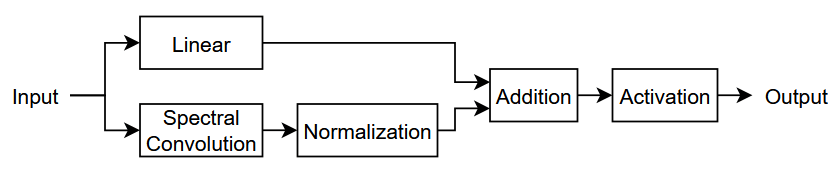
A Fourier layer is a network with two parallel paths that branch from the input:
Spectral convolution path — The input passes through a spectral convolution layer, which transforms the data to the frequency domain, applies a learned linear transformation to a fixed number of Fourier modes, and transforms the result back to the spatial domain. The layer applies an optional normalization operation to the output of the spectral convolution layer.
Skip connection path — The input passes through a linear layer, represented as a convolution layer with a filter size of 1. This path allows information to bypass the spectral convolution and helps stabilize training.
The layer combines both outputs using an addition layer. Optionally, the layer can apply an activation before or after the addition operation.
This diagram shows the structure of a Fourier layer that applies the activation after the addition operation.
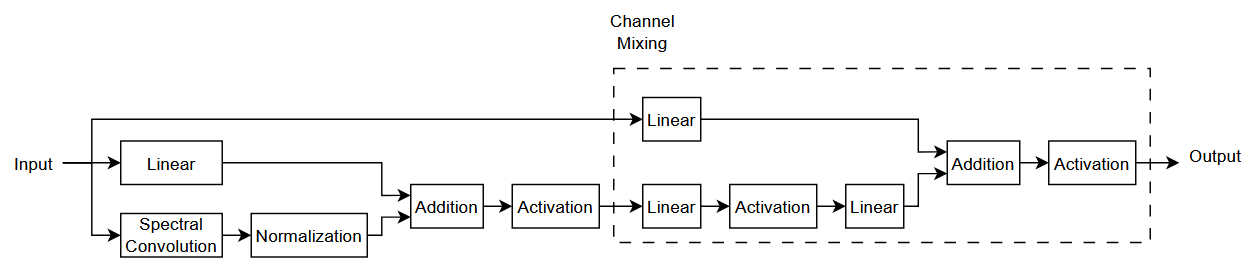
The layer can also include channel mixing by appending a channel mixing block after the spectral convolution addition. The channel mixing block has two parallel paths:
MLP path — The output of the spectral convolution addition passes through an activation and then two linear layers (represented as convolution layers with a filter size of 1) with an activation between them.
MLP skip connection path — The original Fourier layer input passes through a linear layer, represented as a convolution layer with a filter size of 1. This path bypasses both the spectral convolution block and the MLP.
The layer combines the MLP path and the MLP skip connection path using an addition layer and then applies an activation function.
This diagram shows the structure of a Fourier layer with channel mixing that applies the activation after the addition operation.
A Fourier neural operator (FNO) network learns mappings between function spaces using spectral convolution layers, which perform learned transformations in the frequency domain.
FNOs are particularly effective for learning solution operators of parametric partial differential equations (PDEs), where the goal is to learn a mapping from input functions (such as initial conditions, boundary conditions, or PDE coefficients) to output functions (such as the PDE solution) [1].
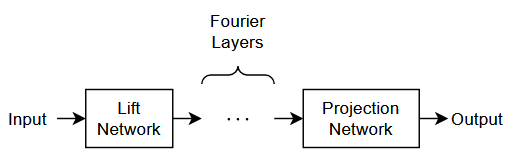
The FNO architecture consists of three main components:
Lift Network — The lift network maps the input channels to a higher-dimensional latent space. It consists of two linear layers, represented as convolution layers with a filter size of 1, with an activation function in between.
Fourier Layers — The core of the FNO architecture is a sequence of Fourier layers. Each Fourier layer has two parallel paths: a spectral convolution path that operates in the frequency domain by retaining a fixed number of Fourier modes, and a linear skip connection path. The layer combines the outputs of both paths using addition and optionally applies an activation function.
Projection Network — The projection network maps from the latent space back to the output channel space. Like the lift network, it consists of two linear layers, represented as convolution layers with a filter size of 1, with an activation function in between.
This diagram shows the architecture of an FNO network.
References
[1] Li, Zongyi, Nikola Kovachki, Kamyar Azizzadenesheli, Burigede Liu, Kaushik Bhattacharya, Andrew Stuart, and Anima Anandkumar. "Fourier Neural Operator for Parametric Partial Differential Equations." arXiv, May 17, 2021. https://doi.org/10.48550/arXiv.2010.08895.
Version History
Introduced in R2026b
See Also
spectralConvolution1dLayer | spectralConvolution2dLayer | spectralConvolution3dLayer | neuralODELayer | transolverNetwork | resnetNetwork | trainnet | trainingOptions | dlnetwork
Topics
- Solve PDE Using Fourier Neural Operator
- Solve PDE Using Physics-Informed Neural Network
- 3-D Battery Module Cooling Analysis Using Fourier Neural Operator (Partial Differential Equation Toolbox)
MATLAB Command
You clicked a link that corresponds to this MATLAB command:
Run the command by entering it in the MATLAB Command Window. Web browsers do not support MATLAB commands.
选择网站
选择网站以获取翻译的可用内容,以及查看当地活动和优惠。根据您的位置,我们建议您选择:。
您也可以从以下列表中选择网站:
如何获得最佳网站性能
选择中国网站(中文或英文)以获得最佳网站性能。其他 MathWorks 国家/地区网站并未针对您所在位置的访问进行优化。
美洲
- América Latina (Español)
- Canada (English)
- United States (English)
欧洲
- Belgium (English)
- Denmark (English)
- Deutschland (Deutsch)
- España (Español)
- Finland (English)
- France (Français)
- Ireland (English)
- Italia (Italiano)
- Luxembourg (English)
- Netherlands (English)
- Norway (English)
- Österreich (Deutsch)
- Portugal (English)
- Sweden (English)
- Switzerland
- United Kingdom (English)