Prune Neural Network with Accuracy Requirement
R2026bThis example shows how to compress a neural network with a minimum accuracy requirement using Taylor pruning.
To embed a neural network into a resource-constrained hardware device for inference, you might need to reduce the size of your model while maintaining its predictive capability. This example shows how to prune a neural network to the smallest size that is possible while maintaining a minimum accuracy requirement.
Load Pretrained Network and Data
This example uses a pretrained image classification network.
First, download the CIFAR-10 image data set [1] by using the downloadCIFARData function, which is attached to this example as a supporting file. To access this file, open the example as a live script. The data set contains 60,000 images. Each image is 32-by-32 pixels in size and has three color channels (RGB). The size of the data set is 175 MB. Depending on your internet connection, the download process can take time. The training set contains 50,000 images and the test set contains 10,000 images.
datadir = tempdir;
downloadCIFARData(datadir);
Downloading CIFAR-10 dataset (175 MB). This can take a while...done.
Load the CIFAR-10 training and test images into memory by using the loadCIFARData function, which is attached to this example as a supporting file.
[XTrain,TTrain,XTest,TTest] = loadCIFARData(datadir);
Load the trained network.
load("CIFARNetDlNetwork","trainedNet");
To learn how to train this network, see Train Residual Network for Image Classification.
Analyze Network for Compression
To see if the network supports Taylor pruning, open the network in Deep Network Designer.
>> deepNetworkDesigner(trainedNet)
To see how much you can compress the network by pruning, projecting, or quantizing it, click Compression Analysis on the toolstrip. A compression analysis report opens.
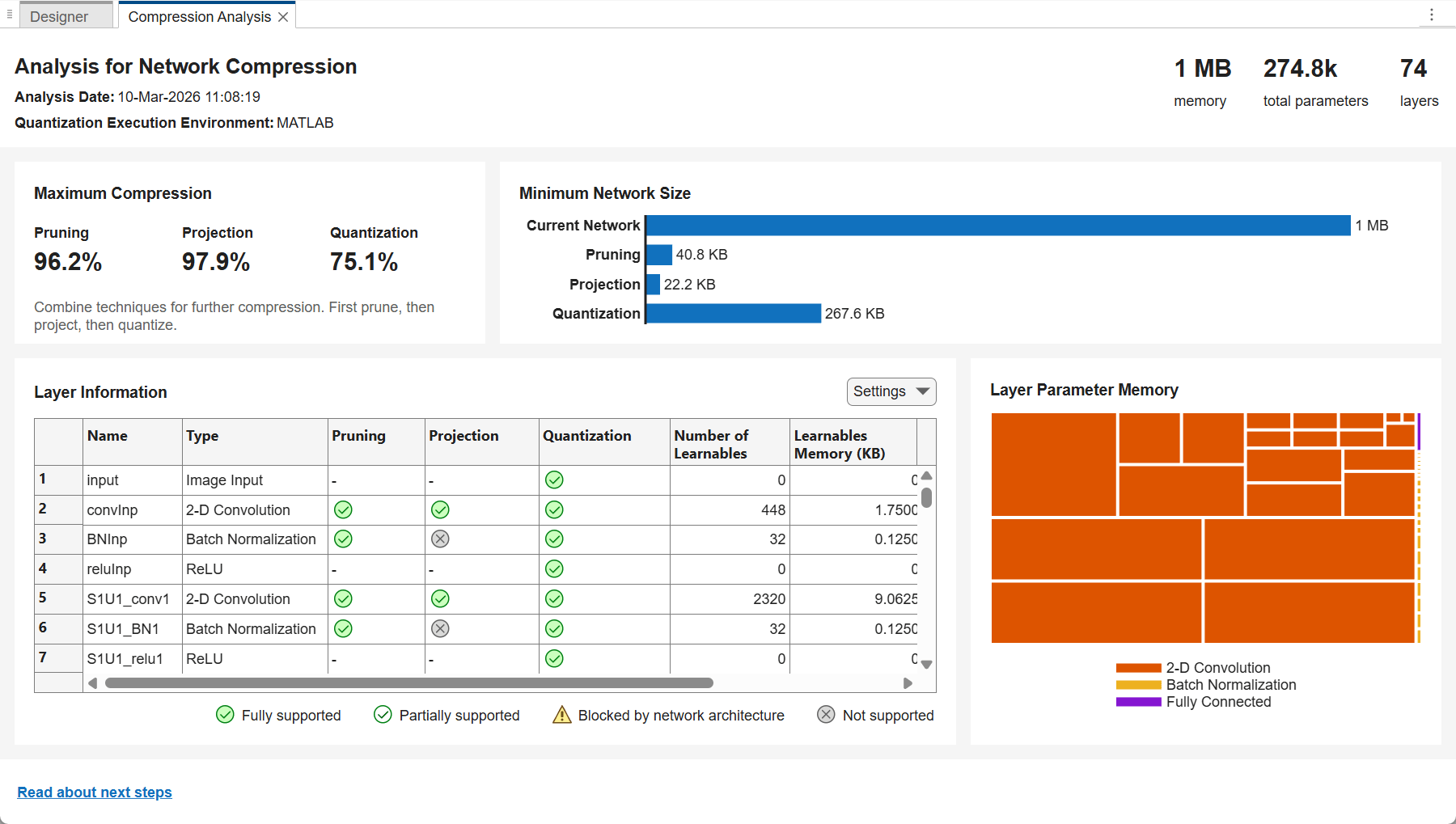
The trained network takes up 1 MB of memory. Pruning can reduce the network size by up to 96.2%, that is, to as small as 40.8 KB.
Test Pretrained Network
Test the accuracy of the trained network by using the testnet function.
accuracyTrained = testnet(trainedNet,XTest,TTest,"accuracy")accuracyTrained = 90.2400
Set the accuracy requirement. For example, set the minimum accuracy to 85%.
minAccuracy = 85;
Configure Fine-Tuning Options
The compressNetworkUsingTaylorPruning function prunes a network iteratively using these steps:
Compute the importance score of each prunable filter.
Prune the least important filters.
Fine-tune the pruned network.
Specify the training options for the fine-tuning step. Use the same options that were used to train the original network, but use fewer training epochs. The network does not need to be trained from scratch, so you need fewer training epochs to retrain it.
The compressNetworkUsingTaylorPruning function applies the MaxEpochs training option to each fine-tuning period, during each pruning iteration. For example, if you set the LearnablesIncrement option to 0.05, then each pruning iteration removes approximately 5% of the original number of learnable parameters. In this case, pruning can comprise up to 20 pruning iterations, and the total number of training epochs can be as many as 20*MaxEpochs. Choosing the number of fine-tuning epochs is a tradeoff between pruning time and network accuracy.
The network in this example was trained using 80 training epochs. For fine-tuning, set MaxEpochs to 5 instead.
miniBatchSize = 128;
initialLearnRate = 0.1*miniBatchSize/128;
validationFrequency = floor(size(XTrain,4)/miniBatchSize);
options = trainingOptions("sgdm", ...
    InitialLearnRate=initialLearnRate, ...
    MaxEpochs=5, ...
    MiniBatchSize=miniBatchSize, ...
    Shuffle="every-epoch", ...
    Plots="training-progress", ...
    Verbose=false, ...
    ValidationData={XTest,TTest}, ...
    ValidationFrequency=validationFrequency, ...
    LearnRateSchedule="piecewise", ...
    LearnRateDropFactor=0.1, ...
    LearnRateDropPeriod=60);
To stop pruning early if the quality of the network predictions deteriorates too much, specify the validation metric threshold. The software stops pruning if the validation metric exceeds the validation metric threshold at the end of fine-tuning.
By default, the validation metric is the loss. To specify a different validation metric:
Specify the
Metricsproperty of the training options.Specify the
ObjectiveMetricNameproperty of the training options.
For this example, specify the validation metric as the accuracy.
options.Metrics = "accuracy";
options.ObjectiveMetricName = "accuracy";
Return the neural network that corresponds to the fine-tuning iteration with the best validation metric value.
options.OutputNetwork = "best-validation";Compress Network Using Taylor Pruning
Prune the network using the compressNetworkUsingTaylorPruning function until the network no longer meets the validation threshold.
[prunedNet,info] = compressNetworkUsingTaylorPruning(trainedNet,XTrain,TTrain,"crossentropy",options,ValidationThreshold=minAccuracy)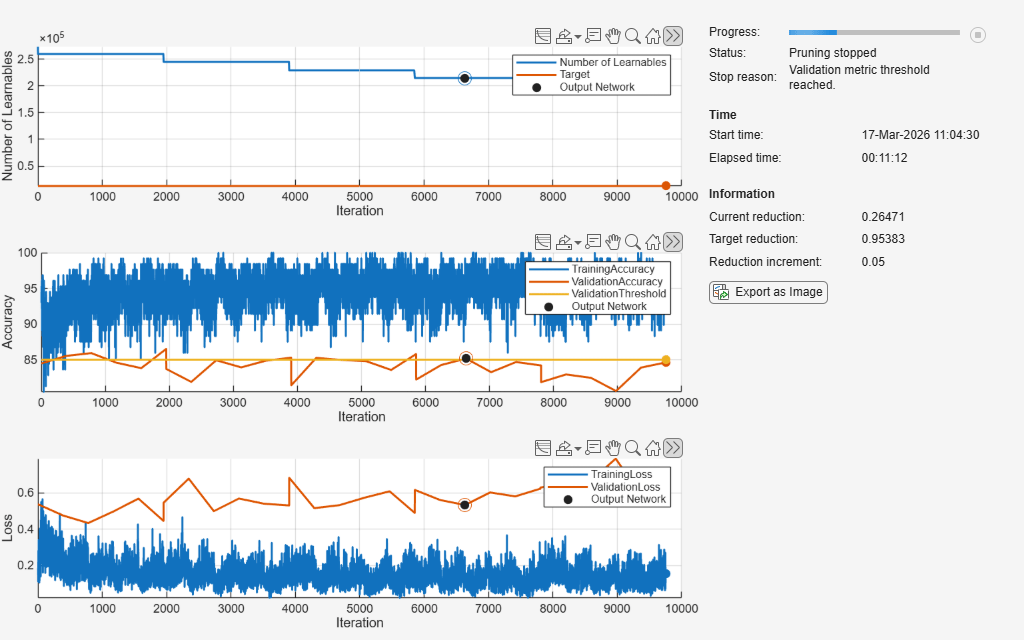
Compressed network has 21.5% fewer learnable parameters.
Pruning compressed 33 layers: "S1U1_conv1","S1U1_BN1","S1U1_conv2","S1U2_conv1","S1U2_BN1","S1U2_conv2","S1U3_conv1","S1U3_BN1","S1U3_conv2","S2U1_conv1","S2U1_BN1","S2U1_conv2","S2U2_conv1","S2U2_BN1","S2U2_conv2","S2U3_conv1","S2U3_BN1","S2U3_conv2","S3U1_conv1","S3U1_BN1","S3U1_conv2","S3U1_BN2","S3U2_conv1","S3U2_BN1","S3U2_conv2","S3U2_BN2","S3U3_conv1","S3U3_BN1","S3U3_conv2","S3U3_BN2","fcFinal","skipConv2","skipBN2"
prunedNet =
  dlnetwork with properties:

         Layers: [74×1 nnet.cnn.layer.Layer]
    Connections: [82×2 table]
     Learnables: [86×3 table]
          State: [42×3 table]
     InputNames: {'input'}
    OutputNames: {'softmax'}
    Initialized: 1

  View summary with summary.
info = struct with fields:
       PruningHistory: [5×3 table]
    ValidationHistory: [24×5 table]
      TrainingHistory: [7800×7 table]
         PrunedLayers: [33×1 string]
           StopReason: "Validation metric threshold reached."
      ProgressMonitor: [1×1 deep.TrainingProgressMonitor]
The pruning progress plot shows that in this example, the function performs 4 pruning iterations. During each iteration, the software tries to remove 5% of learnable parameters, until it reaches the maximum possible compression of 21.5%. At the beginning of each pruning iteration, the loss spikes and the accuracy drops, but both loss and accuracy recover during fine-tuning.
Test Pruned Network
View the pruning and validation history.
info.PruningHistory
ans = 5×3 table
    0    273258         0
    1    259575    0.0501
    2    244950    0.1036
    3    228798    0.1627
    4    214635    0.2145
info.ValidationHistory
ans = 24×5 table
    1       0    0.5365    84.4700    false
    1     390    0.4745    85.5300    false
    1     780    0.4331    85.9200    false
    1    1170    0.4966    84.5800    false
    1    1560    0.5675    83.8100    false
    1    1950    0.4447    86.5100     true
    2       0    0.5451    83.7000    false
    2     390    0.6774    81.8800    false
    2     780    0.4984    84.9200    false
    2    1170    0.5678    83.9200    false
    2    1560    0.5395    84.8700    false
    2    1950    0.5299    85.2800     true
    3       0    0.6823    81.4000    false
    3     390    0.5151    85.2500    false
      ⋮
Evaluate the accuracy of the pruned network using the testnet function.
accuracyPruned = testnet(prunedNet,XTest,TTest,"accuracy")accuracyPruned = 85.1500
The pruned network satisfies the accuracy requirement and is 21.45% smaller than the original network.
See Also
compressNetworkUsingTaylorPruning | trainnet | trainingOptions | testnet

