Test Deep Learning Network for ECG Signal Classification
R2026bThis example show how to test a deep neural network for ECG signal classification. This example is step five in a series of examples that take you through an ECG signal classification workflow. This example follows the Improve Adversarial Robustness of Deep Learning Network for ECG Signal Classification example. For more information about the full workflow, see ECG Signal Classification Using Deep Learning.
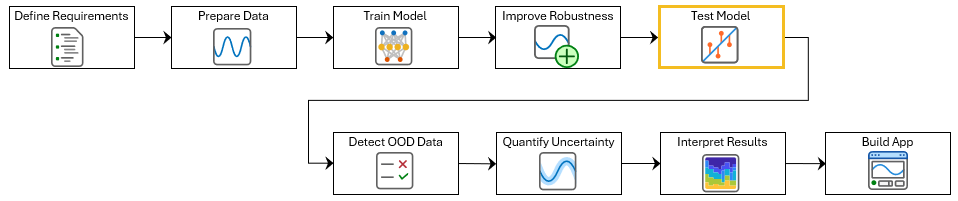
To run this example, open ECG Signal Classification Using Deep Learning and navigate to scripts\S5_TestNetwork. Alternatively, if you already have MATLAB open, then run
openExample("deeplearning_shared/ECGSignalClassificationUsingDeepLearningExample")This project contains all of the steps for this workflow. You can run the scripts in order or run each one independently.
You can test how well a deep learning network generalizes to new data by evaluating its performance on a separate testing set that the model did not see during training. To test a network, use it to generate predictions on test data and compare these predictions to the true labels. You can then calculate performance metrics such as accuracy, root means squared error (RMSE), precision, and recall.
During model development, you typically test the network interactively and iterate until the performance is satisfactory. Once you are confident in the results, formalize these checks as unit tests linked to requirements. This approach provides traceability and allows you to rerun the tests whenever the model or related components change.
This example shows how to test the accuracy and the false negative rate of the network. The false negative rate is the percentage of atrial fibrillation signals incorrectly classified as Normal. You will also verify that the network meets the requirements defined in Define Requirements for ECG Signal Classification Using Deep Learning.
Load the test data. If you have run the previous step, Prepare Data for ECG Signal Classification, then the example uses the data that you prepared in that step. Otherwise, the example prepares the data as shown in Prepare Data for ECG Signal Classification.
if ~exist("XTest","var") || ~exist("TTest","var")
    [~,~,~,~,XTest,TTest] = prepareECGData;
end
If you have run the previous step, Improve Adversarial Robustness of Deep Learning Network for ECG Signal Classification, then the example uses your robust trained network. Otherwise, load a pretrained network that has been trained using the steps shown in Improve Adversarial Robustness of Deep Learning Network for ECG Signal Classification.
if ~exist("netRobust","var")
    load("adversariallyTrainedECGNetwork.mat");
end
Test Accuracy
Test the accuracy of the neural network using the testnet function. By default, the testnet function uses a GPU if one is available. To select the execution environment yourself, use the ExecutionEnvironment argument of the testnet function.
accuracy = testnet(netRobust,XTest,TTest,"accuracy",InputDataFormats="CTB")
accuracy =
80.1887
Test False Negative Rate
To evaluate the false negative rate (FNR), first make predictions by using the minibatchpredict function. Convert the scores to labels by using the scores2label function.
scores = minibatchpredict(netRobust,XTest,InputDataFormats="CTB");
YTest = scores2label(scores,categories(TTest));
Next, identify the test samples where the true label is Atrial Fibrillation ("A") and the predicted label is Normal ("N").
isAFib = (TTest == "A");
isPredNorm = (YTest == "N");
Count the total number of Atrial Fibrillation signals in the test set and the number of false negatives, that is, atrial fibrillation signals that the network incorrectly predicts as normal.
numPositives = sum(isAFib);
numFalseNegatives = sum(isAFib & isPredNorm);
Calculate the false negative rate as the proportion of atrial fibrillation signals incorrectly classified as normal.
falseNegativeRate = numFalseNegatives / numPositives
falseNegativeRate =
0.0280
Use the confusionchart function to display the classification results in a confusion chart. With the Normalization argument set to "row-normalized", the upper right cell displays the false negative rate.
figure
confusionchart(TTest,YTest,Normalization="row-normalized");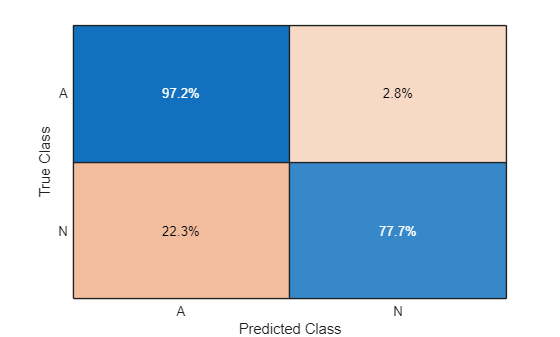
The network performs well on test data from the same distribution as the training data. However, in production, the network might encounter data that differs from the training set, which can lead to unreliable predictions. In the next step of the workflow, you will use out-of-distribution detection to identify unfamiliar data and warn an operator not to trust the predictions.
Optionally, if you have Requirements Toolbox™, then you can link and test network requirements in the next section.
Verify Network Requirements with MATLAB Tests
If you have Requirements Toolbox™, then you can verify requirements in your project by linking them to tests in the project. You can then use Requirements Editor (Requirements Toolbox) to run the tests and view the verification status of the requirements. For more information about creating requirements, see Define Requirements for ECG Signal Classification Using Deep Learning.
Save the test metrics. You will use these to verify the network requirements.
networkMetricsPath = fullfile(currentProject().RootFolder,"models","NetworkMetrics.mat");
save(networkMetricsPath,"accuracy","falseNegativeRate");
Open the preauthored test file testNetworkRequirements. This file contains tests to check the network requirements.
edit testNetworkRequirements.m
Select the function declaration line for the test testNetworkAccuracy. The testNetworkAccuracy function checks that accuracy of the predictions made by the network on the test set is at least 75%.

Open the network requirements set in the Requirements Editor.
slreq.open("NetworkRequirements.slreqx");
Select the Classification Accuracy >= 75% requirement:

In the toolstrip, click Add Link > Link from Selection in MATLAB Editor.
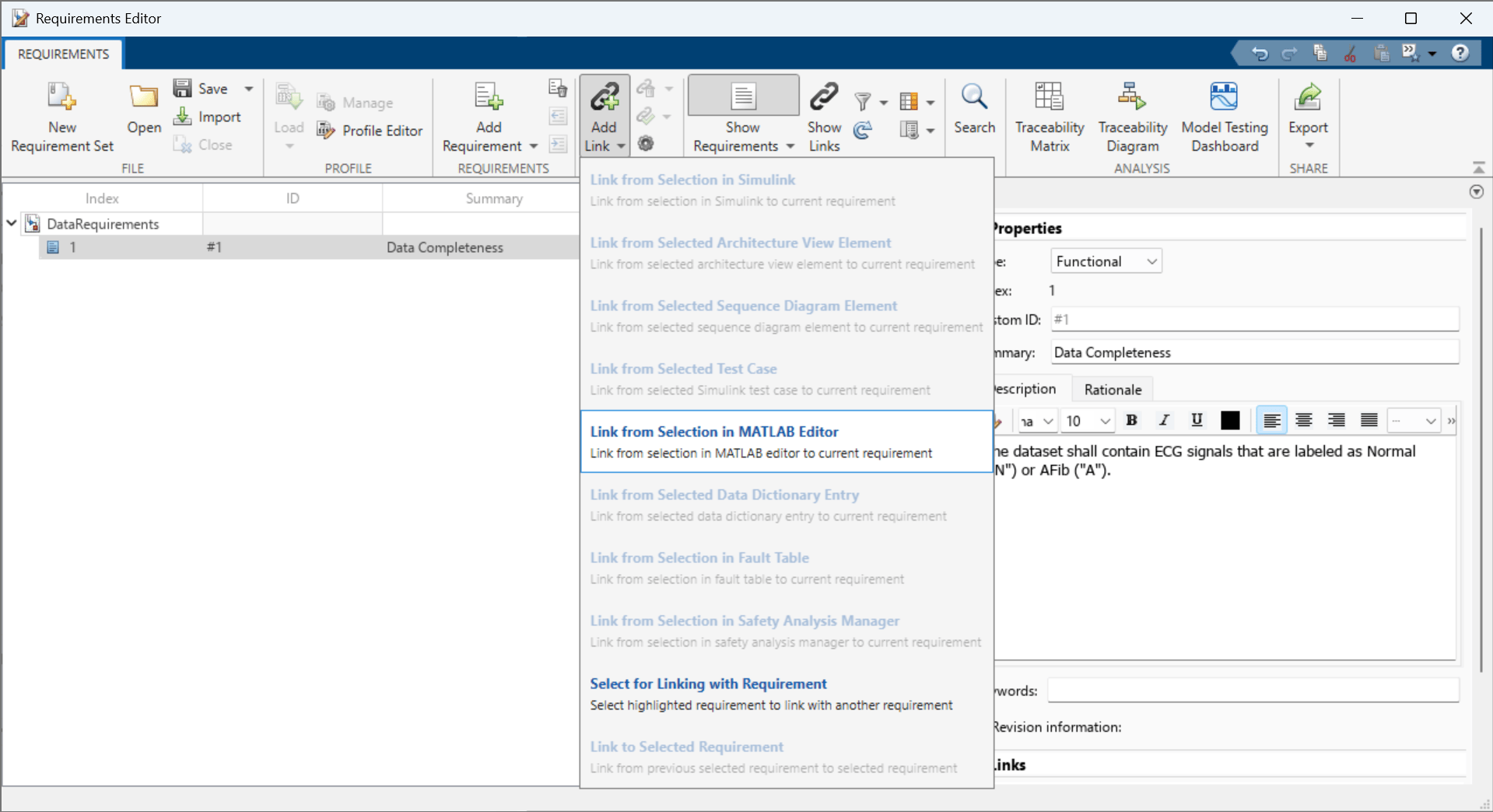
Repeat these steps to link the testNetworkFalseNegativeRate function to the Classifier FNR <= 20% requirement.
To add columns that indicate the implementation and verification status of the requirements, click Columns and then select Implementation Status and Verification Status.
In the Requirements Editor, right-click on the requirements set NetworkRequirements and click Run Tests. To run all tests linked to these requirements, in the Run Tests dialog box, select all of the tests and click Run Tests. If the tests pass, then the verification statuses turn to green.

See Also
Requirements
Editor (Requirements Toolbox) | trainnet | testnet

