actorPoses
R2026bPositions, velocities, and orientations of actors in driving scenario
Description
poses = actorPoses(scenario)scenario. Actors include
Actor objects, Vehicle objects, and
Barrier segments, which you can create using the actor, vehicle and barrier functions, respectively. Actor poses are in scenario
coordinates.
Examples
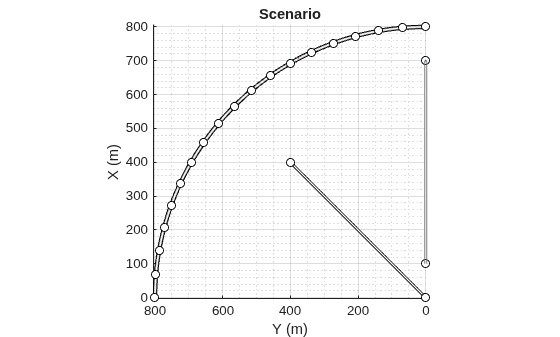
Create a driving scenario containing a curved road, two straight roads, and two actors: a car and a bicycle. Both actors move along the road for 60 seconds.
Create the driving scenario object.
scenario = drivingScenario('SampleTime',0.1','StopTime',60);
Create the curved road using road center points following the arc of a circle with an 800-meter radius. The arc starts at 0°, ends at 90°, and is sampled at 5° increments.
angs = [0:5:90]';
R = 800;
roadcenters = R*[cosd(angs) sind(angs) zeros(size(angs))];
roadwidth = 10;
cr = road(scenario,roadcenters,roadwidth);
Add two straight roads with the default width, using road center points at each end. To the first straight road add barriers on both road edges.
roadcenters = [700 0 0; 100 0 0];
sr1 = road(scenario,roadcenters);
barrier(scenario,sr1)
barrier(scenario,sr1,'RoadEdge','left')
roadcenters = [400 400 0; 0 0 0];
road(scenario,roadcenters);
Get the road boundaries.
rbdry = roadBoundaries(scenario);
Add a car and a bicycle to the scenario. Position the car at the beginning of the first straight road.
car = vehicle(scenario,'ClassID',1,'Position',[700 0 0], ...
    'Length',3,'Width',2,'Height',1.6);
Position the bicycle farther down the road.
bicycle = actor(scenario,'ClassID',3,'Position',[706 376 0]', ...
    'Length',2,'Width',0.45,'Height',1.5);
Plot the scenario.
plot(scenario,'Centerline','on','RoadCenters','on');
title('Scenario');
Display the actor poses and profiles.
allActorPoses = actorPoses(scenario)
allActorPoses = 242×1 struct array with fields:
    ActorID
    Position
    Velocity
    Roll
    Pitch
    Yaw
    AngularVelocity
allActorProfiles = actorProfiles(scenario)
allActorProfiles = 242×1 struct array with fields:
    ActorID
    ClassID
    Length
    Width
    Height
    OriginOffset
    MeshVertices
    MeshFaces
    RCSPattern
    RCSAzimuthAngles
    RCSElevationAngles
Because there are barriers in this scenario, and each barrier segment is considered an actor, actorPoses and actorProfiles functions return the poses of all stationary and non-stationary actors. To only obtain the poses and profiles of non-stationary actors such as vehicles and bicycles, first obtain their corresponding actor IDs using the scenario.Actors.ActorID property.
movableActorIDs = [scenario.Actors.ActorID];
Then, use those IDs to filter only non-stationary actor poses and profiles.
movableActorPoseIndices = ismember([allActorPoses.ActorID],movableActorIDs);

movableActorPoses = allActorPoses(movableActorPoseIndices)
movableActorPoses = 2×1 struct array with fields:
    ActorID
    Position
    Velocity
    Roll
    Pitch
    Yaw
    AngularVelocity
movableActorProfiles = allActorProfiles(movableActorPoseIndices)
movableActorProfiles = 2×1 struct array with fields:
    ActorID
    ClassID
    Length
    Width
    Height
    OriginOffset
    MeshVertices
    MeshFaces
    RCSPattern
    RCSAzimuthAngles
    RCSElevationAngles
Input Arguments
Output Arguments
Version History
Introduced in R2017a

