configure
Description
Add-On Required: This feature requires the Automated Driving Toolbox Test Suite for Euro NCAP Protocols add-on.
configure(
configures options for plotting or simulating the scenarios in the scenario descriptor plot
data scenarioDescriptorPlotObj,Name=Value)scenarioDescriptorPlotObj using one or more name-value arguments.
Specified configuration options also apply to the current plot or simulation figure
associated with scenarioDescriptorPlotObj.
Examples
Load a driving scenario into the workspace.
load("scenarioWithSingleActor.mat")Create a scenario descriptor from the loaded driving scenario.
scenarioDescriptor = getScenarioDescriptor(sc);
Plot the first frame of the scenario simulation from the scenario descriptor object.
plot(scenarioDescriptor)
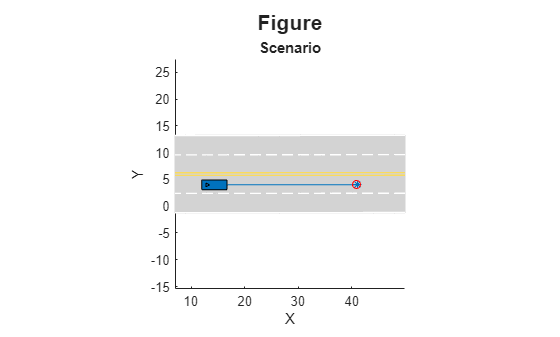
Create a scenario descriptor plot object from the scenario descriptor object.
scenarioDescriptorPlotObj = plot(scenarioDescriptor)
scenarioDescriptorPlotObj =
ScenarioDescriptorPlot with properties:
SimulationTime: 0
MaxSimulationTime: 0.9300
NumDescriptors: 1
FigureHandles: [1×1 Figure]
Waypoints: "StartEnd"
CropType: "None"
XLimit: []
YLimit: []
ZLimit: []
Title: "Figure"
SubPlotTitles: "Scenario"
GridSize: []
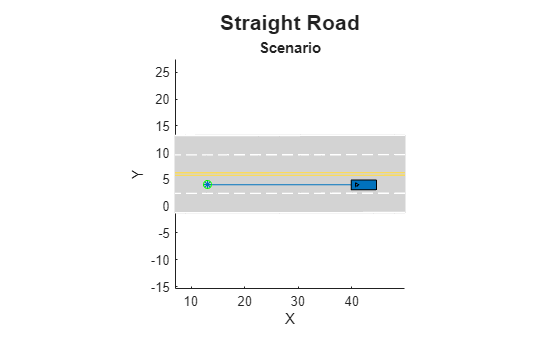
Configure the scenario descriptor plot object to change the title.
configure(scenarioDescriptorPlotObj,Title="Straight Road")Play the entire scenario simulation, instead of displaying only the first frame of the scenario.
play(scenarioDescriptorPlotObj)
Close the scenario descriptor plot.
close(scenarioDescriptorPlotObj)
Load a MAT file containing two scenario descriptors.
load("scenarioDescriptors")Plot the first frames of the scenario simulations for both loaded scenario descriptors in a single figure.
scenarioDescriptorPlotObj = plot(scenarioDescriptors)
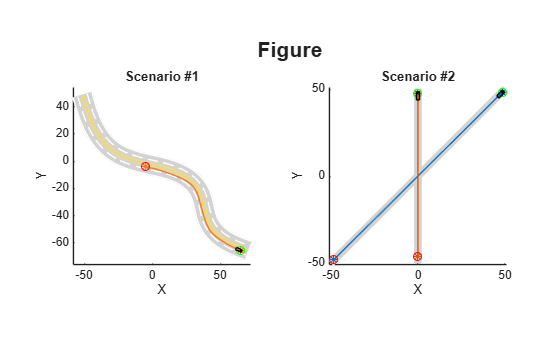
scenarioDescriptorPlotObj =
ScenarioDescriptorPlot with properties:
SimulationTime: [2×1 double]
MaxSimulationTime: [2×1 double]
NumDescriptors: 2
FigureHandles: [1×1 Figure]
Waypoints: "StartEnd"
CropType: "None"
XLimit: []
YLimit: []
ZLimit: []
Title: "Figure"
SubPlotTitles: ["Scenario #1" "Scenario #2"]
GridSize: []
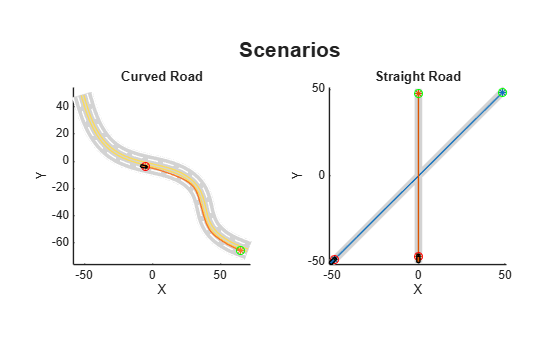
Configure the scenario descriptor plot object to change the title and subplot titles.
configure(scenarioDescriptorPlotObj,Title="Scenarios",SubPlotTitles=["Curved Road" "Straignt Road"])
Play the entirety of both scenario simulations, instead of displaying only the first frame of each.
play(scenarioDescriptorPlotObj)
Close the scenario descriptor plot.
close(scenarioDescriptorPlotObj)
Input Arguments
Scenario descriptor plot data, specified as a ScenarioDescriptorPlot object.
Name-Value Arguments
Specify optional pairs of arguments as
Name1=Value1,...,NameN=ValueN, where Name is
the argument name and Value is the corresponding value.
Name-value arguments must appear after other arguments, but the order of the
pairs does not matter.
Example: configure(scenarioDescriptorPlot,Waypoints="StartEnd")
configures the scenario descriptor plot object to display the start and end waypoints of the
actor trajectory, and updates the current plot or simulation figure.
Display actor waypoints, specified as "on",
"off", or "StartEnd".
By default, the plot
function displays the start and end waypoints of the actor trajectory.
This argument sets the Waypoints property of
scenarioDescriptorPlotObj.
Crop scenario to plot and simulate, specified as one of these options:
"None"— Does not crop when you plot or simulate the scenario."GlobalWaypoint"— Crops the scenario with reference to all waypoints in the scenario."DynamicWaypoint"— Crops the scenario with reference to the actor waypoints."RuntimeActorsCrop"— Crops the scenario around the actor on runtime simulation.
This argument sets the CropType property of
scenarioDescriptorPlotObj.
Minimum and maximum x-axis limits, specified as a two-element row vector.
This argument sets the XLimit property of
scenarioDescriptorPlotObj.
Data Types: double
Minimum and maximum y-axis limits, specified as a two-element row vector.
This argument sets the YLimit property of
scenarioDescriptorPlotObj.
Data Types: double
Minimum and maximum z-axis limits, specified as a two-element row vector.
This argument sets the ZLimit property of
scenarioDescriptorPlotObj.
Data Types: double
Title of the plot or the scenario simulation, specified as a string scalar or character vector.
This argument sets the Title property of
scenarioDescriptorPlotObj.
Data Types: string | char
Subtitles of the plot or the scenario simulation, specified as a string scalar, an N-element string array, character vector, or an N-element cell array of character vectors. N is the number of input scenario descriptors.
If you specify a string scalar or character vector, the plot,
play, and
seek
functions appends an incremental numeric integer at the end of the specified plot
subtitle for each subplot. For example, if you specify
SubPlotTitles="Scenario", and the scenario descriptor contains
two scenarios, the plot,
play, and
seek
functions displays the subtitles for the first and second subplots as
Scenario #1 and Scenario #2,
respectively.
This argument sets the SubPlotTitles property of
scenarioDescriptorPlotObj.
Data Types: string | char | cell
Grid size to display the scenarios, specified as a two-element row vector of the
form [nrows, ncols].
This argument sets the GridSize property of
scenarioDescriptorPlotObj.
Data Types: double
Version History
Introduced in R2026a
See Also
ScenarioDescriptorPlot | plot | play | seek | close | getScenarioDescriptor | getScenario | drivingScenario
MATLAB Command
You clicked a link that corresponds to this MATLAB command:
Run the command by entering it in the MATLAB Command Window. Web browsers do not support MATLAB commands.
选择网站
选择网站以获取翻译的可用内容,以及查看当地活动和优惠。根据您的位置,我们建议您选择:。
您也可以从以下列表中选择网站:
如何获得最佳网站性能
选择中国网站(中文或英文)以获得最佳网站性能。其他 MathWorks 国家/地区网站并未针对您所在位置的访问进行优化。
美洲
- América Latina (Español)
- Canada (English)
- United States (English)
欧洲
- Belgium (English)
- Denmark (English)
- Deutschland (Deutsch)
- España (Español)
- Finland (English)
- France (Français)
- Ireland (English)
- Italia (Italiano)
- Luxembourg (English)
- Netherlands (English)
- Norway (English)
- Österreich (Deutsch)
- Portugal (English)
- Sweden (English)
- Switzerland
- United Kingdom (English)