ScenarioDescriptorPlot
R2026bDescription
Add-On Required: This feature requires the Automated Driving Toolbox Test Suite for Euro NCAP Protocols add-on.
The ScenarioDescriptorPlot object contains properties you can use to plot and simulate
the scenario obtained from a scenario descriptor object. To configure the properties of the
ScenarioDescriptorPlot object, use the configure object
function. To plot a specific frame of the scenario simulation, use the seek object
function. To instead play the entire scenario simulation, use the play object
function.
Creation
Create a ScenarioDescriptorPlot object by using the plot
function.
Properties
Object Functions
Examples
Load a driving scenario into the workspace.
load("scenarioWithSingleActor.mat")Create a scenario descriptor from the loaded driving scenario.
scenarioDescriptor = getScenarioDescriptor(sc);
Plot the first frame of the scenario simulation from the scenario descriptor object.
plot(scenarioDescriptor)
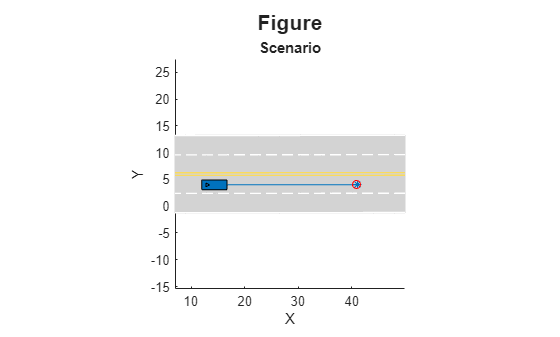
Create a scenario descriptor plot object from the scenario descriptor object.
scenarioDescriptorPlotObj = plot(scenarioDescriptor)
scenarioDescriptorPlotObj =
  ScenarioDescriptorPlot with properties:

       SimulationTime: 0
    MaxSimulationTime: 0.9300

       NumDescriptors: 1
        FigureHandles: [1×1 Figure]

            Waypoints: "StartEnd"
             CropType: "None"
               XLimit: []
               YLimit: []
               ZLimit: []
                Title: "Figure"
        SubPlotTitles: "Scenario"
             GridSize: []
Configure the scenario descriptor plot object to change the title.
configure(scenarioDescriptorPlotObj,Title="Straight Road")Play the entire scenario simulation, instead of displaying only the first frame of the scenario.
play(scenarioDescriptorPlotObj)
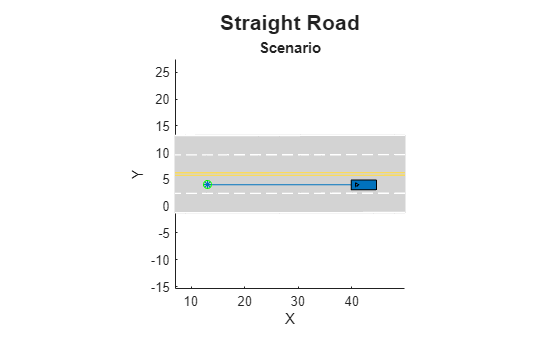
Close the scenario descriptor plot.
close(scenarioDescriptorPlotObj)
Load a MAT file containing two scenario descriptors.
load("scenarioDescriptors")Plot the first frames of the scenario simulations for both loaded scenario descriptors in a single figure.
scenarioDescriptorPlotObj = plot(scenarioDescriptors)
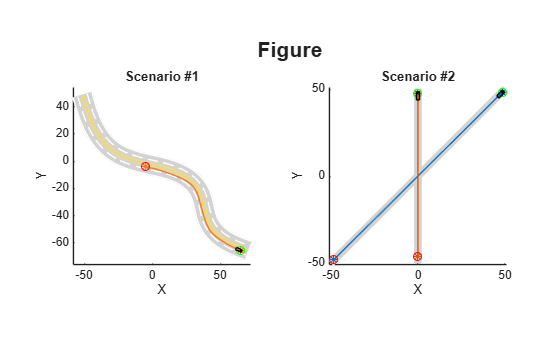
scenarioDescriptorPlotObj =
  ScenarioDescriptorPlot with properties:

       SimulationTime: [2×1 double]
    MaxSimulationTime: [2×1 double]

       NumDescriptors: 2
        FigureHandles: [1×1 Figure]

            Waypoints: "StartEnd"
             CropType: "None"
               XLimit: []
               YLimit: []
               ZLimit: []
                Title: "Figure"
        SubPlotTitles: ["Scenario #1"    "Scenario #2"]
             GridSize: []
Configure the scenario descriptor plot object to change the title and subplot titles.
configure(scenarioDescriptorPlotObj,Title="Scenarios",SubPlotTitles=["Curved Road" "Straight Road"])
Play the entirety of both scenario simulations, instead of displaying only the first frame of each.
play(scenarioDescriptorPlotObj)
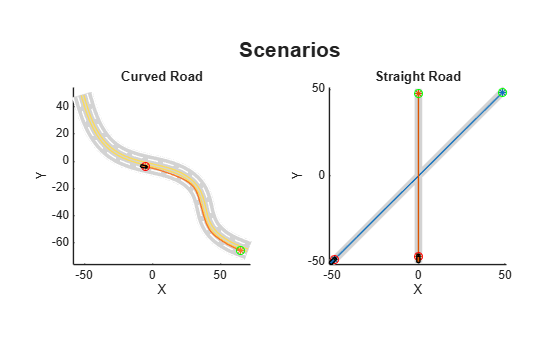
Close the scenario descriptor plot.
close(scenarioDescriptorPlotObj)
Limitations
The
plot,play, andseekfunctions display the lane markings at a junction if that junction has been created without using theroadGroupfunction.The
plot,play, andseekfunctions do not support Composite Lane Marking and lanes created using thecompositeLaneSpecobject.
Version History
Introduced in R2026a
See Also
plot | configure | play | seek | close | getScenarioDescriptor | getScenario | drivingScenario

