Load, Create, and Use Optical Materials
R2026bUsing the Optical Design and Simulation Library for Image Processing Toolbox™, you can load optical materials from default coating and glass libraries, or create custom materials. Use these materials for optical coating layers, as bulk glass materials for lenses, and as substrate materials for mirrors.
Use Materials from Default Libraries
You can specify glass materials for bulk refractive regions in lenses using materials loaded from the glass library, and you can specify materials for optical coating layers using materials loaded from the coating library. You can load materials from the libraries into the workspace, search glasses in the glass library by name hint and optical properties, and add materials to or remove them from the libraries. This table summarizes the functionalities for each type of library.
| Library Type | Access Material from Library | Add Materials to Library | Remove Materials from Library | Restore Default Library |
|---|---|---|---|---|
GlassLibrary — Glass library containing bulk glass
materials |
| addGlassCatalog | removeGlassCatalog |
restoreDefaultGlassLibrary |
CoatingMaterialLibrary — Coating material library containing
coating materials |
| addCoatingMaterial | removeCoatingMaterial | restoreDefaultCoatingMaterialLibrary
|
For information on instead creating a custom material, see Create Custom Optical Materials.
Apply Material from Glass Library to Lens Element
To use a material from the glass library, first load the glass library using the
GlassLibrary
object. Optionally, you can import a material catalog from a specified file location
into the glass library using the addGlassCatalog
function.
gl = glassLibrary;
To find the H-ZF2 glass material, search the glass library for all the materials
whose names are similar to "H-ZF2" using the searchGlassLibrary
function.
searchGlassLibrary(NameHint="H-ZF2")
ans =

  13×6 table

      Name         Catalog          Nd        Vd      WavelengthRange         Material
    ________    ______________    ______    ______    _______________    ___________________

    "H-ZF2"     "CDGM"            1.6727    32.171      365     2325     1×1 opticalMaterial
    "H-ZF2"     "EDMUNDOPTICS"    1.6727    32.179      365     1014     1×1 opticalMaterial
    "H-ZK2"     "CDGM"            1.5831     59.46      302     2325     1×1 opticalMaterial
    "H-F2"      "CDGM"            1.6129    37.004      365     2325     1×1 opticalMaterial
    "H-ZF1"     "CDGM"            1.6477     33.84      365     2325     1×1 opticalMaterial
    "H-ZF3"     "CDGM"            1.7174    29.499      365     2325     1×1 opticalMaterial
    "H-ZF5"     "CDGM"              1.74    28.296      365     2325     1×1 opticalMaterial
    "H-ZF6"     "CDGM"            1.7552     27.53    404.7     2325     1×1 opticalMaterial
    "H-ZF12"    "CDGM"            1.7618    26.608    404.7     2325     1×1 opticalMaterial
    "H-ZF52"    "CDGM"            1.8467    23.784    404.7     2325     1×1 opticalMaterial
    "H-ZF62"    "CDGM"            1.9229     20.88    404.7     2325     1×1 opticalMaterial
    "H-ZF6"     "EDMUNDOPTICS"    1.7552    27.547      365     1711     1×1 opticalMaterial
    "H-ZF52"    "EDMUNDOPTICS"    1.8467    23.787      365     1014     1×1 opticalMaterial
Because the H-ZF2 glass material appears in more than one glass catalog, you can
select the catalog to use by changing the catalog priority order. Check the default
catalog priority by displaying the GlassCatalogTable property of
the GlassLibrary object.
gl.GlassCatalogTable
ans =

  6×3 table

    Index         Name                                                                       File
    _____    ______________    ________________________________________________________________________________________________________________________________

      1      "SCHOTT"          "C:\ProgramData\MATLAB\SupportPackages\R2026aPrerelease_6\toolbox\images\supportpackages\optics\catalogs\glass\SCHOTT.AGF"
      2      "HIKARI"          "C:\ProgramData\MATLAB\SupportPackages\R2026aPrerelease_6\toolbox\images\supportpackages\optics\catalogs\glass\HIKARI.AGF"
      3      "OHARA"           "C:\ProgramData\MATLAB\SupportPackages\R2026aPrerelease_6\toolbox\images\supportpackages\optics\catalogs\glass\OHARA.AGF"
      4      "SUMITA"          "C:\ProgramData\MATLAB\SupportPackages\R2026aPrerelease_6\toolbox\images\supportpackages\optics\catalogs\glass\SUMITA.AGF"
      5      "CDGM"            "C:\ProgramData\MATLAB\SupportPackages\R2026aPrerelease_6\toolbox\images\supportpackages\optics\catalogs\glass\CDGM.AGF"
      6      "EDMUNDOPTICS"    "C:\ProgramData\MATLAB\SupportPackages\R2026aPrerelease_6\toolbox\images\supportpackages\optics\catalogs\glass\EDMUNDOPTICS.AGF"
To use an H-ZF2 glass material from the EDMUNDOPTICS catalog
instead of the CDGM catalog, use the changePriority object function to move the
EDMUNDOPTICS catalog to a higher priority.
changePriority(gl,"EDMUNDOPTICS",5);Select the H-ZF2 glass material from the EDMUNDOPTICS catalog and
preview its properties by using the pickGlass
function.
ZF2Glass = pickGlass("H-ZF2")ans =
opticalMaterial with properties:
Main Properties
Name: "H-ZF2"
Catalog: "EDMUNDOPTICS"
Nd: 1.6727
Vd: 32.1789
WavelengthRange: [365 1014]
Extended Properties
RefractiveIndexMethod: "Schott"
RefractiveIndexParameter: [2.7075 -0.0088 0.0307 2.4016e-04 8.9343e-05 3.6523e-06 0 0 0 0]
TransmissionParameters: [27×3 double]
RawCatalogData: [1×1 struct]After you load a material as an opticalMaterial object into your
workspace, specify it to the Material name-value argument of the
addRefractiveSurface function, when you create a lens, or the addMirror
function, when you create a mirror.
Create an optical system, and add the surfaces that comprise a singlet lens to the
optical system using the addRefractiveSurface function. Specify the material of the lens as the
H-ZF2 glass using the Material
opsys = opticalSystem;
addRefractiveSurface(opsys,Radius=10,DistanceToNext=4,Material="H-ZF2")
addRefractiveSurface(opsys)
For an example of how to filter the glass library and select a material based on its properties and optical response, see Select Optical Material for Optical System.
Apply Material from Coating Material Library to Optical Coating
To use a material from the coating material library, first load the coating library
using the CoatingMaterialLibrary
object.
cml = coatingMaterialLibrary;
Select the HfO2 coating material and preview its properties by
using the pickCoatingMaterial
function.
pickCoatingMaterial("HfO2")ans =
opticalMaterial with properties:
Main Properties
Name: "HfO2"
Catalog: "RefractiveIndex.INFO"
Nd: 2.0938
Vd: 36.6557
WavelengthRange: [0 Inf]
Extended Properties
RefractiveIndexMethod: "LookupTable"
RefractiveIndexParameter: [2431×2 double]
ExtinctionCoefficientParameters: [2431×2 double]
RawCatalogData: [1×1 struct]Create an optical coating using the opticalCoating object. Specify coating materials by setting the
CoatingMaterial property of the
opticalCoating object. Specify the substrate as the coating material
SiO2 by setting the Substrate property of the opticalCoating
object.
ocAR_HfO2 = opticalCoating( ...
    Name="AR_HfO2_Visible", ...
    CoatingMaterial=["HfO2" "SiO2"], ...
    LayerMaterialIndex=[1 2 1 2], ...
    ThicknessUnit="nm", ...
    LayerThickness=[20 40 80 100], ...
    Substrate="SiO2", ...
    WavelengthRange=[400 700]);
To learn more about how to apply coatings to lens elements and mirror surfaces, see Apply Optical Coatings.
Create Custom Optical Materials
In addition to loading materials from default libraries, you can create custom optical
materials using the opticalMaterial
object.
Create a custom optical material, CaF2, using the
opticalMaterial object.
Specify the Sellmeier equation as the refractive index method by setting the
RefractiveIndexMethod property to "Sellmeier".
Set the RefractiveIndexParameter property to the explicit squared
Sellmeier coefficient values. Since the Sellmeier equation measures refractive index data
over a certain spectral range, set the WavelengthRange property to the
wavelength range between the ultraviolet absorption edge, 180 nm, and the infrared
absorption edge, 8000
nm.
omCaF2 = opticalMaterial( ...
    Name="CaF2_Sellmeier", ...
    RefractiveIndexMethod="Sellmeier", ...
    RefractiveIndexParameter=[ ...
        0.5675888 0.00252643 ...
        0.4710914 0.01007838 ...
        3.8484723 1200.5670], ...
    WavelengthRange=[180 8000]);
After you create a custom optical material, you can specify it to the
Material name-value argument of the addRefractiveSurface function, when you create a lens, or the addMirror
function, when you create a mirror.
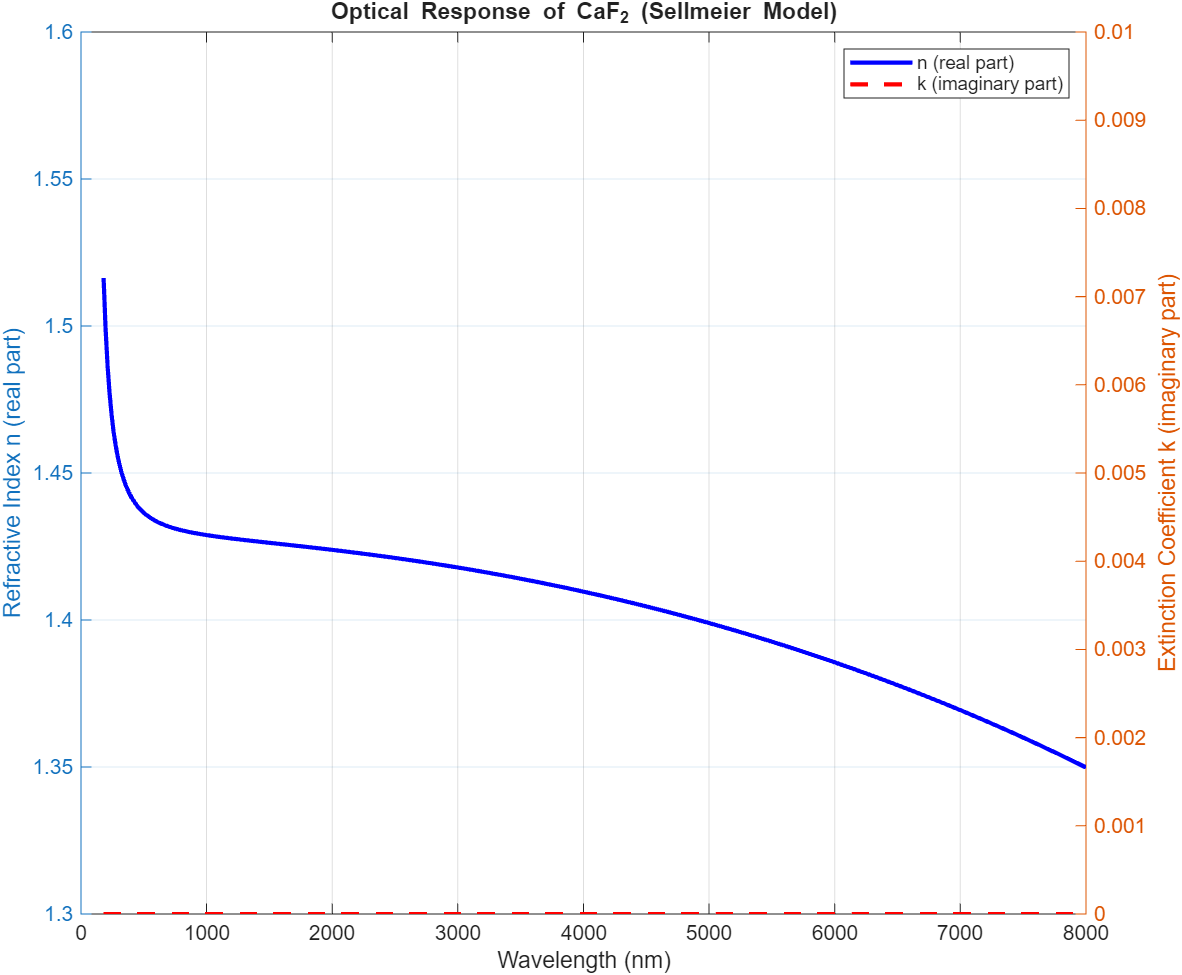
Compute and Visualize Dispersion Curve
After you load an optical material from a library or create an optical material using
the opticalMaterial object, you can compute its dispersion curve using the
refractiveIndex object function.
For example, to visualize the dispersion plot for the new the new CaF2 material, first define the wavelength range. Units are in nanometers.
lambdas = omCaF2.WavelengthRange(1):100:omCaF2.WavelengthRange(2);
Compute the complex-valued refractive index of the material using the
refractiveIndex
function.
n_complex = refractiveIndex(omCaF2,lambdas);
Extract the real and imaginary parts of the refractive index.
n_real = real(n_complex);
n_imag = imag(n_complex);
Plot the refractive index across the wavelength range.
figure
yyaxis left
plot(lambdas,n_real,"b-",LineWidth=2)
ylabel("Refractive Index n (real part)")
ylim([1.3 1.6])

yyaxis right
plot(lambdas,n_imag,"r--",LineWidth=2)
ylabel("Extinction Coefficient k (imaginary part)")
ylim([0 0.01])

xlabel("Wavelength (nm)")
title("Optical Response of CaF_2 (Sellmeier Model)")
legend("n (real part)","k (imaginary part)")
grid on