insCFGPS
R2026bDescription
The insCFGPS object models GPS readings for insCF sensor fusion. When
creating an insCF filter object, you can specify an
insCFGPS object to enable the filter to use GPS data to correct
position.
Creation
Description
sensor = insCFGPSinsCFGPS object. You can specify the
insCFGPS object when creating an insCF object to enable
the insCF object to fuse GPS data.
sensor = insCFGPS(PropertyName=Value)ReferenceLocation=[1 1 1] sets the reference location of the GPS
sensor model to a latitude of 1 degree, longitude of 1 degree, and altitude of 1
meter.
Properties
Examples
Estimate pose (orientation and position) and velocity from IMU and GPS data by using a complementary filter, represented by an insCF filter object.
Load the racetrackINSCFDataset.mat file, which contains a timetable with simulated accelerometer, gyroscope, magnetometer, and GPS sensor data for a racetrack-like trajectory, into the workspace. The file also contains the sample rate of the data.
load("raceTrackINSCFDataset.mat")Create an insCF filter object that includes the accelerometer, gyroscope, magnetometer, and GPS sensor objects, as well as an insCFMotionPose motion model object for modeling pose.
% Sensor object for predicting orientation
gyro = insCFGyroscope;
% Sensor objects for correcting orientation
accel = insCFAccelerometer;
mag = insCFMagnetometer;
% Sensor object for correcting position
gps = insCFGPS(ReferenceLocation=localOrigin);

% Pose motion model
motModel = insCFMotionPose;

% Filter object
filt = insCF(accel,mag,gyro,gps,motModel);
Specify the initial position, velocity, and orientation from the measurement data.
% Set initial position
stateparts(filt,"Position",initPos)
% Set initial orientation
stateparts(filt,"Orientation",initOrient)
% Set initial velocity
stateparts(filt,"Velocity",initVel)
Specify the sensor gains.
% Set Accelerometer gain
gainparts(filt,"Accelerometer",9.6335e-09)
% Set Magnetometer gain
gainparts(filt,"Magnetometer",0.01)
% Set GPS gain
gainparts(filt,"GPS",0.039246)
Fuse the sensor data using the filter. The filter estimates pose (orientation and position) and velocity. Extract the estimated position.
outTT = estimateStates(filt,sensorData);
estPos = outTT.Position;
Calculate the position RMS error.
posErr = truePos - estPos;
pRMS = sqrt(mean(posErr.^2));
fprintf("Position RMS Error:\tX: %.3f, Y: %.3f, Z: %.3f (meters) \n", pRMS(1),pRMS(2),pRMS(3))
Position RMS Error: X: 0.372, Y: 0.493, Z: 0.303 (meters)
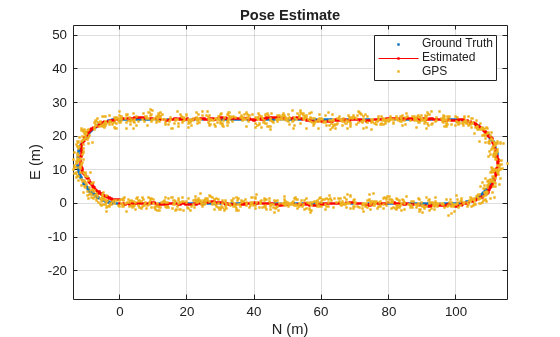
Visualize the estimated pose against the ground truth and GPS data.
figure
plot(truePos(:,1),truePos(:,2),".")
hold on
plot(estPos(:,1),estPos(:,2),"r.-")
gpsLocal = lla2ned(sensorData.GPS,localOrigin,"flat");
plot(gpsLocal(:,1),gpsLocal(:,2),".")

title("Pose Estimate")
legend("Ground Truth","Estimated","GPS")

grid on
xlabel("N (m)")
ylabel("E (m)")
axis equal
Extended Capabilities
Version History
Introduced in R2026a

