polysweepoptsbous
R2026bDescription
The polysweepoptsbous object stores options for sweeping a
polygon with a boustrophedon pattern using the polygonSweep
function.
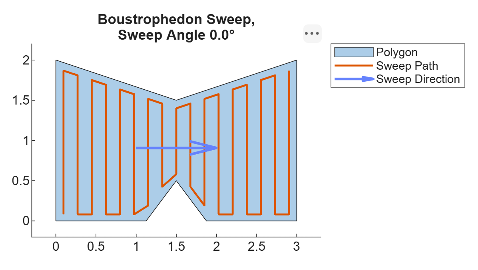
This figure shows an example of a polygon swept with a boustrophedon pattern with a sweep
angle of 0 and the boundary behavior set to “inset”. Note that the sweep
angle refers to the angle of the sweep direction, not the lines of the sweep path.
Creation
Description
polysweepoptsbous creates a polygon sweep options object with
default properties.
polysweepoptsbous( sets
one or more properties using name-value arguments.PropertyName=Value)
Properties
Geometry of the tool used to sweep the coverage path, specified as a polyshape
object. The (0, 0) point of the polyshape aligns with the sweep
path.
Example:
polyshape([-1 1 4 -4],[2 2 -2 -2])
Orientation of the sweep tool relative to the sweep path, specified as
"fixed" or "oriented".
"fixed"— Fix the tool orientation to the initial positive sweep-line direction."oriented"— Realign the tool to the direction of each sweep line.
Desired sweep angle, specified as either a numeric scalar in the range [0, 2π) or
NaN. If you specify NaN, the
polygonSweep function attempts to determine the optimal sweep
angle for the specified polygon.
The sweep angle determines the sweep direction.
Initial and final path directions normal to the desired sweep angle, specified as a two-element vector of integers in the range [–1, 1]. The first element specifies the initial path direction, and the second element specifies the final path direction.
1— Path direction is normal to the desired sweep angle.-1— Path direction is negative normal to the desired sweep angle.0— ThepolygonSweepfunction follows the path direction that results in the fewest number of passes in the sweep path.
This image shows the relationship between the sweep direction and the sweep line directions.

For example, the first figure in this image shows a
SweepLineDirections value of [1 -1], which
causes the sweep path to start with a positive direction and end with a negative
direction relative to the sweep direction. In the second figure, the start and end
directions are both positive with respect to the sweep direction.
In cases where you have sweep paths for separate polygon regions, you can use the
SweepLineDirections name-value argument to match the direction at
the end of the first sweep path with the start of another sweep path to create smooth
transitions between the sweep paths.
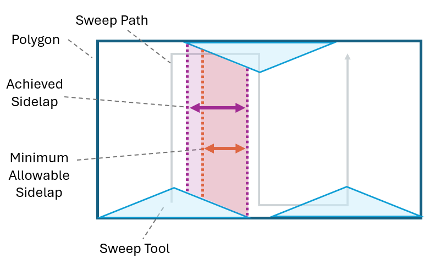
Minimum overlap distance between adjacent sweep lines, specified as a numeric scalar, in meters.
This figure shows the minimum overlap.
Boundary constraint on the path based on the geometry of the sweep tool, specified
as "inset" or "tight".
"tight"— The sweep tool can exit the boundaries of the sweptpolyshapeas necessary to ensure that the sweep tool can completely cover the polygon."inset"— The sweep tool must remain inside sweptpolyshape. Depending on the geometry of the sweep tool and thepolyshapebeing swept, the sweep tool might not completely cover the polygon.
Examples
Define the geometry of a polygon as a polyshape object.
poly = polyshape([0 0 1.5 3 3 1.875 1.5 1.1250 0],[0 2 1.5 2 0 0 0.5 0 0]);
Check if any regions of the polygon are monotonic, and return the monotonic angle intervals for those regions.
[isMono,intervals] = polygonMonotonicity(poly);
Plot the monotonic intervals of the polygon.
hVis = plotMonotonicity(poly);
axis equal tight
title(["Polygon and Corresponding","Monotonic Intervals"])
legend("Polygon","Monotonic Intervals",Location="northeastoutside")
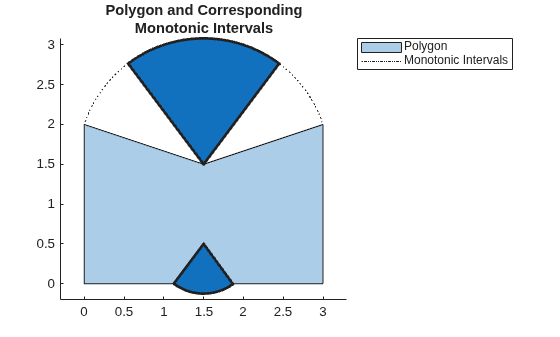
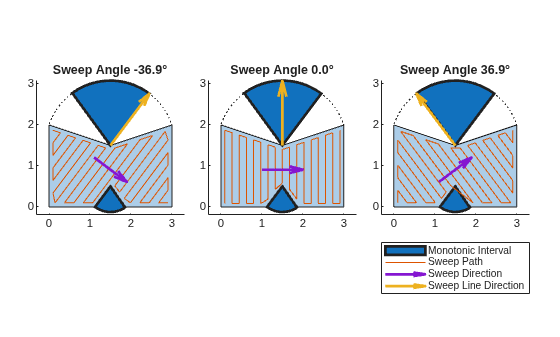
You can use these monotonic intervals to plan sweep paths. Sweeping in a monotonic interval ensures that you can fully sweep the corresponding region of a polygon in one direction, without needing to backtrack.
Store three sweep angles from within the first monotonic angle interval.
sweepAngles = [intervals(1,1) mean(intervals(1,:)) intervals(1,2)] - pi;
Define the geometry of the sweep tool. In this case, assume the tool is shaped like a regular pentagon.
tool = nsidedpoly(5,Radius=0.1);
Set up three subplots, for showing the sweep paths along the selected sweep angles.
t = tiledlayout(1,3,Padding="compact",TileSpacing="compact");
Generate and plot a sweep path for each of the stored sweep angles. Plot the sweep direction arrow and sweep line direction arrow to show their relationships to the sweep angle and path.
for i = 1:3
opts = polysweepoptsbous(SweepAngle=sweepAngles(i),BoundaryBehavior="inset",SweepToolGeometry=tool);
path = polygonSweep(poly,opts);

nexttile

hVis = plotMonotonicity(poly);

hold on
axis equal tight

% Plot the swept path
pathHandle = plot(path(:,1),path(:,2));

% Plot the sweep direction arrow and sweep line direction arrows to
% show their relationships to the sweep angle and path.
sweepLineDirHandle = exampleHelperHighlightInterval(hVis,sweepAngles(i)+pi/2);
sweepDirHandle = exampleHelperPlotSweepDirection(poly,sweepAngles(i));

% Add a title to the current tile
title("Sweep Angle " + num2str(rad2deg(sweepAngles(i)),"%.1f") + "°");

hold off
end

handles = [hVis.MonotoneIntervals.Children(1), ...
           pathHandle, ...
           sweepDirHandle, ...
           sweepLineDirHandle];

legend(handles,{"Monotonic Interval","Sweep Path","Sweep Direction","Sweep Line Direction"},Location="southoutside",Orientation="vertical");
Extended Capabilities
Version History
Introduced in R2026a

