识别并选择 GPU 设备
R2026b此示例显示如何使用 gpuDevice 来识别和选择您想要使用的设备。
要确定您的计算机中有多少个可用的 GPU 设备,请使用 gpuDeviceCount 函数。
gpuDeviceCount("available")ans = 2
当有多个设备时,第一个是默认的。您可以使用 gpuDeviceTable 函数检查其属性,以确定它是否是您想要使用的函数。
gpuDeviceTable
ans = 2×5 table
1 "NVIDIA RTX A5000" "8.6" true true
2 "NVIDIA RTX A5000" "8.6" true false
如果第一个设备是您想要使用的设备,那么您可以继续。要在 GPU 上运行计算,请使用启用 gpuArray 的函数。有关详细信息,请参阅在 GPU 上运行 MATLAB 函数。
要验证 MATLAB® 是否可以使用您的 GPU,请使用 canUseGPU 函数。如果有可用于计算的 GPU,则该函数返回 1 (true),否则返回 0 (false)。
canUseGPU
ans = logical
   1
要诊断 GPU 设置的问题,例如如果 canUseGPU 返回 0 (false),请使用 validateGPU 函数。验证您的 GPU 是可选的。
validateGPU
# Beginning GPU validation
# Performing system validation
#    CUDA-supported platform .................................................PASSED
#    CUDA-enabled graphics driver exists .....................................PASSED
#        Version: 570.133.07
#    CUDA-enabled graphics driver load .......................................PASSED
#    CUDA environment variables ..............................................PASSED
#        CUDA_VISIBLE_DEVICES: "0,1"
#    CUDA device count .......................................................PASSED
#        Found 2 devices.
#    GPU libraries load ......................................................PASSED
#
# Performing device validation for device index 1
#    Device exists ...........................................................PASSED
#        NVIDIA RTX A5000
#    Device supported ........................................................PASSED
#    Device available ........................................................PASSED
#        Device is in 'Default' compute mode.
#    Device selectable .......................................................PASSED
#    Device memory allocation ................................................PASSED
#    Device kernel launch ....................................................PASSED
#
# Finished GPU validation with no failures.
要使用另一个设备,请使用另一个设备的索引调用 gpuDevice。
gpuDevice(2)
ans =
  CUDADevice with properties:

                 Name: 'NVIDIA RTX A5000'
                Index: 2 (of 2)
    ComputeCapability: '8.6'
          DriverModel: 'N/A'
          TotalMemory: 25294995456 (25.29 GB)
      AvailableMemory: 25073221632 (25.07 GB)
      DeviceAvailable: true
       DeviceSelected: true

  Show all properties.
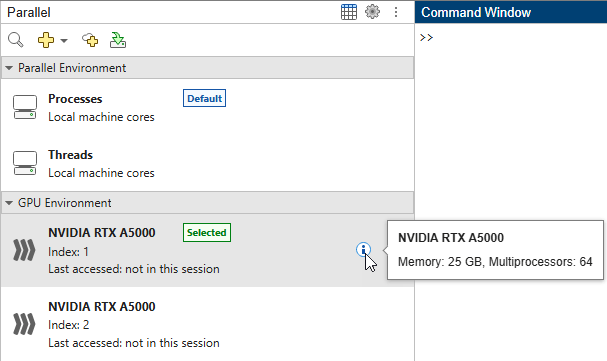
您还可以确定有多少 GPU 设备可用,检查它们的某些属性,并在“并行”面板  的“GPU 环境”部分选择要使用的设备。或者,在主页选项卡的环境区域中,选择并行 > 选择 GPU 环境。
另请参阅
gpuDevice | gpuDeviceCount | gpuArray | gpuDeviceTable | canUseGPU | validateGPU

