pdeeig
R2026b(Not recommended) Solve eigenvalue PDE problem
pdeeig is not recommended. Use solvepdeeig instead.
Description
[
produces the solution to the FEM formulation of the scalar PDE eigenvalue
problemv,l] =
pdeeig(model,c,a,d,r)
or the system PDE eigenvalue problem
with geometry, boundary conditions, and mesh specified in
model, a PDEModel object.
The eigenvalue PDE problem is a homogeneous problem, i.e., only boundary conditions where g = 0 and r = 0 can be used. The nonhomogeneous part is removed automatically.
Examples
Compute the eigenvalues that are less than 100, and compute the corresponding eigenmodes for on the geometry of the L-shaped membrane.
model = createpde; geometryFromEdges(model,@lshapeg); applyBoundaryCondition(model,Edge=1:model.Geometry.NumEdges,u=0); generateMesh(model,GeometricOrder="linear",Hmax=0.02); c = 1; a = 0; d = 1; r = [-Inf 100]; [v,l] = pdeeig(model,c,a,d,r); l(1) % first eigenvalue
ans = 19.7491
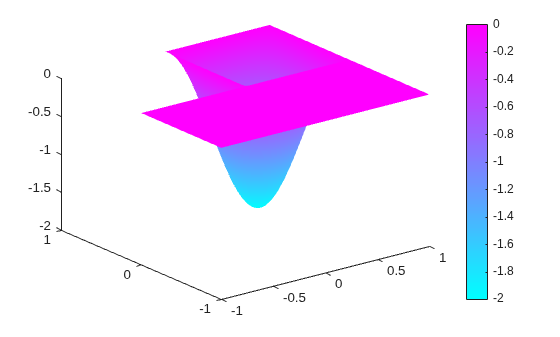
Display the first eigenmode, and compare it to the built-in membrane plot.
pdeplot(model,XYData=v(:,1),ZData=v(:,1))
figure
membrane(1,20,9,9) % the MATLAB function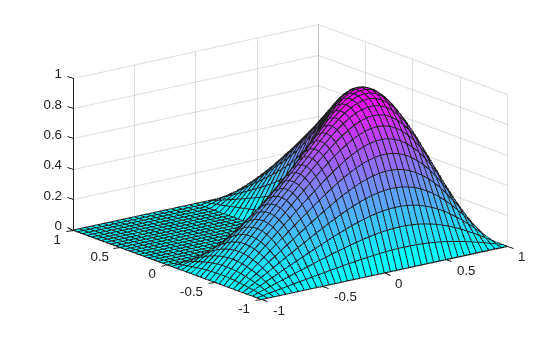
Compute the sixteenth eigenvalue, and plot the sixteenth eigenmode.
l(16) % sixteenth eigenvalueans = 98.9431
figure
pdeplot(model,XYData=v(:,16),ZData=v(:,16)) % sixteenth eigenmode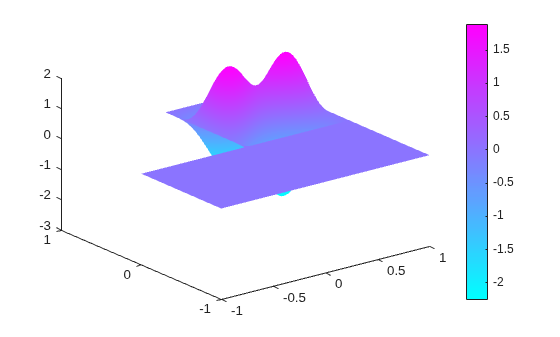
Compute the eigenvalues that are less than 100, and compute the corresponding eigenmodes for on the geometry of the L-shaped membrane, using the legacy syntax.
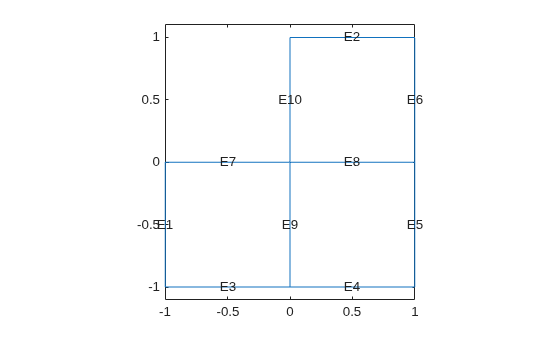
Use the geometry in lshapeg. For more information about this syntax, see Parameterized Function for 2-D Geometry Creation.
g = @lshapeg; pdegplot(g,EdgeLabels="on") axis equal ylim([-1.1,1.1])
Set zero Dirichlet boundary conditions using the lshapeb function.
b = @lshapeb;
Set coefficients c = 1, a = 0, and d = 1. Collect eigenvalues up to 100.
c = 1; a = 0; d = 1; r = [-Inf 100];
Generate a mesh and solve the eigenvalue problem.
[p,e,t] = initmesh(g,Hmax=0.02); [v,l] = pdeeig(b,p,e,t,c,a,d,r);
Find the first eigenvalue.
l(1)
ans = 9.6481
Import a simple 3-D geometry and find eigenvalues and eigenvectors from the associated finite element matrices.
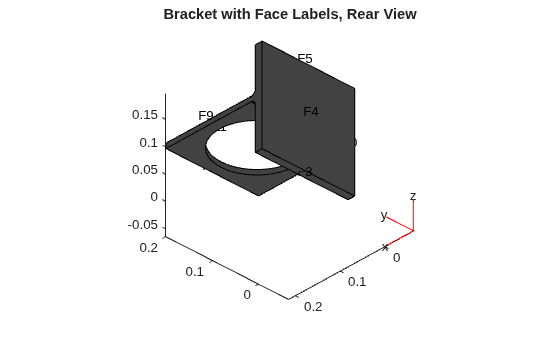
Create a model and import the BracketWithHole.stl geometry.
model = createpde; importGeometry(model,"BracketWithHole.stl"); figure pdegplot(model,FaceLabels="on") view(30,30) title("Bracket with Face Labels")
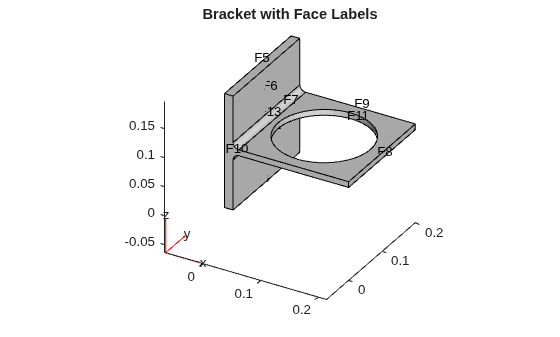
figure pdegplot(model,FaceLabels="on") view(-134,-32) title("Bracket with Face Labels, Rear View")
Set coefficients c = 1, a = 0, and d = 1. Collect eigenvalues that are less than 100.
c = 1; a = 0; d = 1; r = [-Inf 100];
Generate a mesh for the model.
generateMesh(model);
Create the associated finite element matrices.
[Kc,~,B,~] = assempde(model,c,a,0); [~,M,~] = assema(model,0,d,0);
Solve the eigenvalue problem.
[v,l] = pdeeig(Kc,B,M,r);
Look at the first two eigenvalues.
l([1,2])
ans = 2×1

   -0.0000
   42.8014
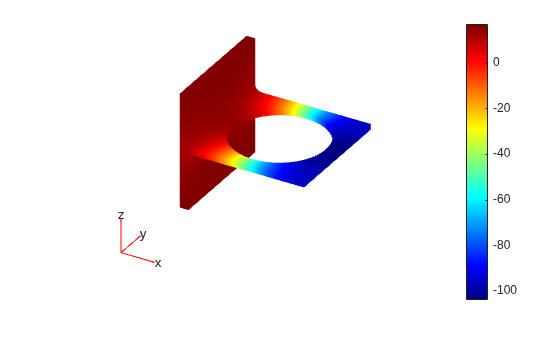
Plot the solution corresponding to eigenvalue 2.
pdeplot3D(model,ColorMapData=v(:,2))
Input Arguments
Output Arguments
Limitations
In the standard case c and d are positive in the entire region. All eigenvalues are positive, and 0 is a good choice for a lower bound of the interval. The cases where either c or d is zero are discussed next.
If d = 0 in a subregion, the mass matrix M becomes singular. This does not cause any trouble, provided that c > 0 everywhere. The pencil (K,M) has a set of infinite eigenvalues.
If c = 0 in a subregion, the stiffness matrix
Kbecomes singular, and the pencil (K,M) has many zero eigenvalues. With an interval containing zero,pdeeiggoes on for a very long time to find all the zero eigenvalues. Choose a positive lower bound away from zero but below the smallest nonzero eigenvalue.If there is a region where both c = 0 and d = 0, we get a singular pencil. The whole eigenvalue problem is undetermined, and any value is equally plausible as an eigenvalue.
Some of the awkward cases are detected by pdeeig. If the shifted
matrix is singular, another shift is attempted. If the matrix with the new shift is
still singular a good guess is that the entire pencil (K,M) is
singular.
If you try any problem not belonging to the standard case, you must use your knowledge of the original physical problem to interpret the results from the computation.
Tips
The equation coefficients cannot depend on the solution
uor its gradient.

