LaneMarkingStyle
R2026b描述
LaneMarkingStyle 对象在 RoadRunner 工程中代表一种车道标记素材类型。车道标记素材描述车道标记的属性,例如颜色、宽度和虚线间距。使用 LaneMarkingStyle 对象来表示场景中车道边界的标记样式。有关车道标记素材的更多信息,请参阅Lane Marking Assets。
创建对象
getAsset 函数用于从指定工程中,相对于 Asset 文件夹的指定路径,提取指定素材类型的素材对象。将 assetType 参量指定为 "LaneMarkingStyle" 以提取 LaneMarkingStyle 对象。
属性
示例
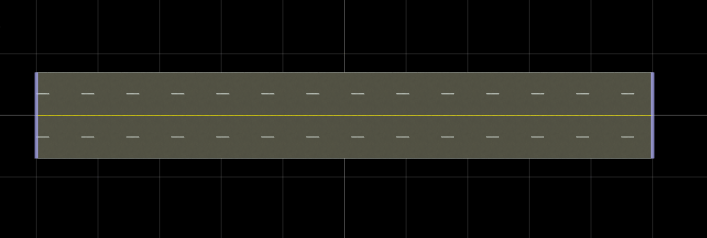
创建一个包含四车道水平道路的 RoadRunner 场景,并在车道边界添加标记。
创建一个 roadrunner 对象,指定现有工程的路径。例如,此代码显示 Windows® 计算机上位于 "C:\RR\MyProject" 的工程路径。此代码假设 RoadRunner 已安装在默认位置,并返回一个名为 rrApp 的对象,该对象提供用于执行基本任务(如打开、关闭和保存场景及工程)的函数。
rrApp = roadrunner(ProjectFolder="C:\RR\MyProject");注意:若您首次从 MATLAB® 打开 RoadRunner,或自上次从 MATLAB 打开以来更改了 RoadRunner 的安装位置,可使用roadrunnerSetup功能指定新的默认工程和安装文件夹,以便在打开 RoadRunner 时使用。您可以在 MATLAB 会话之间通过从对应下拉菜单中选择 Across MATLAB sessions 选项来保存这些文件夹。
在当前工程中使用 newScene 函数创建一个新的 RoadRunner 场景,并指定路跑者对象 rrApp。
newScene(rrApp);
创建一个用于 RoadRunner 作者 API 的对象 rrApi,该对象引用当前 RoadRunner 实例 rrApp 的对象。rrApi 对象支持通过编程方式创建场景,例如使用 MATLAB 添加和修改道路及车道组件。
rrApi = roadrunnerAPI(rrApp);
从创作 API 对象 rrApi 的 Scene 属性中提取场景对象。提取的 Scene 对象可用于指定添加场景元素(如道路和车道)的场景。
scn = rrApi.Scene;
从创作 API 对象 rrApi 的 Project 属性中提取 RoadRunner 工程的 Project 对象。提取的 Project 对象可让您指定当前 RoadRunner 会话的工程文件夹,用于从中检索素材对象。您可以使用素材为场景中的车道分配标记。
prj = rrApi.Project;
使用 addLineArcRoad 函数在场景中添加一条长度为 100 米的水平线弧形道路。通过指定道路控制点在 RoadRunner 局部坐标系 X 轴和 Y 轴上的位置来确定道路的位置。这些控制点定义了道路起始与终点的位置。您可以修改控制点的位置,以调整道路相对于场景原点的位置和方向。您还可以在线弧曲线的起点和终点之间添加控制点,以调整道路曲线的弯度和半径。
controlPoints = [-50 0; 50 0];
rrHorizontalRoad = addLineArcRoad(scn,controlPoints);
从道路对象 rrHorizontalRoad 的 ReferenceLane 属性中提取道路的参考车道。参考车道定义了 RoadRunner 场景中道路的中心车道或参考线。该车道无宽度,作为定位所有其他车道的基础,RoadRunner 以此为基准线向外排列。
refLane = rrHorizontalRoad.ReferenceLane;
使用 getAsset (RoadRunner Scenario) 函数从工程 prj 中提取车道标记样式对象,该对象代表 SolidSingleYellow.rrlms 资源。要定义参考车道的车道标记轮廓,首先提取参考车道对象 refLane 的车道车道标记轮廓对象 refLaneMarkingProfile。然后,从车道标记轮廓对象 refLaneMarkingProfile 的 Spans 属性中提取车道标记跨段对象 refLaneSpan,该对象表示需要放置车道标记的跨段。最后,将提取的 span 对象的 LaneMarkingStyle 属性设置为实心黄色标记样式,以标记参考车道。
solidYellowMarkingStyle = getAsset(prj,"<PROJECT>/Assets/Markings/SolidSingleYellow.rrlms","LaneMarkingStyle");
refLaneMarkingProfile = refLane.LaneMarkingProfile;
refLaneSpan = refLaneMarkingProfile.Spans;
refLaneSpan.LaneMarkingStyle = solidYellowMarkingStyle;
使用提取的参考车道对象 refLane,通过 addLaneToLeft 和 addLaneToRight 函数在道路参考车道的两侧添加行车道。然后,使用新增车道的 LaneType 和 TravelDirection 属性来指定每条车道的类型和行驶方向。
horizontalLane1 = addLaneToLeft(refLane);
horizontalLane1.LaneType = "Driving";
horizontalLane1.TravelDirection = "Forward";
horizontalLane2 = addLaneToRight(refLane);
horizontalLane2.LaneType = "Driving";
horizontalLane2.TravelDirection = "Backward";
提取虚线单白标记样式对象 dashedWhiteMarkingStyle,并标记车道的边界。
dashedWhiteMarkingStyle = getAsset(prj,"<PROJECT>/Assets/Markings/DashedSingleWhite.rrlms","LaneMarkingStyle");
horLane1MarkingProfile = horizontalLane1.LaneMarkingProfile;
horLane1Span = horLane1MarkingProfile.Spans;
horLane1Span.LaneMarkingStyle = dashedWhiteMarkingStyle;
horLane2MarkingProfile = horizontalLane2.LaneMarkingProfile;
horLane2Span = horLane2MarkingProfile.Spans;
horLane2Span.LaneMarkingStyle = dashedWhiteMarkingStyle;
在第一条水平车道左侧增加一条边界车道,并在第二条水平车道右侧增加另一条边界车道。提取实心单白标记样式对象 solidWhiteMarkingStyle,并标记边界车道的边界。
endLane1 = addLaneToLeft(horizontalLane1);
endLane1.LaneType = "Border";
endLane1.TravelDirection = "Forward";
endLane2 = addLaneToRight(horizontalLane2);
endLane2.LaneType = "Border";
endLane2.TravelDirection = "Backward";
solidWhiteMarkingStyle = getAsset(prj,"<PROJECT>/Assets/Markings/SolidSingleWhite.rrlms","LaneMarkingStyle");
endLane1MarkingProfile = endLane1.LaneMarkingProfile;
endLane1Span = endLane1MarkingProfile .Spans;
endLane1Span.LaneMarkingStyle = solidWhiteMarkingStyle;
endLane2MarkingProfile = endLane2.LaneMarkingProfile;
endLane2Span = endLane2MarkingProfile.Spans;
endLane2Span.LaneMarkingStyle = solidWhiteMarkingStyle;
版本历史记录
在 R2025a 中推出
另请参阅
roadrunnerAPI | roadrunnerSetup | getAsset | Scene | Lane | ReferenceLane | addLineArcRoad | LaneMarkingProfile

