ClassificationTree
R2026bBinary decision tree for multiclass classification
Description
ClassificationTree is a decision tree with binary splits for
classification. Use the predict function of
ClassificationTree to predict labels for new data. Because the
ClassificationTree object contains the data used for training, you
can use the object to compute resubstitution predictions.
Creation
Create a ClassificationTree object by using fitctree.
Properties
Tree Properties
This property is read-only.
Categorical splits, returned as an n-by-2 cell array, where
n is the number of categorical splits in the tree. Each row in
CategoricalSplit contains the left and right values for a
categorical split. For each branch node with categorical split j
based on a categorical predictor variable z, the software selects the
left child if z is in CategoricalSplit(j,1) and
the right child if z is in CategoricalSplit(j,2).
The splits are in the same order as the nodes of the tree. Nodes for these splits can be
found by running cuttype and selecting
'categorical' cuts from top to bottom.
Data Types: cell
This property is read-only.
Numbers of the child nodes for each node in the tree, returned as an
n-by-2 numeric array, where n is the number of
nodes. Leaf nodes have child node 0.
Data Types: double
This property is read-only.
Class counts for the nodes in the tree, returned as an
n-by-k numeric array, where
n is the number of nodes and k is the number
of classes. For any node number i, the class counts
ClassCount(i,:) are counts of the training observations from each
class that satisfy the conditions for node i.
Data Types: double
This property is read-only.
Class probabilities for the nodes in the tree, returned as an
n-by-k numeric array, where
n is the number of nodes and k is the number
of classes. For any node number i, the class probabilities
ClassProbability(i,:) are the estimated probabilities for each
class for a point that satisfies the conditions for node i.
Data Types: double
This property is read-only.
Categories used at the branches in the tree, returned as an n-by-2
cell array, where n is the number of nodes. For each branch node
i based on a categorical predictor variable X,
the software selects the left child if X is among the categories
listed in CutCategories{i,1} and the right child if
X is among those listed in CutCategories{i,2}.
Both columns of CutCategories are empty for leaf nodes and for branch
nodes based on continuous predictors.
CutPoint contains the cut points for
'continuous' cuts, and CutCategories contains
the set of categories for 'categorical' cuts.
Data Types: cell
This property is read-only.
Values used as cut points in the tree, returned as an n-element
numeric vector, where n is the number of nodes. For each branch node
i based on a continuous predictor variable X,
the software selects the left child if X < CutPoint(i) and the
right child if X >= CutPoint(i). CutPoint is
NaN for leaf nodes and for branch nodes based on categorical
predictors.
CutPoint contains the cut points for
'continuous' cuts, and CutCategories contains
the set of categories for 'categorical' cuts.
Data Types: double
This property is read-only.
Names of the variables used for branching in each node in the tree, returned as an
n-element cell array, where n is the number of
nodes. These variables are also known as cut variables. For leaf
nodes, CutPredictor contains an empty character vector.
CutPoint contains the cut points for
'continuous' cuts, and CutCategories
contains the set of categories for 'categorical' cuts.
Data Types: cell
This property is read-only.
Indices of the variables used for branching in each node in the tree, returned as an
n-element numeric array, where n is the number
of nodes. For more information, see CutPredictor.
Data Types: double
This property is read-only.
Type of cut at each node in the tree, returned as an n-element cell
array, where n is the number of nodes. For each node
i:
CutType{i}is'continuous'if the cut is defined in the formX < vfor a variableXand cut pointv.CutType{i}is'categorical'if the cut is defined by whether a variableXtakes a value in a set of categories.CutType{i}is''ifiis a leaf node.
CutPoint contains the cut points for
'continuous' cuts, and CutCategories
contains the set of categories for 'categorical' cuts.
Data Types: cell
This property is read-only.
Indicator of branch nodes, returned as a logical vector that is true for
each branch node and false for each leaf node of the tree.
Data Types: logical
This property is read-only.
Parameters used to train the tree, returned as a
TreeParams object. To access the parameters, use
dot notation. For example, for a tree model Mdl, you
can display the split criterion by entering
Mdl.ModelParameters.SplitCriterion. To display
all parameter values, enter
Mdl.ModelParameters.
This property is read-only.
Name of most probable class in each node of the tree, returned as a cell array with
n elements, where n is the number of nodes in
the tree. Each element of the array is a character vector containing a class name in
ClassNames.
Data Types: cell
This property is read-only.
Misclassification probability for each node in the tree, returned as an
n-element numeric vector, where n is
the number of nodes in the tree.
Data Types: double
This property is read-only.
Proportion of the observations in the original data that satisfy the conditions for
each node in the tree, returned as an n-element numeric vector, where
n is the number of nodes in the tree. The
NodeProbability values are adjusted for any prior probabilities
assigned to each class.
Data Types: double
This property is read-only.
Impurity of the nodes in the tree, weighted by the node probability, returned as an
n-element numeric vector, where n is the
number of nodes in the tree. The measure of impurity is the Gini index or deviance for
the node, weighted by the node probability. If the tree is grown by using the twoing
rule, the risk for each node is zero.
Data Types: double
This property is read-only.
Size of the nodes in the tree, returned as an n-element numeric vector,
where n is the number of nodes in the tree. The size of a node is the
number of training observations that satisfy the conditions for the node.
Data Types: double
This property is read-only.
Number of nodes in the tree, returned as a positive integer.
Data Types: double
This property is read-only.
Number of parents for each node in the tree, returned as an
n-element integer vector, where n is the number of
nodes in the tree. The parent of the root node is 0.
Data Types: double
This property is read-only.
Alpha values for pruning the tree, returned as a numeric vector with one element per
pruning level. If the pruning level ranges from 0 to M, then
PruneAlpha has M + 1 elements sorted in
ascending order. PruneAlpha(1) is for pruning level 0 (no pruning),
PruneAlpha(2) is for pruning level 1, and so on.
For more information, see How Decision Trees Create a Pruning Sequence.
Data Types: double
This property is read-only.
Pruning levels of each node in the tree, returned as an integer vector with
NumNodes elements. The pruning levels range from 0 (no pruning)
to M, where M is the distance between the deepest
leaf and the root node.
For details, see Pruning.
Data Types: double
This property is read-only.
Categories used for the surrogate splits, returned as an n-element
cell array, where n is the number of nodes in the tree. For each node
k, SurrogateCutCategories{k} is a cell array.
The length of SurrogateCutCategories{k} is equal to the number of
surrogate predictors at the node. Every element of
SurrogateCutCategories{k} is either an empty character vector for
a continuous surrogate predictor, or a two-element cell array with categories for a
categorical surrogate predictor. The first element of the array lists categories
assigned to the left child by the surrogate split, and the second element lists
categories assigned to the right child. The order of the surrogate split variables at
each node matches the order of the variables in
SurrogateCutPredictor. The optimal-split variable at this node
does not appear. For nonbranch (leaf) nodes, SurrogateCutCategories
contains an empty cell.
Data Types: cell
This property is read-only.
Numeric cut assignments used for the surrogate splits in the tree, returned as an
n-element cell array, where n is the number of
nodes in the tree. For each node k,
SurrogateCutFlip{k} is a numeric vector. The length of
SurrogateCutFlip{k} is equal to the number of surrogate
predictors at the node. Every element of SurrogateCutFlip{k} is
either zero for a categorical surrogate predictor, or a numeric cut assignment for a
continuous surrogate predictor. The numeric cut assignment is either –1 or +1. For every
surrogate split with a numeric cut C based on a continuous predictor
variable Z, the software selects the left child if Z < C and the cut assignment for the surrogate split is +1, or if Z ≥ C and the cut assignment is –1. Similarly, the software selects the
right child if Z ≥ C and the cut assignment for the surrogate split is +1, or if Z < C and the cut assignment is –1. The order of the surrogate split
variables at each node matches the order of the variables in
SurrogateCutPredictor. The optimal-split variable at this node
does not appear. For nonbranch (leaf) nodes, SurrogateCutFlip
contains an empty array.
Data Types: cell
This property is read-only.
Numeric values used for the surrogate splits in the tree, returned as an
n-element cell array, where n is the number of
nodes in the tree. For each node k,
SurrogateCutPoint{k} is a numeric vector. The length of
SurrogateCutPoint{k} is equal to the number of surrogate
predictors at the node. Every element of SurrogateCutPoint{k} is
either NaN for a categorical surrogate predictor, or a numeric cut
for a continuous surrogate predictor. For every surrogate split with a numeric cut
C based on a continuous predictor variable Z,
the software selects the left child if Z < C and the SurrogateCutFlip value for the surrogate
split is +1, or if Z ≥ C and the
SurrogateCutFlip value is –1. Similarly, the software selects the
right child if Z ≥ C and the SurrogateCutFlip value for the surrogate
split is +1, or if Z < C and the SurrogateCutFlip value is –1. The order of
the surrogate split variables at each node matches the order of the variables in
SurrogateCutPredictor. The optimal-split variable at this node
does not appear. For nonbranch (leaf) nodes, SurrogateCutPoint
contains an empty cell.
Data Types: cell
This property is read-only.
Names of the variables used for the surrogate splits in each node in the tree,
returned as an n-element cell array, where n is
the number of nodes in the tree. Every element of
SurrogateCutPredictor is a cell array containing the names of the
surrogate split variables at the node. The variables are sorted in descending order by
the predictive measure of association with the optimal predictor, and only variables
with the positive predictive measure are included. The optimal-split variable at this
node does not appear. For nonbranch (leaf) nodes,
SurrogateCutPredictor contains an empty cell.
Data Types: cell
This property is read-only.
Types of the surrogate splits at each node in the tree, returned as an
n-element cell array, where n is the number of
nodes in the tree. For each node k,
SurrogateCutType{k} is a cell array containing the types of the
surrogate split variables at the node. The variables are sorted in descending order by
the predictive measure of association with the optimal predictor, and only variables
with the positive predictive measure are included. The order of the surrogate split
variables at each node matches the order of the variables in
SurrogateCutPredictor. The optimal-split variable at this node
does not appear. For nonbranch (leaf) nodes, SurrogateCutType
contains an empty cell.
The surrogate split type is 'continuous' if the cut is defined in
the form Z < V for a variable
Z and cut point V, or
'categorical' if the cut is defined by whether
Z takes a value in a set of categories.
Data Types: cell
This property is read-only.
Predictive measures of association for the surrogate splits in the tree, returned as an
n-element cell array, where n is the number of
nodes in the tree. For each node k,
SurrogatePredictorAssociation{k} is a numeric vector. The length
of SurrogatePredictorAssociation{k} is equal to the number of
surrogate predictors at the node. Every element of
SurrogatePredictorAssociation{k} contains the predictive measure
of association between the optimal split and the surrogate split. The order of the
surrogate split variables at each node matches the order of the variables in
SurrogateCutPredictor. The optimal-split variable at this node
does not appear. For nonbranch (leaf) nodes,
SurrogatePredictorAssociation contains an empty cell.
Data Types: cell
Predictor Properties
This property is read-only.
Bin edges for numeric predictors, returned as a cell array of p numeric vectors, where p is the number of predictors. Each vector includes the bin edges for a numeric predictor. The element in the cell array for a categorical predictor is empty because the software does not bin categorical predictors.
The software bins numeric predictors only if you specify the NumBins
name-value argument as a positive integer scalar when training a model with tree learners.
The BinEdges property is empty if the NumBins value
is empty (default).
You can reproduce the binned predictor data Xbinned by using the
BinEdges property of the trained model
mdl.
X = mdl.X; % Predictor data
Xbinned = zeros(size(X));
edges = mdl.BinEdges;
% Find indices of binned predictors.
idxNumeric = find(~cellfun(@isempty,edges));
if iscolumn(idxNumeric)
idxNumeric = idxNumeric';
end
for j = idxNumeric
x = X(:,j);
% Convert x to array if x is a table.
if istable(x)
x = table2array(x);
end
% Group x into bins by using the discretize function.
xbinned = discretize(x,[-inf; edges{j}; inf]);
Xbinned(:,j) = xbinned;
endXbinned contains the bin indices, ranging from 1
to the number of bins, for the numeric predictors. Xbinned values are 0
for categorical predictors. If X contains NaNs, then
the corresponding Xbinned values are NaNs.Data Types: cell
This property is read-only.
Categorical predictor
indices, returned as a vector of positive integers. CategoricalPredictors
contains index values indicating that the corresponding predictors are categorical. The index
values are between 1 and p, where p is the number of
predictors used to train the model. If none of the predictors are categorical, then this
property is empty ([]).
Data Types: single | double
This property is read-only.
Expanded predictor names, returned as a cell array of character vectors.
If the model uses encoding for categorical variables, then
ExpandedPredictorNames includes the names that describe the
expanded variables. Otherwise, ExpandedPredictorNames is the same as
PredictorNames.
Data Types: cell
This property is read-only.
Predictor names, returned as a cell array of character vectors. The order of the
entries in PredictorNames is the same as in the training data.
Data Types: cell
This property is read-only.
Predictor values, returned as a real matrix or table. Each column of
X represents one variable (predictor), and each row represents
one observation.
Data Types: double | table
Response Properties
This property is read-only.
List of the elements in Y with duplicates removed, returned as a
categorical array, cell array of character vectors, character array, logical vector, or
numeric vector. ClassNames has the same data type as the data in the
argument Y. (The software treats string arrays as cell arrays of character
vectors.)
Data Types: double | logical | char | cell | categorical
This property is read-only.
Name of the response variable, returned as a character vector.
Data Types: char
This property is read-only.
Class labels corresponding to the observations in X, returned as
a categorical array, cell array of character vectors, character array, logical vector,
or numeric vector. Each row of Y represents the classification of the
corresponding row of X.
Data Types: single | double | logical | char | string | cell | categorical
Other Data Properties
This property is read-only.
Cross-validation optimization of hyperparameters, returned as a SupervisedLearningBayesianOptimization object or a table of
hyperparameters and associated values. This property is nonempty if the
OptimizeHyperparameters name-value argument is nonempty when
you create the model. The value of
HyperparameterOptimizationResults depends on the setting of the
Optimizer option in the
HyperparameterOptimizationOptions value when you create the
model.
Value of Optimizer Option | Value of HyperparameterOptimizationResults |
|---|---|
"bayesopt" (default) | SupervisedLearningBayesianOptimization object |
"gridsearch" or "randomsearch" | Table of hyperparameters used, observed objective function values (cross-validation loss), and observation ranks from lowest (best) to highest (worst) |
This property is read-only.
Number of observations in the training data, returned as a positive integer.
NumObservations can be less than the number of rows of input data
when there are missing values in the input data or response data.
Data Types: double
This property is read-only.
Rows of the original predictor data X used for fitting, returned as
an n-element logical vector, where n is the number
of rows of X. If the software uses all rows of X
to create the object, then RowsUsed is an empty array
([]).
Data Types: logical
This property is read-only.
Scaled weights in the tree, returned as a numeric vector. W has
length n, the number of rows in the training data.
Data Types: double
Other Classification Properties
This property is read-only.
Misclassification costs, returned as a square numeric matrix.
Cost has K rows and columns, where
K is the number of classes.
Cost(i,j) is the cost of classifying a point into class
j if its true class is i. The order of the
rows and columns of Cost corresponds to the order of the classes in
ClassNames.
Data Types: double
This property is read-only.
Prior probabilities for each class, returned as a K-element numeric
vector, where K is the number of unique classes in the response. The
order of the elements of Prior corresponds to the order of the
classes in ClassNames.
Data Types: double
Function for transforming scores, specified as a function handle or the name of a built-in
transformation function. "none" means no transformation;
equivalently, "none" means @(x)x. For a list of
built-in transformation functions and the syntax of custom transformation functions, see
ScoreTransform (for
trees) or ScoreTransform (for
ensembles).
Add or change a ScoreTransform function using dot notation:
Mdl.ScoreTransform = "function" % or Mdl.ScoreTransform = @function
Data Types: char | string | function_handle
Object Functions
compact | Reduce size of machine learning model |
compareHoldout | Compare accuracies of two classification models using new data |
crossval | Cross-validate machine learning model |
cvloss | Classification error by cross-validation for classification tree model |
edge | Classification edge for classification tree model |
gather | Gather properties of Statistics and Machine Learning Toolbox object from GPU |
lime | Local interpretable model-agnostic explanations (LIME) |
loss | Classification loss for classification tree model |
margin | Classification margins for classification tree model |
nodeVariableRange | Retrieve variable range of decision tree node |
partialDependence | Compute partial dependence |
plotPartialDependence | Create partial dependence plot (PDP) and individual conditional expectation (ICE) plots |
predict | Predict labels using classification tree model |
predictorImportance | Estimates of predictor importance for classification tree |
prune | Produce sequence of classification subtrees by pruning classification tree |
resubEdge | Resubstitution classification edge for classification tree model |
resubLoss | Resubstitution classification loss for classification tree model |
resubMargin | Resubstitution classification margins for classification tree model |
resubPredict | Classify observations in classification tree by resubstitution |
shapley | Shapley values |
surrogateAssociation | Mean predictive measure of association for surrogate splits in classification tree |
testckfold | Compare accuracies of two classification models by repeated cross-validation |
view | View classification tree |
Examples
Train a classification tree using the ionosphere data set.
load ionosphere
Mdl = fitctree(X,Y)Mdl =
ClassificationTree
ResponseName: 'Y'
CategoricalPredictors: []
ClassNames: {'b' 'g'}
ScoreTransform: 'none'
NumObservations: 351
Properties, Methods
Mdl is a ClassificationTree model object.
fitctree grows deep decision trees by default. You can grow shallower trees to reduce model complexity or computation time.
Load the ionosphere data set.
load ionosphereThe default values of the name-value arguments that control tree depth are:
n - 1forMaxNumSplits, wherenis the training sample size1forMinLeafSize10forMinParentSize
These default values tend to grow deep trees for large training sample sizes.
Train a classification tree using the default values. Cross-validate the model by using 10-fold cross-validation.
rng(1) % For reproducibility MdlDefault = fitctree(X,Y,CrossVal="on");
MdlDefault is a ClassificationPartitionedModel object that contains 10 tree models in its Trained property.
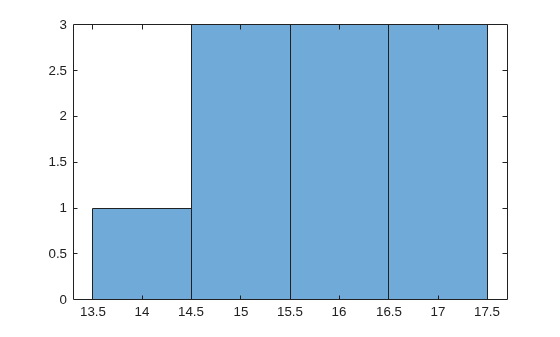
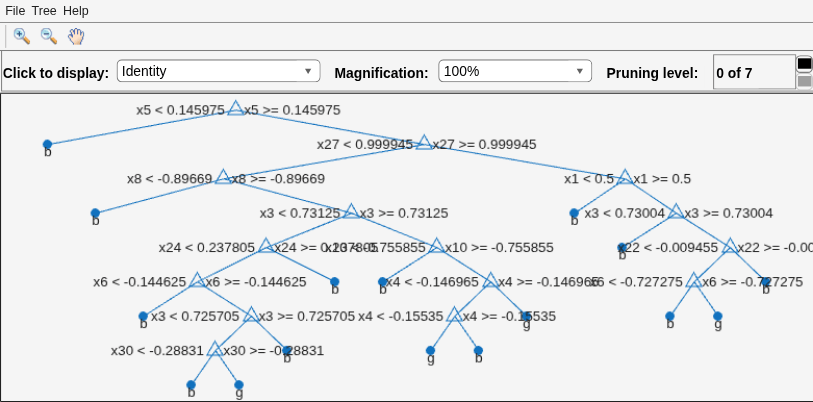
Plot a histogram of the number of imposed splits on the trees. Then, view one of the trees.
numBranches = @(x)sum(x.IsBranch); mdlDefaultNumSplits = cellfun(numBranches,MdlDefault.Trained); histogram(mdlDefaultNumSplits)
view(MdlDefault.Trained{1},Mode="graph")
The average number of splits is around 15.
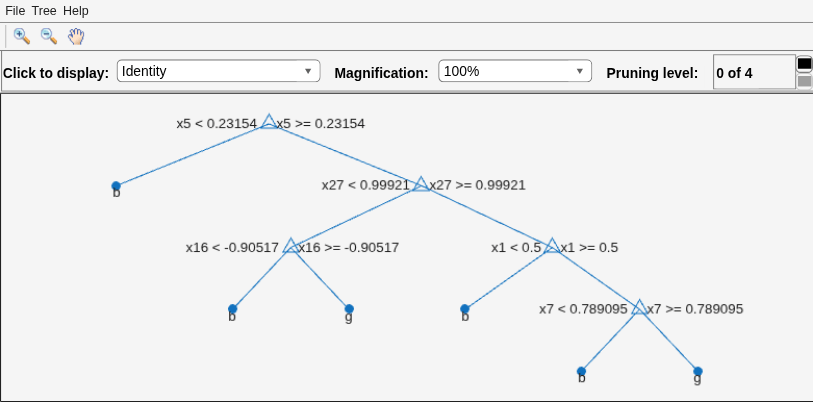
Train another classification tree, but set the maximum number of splits to 7, which is about half the mean number of splits in the default classification tree. Cross-validate the model by using 10-fold cross-validation.
Mdl7 = fitctree(X,Y,MaxNumSplits=7,CrossVal="on"); view(Mdl7.Trained{1},Mode="graph")
Compare the cross-validation classification errors of the models.
classErrorDefault = kfoldLoss(MdlDefault)
classErrorDefault = 0.1168
classError7 = kfoldLoss(Mdl7)
classError7 = 0.1311
Mdl7 is much less complex than MdlDefault and performs only slightly worse than MdlDefault.
More About
A decision tree splits nodes based on either impurity or node error.
The meaning of impurity depends on the value of the SplitCriterion
name-value argument:
Gini's Diversity Index (
"gdi") — The Gini index of a node iswhere the sum is over the classes i at the node, and p(i) is the observed fraction of classes with class i that reach the node. A node with just one class (a pure node) has the Gini index
0; otherwise, the Gini index is positive. So, the Gini index is a measure of node impurity.Deviance (
"deviance") — With the same definition of p(i) as for the Gini index, the deviance of a node isA pure node has deviance
0; otherwise, the deviance is positive.Twoing rule (
"twoing") — Twoing is not a purity measure of a node, but is a different measure for deciding how to split a node. Let L(i) denote the fraction of members of class i in the left child node after a split, and R(i) denote the fraction of members of class i in the right child node after a split. Choose the split criterion to maximizewhere P(L) and P(R) are the fractions of observations that split to the left and right, respectively. If the expression is large, the split makes each child node purer. If the expression is small, the split makes each child node similar to each other and, therefore, similar to the parent node; the split does not increase node purity.
Node error — The node error is the fraction of misclassified classes at a node. If j is the class with the largest number of training samples at a node, the node error is
1 – p(j).
References
[1] Breiman, L., J. Friedman, R. Olshen, and C. Stone. Classification and Regression Trees. Boca Raton, FL: CRC Press, 1984.
Extended Capabilities
Usage notes and limitations:
To integrate the prediction of a classification tree model into Simulink®, you can use the ClassificationTree Predict block in the Statistics and Machine Learning Toolbox™ library or a MATLAB® Function block with the
predictfunction.When you train a classification tree using
fitctree, the following restrictions apply.The value of the
ScoreTransformname-value argument cannot be an anonymous function. For fixed-point code generation, theScoreTransformvalue cannot be"invlogit".You cannot use surrogate splits; that is, the value of the
Surrogatename-value argument must be"off".For fixed-point code generation and code generation with a coder configurer, the following additional restrictions apply.
Categorical predictors (
logical,categorical,char,string, orcell) are not supported. You cannot use theCategoricalPredictorsname-value argument. To include categorical predictors in a model, preprocess them by usingdummyvarbefore fitting the model.Class labels with the
categoricaldata type are not supported. Both the class label value in the training data (TblorY) and the value of theClassNamesname-value argument cannot be an array with thecategoricaldata type.
For more information, see Introduction to Code Generation for Statistics and Machine Learning Functions.
Refer to the usage notes and limitations in the C/C++ Code Generation section. The same usage notes and limitations apply to GPU code generation.
Usage notes and limitations:
The following object functions fully support GPU arrays:
The following object functions offer limited support for GPU arrays:
The object functions execute on a GPU if at least one of the following applies:
The model was fitted with GPU arrays.
The predictor data that you pass to the object function is a GPU array.
For more information, see Run MATLAB Functions on a GPU (Parallel Computing Toolbox).
Version History
Introduced in R2011aIf you perform Bayesian hyperparameter optimization by using a supervised learning fit
function, the optimization results are stored in a SupervisedLearningBayesianOptimization object. In previous releases, the
optimization results are stored in a BayesianOptimization object.
MATLAB Command
You clicked a link that corresponds to this MATLAB command:
Run the command by entering it in the MATLAB Command Window. Web browsers do not support MATLAB commands.
选择网站
选择网站以获取翻译的可用内容,以及查看当地活动和优惠。根据您的位置,我们建议您选择:。
您也可以从以下列表中选择网站:
如何获得最佳网站性能
选择中国网站(中文或英文)以获得最佳网站性能。其他 MathWorks 国家/地区网站并未针对您所在位置的访问进行优化。
美洲
- América Latina (Español)
- Canada (English)
- United States (English)
欧洲
- Belgium (English)
- Denmark (English)
- Deutschland (Deutsch)
- España (Español)
- Finland (English)
- France (Français)
- Ireland (English)
- Italia (Italiano)
- Luxembourg (English)
- Netherlands (English)
- Norway (English)
- Österreich (Deutsch)
- Portugal (English)
- Sweden (English)
- Switzerland
- United Kingdom (English)