harmmean
R2026bHarmonic mean
Syntax
Description
returns
the harmonic mean of
m = harmmean(X)X. The harmonic mean returned in m depends on the
data type of X.
Examples
Set the random seed for reproducibility of the results.
rng(0,"twister")Create a matrix of exponential random numbers with 5 rows and 4 columns.
X = exprnd(1,5,4)
X = 5×4
0.2049 2.3275 1.8476 1.9527
0.0989 1.2783 0.0298 0.8633
2.0637 0.6035 0.0438 0.0880
0.0906 0.0434 0.7228 0.2329
0.4583 0.0357 0.2228 0.0414
Compute the harmonic and arithmetic means of the columns of X.
harmonic = harmmean(X)
harmonic = 1×4
0.1743 0.0928 0.0797 0.1205
arithmetic = mean(X)
arithmetic = 1×4
0.5833 0.8577 0.5734 0.6357
The arithmetic mean is greater than the harmonic mean for all the columns of X.
Find the harmonic mean of all the values in an array.
Create a 3-by-5-by-2 array X.
X = reshape(1:30,[3 5 2])
X =
X(:,:,1) =
1 4 7 10 13
2 5 8 11 14
3 6 9 12 15
X(:,:,2) =
16 19 22 25 28
17 20 23 26 29
18 21 24 27 30
Find the harmonic mean of all elements of X.
m = harmmean(X,"all")m = 7.5094
Find the harmonic mean along different operating dimensions and vectors of dimensions for a multidimensional array.
Create a 3-by-5-by-2 array X.
X = reshape(1:30,[3 5 2])
X =
X(:,:,1) =
1 4 7 10 13
2 5 8 11 14
3 6 9 12 15
X(:,:,2) =
16 19 22 25 28
17 20 23 26 29
18 21 24 27 30
Find the harmonic mean of X along the default dimension.
hmean1 = harmmean(X)
hmean1 =
hmean1(:,:,1) =
1.6364 4.8649 7.9162 10.9392 13.9523
hmean1(:,:,2) =
16.9607 19.9666 22.9710 25.9743 28.9770
By default, harmmean operates along the first dimension of X whose size does not equal 1. In this case, this dimension is the first dimension of X. Therefore, hmean1 is a 1-by-5-by-2 array.
Find the harmonic mean of X along the second dimension.
hmean2 = harmmean(X,2)
hmean2 =
hmean2(:,:,1) =
3.1852
5.0641
6.5693
hmean2(:,:,2) =
21.1595
22.1979
23.2329
hmean2 is a 3-by-1-by-2 array.
Find the harmonic mean of X along the third dimension.
hmean3 = harmmean(X,3)
hmean3 = 3×5
1.8824 6.6087 10.6207 14.2857 17.7561
3.5789 8.0000 11.8710 15.4595 18.8837
5.1429 9.3333 13.0909 16.6154 20.0000
hmean3 is a 3-by-5 array.
Find the harmonic mean of each page of X by specifying the first and second dimensions using the vecdim input argument.
mpage = harmmean(X,[1 2])
mpage =
mpage(:,:,1) =
4.5205
mpage(:,:,2) =
22.1645
mpage(1,1,2), for example, is the harmonic mean of the elements in X(:,:,2).
Find the harmonic mean of the elements in each X(i,:,:) slice by specifying the second and third dimensions.
mrow = harmmean(X,[2 3])
mrow = 3×1
5.5369
8.2469
10.2425
mrow(3), for example, is the harmonic mean of the elements in X(3,:,:) and is equivalent to specifying harmmean(X(3,:,:),"all").
Create a vector and compute its harmonic mean, excluding NaN values.
X = 1:10; X(3) = nan; % Replace the third element of x with a NaN value n = harmmean(X,"omitnan")
n = 3.4674
If you do not specify "omitnan", then harmmean(x) returns NaN.
Input Arguments
Input data, specified as a numeric vector, matrix, or multidimensional array.
If
Xis a vector, thenharmmean(X)is the harmonic mean of the elements inX.If
Xis a matrix, thenharmmean(X)is a row vector containing the harmonic mean of each column ofX.If
Xis a multidimensional array, thenharmmeanoperates along the first nonsingleton dimension ofX.
To specify the operating dimension when X is a matrix or an
array, use the dim input argument.
Data Types: single | double
Dimension along which to operate, specified as a positive integer scalar. If you do
not specify a value, then the default value is the first array dimension of
X whose size does not equal 1.
Consider a two-dimensional array X:
If
dimis equal to 1, thenharmmean(X,1)returns a row vector containing the harmonic mean for each column inX.If
dimis equal to 2, thenharmmean(X,2)returns a column vector containing the harmonic mean for each row inX.
If dim is greater than ndims(X) or if
size(X,dim) is 1, then harmmean returns
X.
Data Types: single | double
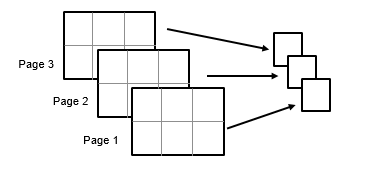
Vector of dimensions, specified as a positive integer vector. Each element of
vecdim represents a dimension of the input array
X. The output m has length 1 in the
specified operating dimensions. The other dimension lengths are the same for
X and m.
For example, if X is a 2-by-3-by-3 array, then
harmmean(X,[1 2]) returns a 1-by-1-by-3 array. Each element of the
output is the harmonic mean of the elements on the corresponding page of
X.
Data Types: single | double
NaN condition, specified as "includenan" or
"omitnan". When the value of this argument is
"includenan", the function includes NaN values when
computing the harmonic mean, and returns NaN. When the value is
"omitnan", the function ignores NaN values in
the input data.
Data Types: char | string
Output Arguments
Harmonic mean, returned as a numeric scalar, vector, matrix, or multidimensional
array. When harmmean computes the harmonic mean of an array
containing 0, the returned value is 0.
More About
The harmonic mean of a sample X is
where n is the number of values in
X.
Use the harmonic mean when you want to compute the average of a set of ratios or rate values, such as the average price-to-earnings ratio or average return on investment.
Extended Capabilities
The
harmmean function fully supports tall arrays. For more
information, see Tall Arrays.
Usage notes and limitations:
These input arguments are not supported:
"all",vecdim, andnanflag.The
diminput argument must be a compile-time constant.If you do not specify the
diminput argument, the working (or operating) dimension can be different in the generated code. As a result, run-time errors can occur. For more details, see Incompatibility with MATLAB for Default Dimension Selection (MATLAB Coder).
For more information on code generation, see Introduction to Code Generation for Statistics and Machine Learning Functions and Overview of Code Generation Using MATLAB Coder (MATLAB Coder).
Refer to the usage notes and limitations in the C/C++ Code Generation section. The same usage notes and limitations apply to GPU code generation.
The harmmean
function fully supports thread-based environments. For more information, see Run MATLAB Functions in Thread-Based Environment.
This function fully supports GPU arrays. For more information, see Run MATLAB Functions on a GPU (Parallel Computing Toolbox).
Version History
Introduced before R2006aharmmean fully supports gpuArray inputs.
MATLAB Command
You clicked a link that corresponds to this MATLAB command:
Run the command by entering it in the MATLAB Command Window. Web browsers do not support MATLAB commands.
选择网站
选择网站以获取翻译的可用内容,以及查看当地活动和优惠。根据您的位置,我们建议您选择:。
您也可以从以下列表中选择网站:
如何获得最佳网站性能
选择中国网站(中文或英文)以获得最佳网站性能。其他 MathWorks 国家/地区网站并未针对您所在位置的访问进行优化。
美洲
- América Latina (Español)
- Canada (English)
- United States (English)
欧洲
- Belgium (English)
- Denmark (English)
- Deutschland (Deutsch)
- España (Español)
- Finland (English)
- France (Français)
- Ireland (English)
- Italia (Italiano)
- Luxembourg (English)
- Netherlands (English)
- Norway (English)
- Österreich (Deutsch)
- Portugal (English)
- Sweden (English)
- Switzerland
- United Kingdom (English)