incrementalRegressionNeuralNetwork
R2026bDescription
The incrementalRegressionNeuralNetwork function creates an
incrementalRegressionNeuralNetwork model object, which represents a neural network regression
model for incremental learning.
Unlike other Statistics and Machine Learning Toolbox™ model objects, incrementalRegressionNeuralNetwork can be called directly. Also,
you can specify learning options, such as performance metrics configurations and the objective
solver, before fitting the model to data. After you create an incrementalRegressionNeuralNetwork
object, it is prepared for incremental learning.
incrementalRegressionNeuralNetwork is best suited for incremental learning. For a traditional
approach to training a neural network model for regression (such as creating a model by
fitting it to data, performing cross-validation, tuning hyperparameters, and so on), see
fitrnet.
Creation
You can create an incrementalRegressionNeuralNetwork model object in several ways:
Call the function directly — Configure incremental learning options, or specify learner-specific options, by calling
incrementalRegressionNeuralNetworkdirectly. This approach is best when you do not have data yet or you want to start incremental learning immediately.Convert a traditionally trained model — To initialize a model for incremental learning using the model parameters and hyperparameters of a trained model object, you can convert the traditionally trained model (
RegressionNeuralNetwork) to anincrementalRegressionNeuralNetworkmodel object by passing it to theincrementalLearnerfunction.Call an incremental learning function —
fit,updateMetrics, andupdateMetricsAndFitaccept a configuredincrementalRegressionNeuralNetworkmodel object and data as input, and return anincrementalRegressionNeuralNetworkmodel object updated with information learned from the input model and data.
Syntax
Description
returns a default incremental neural network model object for regression,
Mdl = incrementalRegressionNeuralNetwork()Mdl. Properties of a default model contain placeholders for unknown
model parameters. You must train a default model before you can track its performance or
generate predictions from it.
sets properties and additional
options using name-value arguments. For example,
Mdl = incrementalRegressionNeuralNetwork(Name=Value)incrementalRegressionNeuralNetwork(NumPredictors=5,LayerSizes=[50
30]) specifies a model with five predictors and two fully connected layers of
sizes 50 and 30.
Name-Value Arguments
Specify optional pairs of arguments as
Name1=Value1,...,NameN=ValueN, where Name is
the argument name and Value is the corresponding value.
Name-value arguments must appear after other arguments, but the order of the
pairs does not matter.
Example: incrementalRegressionNeuralNetwork(NumPredictors=5,LayerSizes=[50
30]) specifies a model with five predictors and two fully connected layers of
sizes 50 and 30.
Neural Network Options
Activation functions for the fully connected layers of the neural network model,
specified as one of the following values. This argument sets the Activations property.
String scalar or character vector — Use the specified activation function for each of the fully connected layers of the model, excluding the final fully connected layer. For more information, see Neural Network Structure.
String array or cell array of character vectors — Use the ith element of
Activationsfor the ith fully connected layer of the model. You cannot specify the activation function of the final fully connected layer.
Specify the activation functions using one or more of these values:
| Value | Description |
|---|---|
"relu" | Rectified linear unit (ReLU) function — Performs a threshold operation on each element of the input, where any value less than zero is set to zero, that is, |
"tanh" | Hyperbolic tangent (tanh) function — Applies the |
"sigmoid" | Sigmoid function — Performs the following operation on each input element: |
"none" | Identity function — Returns each input element without performing any transformation, that is, f(x) = x |
If you specify Activations, you must also specify either
LayerSizes, or LayerWeights and LayerBiases.
Example: Activations="sigmoid"
Example: Activations=["relu","tanh"]
Data Types: char | string
Output sizes of the fully connected layers in the neural network model,
specified as a positive integer vector. This argument sets the LayerSizes
property. The ith element of LayerSizes is
the number of outputs in the ith fully connected layer of the
network. You cannot specify the output size of the final connected layer, which has
an output size equal to the number of classes. You cannot specify
LayerSizes when you specify LayerWeights.
Example: LayerSizes=[50 30]
Data Types: single | double
Weights for the fully connected layers, specified as a cell array of numeric
matrices. This argument sets the LayerWeights property. The number of cell elements must equal the
number of fully connected layers (numel(LayerSizes) + 1). The
ith element contains the weight matrix for the
ith fully connected layer. The first dimension of the last cell
element determines the number of classes, and the second dimension of the first cell
element determines the number of predictors. Layer weights are typically set during
training or when converting from a traditionally trained model. You must specify
LayerWeights, LayerBiases, and Activations together.
Data Types: cell
Initialization method for the layer weights, specified as one of these values:
"glorot"— Initialize the weights with the Glorot initializer [1] (also known as the Xavier initializer). For each layer, the Glorot initializer independently samples from a uniform distribution with zero mean and variance2/(I+O), whereIis the input size andOis the output size for the layer."he"— Initialize the weights with the He initializer [2]. For each layer, the He initializer samples from a normal distribution with zero mean and variance2/I, whereIis the input size for the layer.
The reset
function uses the LayerWeightsInitializer function to initialize
the layer weights.
Example:
LayerWeightsInitializer="he"
Data Types: string | char
Biases for the fully connected layers, specified as a cell array of numeric
column vectors. This argument sets the LayerBiases property. The number of cell elements must equal the number
of layers (numel(LayerSizes) + 1). The ith
element contains the weight matrix for the ith fully connected
layer. The first dimension of the last cell element determines the number of
classes, and the second dimension of the first cell element determines the number of
predictors. Layer biases are typically set during training or when converting from a
traditionally trained model. You must specify LayerWeights, LayerBiases, and Activations together.
Data Types: cell
Initialization method for layer biases, specified as one of these values:
"zeros"— Initialize the biases with a vector of zeros."ones"— Initialize the biases with a vector of ones.
The reset
function uses the LayerBiasesInitializer method to initialize the
layer biases.
Example:
LayerBiasesInitializer="ones"
Data Types: string | char
Training Parameters
Solver training options, specified as a TrainingOptionsMiniBatchLBFGS or TrainingOptionsFREEREX object returned by incrementalTrainingOptions. The training options specify the solver
algorithm and its hyperparameters. This argument sets the TrainingOptions property. For more information about solver algorithms,
see the Limited-Memory BFGS and FreeRex sections of the
incrementalTrainingOptions reference page.
Example: TrainingOptions=incrementalTrainingOptions("freerex")
Flag to standardize the predictor data, specified as a numeric or logical
0 (false) or 1
(true). If you set Standardize to
true, then the software centers and scales each numeric
predictor variable by the corresponding column mean and standard deviation.
If you specify Standardize=true and do not specify EstimationPeriod,
the function sets the EstimationPeriod property value to 1000.
Example: Standardize=true
Data Types: logical
Flag to standardize the responses, specified as a numeric or logical
0 (false) or 1
(true). If you set StandardizeResponses to
true, then the software centers and scales each response
variable by the corresponding column mean and standard deviation.
If you specify StandardizeResponses=true and do not specify
EstimationPeriod,
the function sets the EstimationPeriod property value to 1000.
Example: StandardizeResponses=true
Data Types: logical
Number of predictor variables, specified as a nonnegative integer. This argument
sets the NumPredictors property.
The default NumPredictors value depends on how you create
the model:
If you convert a traditionally trained model to create
Mdl, thenNumPredictorsis specified by the corresponding property of the traditionally trained model.If you create
Mdlby callingincrementalRegressionNeuralNetworkdirectly, you can specifyNumPredictorsby using name-value argument syntax. If you do not specify the value, then the default value is0, and the incremental fitting functions inferNumPredictorsfrom the predictor data during training.
Example: NumPredictors=6
Data Types: single | double
Number of response variables, specified as a nonnegative integer. This argument
sets the NumResponses property.
The default NumResponses value depends on how you create the model:
If you convert a traditionally trained model to create
Mdl, thenNumResponsesis specified by the corresponding property of the traditionally trained model.If you create
Mdlby callingincrementalRegressionNeuralNetworkdirectly, you can specifyNumResponsesby using name-value argument syntax. If you do not specify the value, then the default value is0, and the incremental fitting functions inferNumResponsesfrom the predictor data during training.
Example: NumResponses=2
Data Types: single | double
Function for transforming raw response values, specified as a function handle or
function name. This argument sets the ResponseTransform property. The default is "none",
which means @(y)y, or no transformation. The function must accept
the original response values and return an output of the same size (the transformed
response values).
Example: Suppose you create a function handle that applies an exponential
transformation to an input vector by using myfunction =
@(y)exp(y). Then, you can specify the response transformation as
ResponseTransform=myfunction.
Data Types: char | string | function_handle
Number of observations processed by the incremental fitting functions fit and
updateMetricsAndFit to estimate the predictor and response means and
standard deviations, specified as a nonnegative integer. This argument sets the
EstimationPeriod property.
If you specify Standardize=true or StandardizeResponses=true, the default value is
1000.
For more information, see Incremental Training Periods
Example: EstimationPeriod=500
Data Types: single | double
Performance Metrics Options
Model performance metrics to track during incremental learning, in addition to
minimal expected misclassification cost, specified as "mse"
(weighted mean squared error), string vector of names, function handle (for example,
@metricName), structure array of function handles, or cell
vector of names, function handles, or structure arrays. This argument sets the
Metrics
property.
When Mdl is warm (see
IsWarm), updateMetrics and updateMetricsAndFit track performance metrics in the
Metrics property of Mdl.
Example: Metrics=@myMetricFun
To specify a custom function that returns a performance metric, use function handle notation. The function must have this form:
metric = customMetric(Y,YFit)
The output argument
metricis an n-by-1 numeric vector, where each element is the loss of the corresponding observation in the data processed by the incremental learning functions during a learning cycle.You specify the function name (
customMetric).Yis a length n numeric vector of observed responses, where n is the sample size.YFitis a length n numeric vector of corresponding predicted responses.
To specify multiple custom metrics and assign a custom name to each, use a structure array. To specify a combination of built-in and custom metrics, use a cell vector.
Example: Metrics=struct(Metric1=@customMetric1,Metric2=@customMetric2)
Example: Metrics={@customMetric1,@customMetric2,"mse",struct(Metric3=@customMetric3)}
updateMetrics and updateMetricsAndFit
store specified metrics in a table in the property Metrics. The
data type of Metrics determines the row names of the
table.
Metrics Value Data Type | Description of Metrics Property Row Name | Example |
|---|---|---|
| String or character vector | Name of corresponding built-in metric | Row name for "mse" is
"MeanSquaredError" |
| Structure array | Field name | Row name for struct(Metric1=@customMetric1) is
"Metric1" |
| Function handle to function stored in a program file | Name of function | Row name for @customMetric is
"customMetric" |
| Anonymous function | CustomMetric_, where
is metric
in
Metrics | Row name for @(Y,YFit)customMetric(Y,YFit)... is
CustomMetric_1 |
For more details on performance metrics options, see Performance Metrics.
Data Types: char | string | struct | cell | function_handle
Number of observations to fit during the metrics warm-up period, specified as a
nonnegative integer. This argument sets the MetricsWarmupPeriod property. The metrics warm-up period takes place
after the solver tuning period and estimation period (if specified). The metrics
warm-up period is completed when the incremental fitting functions have processed
MetricsWarmupPeriod observations and at least one observation
from each expected class. After the metrics warm-up period, the model object is warm
and the incremental fitting functions compute and store performance metrics.
For more details, see Incremental Training Periods.
Example: MetricsWarmupPeriod=50
Data Types: single | double
Number of observations to use to compute window performance metrics, specified
as a positive integer. This argument sets the MetricsWindowSize property.
For more details on performance metrics options, see Performance Metrics.
Example: MetricsWindowSize=250
Data Types: single | double
Properties
You can set most properties by using name-value pair argument syntax only when you call
incrementalRegressionNeuralNetwork directly. You can set some properties when you call
incrementalLearner
to convert a traditionally trained model. You cannot set the properties IsWarm, Mu, Sigma, OutputLayerActivation, and NumTrainingObservations.
You can set some properties when you call incrementalLearner
to convert a traditionally trained model.
Regression Model Parameters
This property is read-only after object creation.
Number of predictor variables, specified as a nonnegative numeric scalar.
The default NumPredictors value depends on how you create the model:
If you convert a traditionally trained model to create
Mdl,NumPredictorsis specified by the corresponding property of the traditionally trained model.If you create
Mdlby callingincrementalRegressionNeuralNetworkdirectly, you can specifyNumPredictorsby using name-value argument syntax. If you do not specify the value, then the default value is0, and incremental fitting functions inferNumPredictorsfrom the predictor data during training.
Data Types: double
This property is read-only after object creation.
Number of response variables, specified as a nonnegative integer.
Data Types: single | double
This property is read-only after object creation.
Function for transforming raw response values, specified as a function handle or
function name. The default is "none", which means
@(y)y, or no transformation. The function must accept the
original response values and return an output of the same size (the transformed
response values).
Data Types: char | string | function_handle
Training Parameters
This property is read-only.
Predictor means, represented as a numeric vector.
When you create
Mdland specifyNumPredictors=0orStandardizeData=false(the default), thenMuis an empty array[].When you create
Mdland setStandardizeData=true, specifyNumPredictorsas a positive integer, and specifyk, thenMuis initially a 1-by-NumPredictorsvector of zeros. Otherwise,Muis[].When you create
Mdland setStandardizeData=true, andMuis[]or an array of zeros, then the incrementalfitfunction calculates the predictor variable means using all data points that do not have any missing values. At the end of the estimation period specified byEstimationPeriod,Muis aNumPredictors-by-1 vector that contains the predictor means.
You cannot specify Mu directly.
Data Types: single | double
This property is read-only.
Predictor standard deviations, represented as a numeric vector.
When you create
Mdland specifyNumPredictors=0orStandardizeData=false(the default), thenSigmais an empty array[].When you create
Mdland setStandardizeData=true, specifyNumPredictorsas a positive integer, and specifyk, thenSigmais initially a 1-by-NumPredictorsvector of zeros. Otherwise,Sigmais[].When you create
Mdland setStandardizeData=true, andSigmais[]or an array of zeros, then the incrementalfitfunction calculates the predictor variable standard deviations using all data points that do not have any missing values. At the end of the estimation period specified byEstimationPeriod,Sigmais aNumPredictors-by-1 vector that contains the predictor standard deviations.
You cannot specify Sigma directly.
Data Types: single | double
This property is read-only after object creation.
Number of observations processed by the incremental fitting functions fit and
updateMetricsAndFit to estimate the predictor and response means and
standard deviations, specified as a nonnegative integer. This argument sets the
EstimationPeriod property.
If you specify Standardize=true or StandardizeResponses=true, the default value is
1000.
For more information, see Incremental Training Periods
Example: EstimationPeriod=500
Data Types: single | double
This property is read-only.
Response variable means, specified as a numeric row vector with size equal to
NumResponses.
When you create
Mdland specifyStandardizeResponses=0, thenResponseMeanis an empty array[].When you create
Mdland setStandardizeResponses=true, andResponseMeanis[], then the incrementalfitfunction calculates the response variable means using all data points that do not have any missing values. At the end of the estimation period specified byEstimationPeriod,ResponseMeanis a 1-by-NumResponsesvector that contains the response variable means.
Data Types: single | double
This property is read-only.
Response variable standard deviations, specified as a numeric row vector with size
equal to NumResponses.
When you create
Mdland specifyStandardizeResponses=0, thenResponseStandardDeviationis an empty array[].When you create
Mdland setStandardizeResponses=true, andResponseStandardDeviationis[], then the incrementalfitfunction calculates the response variable means using all data points that do not have any missing values. At the end of the estimation period specified byEstimationPeriod,ResponseStandardDeviationis a 1-by-NumResponsesvector that contains the response variable standard deviations.
Data Types: single | double
This property is read-only after object creation.
Objective function minimization technique, specified as one of the following values:
| Value | Solver Name | More Information |
|---|---|---|
"minibatch-lbfgs" | Mini-Batch Limited-memory Broyden–Fletcher–Goldfarb–Shanno (LBFGS) | |
"freerex" | FreeRex | FreeRex |
If you convert a traditionally trained model to create Mdl,
then Solver is "minibatch-lbfgs".
Data Types: string
This property is read-only after object creation.
Solver training options, specified as a TrainingOptionsMiniBatchLBFGS or TrainingOptionsFREEREX object. If you convert a traditionally trained
model to create Mdl, the TrainingOptions
name-value argument of the incrementalLearner function sets this
property.
This property is read-only.
Number of observations fit to the incremental model Mdl,
represented as a nonnegative numeric scalar. NumTrainingObservations
increases when you pass Mdl and training data to
fit or updateMetricsAndFit.
Note
If you convert a traditionally trained model to create Mdl,
incrementalRegressionNeuralNetwork does not add the number of observations fit to
the traditionally trained model to
NumTrainingObservations.
Data Types: double
Performance Metrics Properties
Flag indicating whether the incremental model tracks performance metrics in the
Metrics
property, specified as logical 0 (false) or
1 (true).
When you create Mdl with the incrementalRegressionNeuralNetwork
function, the model is warm(IsWarm is
true) when the following are true:
You specify
NumPredictorsandNumResponsesThere is no estimation period, solver tuning period, or metrics warm-up period
When you create Mdl with the
incrementalLearner function, the model is warm when MetricsWarmupPeriod is 0 and either of the following
is true:
Solveris"freerex"Solveris"minibatch-lbfgs"andMdl.TrainingOptions.TuningPeriodis0.
Otherwise, the incremental model becomes warm after the estimation period, solver tuning period, and metrics warm-up period (if specified). For more information, see Incremental Training Periods.
Data Types: logical
Model performance metrics updated during incremental learning by
updateMetrics and updateMetricsAndFit,
specified as a table with two columns.
The table contains a row for the MeanSquaredError
("mse") metric, and a row for each metric specified by the
Metrics name-value argument.
The columns of Metrics are labeled
Cumulative and Window.
Cumulative: Elementjis the model performance, as measured by metricj, from the time the model became warm (IsWarmis1).Window: Elementjis the model performance, as measured by metricj, evaluated over all observations within the window specified by theMetricsWindowSizeproperty. The software updatesWindowafter it processesMetricsWindowSizeobservations.
If you convert a traditionally trained model to create Mdl,
the Metrics name-value argument of the
incrementalLearner function sets this property.
Data Types: table
This property is read-only after object creation.
Number of observations in the metrics warm-up period, specified as a nonnegative integer.
If you convert a traditionally trained model to create Mdl,
the MetricsWindowSize name-value argument of the
incrementalLearner function sets this property.
For more details about the metrics warm-up period, see Incremental Training Periods.
Data Types: double
This property is read-only after object creation.
Number of observations to use to compute window performance metrics, specified as a positive integer.
The default MetricsWindowSize value depends on how you create the model:
If you convert a traditionally trained model to create
Mdl, theMetricsWindowSizename-value argument of theincrementalLearnerfunction sets this property. The default value of the argument is200.Otherwise, the default value is
200.
For more details on performance metrics options, see Performance Metrics.
Data Types: double
Neural Network Properties
This property is read-only after object creation.
Output sizes of the fully connected layers in the neural network model, specified
as a positive integer vector. The ith element of
LayerSizes is the number of outputs in the
ith fully connected layer of the network.
Data Types: double
This property is read-only after object creation.
Weights for the fully connected layers, specified as a cell array of numeric matrices. The ith element contains the weight matrix for the ith fully connected layer.
Data Types: cell
This property is read-only after object creation.
Biases for the fully connected layers, specified as a cell array of numeric column vectors. The ith element contains the weight matrix for the ith fully connected layer.
Data Types: cell
This property is read-only after object creation.
Activation functions for the fully connected layers of the neural network model, specified as a string or a string array containing one or more of the following values. The activation function for the final fully connected layer is always softmax.
| Value | Description |
|---|---|
"relu" | Rectified linear unit (ReLU) function — Performs a threshold operation on each element of the input, where any value less than zero is set to zero, that is, |
"tanh" | Hyperbolic tangent (tanh) function — Applies the |
"sigmoid" | Sigmoid function — Performs the following operation on each input element: |
"none" | Identity function — Returns each input element without performing any transformation, that is, f(x) = x |
Data Types: string
This property is read-only after object creation.
Activation function for the final fully connected layer, specified as
"none".
Object Functions
fit | Train neural network model for incremental learning |
updateMetrics | Update performance metrics in neural network incremental learning model given new data |
updateMetricsAndFit | Update performance metrics in neural network incremental learning model given new data and train model |
loss | Loss of neural network incremental learning model on batch of data |
perObservationLoss | Per observation regression error of model for incremental neural network |
predict | Predict responses for new observations from neural network incremental learning model |
reset | Reset incremental regression model |
dlnetwork (Deep Learning Toolbox) | Deep learning neural network |
Examples
Create an incremental neural network model without any prior information. Track the model performance on streaming data, and fit the model to the data.
Create a default incremental neural network model for regression.
Mdl = incrementalRegressionNeuralNetwork()
Mdl =
incrementalRegressionNeuralNetwork
IsWarm: 0
Metrics: [1×2 table]
ResponseTransform: 'none'
LayerSizes: 10
Activations: "relu"
OutputLayerActivation: "none"
Solver: "minibatch-lbfgs"
Properties, Methods
Mdl is an incrementalRegressionNeuralNetwork model object. Mdl must be fit to data before you can use it to perform any other operations. Display the default training period values associated with the model object.
Mdl.TrainingOptions.TuningPeriod
ans = 1000
Mdl.MetricsWarmupPeriod
ans = 1000
When you use fit and updateMetricsAndFit to fit the model, these functions:
Use the first incoming 1000 observations to tune the initial learning rate for the solver
Process the next 1000 observations during the warm-up period
Once the model has been fit to 2000 observations, the model is warm, and the fit and updateMetricsAndFit functions compute and store performance metrics.
Load the robot arm data set.
load robotarmFor details on the data set, enter Description at the command line.
Fit the incremental model to the training data by using the updateMetricsAndFit function. To simulate a data stream, fit the model in chunks of 50 observations at a time. At each iteration:
Process 50 observations.
Overwrite the previous incremental model with a new one fitted to the incoming observations.
Store the cumulative metrics, window metrics, and number of training observations to see how they evolve during incremental learning.
% Preallocation n = numel(ytrain); numObsPerChunk = 50; nchunk = floor(n/numObsPerChunk); ei = array2table(zeros(nchunk,2),VariableNames=["Cumulative","Window"]); numtrainobs = zeros(nchunk+1,1); % Incremental fitting rng(0,"twister") % For reproducibility for j = 1:nchunk ibegin = min(n,numObsPerChunk*(j-1) + 1); iend = min(n,numObsPerChunk*j); idx = ibegin:iend; Mdl = updateMetricsAndFit(Mdl,Xtrain(idx,:),ytrain(idx)); ei{j,:} = Mdl.Metrics{"MeanSquaredError",:}; numtrainobs(j+1) = Mdl.NumTrainingObservations; end
Mdl is an incrementalRegressionNeuralNetwork model object trained on all the data in the stream. While updateMetricsAndFit processes the first 1000 observations, it tunes the initial learning rate for the solver; the function does not fit the model until after this solver tuning period. During incremental learning and after the model is warmed up, updateMetricsAndFit checks the performance of the model on the incoming observations, and then fits the model to those observations.
Plot a trace plot of the number of training observations and the performance metrics on separate tiles.
t = tiledlayout(2,1); nexttile plot(numtrainobs) xlim([0 nchunk]) ylabel("Number of Training Observations") xline(Mdl.TrainingOptions.TuningPeriod/numObsPerChunk,"r-.") nexttile plot(ei.Variables) xlim([0 nchunk]) ylabel("Mean Squared Error") xline((Mdl.TrainingOptions.TuningPeriod + Mdl.MetricsWarmupPeriod)/numObsPerChunk,"b--") legend(ei.Properties.VariableNames,Location="best") xlabel(t,"Iteration")
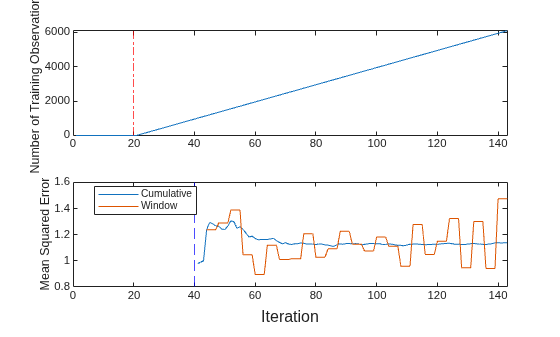
The plot suggests that updateMetricsAndFit does the following:
After the solver tuning period (red dot-dashed line), fit the model during all incremental learning iterations.
Compute the performance metrics after the metrics warm-up period only (blue dashed line).
Compute the cumulative metrics during each iteration.
Compute the window metrics after processing 200 observations (4 iterations).
Prepare an incremental regression learner by specifying a metrics warm-up period and a metrics window size. Train the model by using SGD, and adjust the SGD batch size, learning rate, and regularization parameter.
Load the robot arm data set.
load robotarmFor details on the data set, enter Description at the command line.
Create an incremental neural network model for regression. Configure the model as follows:
Specify a metrics warm-up period of 1000 observations.
Specify a metrics window size of 500 observations.
Specify the FreeRex solver and apply parameter updates based on the L2-norm of the gradient.
Track the mean squared error (MSE) and mean absolute error (MAE) to measure the performance of the model. Create an anonymous function that measures the absolute error of each new observation. Create a structure array containing the name
MeanAbsoluteErrorand its corresponding function.
maefcn = @(z,zfit)abs(z - zfit); maemetric = struct("MeanAbsoluteError",maefcn); Mdl = incrementalRegressionNeuralNetwork(MetricsWarmupPeriod=1000,MetricsWindowSize=500, ... TrainingOptions=incrementalTrainingOptions("freerex",UpdateMethod="l2-norm"), ... Metrics={"mse",maemetric})
Mdl =
incrementalRegressionNeuralNetwork
IsWarm: 0
Metrics: [2×2 table]
ResponseTransform: 'none'
LayerSizes: 10
Activations: "relu"
OutputLayerActivation: "none"
Solver: "freerex"
Properties, Methods
Mdl is an incrementalRegressionNeuralNetwork model object configured for incremental learning without an estimation period or solver tuning period.
Fit the incremental model to the data by using the updateMetricsAndFit function. At each iteration:
Simulate a data stream by processing a chunk of 50 observations.
Overwrite the previous incremental model with a new one fitted to the incoming observations.
Store the cumulative metrics, window metrics, and number of training observations to see how they evolve during incremental learning.
% Preallocation n = numel(ytrain); numObsPerChunk = 50; nchunk = floor(n/numObsPerChunk); mse = array2table(zeros(nchunk,2),VariableNames=["Cumulative","Window"]); mae = array2table(zeros(nchunk,2),VariableNames=["Cumulative","Window"]); numtrainobs = zeros(nchunk,1); % Incremental fitting rng(0,"twister") % For reproducibility for j = 1:nchunk ibegin = min(n,numObsPerChunk*(j-1) + 1); iend = min(n,numObsPerChunk*j); idx = ibegin:iend; Mdl = updateMetricsAndFit(Mdl,Xtrain(idx,:),ytrain(idx)); mse{j,:} = Mdl.Metrics{"MeanSquaredError",:}; mae{j,:} = Mdl.Metrics{"MeanAbsoluteError",:}; numtrainobs(j) = Mdl.NumTrainingObservations; end
Mdl is an incrementalRegressionNeuralNetwork model object trained on all the data in the stream. During incremental learning and after the model is warmed up, updateMetricsAndFit checks the performance of the model on the incoming observations, and then fits the model to those observations.
Plot a trace plot of the number of training observations and the performance metrics on separate tiles.
t = tiledlayout(3,1); nexttile plot(numtrainobs) xlim([0 nchunk]) ylabel(["Number of","Training Observations"]) xline(Mdl.MetricsWarmupPeriod/numObsPerChunk,"--") nexttile plot(mse.Variables) xlim([0 nchunk]) ylabel("MSE") xline(Mdl.MetricsWarmupPeriod/numObsPerChunk,"--") legend(mse.Properties.VariableNames) nexttile plot(mae.Variables) xlim([0 nchunk]) ylabel("MAE") xline(Mdl.MetricsWarmupPeriod/numObsPerChunk,"--") legend(mae.Properties.VariableNames) xlabel(t,"Iteration")
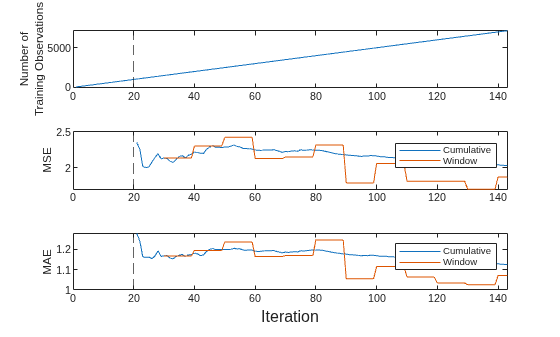
The plot suggests that updateMetricsAndFit does the following:
Fit the model during all incremental learning iterations.
Compute the performance metrics after the metrics warm-up period only (dashed vertical line).
Compute the cumulative metrics during each iteration.
Compute the window metrics after processing 500 observations (10 iterations).
More About
Incremental learning, or online learning, is a branch of machine learning concerned with processing incoming data from a data stream, possibly given little to no knowledge of the distribution of the predictor variables, aspects of the prediction or objective function (including tuning parameter values), or whether the observations are labeled. Incremental learning differs from traditional machine learning, where enough labeled data is available to fit to a model, perform cross-validation to tune hyperparameters, and infer the predictor distribution.
Given incoming observations, an incremental learning model processes data in any of the following ways, but usually in this order:
Predict labels.
Measure the predictive performance.
Check for structural breaks or drift in the model.
Fit the model to the incoming observations.
For more details, see Incremental Learning Overview.
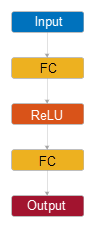
The default neural network model has the following layer structure.
| Structure | Description |
|---|---|
|
| Input — This layer corresponds to the predictor data in
Tbl or X. |
First fully connected layer — This layer has 10 outputs by default.
| |
ReLU activation function —
| |
Final fully connected layer — This layer has one output for each response variable.
|
If incremental learning functions are configured to standardize predictor variables,
they do so using the means and standard deviations stored in the Mu and Sigma properties
of the incremental learning model Mdl.
When you set
Standardize=trueand a positive estimation period (seeEstimationPeriod), andMdl.MuandMdl.Sigmaare empty, the incremental fit function estimates predictor means and standard deviations using the estimation period observations.When the incremental fitting function estimates predictor means and standard deviations, the function computes weighted means and weighted standard deviations using the estimation period observations. Specifically, the function standardizes predictor j (xj) using
xj is predictor j, and xjk is observation k of predictor j in the estimation period.
wj is observation weight j.
The observation weights wj are all equal to one and cannot be specified.
If incremental learning functions are configured to standardize response variables, they
do so using the means and standard deviations stored in the ResponseMean and
ResponseStandardDeviation properties of the incremental learning model
Mdl.
When you set StandardizeResponses=true and a positive estimation period
(see EstimationPeriod), and
Mdl.ResponseMean and Mdl.ResponseStandardDeviation
are empty, the incremental fit function estimates response means and standard deviations
using the estimation period observations.
When you train an incremental neural network model with the incremental fitting
functions fit and updateMetricsAndFit, then depending on the model's properties, up to three
incremental training periods can occur in the following order: the estimation period, the
solver tuning period, and the metrics warm-up period. Following these periods, the
incremental model is warm and the incremental fitting functions track
model performance metrics from new data.
During the estimation period, fit does not fit the model, and
updateMetricsAndFit does not fit the model or update the
performance metrics. The incremental fitting functions use the first incoming EstimationPeriod
observations to estimate the predictor and response variable means and standard deviation
hyperparameters required to standardize the data and responses during incremental
training. The fitting functions store the hyperparameter estimates in the Mu, Sigma, ResponseMean,
and ResponseStandardDeviation properties of Mdl.
Estimation occurs only when Mdl.EstimationPeriod is positive.
Additionally, you must specify Standardize=true or
StandardizeResponses=true when you create
Mdl. The software only estimates:
MuandSigmawhenMdl.Muis[]or an array of zeros andMdl.Sigmais[]or an array of onesResponseMeanandResponseStandardDeviationwhenMdl.ResponseMeanandMdl.ResponseStandardDeviationare[]
When you create Mdl using the incrementalLearner function, EstimationPeriod is always
0.
During the solver tuning period, the incremental fitting functions use
Mdl.TrainingOptions.TuningPeriod observations to tune the parameters
of the mini-batch LBFGS solver (the default solver). There is no solver turning period for
the FreeREX solver. You can select the solver algorithm and the length of the solver
tuning period using the TrainingOptions name-value argument when you
create the model object. For more information, see the Limited-Memory BFGS and FreeRex sections of the
incrementalTrainingOptions reference page.
During the metrics warm-up period, the incremental fitting functions fit the
incremental model. Mdl is warm after the incremental fitting
functions process MetricsWarmupPeriod observations.
The
updateMetricsandupdateMetricsAndFitfunctions track model performance metrics from new data only when the incremental model is warm (IsWarmproperty istrue).The
Metricsproperty of the incremental model stores two forms of each performance metric as variables (columns) of a table,CumulativeandWindow, with individual metrics in rows. When the incremental model is warm,updateMetricsandupdateMetricsAndFitupdate the metrics at the following frequencies:Cumulative— The functions compute cumulative metrics since the start of model performance tracking. The functions update metrics every time you call the functions and base the calculation on the entire supplied data set.Window— The functions compute metrics based on all observations within a window determined by theMetricsWindowSizename-value argument.MetricsWindowSizealso determines the frequency at which the software updatesWindowmetrics. For example, ifMetricsWindowSizeis 20, the functions compute metrics based on the last 20 observations in the supplied data (X((end – 20 + 1):end,:)andY((end – 20 + 1):end)).Incremental functions that track performance metrics within a window use the following process:
Store a buffer of length
MetricsWindowSizefor each specified metric, and store a buffer of observation weights.Populate elements of the metrics buffer with the model performance based on batches of incoming observations, and store corresponding observation weights in the weights buffer.
When the buffer is full, overwrite
Mdl.Metrics.Windowwith the weighted average performance in the metrics window. If the buffer overfills when the function processes a batch of observations, the latest incomingMetricsWindowSizeobservations enter the buffer, and the earliest observations are removed from the buffer. For example, supposeMetricsWindowSizeis 20, the metrics buffer has 10 values from a previously processed batch, and 15 values are incoming. To compose the length 20 window, the functions use the measurements from the 15 incoming observations and the latest 5 measurements from the previous batch.
References
[1] Glorot, Xavier, and Yoshua Bengio. “Understanding the difficulty of training deep feedforward neural networks.” In Proceedings of the thirteenth international conference on artificial intelligence and statistics, pp. 249–256. 2010.
[2] He, Kaiming, Xiangyu Zhang, Shaoqing Ren, and Jian Sun. “Delving deep into rectifiers: Surpassing human-level performance on imagenet Regression.” In Proceedings of the IEEE international conference on computer vision, pp. 1026–1034. 2015.
Version History
Introduced in R2026b
See Also
incrementalLearner | fitrnet | RegressionNeuralNetwork | incrementalTrainingOptions | fit | updateMetrics | updateMetricsAndFit | dlnetwork (Deep Learning Toolbox)
MATLAB Command
You clicked a link that corresponds to this MATLAB command:
Run the command by entering it in the MATLAB Command Window. Web browsers do not support MATLAB commands.
选择网站
选择网站以获取翻译的可用内容,以及查看当地活动和优惠。根据您的位置,我们建议您选择:。
您也可以从以下列表中选择网站:
如何获得最佳网站性能
选择中国网站(中文或英文)以获得最佳网站性能。其他 MathWorks 国家/地区网站并未针对您所在位置的访问进行优化。
美洲
- América Latina (Español)
- Canada (English)
- United States (English)
欧洲
- Belgium (English)
- Denmark (English)
- Deutschland (Deutsch)
- España (Español)
- Finland (English)
- France (Français)
- Ireland (English)
- Italia (Italiano)
- Luxembourg (English)
- Netherlands (English)
- Norway (English)
- Österreich (Deutsch)
- Portugal (English)
- Sweden (English)
- Switzerland
- United Kingdom (English)
