Get Started with Code Generation, Deployment, GPU, and OpenCV Support
R2026bMATLAB Coder™, Simulink Coder™, and Embedded Coder™ generate ANSI-compliant C/C++ code and standalone executables from Computer Vision Toolbox™ functions that support C/C++ code generation.
The GPU Coder generates CUDA® code and standalone executables for functions that support GPU code generation. Computer Vision Toolbox also includes functions that can automatically run on a GPU. This support requires Parallel Computing Toolbox™.
Computer Vision Toolbox provides an OpenCV Interface C++ API support package. Use the API for integrating OpenCV C++ code into MATLAB®. You can also use this support package to build MEX files that call OpenCV functions.
Many Computer Vision Toolbox functions support deployment using MATLAB Compiler™. For a list of functions that cannot be compiled into standalone applications or shared libraries, see Computer Vision Toolbox Functions Not Supported for Compilation by MATLAB Compiler and MATLAB Compiler SDK.
Find Features That Support Extended Capabilities
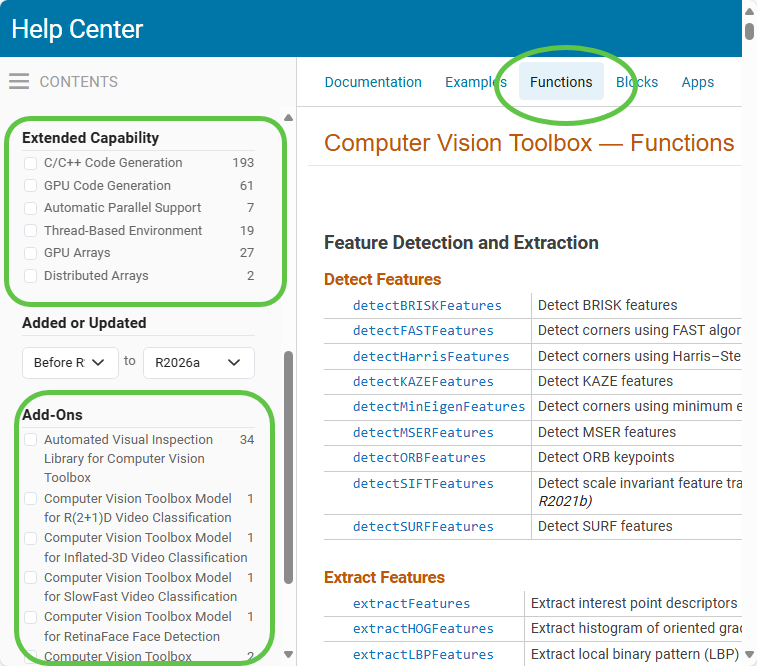
In addition to the information provided here, you can find functions and other features supported for extended capabilities such as C/C++, GPU, and others in the Extended Capability section of reference pages. Additionally, you can select specific extended capabilities found in the left navigation bar to provide a filtered list of supported features. You can also filter on supported Add-Ons.
C/C++ Code Generation
Several Computer Vision Toolbox™ functions and blocks are able to generate C/C++ code. After you generate the code, you can deploy it on another machine. For some Computer Vision Toolbox functions, code generation includes the creation of a shared library. For more information about code generation, see the MATLAB Coder™ documentation and the Introduction to Code Generation with Feature Matching and Registration example.
Note
To generate code from MATLAB code that contains Computer Vision Toolbox functionality, you must have the MATLAB Coder software.
Supporting functions and blocks:
Related Topics and Examples:
Introduction to Code Generation with Feature Matching and Registration
Generate Deployable Standalone Code by Using the MATLAB Coder App (MATLAB Coder)
Human Activity Recognition Simulink Model for Smartphone Deployment (Statistics and Machine Learning Toolbox)
GPU Code Generation and Acceleration
After you develop your application using Computer Vision Toolbox, you can generate optimized CUDA code for NVIDIA® graphics processing unit (GPU) from MATLAB code. The code can be integrated into your project as source code, static libraries, or dynamic libraries, and can be used for prototyping on GPUs. You can use the generated CUDA within MATLAB to accelerate computationally intensive portions of your MATLAB code in machine learning, deep learning, or other applications. You must have MATLAB Coder and GPU Coder™ to generate CUDA code.
To take advantage of the performance benefits offered by a modern GPU, certain Computer Vision Toolbox functions can run on a GPU. This support requires Parallel Computing Toolbox.
Supporting functions:
Related Topics and Examples:
The GPU Environment Check and Setup App (GPU Coder)
Generate Code by Using the GPU Coder App (GPU Coder)
Generate Code Using the Command Line Interface (GPU Coder)
Run MATLAB Functions on a GPU (Parallel Computing Toolbox)
GPU Computing Requirements (Parallel Computing Toolbox)
OpenCV Support
The Computer Vision Toolbox Interface for OpenCV in MATLAB support package provides these functionalities for OpenCV support:
MATLAB functions to convert computed camera parameters between MATLAB and OpenCV formats for camera calibration applications.
OpenCV Interface C++ API support files for building MEX files that you can use to call OpenCV functions and integrate OpenCV C++ code into MATLAB. The interface does not support graphics processing unit (GPU). You can use the MEX-based approach to integrate a custom OpenCV function with MATLAB. For more information about the MEX-based approach, see Build MEX Files for OpenCV Interface.
Prebuilt MATLAB interface to the OpenCV library to directly call OpenCV functions from MATLAB without writing C/C++ code. The support package also provides MATLAB functions to pass data back and forth between OpenCV and MATLAB. However, the prebuilt MATLAB interface to the OpenCV does not provide support for integrating custom OpenCV functions with MATLAB.
To use the MEX-based and the prebuilt MATLAB interface to OpenCV support files, you must first download the Computer Vision Toolbox Interface for OpenCV in MATLAB support package. For information about how to download the support package, see Install and Use Computer Vision Toolbox Interface for OpenCV in MATLAB.
Functions:
Related Topics and Examples:
OpenCV Interface for Simulink
The Computer Vision Toolbox Interface for OpenCV in Simulink® enables you to import OpenCV code into Simulink. This support package requires Computer Vision Toolbox and Simulink Coder.
You can also generate C++ code from the Simulink model and deploy into your target hardware.
You can import OpenCV code to a Simulink model by using the OpenCV Importer app. For more information, see Install and Use Computer Vision Toolbox Interface for OpenCV in Simulink.
| Block | Description |
|---|---|
| FromOpenCV | Converts OpenCV data types to Simulink data types |
| ToOpenCV | Converts Simulink data types to OpenCV data types |
| Image To Matrix | Converts Simulink image data to matrix data |
| Matrix To Image | Converts matrix data to Simulink image data |
Related Topics and Examples:
HDL Code Generation
Computer Vision Toolbox provides vision algorithm modeling at a high level of abstraction. The blocks, objects, and functions perform full-frame processing, operating on one image frame at a time. However, FPGA or ASIC systems perform pixel-stream processing, operating on one image pixel at a time. Vision HDL Toolbox™ provides libraries of vision algorithms that use a pixel-streaming interface, and have a hardware-friendly implementation. For instance, Vision HDL Toolbox™ provides algorithms for automated driving, feature detection, and camera pipeline applications. For an example showing how to use the Vision HDL Toolbox, see the Noise Removal and Image Sharpening example.
You can generate target-independent, synthesizable Verilog® and VHDL® code from Vision HDL Toolbox blocks and objects using HDL Coder™.

