waveletPooling2dLayer
R2026bDescription
A 2-D discrete wavelet pooling layer applies the forward and inverse discrete wavelet transforms to reconstruct approximations of the layer input. Use this layer to downsample the layer input along the spatial dimensions. The layer supports learnable (adaptive) and nonadaptive pooling. For more information, see Discrete Wavelet Pooling. Use of this layer requires Deep Learning Toolbox™.
Creation
Description
layer = waveletPooling2dLayer
The input to waveletPooling2dLayer must be a real-valued dlarray (Deep Learning Toolbox) object in
"SSCB" format. The output is a dlarray object in
"SSCB" format. For more information, see Layer Output Format.
Note
When you initialize the learnable parameters of waveletPooling2dLayer, the
layer weights are set to unity. It is not recommended to initialize the weights
directly.
layer = waveletPooling2dLayer(PropertyName=Value)
Example: layer =
waveletPooling2dLayer(Wavelet="db4",Boundary="zeropad") creates a wavelet
pooling layer that uses the extremal phase Daubechies wavelet with four vanishing moments
and zero padding at the boundaries.
Properties
Examples
Load the xbox image. The image is a 128-by-128 matrix. Save the image in single precision as a dlarray object with format "SSCB".
load xbox
dlimg = dlarray(single(xbox),"SSCB");
Create the default 2-D discrete wavelet pooling layer. By default, the learnable parameters DetailWeights and LowpassWeights are both empty.
dwtPool = waveletPooling2dLayer
dwtPool =
  waveletPooling2dLayer with properties:

                            Name: ''
     DetailWeightLearnRateFactor: 0
    LowpassWeightLearnRateFactor: 0
                         Wavelet: 'db1'
             ReconstructionLevel: 1
                   AnalysisLevel: 2
                        Boundary: 'reflection'
      SelectedDetailCoefficients: [1 1 1]
              ExpectedOutputSize: 'none'

   Learnable Parameters
                   DetailWeights: []
                  LowpassWeights: []

   State Parameters
    No properties.

  Show all properties
Include the default 2-D wavelet pooling layer in a Layer array.
layers = [ ...
    imageInputLayer([128 128 1])
    waveletPooling2dLayer]
layers =
2×1 Layer array with layers:
1 '' Image Input 128×128×1 images with 'zerocenter' normalization
2 '' waveletPooling2dLayer waveletPooling2dLayer
Convert the layer array to a dlnetwork object. Because the layer array has an input layer and no other inputs, the software initializes the network.
dlnet = dlnetwork(layers)
dlnet =
  dlnetwork with properties:

         Layers: [2×1 nnet.cnn.layer.Layer]
    Connections: [1×2 table]
     Learnables: [2×3 table]
          State: [0×3 table]
     InputNames: {'imageinput'}
    OutputNames: {'layer'}
    Initialized: 1

  View summary with summary.
Confirm the network learnable parameters are DetailWeights and LowpassWeights.
dlnet.Learnables
ans = 2×3 table
     Layer        Parameter            Value
    _______    ________________    _____________

    "layer"    "DetailWeights"     {1×3 dlarray}
    "layer"    "LowpassWeights"    {1×1 dlarray}
Inspect the wavelet pooling layer in the network. Confirm the software initialized the weights.
dlnet.Layers(2)
ans =
  waveletPooling2dLayer with properties:

                            Name: 'layer'
     DetailWeightLearnRateFactor: 0
    LowpassWeightLearnRateFactor: 0
                         Wavelet: 'db1'
             ReconstructionLevel: 1
                   AnalysisLevel: 2
                        Boundary: 'reflection'
      SelectedDetailCoefficients: [1 1 1]
              ExpectedOutputSize: 'none'

   Learnable Parameters
                   DetailWeights: [1×3 dlarray]
                  LowpassWeights: [1×1 dlarray]

   State Parameters
    No properties.

  Show all properties
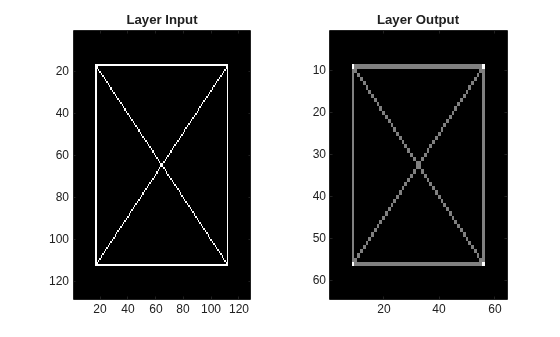
Run the image through the network. By default, the layer outputs the level-one lowpass approximation of the input.
dlnetout = forward(dlnet,dlimg);
size(dlnetout)
ans = 1×4

    64    64     1     1
dims(dlnetout)
ans =
'SSCB'
Plot the layer input and output.
dlnetout2 = squeeze(extractdata(dlnetout));
tiledlayout(1,2)
nexttile
imagesc(xbox)
title("Layer Input")
nexttile
imagesc(dlnetout2)
title("Layer Output")
colormap gray
Load the xbox image. The image dimensions are 128-by-128. Save the image in single precision as a dlarray object with format "SSCB".
load xbox
dlimg = dlarray(single(xbox),"SSCB");
Create a 2-D discrete wavelet pooling layer that uses the biorthogonal bior4.4 wavelet, which has four vanishing moments each for the decomposition and reconstruction filters. Set the analysis level to 4 and reconstruction level to 1. Set the boundary extension mode to "zeropad". Specify a mask so that the layer excludes from the pooling:
The LH subband (horizontal details) at level 3
The HL subband (vertical details) at level 2
The wavelet HH subband (diagonal details) at levels 3 and 4
% specify levels
alevel = 4;
rlevel = 1;
bdy = "zeropad";
wv = "bior4.4";

% create mask
msk = ones(1,3,alevel-rlevel);
msk(1,1,2) = 0;                % exclude LH subband
msk(1,2,1) = 0;                % exclude HL subband
msk(1,3,2:3) = 0;              % exclude HH subband


% create layer
poolDWT = waveletPooling2dLayer(AnalysisLevel=alevel, ...
    ReconstructionLevel=rlevel, ...
    SelectedDetailCoefficients=msk, ...
    Wavelet=wv, ...
    Boundary=bdy);
Create a Layer array containing an image input layer and the pooling layer.
layers = [ ...
    imageInputLayer([size(dlimg,1:2) 1])
    poolDWT];
Convert the layer array to a dlnetwork object.
dlnet = dlnetwork(layers);
dlnet.Layers(2)
ans =
  waveletPooling2dLayer with properties:

                            Name: 'layer'
     DetailWeightLearnRateFactor: 0
    LowpassWeightLearnRateFactor: 0
                         Wavelet: "bior4.4"
             ReconstructionLevel: 1
                   AnalysisLevel: 4
                        Boundary: 'zeropad'
      SelectedDetailCoefficients: [1×3×3 double]
              ExpectedOutputSize: 'none'

   Learnable Parameters
                   DetailWeights: [1×3×3 dlarray]
                  LowpassWeights: [1×1 dlarray]

   State Parameters
    No properties.

  Show all properties
Run the signal through the network.
netout = forward(dlnet,dlimg);
Now use the same layer property values in the functions dldwt and dlidwt.
Use the dldwt function to obtain the differentiable DWT of the image down to level 4. To specify the extension mode, use the PaddingMode name-value argument. To obtain the full wavelet decomposition instead of only the final level wavelet coefficients, set the full wavelet decomposition option to true.
[A,D] = dldwt(dlimg, ...
    Wavelet=wv, ...
    Level=alevel, ...
    FullTree=true, ...
    PaddingMode=bdy);
For a multilevel 2-D inverse DWT, the dlidwt function expects the wavelet subband gains (mask) to be an NC-by-3-by-L matrix, where NC is the number of channels in the data, and L is the difference between the decomposition level (used to obtain the coefficients) and the reconstruction level. Use the dlidwt function to reconstruct the DWT up to level 2. Set the extension mode to zero padding and the DetailGain name-value argument to the mask.
dlout = dlidwt(A,D, ...
    Wavelet=wv, ...
    Level=rlevel, ...
    DetailGain=msk, ...
    PaddingMode=bdy);
Confirm the sizes of the layer output and dlidwt output are identical.
size(netout)
ans = 1×4

    68    68     1     1
size(dlout)
ans = 1×4

    68    68     1     1
Confirm the outputs are equal.
netoutEx = extractdata(netout);
dloutEx = extractdata(dlout);
max(abs(netoutEx(:)-dloutEx(:)))
ans = single

0
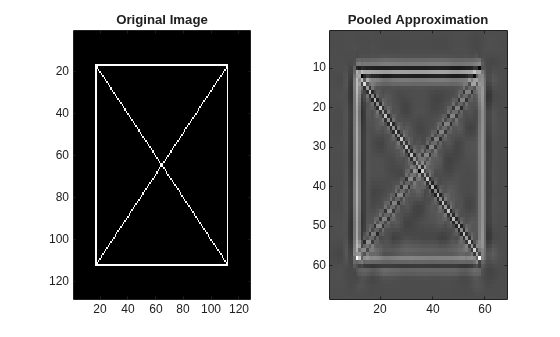
Plot the original image and its pooled approximation.
tiledlayout(1,2)
nexttile
imagesc(xbox)
axis tight
title("Original Image")
nexttile
imagesc(netoutEx)
axis tight
title("Pooled Approximation")
colormap gray
Create a 127-by-135 image. Save the image in single precision as a dlarray object.
img = randn(127,135);
dlimg = dlarray(img,"SSCB");
The reconstruction level and the difference between the analysis and reconstruction levels can affect the output size.
Reconstruction Level Greater Than 0, Difference Between Analysis and Reconstruction Levels Greater Than 1
Use the dldwt function to obtain the differentiable DWT of the image down to level 4. Specify the db2 wavelet and zero padding as the extension mode. Obtain the full wavelet decomposition by setting FullTree to true.
wv = "db2";
alevel = 4;
bdy = "zeropad";

[A,D] = dldwt(dlimg, ...
    Wavelet=wv, ...
    Level=alevel, ...
    FullTree=true, ...
    PaddingMode=bdy); %#ok<*ASGLU>
Create a waveletPooling2dLayer using the same parameters as the dldwt function. Specify a reconstruction level of 2.
rlevel = 2;

wpl = waveletPooling2dLayer(Wavelet=wv, ...
    AnalysisLevel=alevel, ...
    ReconstructionLevel=rlevel, ...
    Boundary=bdy);
Create a Layer array containing an image input layer appropriate for the signal and the wavelet pooling layer. Convert the layer array to a dlnetwork object. Run the image through the network.
layers = [
    imageInputLayer([size(dlimg,1:2) 1])
    wpl];

dlnet = dlnetwork(layers);
netOutput = forward(dlnet,dlimg);
Compare the sizes of the spatial dimensions of the layer output with the dimensions of the coefficients at the corresponding decomposition level. Because the reconstruction level is greater than 0 and the difference between the analysis and reconstruction levels is greater than 1, the sizes are equal. The layer effectively sets FullTree to true which removes any ambiguity regarding the size of the reconstruction.
[size(netOutput,[1 2]); size(D{rlevel},[1 2])]ans = 2×2
34 36
34 36
Reconstruction Level is 0
Use the dldwt function to obtain the differentiable DWT of the image down to level 2. Specify the db2 wavelet and zero padding as the extension mode. Set FullTree to true to obtain the full wavelet decomposition.
wv = "db2";
alevel = 2;
bdy = "zeropad";

[A,D] = dldwt(dlimg, ...
    Wavelet=wv, ...
    Level=alevel, ...
    FullTree=true, ...
    PaddingMode=bdy);
Use the dlidwt function to obtain the reconstruction at level 0. Compare the dimensions of the reconstruction with the dimensions of the original signal. Even though FullTree is true, the dimensions are different. Because the reconstruction level is 0, ambiguity exists.
rlevel = 0;

xrec = dlidwt(A,D, ...
    Wavelet=wv, ...
    Level=rlevel, ...
    PaddingMode=bdy);

[size(dlimg,[1 2]) ; size(xrec,[1 2])]
ans = 2×2

   127   135
   128   136
Because the reconstruction level is 0, the size of the reconstruction must equal the size of the original signal. You can set ExpectedOutputSize to remove the ambiguity.
xrec2 = dlidwt(A,D, ...
    Wavelet=wv, ...
    Level=rlevel, ...
    PaddingMode=bdy, ...
    ExpectedOutputSize=size(dlimg,[1 2]));

[size(dlimg,[1 2]) ; size(xrec2,[1 2])]
ans = 2×2

   127   135
   127   135
Similarly, to remove the ambiguity in the wavelet pooling layer, you can specify ExpectedOutputSize. Create a Layer array containing an image input layer and the wavelet pooling layer. Convert the layer array to a dlnetwork object. Run the image through the network.
wpl = waveletPooling2dLayer(Wavelet=wv, ...
    AnalysisLevel=alevel, ...
    ReconstructionLevel=rlevel, ...
    Boundary=bdy, ...
    ExpectedOutputSize=size(dlimg,[1 2]));

layers = [
    imageInputLayer([size(dlimg,[1 2]),1])
    wpl];
dlnet = dlnetwork(layers);
dlnetout = forward(dlnet,dlimg);

[size(dlimg,[1 2]) ; size(dlnetout,[1 2])]
ans = 2×2

   127   135
   127   135
Difference Between Analysis and Reconstruction Levels is 1
When the difference between the analysis and reconstruction levels is 1, the pooling layer behaves as if FullTree is false. Use the dldwt function to obtain the differentiable DWT of the image down to level 2. Specify the db2 wavelet and zero padding as the extension mode. Set FullTree to false.
wv = "db2";
alevel = 2;
bdy = "zeropad";

[A,D] = dldwt(dlimg, ...
    Wavelet=wv, ...
    Level=alevel, ...
    FullTree=false, ...
    PaddingMode=bdy);
If the input coefficients are a tensor, the dlidwt function performs a single-level IDWT. Obtain the size of the reconstruction.
xrec = dlidwt(A,D, ...
    Wavelet=wv, ...
    PaddingMode=bdy);
size(xrec,[1 2])
ans = 1×2

    66    70
Use the wavedec2 function to obtain the bookkeeping matrix of an image whose dimensions equal the size of the spatial dimensions of the dlarray object. Use the same input parameters. Use zero padding boundary extension. Extract from the bookkeeping matrix the sizes of the coefficients at level 2. Because FullTree is false, the sizes extracted from the bookkeeping matrix do not equal the sizes of the reconstruction.
origMode = dwtmode("status","nodisplay");
dwtmode("zpd","nodisplay")
[~,s] = wavedec2(img,alevel,wv);
dwtmode(origMode,"nodisplay")

extractedSize = s(end-2+1,:)
extractedSize = 1×2

    65    69
Use the dlidwt function to obtain the reconstruction at level 1, but this time specify ExpectedOutputSize to equal the extracted values.
xrec2 = dlidwt(A,D, ...
    Wavelet=wv, ...
    PaddingMode=bdy, ...
    ExpectedOutputSize=extractedSize);
size(xrec2,[1 2])
ans = 1×2

    65    69
Create a wavelet pooling layer. Set the layer properties to agree with the dldwt and dlidwt input arguments, including the expected output size. Create a Layer array containing an image input layer and the wavelet pooling layer. Convert the layer array to a dlnetwork object. Run the image through the network. Confirm the sizes of the network output equal ExpectedOutputSize.
rlevel = 1;

wpl = waveletPooling2dLayer(Wavelet=wv, ...
    AnalysisLevel=alevel, ...
    ReconstructionLevel=rlevel, ...
    Boundary=bdy, ...
    ExpectedOutputSize=extractedSize);

layers = [
    imageInputLayer([size(dlimg,[1 2]),1])
    wpl];
dlnet = dlnetwork(layers);
dlnetout = forward(dlnet,dlimg);

size(dlnetout,[1 2])
ans = 1×2

    65    69
More About
References
[1] Williams, Travis and Robert Y. Li. “Wavelet Pooling for Convolutional Neural Networks.” International Conference on Learning Representations (2018), https://openreview.net/pdf?id=rkhlb8lCZ.
[2] Wolter, Moritz, and Jochen Garcke. “Adaptive Wavelet Pooling for Convolutional Neural Networks.” In Proceedings of The 24th International Conference on Artificial Intelligence and Statistics, edited by Arindam Banerjee and Kenji Fukumizu, vol. 130. PMLR, 2021. https://proceedings.mlr.press/v130/wolter21a.html.
Extended Capabilities
Version History
Introduced in R2026aSee Also
Apps
- Deep Network Designer (Deep Learning Toolbox)
Functions
Objects
waveletPooling1dLayer|modwtLayer|dlarray(Deep Learning Toolbox) |dlnetwork(Deep Learning Toolbox)
Topics
- Practical Introduction to Multiresolution Analysis
- List of Deep Learning Layers (Deep Learning Toolbox)
- Networks and Layers Supported for Code Generation (MATLAB Coder)
- Supported Networks, Layers, and Classes (GPU Coder)

