双连杆机器人的 LTV 模型
R2026b此示例说明如何获取双连杆机器人沿规定轨迹的 LTV 模型。机器人模型及其对应的动态特性基于 [1] 和 [2]。
非线性模型
下图给出了双连杆平面机器人的示意图。
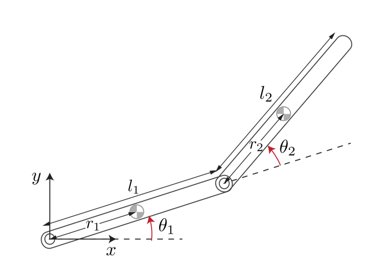
机器人配置由关节角度 、 以及作用于关节的用于控制末端位置的扭矩 、 来描述。状态向量为
.
以下方程描述了机器人的动态特性。
其中:
此示例使用 twoLinkInverseKinematics.m 脚本来求解此逆运动学问题。
定义物理参数。
m1 = 3;         % Mass of link 1, kg
m2 = 2;         % Mass of link 2, kg
L1 = 0.3;       % Length of link 1, meters
L2 = 0.3;       % Length of link 2, meters
期望轨迹与逆运动学
机械臂末端必须遵循规定的平面轨迹 ,。
T0 = 0;
Tf = 5;
tref = linspace(T0,Tf,400)';
load XYTrajectory x2ref y2ref
plot( x2ref,y2ref,"b",LineWidth=3,MarkerSize=10)
xlabel("x (m)")
ylabel("y (m)")
grid on
title("Target Trajectory")
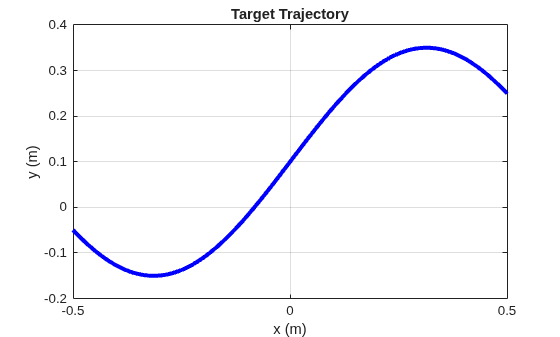
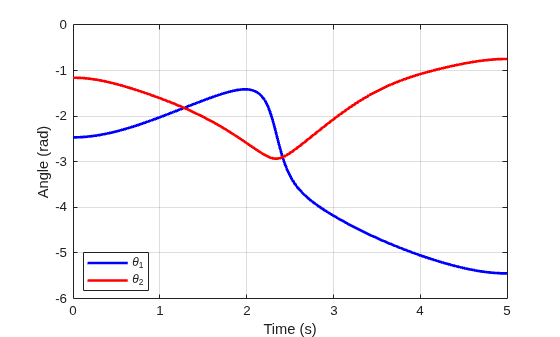
求解连杆 2 端点运动对应的关节角度、关节速度和扭矩输入的逆运动学问题。使用关节角度计算连杆 1 末端的轨迹。
[x,tau] = twoLinkInverseKinematics(tref,x2ref,y2ref,m1,m2,L1,L2);
x1ref = L1*cos(x(:,1));
y1ref = L1*sin(x(:,1));
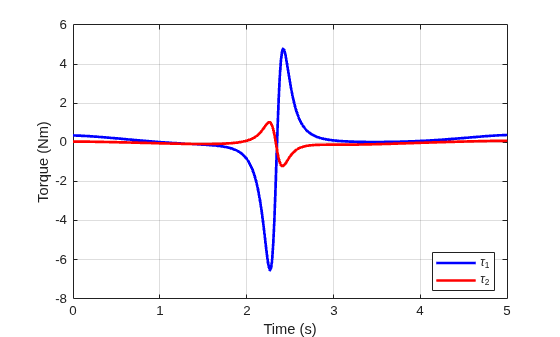
绘制关节角度和扭矩。
plot(tref,x(:,1),"b",tref,x(:,2),"r",LineWidth=2);
legend("\theta_1","\theta_2",Location="best")
ylabel("Angle (rad)")
xlabel("Time (s)")
grid on
plot(tref,tau(:,1),"b",tref,tau(:,2),"r",LineWidth=2);
legend("\tau_1","\tau_2",Location="best")
ylabel("Torque (Nm)")
xlabel("Time (s)")
grid on
使用双连杆机器人的 Simscape™ Multibody™ 模型来仿真机器人对计算所得扭矩的响应。
tau1 = tau(:,1);
tau2 = tau(:,2);
xinit = x(1,:)';  % initial state

open_system("TwoLinkRobotSM")
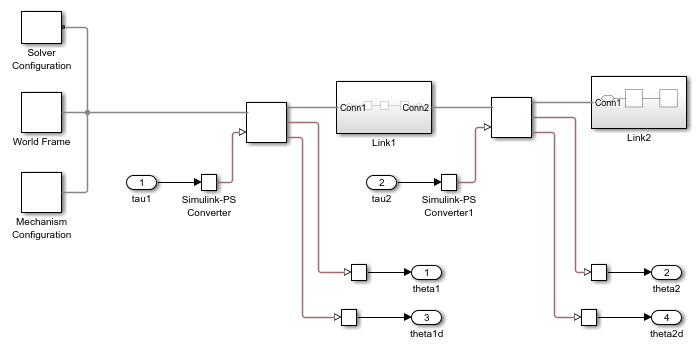
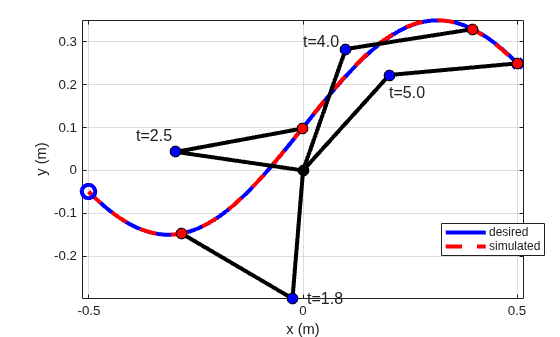
对模型进行仿真,解包结果,并验证末端是否遵循期望的轨迹。
out = sim("TwoLinkRobotSM","ReturnWorkspaceOutputs","on");
tsim = out.xsim.time;
xsim = out.xsim.signals.values;

plotTrajectory(xsim,tref,x1ref,y1ref,x2ref,y2ref,L1,L2)
LTV 模型
要构建双连杆机器人沿期望轨迹的 LTV 模型,请在仿真开始时刻与结束时刻之间选取 50 个均匀分布的时间点拍摄线性化快照。使用 linearize 获取对应工况下的线性化模型。
指定线性化 I/O。
io = [...
   linio("TwoLinkRobotSM/tau1",1,"input");...
   linio("TwoLinkRobotSM/tau2",1,"input");...
   linio("TwoLinkRobotSM/Mux",1,"output")];
获取快照工作点。
tlin = linspace(T0,Tf,50);
op = findop("TwoLinkRobotSM",tlin);
计算带偏移量的线性化。
linOpt = linearizeOptions(StoreOffsets=true);
[G,~,info] = linearize("TwoLinkRobotSM",io,op,linOpt);
G.u = "tau";
G.y = "x";
G.SamplingGrid = struct("Time",tlin);
使用 ssInterpolant 从线性化模型数组及相关偏移量构造 LTV 对象。所得的 LTV 模型在快照时刻 tlin 之间对线性化动态特性进行插值。
Gltv = ssInterpolant(G,info.Offsets);
Gltv.StateName
ans = 4×1 cell
    {'TwoLinkRobotSM.Subsystem.Revolute_Joint1.Rz.q'}
    {'TwoLinkRobotSM.Subsystem.Revolute_Joint1.Rz.w'}
    {'TwoLinkRobotSM.Subsystem.Revolute_Joint2.Rz.q'}
    {'TwoLinkRobotSM.Subsystem.Revolute_Joint2.Rz.w'}
线性化过程中,状态顺序有所不同。使用 xperm 将状态顺序与约定 、、、 对齐。
Gltv = xperm(Gltv,[1 3 2 4]);
Gltv.StateName
ans = 4×1 cell
    {'TwoLinkRobotSM.Subsystem.Revolute_Joint1.Rz.q'}
    {'TwoLinkRobotSM.Subsystem.Revolute_Joint2.Rz.q'}
    {'TwoLinkRobotSM.Subsystem.Revolute_Joint1.Rz.w'}
    {'TwoLinkRobotSM.Subsystem.Revolute_Joint2.Rz.w'}
LTV 模型验证
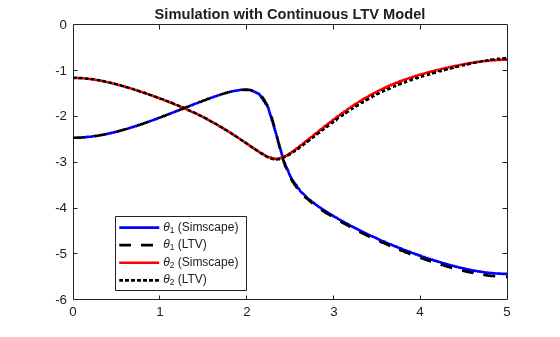
针对相同的扭矩输入,对此 LTV 模型的响应进行仿真,并与 Simscape Multibody 提供的结果进行比较。
仿真 LTV 对扭矩曲线的响应。
xltv = lsim(Gltv,[tau1 tau2],tref,xinit);
与 Simscape 结果进行比较。
clf
plot(tsim,xsim(:,1),"b",tref,xltv(:,1),"k--",...
   tsim,xsim(:,2),"r",tref,xltv(:,2),"k:",LineWidt=2);
xlim([0 5])
legend("\theta_1 (Simscape)","\theta_1 (LTV)",...
   "\theta_2 (Simscape)","\theta_2 (LTV)",Location="best")
title("Simulation with Continuous LTV Model")
离散化
在嵌入式应用中,通常需要一个易于仿真的离散模型。使用 c2d,可以计算 Gltv 的突斯汀离散化,并将其转换为离散网格 LTV 模型。
Ts = 0.05;
Gd = c2d(Gltv,Ts,"tustin");
将 Gd 转换为包含 50 个网格点的网格 LTV 模型。
k = round(linspace(0,Tf/Ts,50));
Gd = ssInterpolant(Gd,struct("Time",k));
突斯汀离散化的初始条件为
.
[A,B,~,~,~,dx0,x0,u0] = Gltv.DataFunction(0);
dxinit = dx0+A*(xinit-x0)+B*(tau(1,:)'-u0);
zinit = xinit-Ts/2*dxinit;
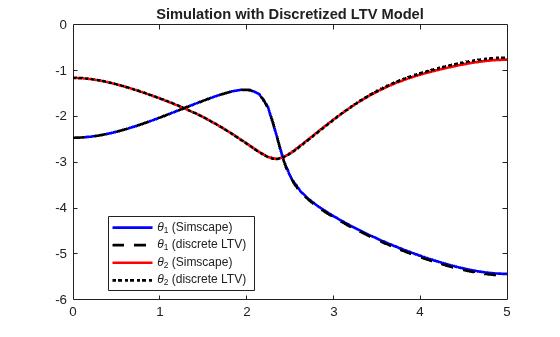
进行仿真并与 Simscape 结果进行比较。
t = T0:Ts:Tf;
taud = interp1(tref,[tau1 tau2],t);
xd = lsim(Gd,taud,t,zinit);

clf
plot(tsim,xsim(:,1),"b",t,xd(:,1),"k--",...
   tsim,xsim(:,2),"r",t,xd(:,2),"k:",LineWidth=2);
xlim([0 5])
legend("\theta_1 (Simscape)","\theta_1 (discrete LTV)",...
   "\theta_2 (Simscape)","\theta_2 (discrete LTV)",Location="best")
title("Simulation with Discretized LTV Model")
参考资料
[1] Murray, Richard M., Zexiang Li, and Shankar Sastry.A Mathematical Introduction to Robotic Manipulation.Boca Raton:CRC Press, 1994.
[2] Seiler, Peter, Robert M. Moore, Chris Meissen, Murat Arcak, and Andrew Packard.“Finite Horizon Robustness Analysis of LTV Systems Using Integral Quadratic Constraints.”Automatica 100 (February 2019):135–43. https://doi.org/10.1016/j.automatica.2018.11.009.
另请参阅
ltvss | ssInterpolant | sample | ndgrid | c2d | linearize (Simulink Control Design)

