complexConvolution2dLayer
R2026bDescription
A complex 2-D convolutional layer applies sliding complex convolutional filters to 2-D input. The layer convolves the input by first moving the filters along the input vertically and horizontally and computing the dot product of the weights and the input, and then adding a bias term.
The dimensions that the layer convolves over depends on the layer input:
For 2-D image input (data with four dimensions corresponding to pixels in two spatial dimensions, the channels, and the observations), the layer convolves over the spatial dimensions.
For 2-D image sequence input (data with five dimensions corresponding to the pixels in two spatial dimensions, the channels, the observations, and the time steps), the layer convolves over the two spatial dimensions.
For 1-D image sequence input (data with four dimensions corresponding to the pixels in one spatial dimension, the channels, the observations, and the time steps), the layer convolves over the spatial and time dimensions.
Creation
Syntax
Description
creates a complex 2-D convolutional layer and sets the layer = complexConvolution2dLayer(filterSize,numFilters)FilterSize and NumFilters properties.
specifies additional options using one or more name-value arguments. For example,
layer = complexConvolution2dLayer(filterSize,numFilters,Name=Value)complexConvolution2dLayer(filterSize,numFilters,Name="complex-conv2d")
specifies the name "complex-conv2d".
Input Arguments
Height and width of the filters, specified as a vector [h w] of
two positive integers, where h is the height and
w is the width. filterSize defines the size
of the local regions to which the neurons connect in the input.
When you create the layer, you can specify filterSize as a
scalar to use the same value for the height and width.
Example:
[5 5] specifies filters with a height of 5 and a width of
5.
Number of filters, specified as a positive integer. This number corresponds to the number of neurons in the layer that connect to the same region in the input. This parameter determines the number of channels (feature maps) in the layer output.
Data Types: single | double | int8 | int16 | int32 | int64 | uint8 | uint16 | uint32 | uint64
Name-Value Arguments
Specify optional pairs of arguments as
Name1=Value1,...,NameN=ValueN, where Name is
the argument name and Value is the corresponding value.
Name-value arguments must appear after other arguments, but the order of the
pairs does not matter.
Example: complexConvolution2dLayer(3,16,Padding="same") creates a
complex 2-D convolutional layer with 16 filters of size [3 3] and
'same' padding. At training time, the software calculates and sets
the size of the padding so that the layer output has the same size as the
input.
Step size for traversing the input vertically and horizontally, specified as a
vector [a b] of two positive integers, where a
is the vertical step size and b is the horizontal step size. When
creating the layer, you can specify Stride as a scalar to use
the same value for both step sizes.
Example:
[2 3] specifies a vertical step size of 2 and a horizontal step
size of 3.
Factor for dilated convolution (also known as atrous convolution), specified as
a vector [h w] of two positive integers, where
h is the vertical dilation and w is the
horizontal dilation. When creating the layer, you can specify
DilationFactor as a scalar to use the same value for both
horizontal and vertical dilations.
Use dilated convolutions to increase the receptive field (the area of the input which the layer can see) of the layer without increasing the number of parameters or computation.
The layer expands the filters by inserting zeros between each filter element.
The dilation factor determines the step size for sampling the input or
equivalently the upsampling factor of the filter. It corresponds to an effective
filter size of (Filter Size – 1) .* Dilation
Factor + 1. For example, a 3-by-3 filter with the dilation factor
[2 2] is equivalent to a 5-by-5 filter with zeros between the
elements.
Example: [2 3]
Input edge padding, specified as one of these values:
"same"— Add padding of size calculated by the software at training or prediction time so that the output has the same size as the input when the stride equals 1. If the stride is larger than 1, then the output size isceil(inputSize/Stride), whereinputSizeis the height or width of the input andstrideis the stride in the corresponding dimension. The software adds the same amount of padding to the top and bottom, and to the left and right, if possible. If the padding that must be added vertically has an odd value, then the software adds extra padding to the bottom. If the padding that must be added horizontally has an odd value, then the software adds extra padding to the right.Nonnegative integer
p— Add padding of sizepto all the edges of the input.Vector
[a b]of nonnegative integers — Add padding of sizeato the top and bottom of the input and padding of sizebto the left and right.Vector
[t b l r]of nonnegative integers — Add padding of sizetto the top,bto the bottom,lto the left, andrto the right of the input.
Example: Padding=1 adds one row of padding to the top and
bottom, and one column of padding to the left and right of the input.
Example: Padding="same" adds padding so that the output has
the same size as the input (if the stride equals 1).
Data Types: single | double | int8 | int16 | int32 | int64 | uint8 | uint16 | uint32 | uint64 | char | string
Value with which to pad the input data, specified as one of the following:
PaddingValue | Description | Example |
|---|---|---|
| Scalar | Pad with the specified scalar value. |
|
"symmetric-include-edge" | Pad using mirrored values of the input, including the edge values. |
|
"symmetric-exclude-edge" | Pad using mirrored values of the input, excluding the edge values. |
|
"replicate" | Pad using repeated border elements of the input |
|
Data Types: single | double | int8 | int16 | int32 | int64 | uint8 | uint16 | uint32 | uint64 | char | string
Complex Number Support: Yes
Number of input channels, specified as one of the following:
"auto"— Automatically determine the number of input channels at training time.Positive integer — Configure the layer for the specified number of input channels.
NumChannelsand the number of channels in the layer input data must match. For example, if the input is an RGB image, thenNumChannelsmust be 3. If the input is the output of a convolutional layer with 16 filters, thenNumChannelsmust be 16.
Data Types: single | double | int8 | int16 | int32 | int64 | uint8 | uint16 | uint32 | uint64 | char | string
Function to initialize the weights, specified as one of the following:
"complex-glorot-normal"– Initialize the weights with the complex normal Glorot initializer [1]. The complex normal Glorot initializer independently samples real and imaginary parts of the weights from a normal distribution with zero mean and variance1/(numIn + numOut)."complex-glorot-uniform-square"– Initialize the weights with the complex uniform square Glorot initializer [1]. The complex uniform square Glorot initializer independently samples real and imaginary parts of the weights from a uniform distribution in the interval(-sqrt(3/(numIn + numOut)), sqrt(3/(numIn + numOut)))."complex-he-normal"– Initialize the weights with the complex normal He initializer [1]. The complex normal He initializer samples real and imaginary parts of the weights from a normal distribution with zero mean and variance1/numIn."complex-he-uniform-square"– Initialize the weights with the complex uniform square He initializer [1]. The complex uniform square He initializer samples real and imaginary parts of the weights from a uniform distribution in the interval(-sqrt(3/numIn), sqrt(3/numIn))."complex-narrow-normal"— Initialize the real and imaginary parts of the weights by independently sampling from a normal distribution with a mean of zero and a variance of1e-4/2, such that the total variance is1e-4."zeros"– Initialize the weights with a real array of zeros."ones"– Initialize the weights with a real array of ones.Function handle — Initialize the weights with a custom function. If you specify a function handle, then the function syntax must be of the form
weights = func(sz), whereszis the size of the weights. For an example, see Specify Custom Weight Initialization Function.
Here, numIn =
FilterSize(1)*FilterSize(2)*NumChannels and numOut =
FilterSize(1)*FilterSize(2)*NumFilters.
The layer only initializes the weights when the Weights
property is empty.
Data Types: char | string | function_handle
Function to initialize the biases, specified as one of these values:
"zeros"— Initialize the biases with zeros."ones"— Initialize the biases with ones."complex-narrow-normal"— Initialize the real and imaginary parts of the weights by independently sampling from a normal distribution with a mean of zero and a variance of1e-4/2, such that the total variance is1e-4.Function handle — Initialize the biases with a custom function. If you specify a function handle, then the function must have the form
bias = func(sz), whereszis the size of the biases.
The layer only initializes the biases when the Bias
property is empty.
Data Types: char | string | function_handle
Layer weights for the convolutional layer, specified as a numeric array.
The layer weights are learnable parameters. You can specify the initial value of the weights
directly using the Weights property of the layer. When
you train a network, if the Weights property of the layer
is nonempty, then the trainnet
function uses the Weights property as the initial value.
If the Weights property is empty, then the software uses
the initializer specified by the WeightsInitializer
property of the layer.
At training time, Weights is a
FilterSize(1)-by-FilterSize(2)-by-NumChannels-by-NumFilters
array.
Data Types: single | double
Complex Number Support: Yes
Layer biases for the convolutional layer, specified as a numeric array.
The layer biases are learnable parameters. When you train a neural network, if
Bias is nonempty, then the trainnet
function uses the Bias property as the initial
value. If Bias is empty, then software uses the
initializer specified by BiasInitializer.
At training time, Bias is a
1-by-1-by-NumFilters array.
Data Types: single | double
Complex Number Support: Yes
Learning rate factor for the weights, specified as a nonnegative scalar.
The software multiplies this factor by the global learning rate to determine
the learning rate for the weights in this layer. For example, if
WeightLearnRateFactor is 2, then the
learning rate for the weights in this layer is twice the current global learning
rate. The software determines the global learning rate based on the settings you
specify using the trainingOptions function.
Data Types: single | double | int8 | int16 | int32 | int64 | uint8 | uint16 | uint32 | uint64
Learning rate factor for the biases, specified as a nonnegative scalar.
The software multiplies this factor by the global learning rate to determine
the learning rate for the biases in this layer. For example, if
BiasLearnRateFactor is 2, then the
learning rate for the biases in the layer is twice the current global learning
rate. The software determines the global learning rate based on the settings you
specify using the trainingOptions function.
Data Types: single | double | int8 | int16 | int32 | int64 | uint8 | uint16 | uint32 | uint64
L2 regularization factor for the weights, specified as a nonnegative scalar.
The software multiplies this factor by the global
L2 regularization factor to
determine the L2 regularization for the
weights in this layer. For example, if WeightL2Factor is
2, then the L2
regularization for the weights in this layer is twice the global
L2 regularization factor. You can
specify the global L2 regularization
factor using the trainingOptions function.
Data Types: single | double | int8 | int16 | int32 | int64 | uint8 | uint16 | uint32 | uint64
L2 regularization factor for the biases, specified as a nonnegative scalar.
The software multiplies this factor by the global
L2 regularization factor to
determine the L2 regularization for the
biases in this layer. For example, if BiasL2Factor is
2, then the L2
regularization for the biases in this layer is twice the global
L2 regularization factor. The
software determines the global L2
regularization factor based on the settings you specify using the trainingOptions function.
Data Types: single | double | int8 | int16 | int32 | int64 | uint8 | uint16 | uint32 | uint64
Properties
2-D Convolution
Height and width of the filters, specified as a vector [h w] of two positive integers, where h is the height and w is the width. FilterSize defines the size of the local regions to which the neurons connect in the input.
When you create the layer, you can specify FilterSize as a scalar to use
the same value for the height and width.
Example: [5 5] specifies filters with a height of 5 and a width of 5.
This property is read-only after object creation. To set this property, use the corresponding
positional input argument when you create the ComplexConvolution2DLayer
object.
Number of filters, specified as a positive integer. This number determines the number of channels (feature maps) in the layer output.
Data Types: double
Step size for traversing the input vertically and horizontally, specified as a vector
[a b] of two positive integers, where a is the
vertical step size and b is the horizontal step size.
When you set this property, you can also specify a scalar value to use the same value for both dimensions.
If the stride sizes are less than the corresponding pooling window sizes, then the pooling regions overlap.
Example: [2 3] specifies a vertical step size of 2 and a horizontal
step size of 3.
Data Types: double
Factor for dilated convolution (also known as atrous convolution), specified as a vector [h w] of two positive integers, where h is the vertical dilation and w is the horizontal dilation. When creating the layer, you can specify DilationFactor as a scalar to use the same value for both horizontal and vertical dilations.
Use dilated convolutions to increase the receptive field (the area of the input which the layer can see) of the layer without increasing the number of parameters or computation.
The layer expands the filters by inserting zeros between each filter element. The dilation
factor determines the step size for sampling the input or equivalently the upsampling factor
of the filter. It corresponds to an effective filter size of (Filter Size
– 1) .* Dilation Factor + 1. For example, a 3-by-3 filter with the
dilation factor [2 2] is equivalent to a 5-by-5 filter with zeros between
the elements.
Example: [2 3]
Size of padding to apply to input borders, specified as a vector
[t b l r] of four nonnegative
integers, where t is the padding applied to
the top, b is the padding applied to the
bottom, l is the padding applied to the left,
and r is the padding applied to the right.
When you create a layer,
use the Padding name-value argument to
specify the padding size.
Example: [1 1 2 2] adds one row of padding to the
top and bottom, and two columns of padding to the left and right
of the input.
Data Types: double
This property is read-only.
Method to determine padding size, represented as one of these:
'manual'– Pad using the integer or vector specified by thePaddingname-value argument.'same'– Apply padding such that the output has the same size as the input for a stride of one. If the stride is larger than 1, then the output size isceil(inputSize/stride), whereinputSizeis the height or width of the input andstrideis the stride in the corresponding dimension. The software adds the same amount of padding to the top and bottom, and to the left and right, if possible. If the padding that must be added vertically has an odd value, then the software adds extra padding to the bottom. If the padding that must be added horizontally has an odd value, then the software adds extra padding to the right.
When you create a layer, use the
Padding name-value argument to specify the method to determine
padding size.
Value to pad data, specified as one of these values:
PaddingValue | Description | Example |
|---|---|---|
| Scalar | Pad with the specified scalar value. |
|
"symmetric-include-edge" | Pad using mirrored values of the input, including the edge values. |
|
"symmetric-exclude-edge" | Pad using mirrored values of the input, excluding the edge values. |
|
"replicate" | Pad using repeated border elements of the input |
|
Data Types: single | double | int8 | int16 | int32 | int64 | uint8 | uint16 | uint32 | uint64 | char | string
Complex Number Support: Yes
This property is read-only after object creation. To set this property, use the corresponding
name-value argument when you create the ComplexConvolution2DLayer object.
Number of input channels, specified as one of these values:
"auto"— Automatically determine the number of input channels at training time.Positive integer — Configure the layer for the specified number of input channels.
NumChannelsand the number of channels in the layer input data must match. For example, if the input is an RGB image, thenNumChannelsmust be 3. If the input is the output of a convolutional layer with 16 filters, thenNumChannelsmust be 16.
The ComplexConvolution2DLayer object stores this property as a character vector or double type.
Data Types: double | char
Parameters and Initialization
Function to initialize the weights, specified as one of the following:
"complex-glorot-normal"– Initialize the weights with the complex normal Glorot initializer [1]. The complex normal Glorot initializer independently samples real and imaginary parts of the weights from a normal distribution with zero mean and variance1/(numIn + numOut)."complex-glorot-uniform-square"– Initialize the weights with the complex uniform square Glorot initializer [1]. The complex uniform square Glorot initializer independently samples real and imaginary parts of the weights from a uniform distribution in the interval(-sqrt(3/(numIn + numOut)), sqrt(3/(numIn + numOut)))."complex-he-normal"– Initialize the weights with the complex normal He initializer [1]. The complex normal He initializer samples real and imaginary parts of the weights from a normal distribution with zero mean and variance1/numIn."complex-he-uniform-square"– Initialize the weights with the complex uniform square He initializer [1]. The complex uniform square He initializer samples real and imaginary parts of the weights from a uniform distribution in the interval(-sqrt(3/numIn), sqrt(3/numIn))."complex-narrow-normal"— Initialize the real and imaginary parts of the weights by independently sampling from a normal distribution with a mean of zero and a variance of1e-4/2, such that the total variance is1e-4."zeros"– Initialize the weights with a real array of zeros."ones"– Initialize the weights with a real array of ones.Function handle — Initialize the weights with a custom function. If you specify a function handle, then the function syntax must be of the form
weights = func(sz), whereszis the size of the weights. For an example, see Specify Custom Weight Initialization Function.
Here, numIn =
FilterSize(1)*FilterSize(2)*NumChannels and numOut =
FilterSize(1)*FilterSize(2)*NumFilters.
The layer only initializes the weights when the Weights
property is empty.
Data Types: char | string | function_handle
Function to initialize the biases, specified as one of these values:
"zeros"— Initialize the biases with zeros."ones"— Initialize the biases with ones."complex-narrow-normal"— Initialize the real and imaginary parts of the weights by independently sampling from a normal distribution with a mean of zero and a variance of1e-4/2, such that the total variance is1e-4.Function handle — Initialize the biases with a custom function. If you specify a function handle, then the function must have the form
bias = func(sz), whereszis the size of the biases.
The layer initializes the biases only when the Bias property
is empty.
Data Types: char | string | function_handle
Layer weights for the convolutional layer, specified as a numeric array.
The layer weights are learnable parameters. You can specify the initial value of the weights
directly using the Weights property of the layer. When
you train a network, if the Weights property of the layer
is nonempty, then the trainnet
function uses the Weights property as the initial value.
If the Weights property is empty, then the software uses
the initializer specified by the WeightsInitializer
property of the layer.
At training time, Weights is a
FilterSize(1)-by-FilterSize(2)-by-NumChannels-by-NumFilters
array.
Data Types: single | double
Complex Number Support: Yes
Layer biases for the convolutional layer, specified as a numeric array.
The layer biases are learnable parameters. When you train a neural network, if Bias is nonempty, then the trainnet
function uses the Bias property as the initial value. If
Bias is empty, then software uses the initializer
specified by the BiasInitializer property.
At training time, Bias is a
1-by-1-by-NumFilters array.
Data Types: single | double
Complex Number Support: Yes
Learning Rate and Regularization
Learning rate factor for the weights, specified as a nonnegative scalar.
The software multiplies this factor by the global learning rate to determine the learning rate for the weights in this layer. For example, if WeightLearnRateFactor is 2, then the learning rate for the weights in this layer is twice the current global learning rate. The software determines the global learning rate based on the settings you specify using the trainingOptions function.
Data Types: double
Learning rate factor for the biases, specified as a nonnegative scalar.
The software multiplies this factor by the global learning rate to determine the learning rate for the biases in this layer. For example, if BiasLearnRateFactor is 2, then the learning rate for the biases in the layer is twice the current global learning rate. The software determines the global learning rate based on the settings you specify using the trainingOptions function.
The ComplexConvolution2DLayer object stores this property as double
type.
Data Types: single | double | int8 | int16 | int32 | int64 | uint8 | uint16 | uint32 | uint64
L2 regularization factor for the weights, specified as a nonnegative scalar.
The software multiplies this factor by the global L2 regularization factor to determine the L2 regularization for the weights in this layer. For example, if WeightL2Factor is 2, then the L2 regularization for the weights in this layer is twice the global L2 regularization factor. You can specify the global L2 regularization factor using the trainingOptions function.
Data Types: double
L2 regularization factor for the biases, specified as a nonnegative scalar.
The software multiplies this factor by the global L2 regularization factor to determine the L2 regularization for the biases in this layer. For example, if BiasL2Factor is 2, then the L2 regularization for the biases in this layer is twice the global L2 regularization factor. The software determines the global L2 regularization factor based on the settings you specify using the trainingOptions function.
The ComplexConvolution2DLayer object stores this property as double
type.
Data Types: single | double | int8 | int16 | int32 | int64 | uint8 | uint16 | uint32 | uint64
Layer
This property is read-only.
Number of inputs to the layer, represented as 1. This layer has a
single input only.
Data Types: double
This property is read-only.
Input name, represented as {'in'}. This layer has a single input
only.
This property is read-only.
Number of outputs from the layer, represented as 1. This layer has
a single output only.
Data Types: double
This property is read-only.
Output name, represented as {'out'}. This layer has a single output
only.
Examples
Create a complex 2-D convolutional layer with 96 filters, each with a height and width of 11. Use a stride (step size) of 4 in the horizontal and vertical directions.
layer = complexConvolution2dLayer(11,96,Stride=4)
layer =
ComplexConvolution2DLayer with properties:
Name: ''
Hyperparameters
FilterSize: [11 11]
NumChannels: 'auto'
NumFilters: 96
Stride: [4 4]
DilationFactor: [1 1]
PaddingMode: 'manual'
PaddingSize: [0 0 0 0]
PaddingValue: 0
Learnable Parameters
Weights: []
Bias: []
Show all properties
Algorithms
Complex 2-D convolutional layers support real-valued and complex-valued inputs. The output is always complex, even if the inputs, weights, and biases are real.
A complex 2-D convolutional layer applies sliding complex convolutional filters to 2-D input. The layer convolves the input by moving the filters along the input vertically and horizontally and computing the dot product of the weights and the input, and then adding a bias term.
The dimensions that the layer convolves over depends on the layer input:
For 2-D input (data with four dimensions corresponding to two spatial dimensions, the channels, and the observations), the layer convolves over the spatial dimensions.
For 2-D sequence input (data with five dimensions corresponding to two spatial dimensions, the channels, the observations, and the time steps), the layer convolves over the two spatial dimensions.
For 1-D sequence input (data with four dimensions corresponding to one spatial dimension, the channels, the observations, and the time steps), the layer convolves over the spatial and time dimensions.
The complex convolutional layer consists of various components.1
A complex convolutional layer consists of neurons that connect to subregions of the
input images or the outputs of the previous layer. The layer learns the features localized
by these regions while scanning through an image. When creating a layer using the function, you can
specify the size of these regions using the complexConvolution2dLayerfilterSize input argument.
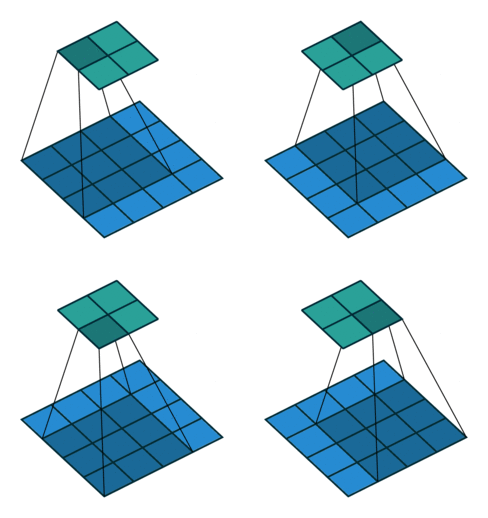
For each region, the layer computes a dot product of the weights and the input, and then adds a bias term. A set of weights that is applied to a region in the image is called a filter. The filter moves along the input image vertically and horizontally, repeating the same computation for each region. In other words, the filter convolves the input.
This image shows a 3-by-3 filter scanning through the input. The lower map represents the input and the upper map represents the output.
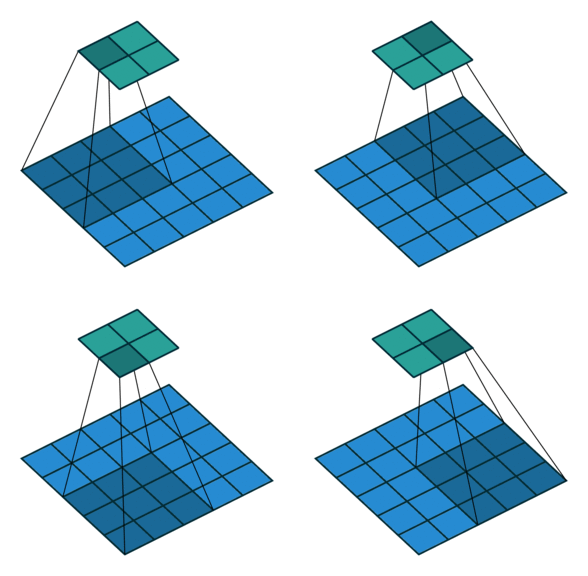
The step size with which the filter moves is called a stride. You
can specify the step size with the Stride name-value argument. The
local regions that the neurons connect to can overlap depending on the
filterSize and 'Stride' values.
This image shows a 3-by-3 filter scanning through the input with a stride of 2. The lower map represents the input and the upper map represents the output.
The number of weights in a filter is h * w *
c, where h is the height, and w
is the width of the filter, respectively, and c is the number of
channels in the input. For example, if the input is a color image, the number of color
channels is 3. The number of filters determines the number of channels in the output of a
complex convolutional layer. Specify the number of filters using the
numFilters argument with the function.complexConvolution2dLayer
A dilated convolution is a convolution in which the filters are expanded by spaces
inserted between the elements of the filter. Specify the dilation factor using the
'DilationFactor' property.
Use dilated convolutions to increase the receptive field (the area of the input which the layer can see) of the layer without increasing the number of parameters or computation.
The layer expands the filters by inserting zeros between each filter element. The dilation
factor determines the step size for sampling the input or equivalently the upsampling factor
of the filter. It corresponds to an effective filter size of (Filter Size
– 1) .* Dilation Factor + 1. For example, a 3-by-3 filter with the
dilation factor [2 2] is equivalent to a 5-by-5 filter with zeros between
the elements.
This image shows a 3-by-3 filter dilated by a factor of two scanning through the input. The lower map represents the input and the upper map represents the output.

As a filter moves along the input, it uses the same set of weights and the same bias for the convolution, forming a feature map. Each feature map is the result of a convolution using a different set of weights and a different bias. Hence, the number of feature maps is equal to the number of filters. The total number of parameters in a convolutional layer is ((h*w*c + 1)*Number of Filters), where 1 is the bias.
You can also apply padding to input image borders vertically and
horizontally using the 'Padding' name-value argument. Padding is
values appended to the borders of the input to increase its size. By adjusting the
padding, you can control the output size of the layer.
This image shows a 3-by-3 filter scanning through the input with padding of size 1. The lower map represents the input and the upper map represents the output.

The output height and width of a convolutional layer is (Input Size – ((Filter Size – 1)*Dilation Factor + 1) + 2*Padding)/Stride + 1. This value must be an integer for the whole image to be fully covered. If the combination of these options does not lead the input data to be fully covered, the software by default ignores the remaining part of the data along the right and bottom edges in the convolution.
The product of the output height and width gives the total number of neurons in a feature map, say Map Size. The total number of neurons (output size) in a convolutional layer is Map Size*Number of Filters.
Usually, the results from these neurons pass through some form of nonlinearity, such as rectified linear units (ReLU).
You can adjust the learning rates and regularization options for the layer using
name-value arguments while defining the complex convolutional layer. If you choose not to
specify these options, then the trainnet function uses the global
training options defined with the trainingOptions function.
A complex convolutional neural network can consist of one or multiple complex convolutional layers. The number of complex convolutional layers depends on the amount and complexity of the data.
Most layers in a layer array or layer graph pass data to subsequent layers as formatted
dlarray objects.
The format of a dlarray object is a string of characters in which each
character describes the corresponding dimension of the data. The format consists of one or
more of these characters:
"S"— Spatial"C"— Channel"B"— Batch"T"— Time"U"— Unspecified
For example, you can describe 2-D image data that is represented as a 4-D array, where the
first two dimensions correspond to the spatial dimensions of the images, the third
dimension corresponds to the channels of the images, and the fourth dimension
corresponds to the batch dimension, as having the format "SSCB"
(spatial, spatial, channel, batch).
You can interact with these dlarray objects in automatic differentiation
workflows, such as those for:
developing a custom layer
using a
functionLayerobjectusing the
forwardandpredictfunctions withdlnetworkobjects
This table shows the supported input formats of ComplexConvolution2DLayer objects and the
corresponding output format. If the software passes the output of the layer to a custom
layer that does not inherit from the nnet.layer.Formattable class, or to
a FunctionLayer object with the Formattable property set
to 0 (false), then the layer receives an unformatted
dlarray object with dimensions ordered according to the formats in this
table. The formats listed here are only a subset of the formats that the layer supports. The
layer might support additional formats, such as formats with additional
"S" (spatial) or "U" (unspecified)
dimensions.
| Input Format | Output Format |
|---|---|
|
|
|
|
|
|
|
|
|
|
|
|
References
[1] Barrachina, Jose Agustin, Chengfang Ren, Gilles Vieillard, Christelle Morisseau, and Jean-Philippe Ovarlez. "Theory and Implementation of Complex-Valued Neural Networks". Preprint, submitted February 16, 2023. https://arxiv.org/abs/2302.08286
[2] Trabelsi, Chiheb, Olexa Bilaniuk, Ying Zhang, Dmitriy Serdyuk, Sandeep Subramanian, João Felipe Santos, Soroush Mehri, Negar Rostamzadeh, Yoshua Bengio, and Christopher J Pal. "Deep Complex Networks". Preprint, submitted February 25, 2018. https://arxiv.org/abs/1705.09792.
Version History
Introduced in R2026b
See Also
trainnet | dlnetwork | convolution2dLayer | complexConvolution1dLayer | complexFullyConnectedLayer | complexReluLayer | zreluLayer | complexToRealLayer | realToComplexLayer | Deep Network Designer
1 Image credit: Convolution arithmetic (License)
MATLAB Command
You clicked a link that corresponds to this MATLAB command:
Run the command by entering it in the MATLAB Command Window. Web browsers do not support MATLAB commands.
选择网站
选择网站以获取翻译的可用内容,以及查看当地活动和优惠。根据您的位置,我们建议您选择:。
您也可以从以下列表中选择网站:
如何获得最佳网站性能
选择中国网站(中文或英文)以获得最佳网站性能。其他 MathWorks 国家/地区网站并未针对您所在位置的访问进行优化。
美洲
- América Latina (Español)
- Canada (English)
- United States (English)
欧洲
- Belgium (English)
- Denmark (English)
- Deutschland (Deutsch)
- España (Español)
- Finland (English)
- France (Français)
- Ireland (English)
- Italia (Italiano)
- Luxembourg (English)
- Netherlands (English)
- Norway (English)
- Österreich (Deutsch)
- Portugal (English)
- Sweden (English)
- Switzerland
- United Kingdom (English)