ncapScenario
Syntax
Description
Add-On Required: This feature requires the Automated Driving Toolbox Test Suite for Euro NCAP Protocols add-on.
Generate Scenario Descriptor
generates a seed scenario descriptor, descriptor = ncapScenario(ncapTestName)descriptor, for the input
European New Car Assessment Programme (Euro
NCAP®) test name ncapTestName.
[
generates seed scenario descriptors for all scenarios for the specified test name, and
returns the scenario information descriptor,scenarioInfo] = ncapScenario(ncapTestName,AllScenarios=true)scenarioInfo.
[___] = ncapScenario(___,
specifies options using one or more name-value arguments, in addition to any combination
of arguments from previous syntaxes. For example, Name=Value)ShowProgress="GUI"
displays the scenario generation progress bar in a graphical user interface.
Generate Scenario Descriptor Using euroAssessment Object
Since R2026a
generates a seed scenario descriptor, descriptor = ncapScenario(euroAssessmentObj,ncapTestName)descriptor, for the input
Euro NCAP test name
ncapTestName using the Euro NCAP assessment protocol specifications
euroAssessmentObj.
[
generates seed scenario descriptors for all scenarios for the specified test name, and
returns the scenario information descriptor,scenarioInfo] = ncapScenario(euroAssessmentObj,ncapTestName,AllScenarios=true)scenarioInfo.
[___] = ncapScenario(___,
specifies options using one or more name-value arguments. For example,
Name=Value)ShowProgress="GUI" displays the scenario generation progress bar in a
graphical user interface.
Examples
Specify the European New Car Assessment Programme (Euro NCAP) test name for the Vulnerable Road User Automatic Emergency Braking Crossing Car-to-Pedestrian Nearside Child Obstructed test.
ncapTestName = "VRU AEB Crossing CPNCO";Generate a seed scenario descriptor for the NCAP test, which you can use to create its variants.
descriptor = ncapScenario(ncapTestName);
To visualize the created scenario, specify the path to your local RoadRunner installation folder. This code shows the path for the default installation location of RoadRunner R2024a on Windows®.
appPath = "C:\Program Files\RoadRunner R2024a\bin\win64";Specify the path to your RoadRunner project. This code shows the path for a sample project folder location in Windows.
projectPath = "C:\RR\MyProject";Set up the environment for opening the scenario in RoadRunner. Update the settings group.
s = settings; s.roadrunner.application.InstallationFolder.TemporaryValue = appPath;
Open RoadRunner using the specified path to your project, and get the ScenarioSimulation object from your scenario.
rrApp = roadrunner(projectPath);
scenario = getScenario(descriptor,Simulator="RoadRunner",SimulatorInstance=rrApp);
Specify the Euro NCAP test name for the Safety Assist Automatic Emergency Braking Car-to-Car Front head-on lane change scenario.
ncapTestName = "SA AEB CCFhol";Specify the path to your RoadRunner ego asset.
egoAssetInfo.AssetPath = "Vehicles/DeliveryVan.fbx_rrx.rrmeta";Generate an array of scenario descriptors and their scenario information for the specified Euro NCAP test name.
[descriptors,scenarioInfo] = ncapScenario(ncapTestName,AllScenarios=true,EgoAssetInfo=egoAssetInfo);
SA AEB CCFhol Progress: (100%)[==================================================]( 2/ 2)
Specify the path to your local RoadRunner installation folder. This code shows the path for the default installation location on Windows®.
appPath = "C:\Program Files\RoadRunner R2024b\bin\win64";Specify the path to your RoadRunner project. This code shows the path for a sample project folder location in Windows.
projectPath = "C:\RR\MyProject";Set up the environment to open the scenario in RoadRunner. Update the settings group.
To update the MATLAB® path for the RoadRunner installation folder, get the root object within the settings hierarchical tree, and update the TemporaryValue for the RoadRunner installation folder property. For more information, see SettingsGroup.
s = settings; s.roadrunner.application.InstallationFolder.TemporaryValue = appPath;
Open RoadRunner using the specified path to your project. The rrApp RoadRunner object enables you to interact with RoadRunner from the MATLAB workspace.
rrApp = roadrunner(projectPath);
Specify a valid index for a scenario descriptor object.
idx = 1;
Create a RoadRunner scenario for the scenario descriptor object at the specified index.
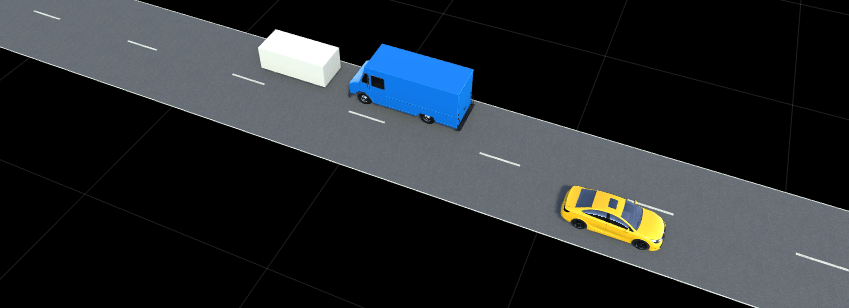
scenario = getScenario(descriptors(idx),Simulator="RoadRunner",SimulatorInstance=rrApp);This figure shows an instance of the simulated Safety Assist Automatic Emergency Braking Car-to-Car Front head-on lane change scenario in RoadRunner, which contains an ego vehicle represented as a blue delivery van.
Since R2026a
Specify a European New Car Assessment Programme (Euro NCAP) test name from protocol specification years 2026–2028.
ncapTestName = "CA FC CCRs";Create a Euro NCAP protocol specification object for protocol specification years 2026–2028.
euroAssessmentObj = euroAssessment(2026);
Generate a seed scenario descriptor for the Euro NCAP test, which you can use to create its variants.
descriptor = ncapScenario(euroAssessmentObj,ncapTestName);
To visualize the created scenario, specify the path to your local RoadRunner installation folder. This code shows the path for the default installation location of RoadRunner R2026a on Windows®.
appPath = "C:\Program Files\RoadRunner R2026a\bin\win64";Specify the path to your RoadRunner project. This code shows the path for a sample project folder location in Windows.
projectPath = "C:\RR\MyProject";Set up the environment for opening the scenario in RoadRunner. Update the settings group.
s = settings; s.roadrunner.application.InstallationFolder.TemporaryValue = appPath;
Open RoadRunner using the specified path to your project, and get the ScenarioSimulation object from your seed scenario descriptor.
rrApp = roadrunner(projectPath);
scenario = getScenario(descriptor,Simulator="RoadRunner",SimulatorInstance=rrApp);Connection status: 1
Connected to RoadRunner Scenario server on localhost:41430, with client id {f1494d10-dfc4-4891-8413-e0a7406e87e9}

Input Arguments
Euro NCAP test scenario name, specified as
a character vector or string scalar, representing a valid Euro NCAP test scenario name. The list of valid Euro NCAP test scenario names depends on the protocol specification year specified
by the Year property of euroAssessmentObj.
2023, or you do not specify
euroAssessmentObj— See the Euro NCAP Test Scenario Information section of Euro NCAP Test Scenarios for Protocol Specification Years 2023–2025, which lists the full names of the valid Euro NCAP test scenarios, their correspondingncapTestNamevalues, and their descriptions for protocol specification years 2023–2025.2026 — See the Euro NCAP Test Scenario Information section of Euro NCAP Test Scenarios for Protocol Specification Years 2026–2028, which lists the full names of Euro NCAP test scenarios, their corresponding
ncapTestNamevalues, and their descriptions for protocol specification years 2026–2028. (since R2026a)
For more information on the Euro NCAP test scenarios, see Euro NCAP Car Safety Protocols.
Since R2026a
Euro NCAP assessment protocol specifications, specified as a euroAssessment object.
Name-Value Arguments
Specify optional pairs of arguments as
Name1=Value1,...,NameN=ValueN, where Name is
the argument name and Value is the corresponding value.
Name-value arguments must appear after other arguments, but the order of the
pairs does not matter.
Example:
ncapScenario(ncapTestName,AllScenarios=true,ShowProgress="GUI") displays
the scenario generation progress bar in a graphical user interface.
Show the progress bar, specified as one of these options:
"CommandLine"— Displays the scenario generation progress bar in the MATLAB® Command Window."GUI"— Displays the scenario generation progress bar in a graphical use interface (GUI)."No"— Does not displays the progress bar.
Ego asset information, specified as a structure. The structure contains these fields:
| Field | Description |
|---|---|
AssetPath | Ego asset path, specified as a string scalar. The value must be a valid RoadRunner asset path for an ego vehicle. |
Dimension | Dimensions of the ego asset, specified as a structure with these fields:
|
Note
To use the EgoAssetInfo name-value argument:
You must install RoadRunner and activate your RoadRunner license interactively. For more information, see Install and Activate RoadRunner (RoadRunner).
You must also specify
AllScenarios=trueto thencapScenariofunction.
Output Arguments
Scenario descriptors, returned as a ScenarioDescriptor object or an
N-element array of ScenarioDescriptor
objects.
If you specify AllScenarios=true to the
ncapScenario function, the function returns an
N-element array of ScenarioDescriptor objects.
N is the number of generated scenario descriptors for a specified
Euro NCAP test name. Otherwise, the function
returns a single ScenarioDescriptor object that represents the seed
scenario for a specified Euro NCAP test
name.
Each ScenarioDescriptor object stores the scene, actor, and vehicle
information of a seed scenario. You can use this information to generate scenario
variants for performing safety assessments for various automated driving
applications.
By default, the function specifies the ego vehicle as a sedan in the returned
scenario descriptor object, and fixes the dimensions of the sedan to
[4.5556
1.9378
1.4538
0.8940
0.9483
2.7133] in the form [length
width
height
frontOverhang
rearOverhang
wheelbase]. Units are in meters. For more information on actor
dimensions, see Actor and Vehicle Positions and Dimensions.
To plot the first frame of the scenario simulation in the
ScenarioDescriptor object, use the plot
function. The plot also returns a ScenarioDescriptorPlot object containing properties you can use to plot and
simulate the scenario from a scenario descriptor object. To configure the properties of
the ScenarioDescriptorPlot object, use the configure
object function. To plot a specific frame of the scenario simulation, use the seek object
function. To instead play the entire scenario simulation, use the play object
function.
Scenario information, returned as a structure. The structure contains these fields:
| Field | Description |
|---|---|
ValidScenario | Valid scenario flag, returned as |
Messages | Messages and warnings related to the generated scenarios, returned as a string scalar or character vector. The
|
BehaviorUnderTest | Behavioral safety assessment test parameters, returned as a structure with these fields:
|
EventTime | Time at which an event occurs, returned as a scalar. For example, for a collision event, this field represents the time at which the collision occurs. Units are in seconds. |
EgoTrajectory | Trajectory information of the ego vehicle, returned as a structure with these fields:
|
Note
To return the scenarioInfo output argument, you must also
specify AllScenarios=true to the ncapScenario
function.
Version History
Introduced in R2024aThe ncapScenario function now accepts the
euroAssessmentObj argument, enabling support for Euro NCAP tests for protocol specification years 2026–2028.
For more information on the supported Euro NCAP
test scenarios for protocol specification years 2026–2028, see Euro NCAP Test Scenarios for Protocol Specification Years 2026–2028.
The ncapScenario function now supports these additional Euro NCAP test scenarios:
"SA LSS Lane Departure Warning""SA LSS HMI Blind Spot Monitoring GVT""SA LSS HMI Blind Spot Monitoring EMT"
The ncapScenario function now supports these name-value arguments:
ShowProgressEgoAssetInfo
The ncapScenario function now returns an additional output argument
scenarioInfo when you specify AllScenarios=true as
input
These Euro NCAP test scenarios are now renamed:
"VRU AEB Lateral CM Oncoming"is now called"VRU LSS CM Oncoming vehicle""VRU AEB Lateral CM Overtaking unintentional"is now called"VRU LSS CM Overtaking vehicle unintentional""VRU AEB Lateral CM Overtaking intentional"is now called"VRU LSS CM Overtaking vehicle intentional"
The ncapScenario function now supports these additional Euro NCAP test scenarios:
"VRU AEB Reverse CPRs""VRU AEB Reverse CPRm""SA LSS LKA Solid Line""SA LSS LKA Dashed Line""SA LSS ELK Road Edge""SA LSS ELK Solid Line""SA LSS ELK Oncoming vehicle""SA LSS ELK Overtaking vehicle intentional""SA LSS ELK Overtaking vehicle unintentional""VRU AEB Lateral CM Oncoming""VRU AEB Lateral CM Overtaking unintentional""VRU AEB Lateral CM Overtaking intentional"
For your specified Euro NCAP test scenario
ncapTestName, the ncapScenario function
specifies the ego vehicle as a sedan with the dimensions [4.5556
1.9378
1.4538
0.8940
0.9483
2.7133] in the form [length
width
height
frontOverhang
rearOverhang
wheelbase]. Units are in meters.
See Also
table2scenario | getScenario | generateVariants | ncapSpec | plot | ScenarioDescriptorPlot
MATLAB Command
You clicked a link that corresponds to this MATLAB command:
Run the command by entering it in the MATLAB Command Window. Web browsers do not support MATLAB commands.
选择网站
选择网站以获取翻译的可用内容,以及查看当地活动和优惠。根据您的位置,我们建议您选择:。
您也可以从以下列表中选择网站:
如何获得最佳网站性能
选择中国网站(中文或英文)以获得最佳网站性能。其他 MathWorks 国家/地区网站并未针对您所在位置的访问进行优化。
美洲
- América Latina (Español)
- Canada (English)
- United States (English)
欧洲
- Belgium (English)
- Denmark (English)
- Deutschland (Deutsch)
- España (Español)
- Finland (English)
- France (Français)
- Ireland (English)
- Italia (Italiano)
- Luxembourg (English)
- Netherlands (English)
- Norway (English)
- Österreich (Deutsch)
- Portugal (English)
- Sweden (English)
- Switzerland
- United Kingdom (English)