chromaticAberration
Compute lateral and longitudinal chromatic aberration of optical system
Since R2026a
Description
Add-On Required: This feature requires the Optical Design and Simulation Library for Image Processing Toolbox add-on.
specifies options for computing chromatic aberration using one or more name-value
arguments. For example, ca = chromaticAberration(opsys,Name=Value)NumSamples=200 specifies to compute the
chromatic aberration at 200 evenly spaced coordinate points.
Examples
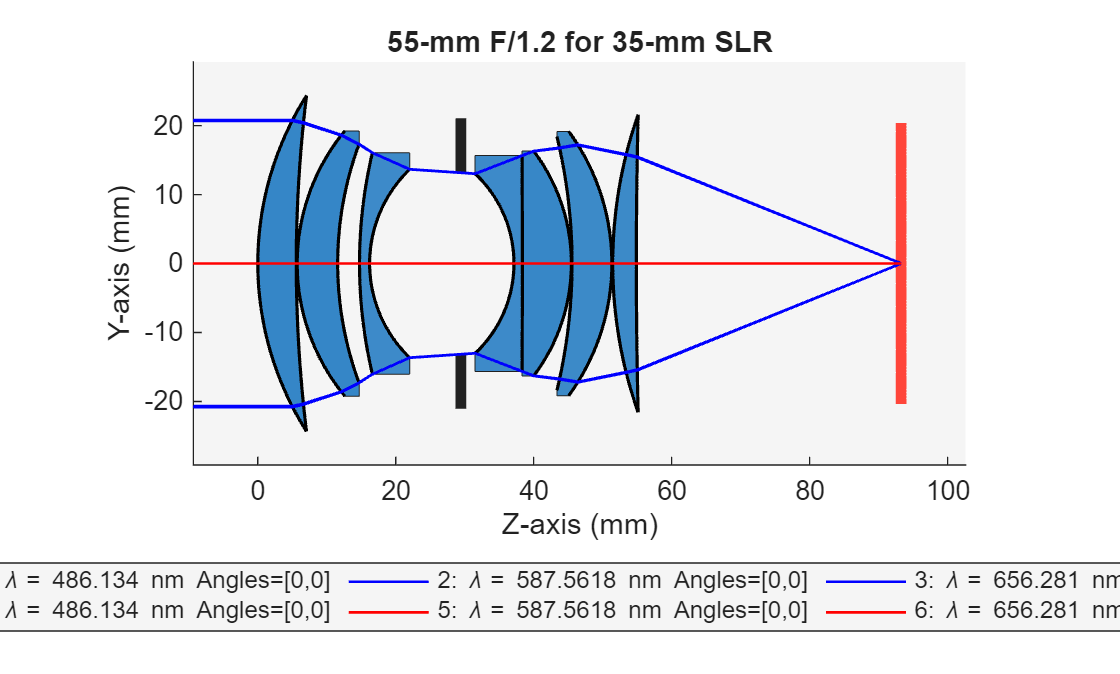
Create an optical system that contains a double Gauss lens using the createDoubleGauss helper function. The function is attached to this example as a supporting file.
opsys = createDoubleGauss;
Trace the marginal rays and the chief ray for the optical system.
mrays = traceMarginalRays(opsys); cray = traceChiefRay(opsys);
Display a 2-D visualization of the optical system and the traced rays. The displayed chief ray is red, and the marginal rays are blue.
hv = view2d(opsys); addRays(hv,mrays,Color="b") addRays(hv,cray,Color="r")
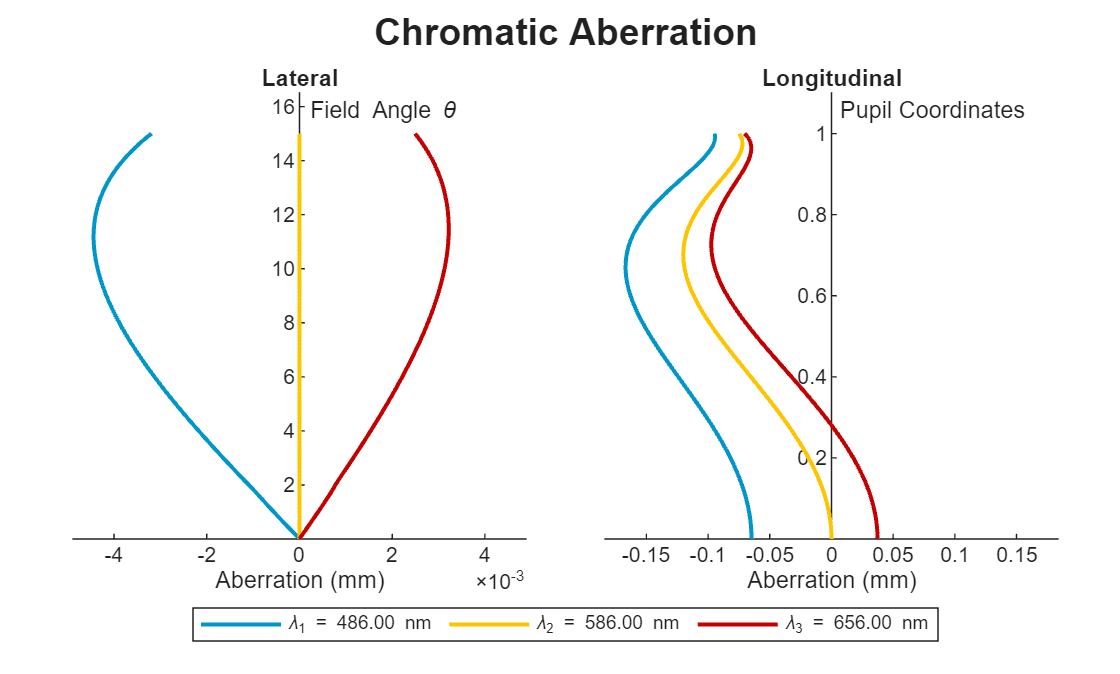
Compute the chromatic aberration of an optical system using the chromaticAberration object function. Specify the maximum field angle as 15 degrees using the MaxFieldAngle name-value argument. Display the results using the show object function.
ca = chromaticAberration(opsys,Wavelengths=[486 586 656],MaxFieldAngle=15); show(ca)
ans =
ChromaticAberrationChart with properties:
ChromaticAberration: [1×1 optics.result.ChromaticAberration]
Color: [3×3 double]
Title: "Chromatic Aberration"
Legend: on
Grid: "off"
Parent: [1×1 Figure]
Show all properties
Input Arguments
Optical system for which to compute the chromatic aberration, specified as an
opticalSystem object.
Name-Value Arguments
Specify optional pairs of arguments as
Name1=Value1,...,NameN=ValueN, where Name is
the argument name and Value is the corresponding value.
Name-value arguments must appear after other arguments, but the order of the
pairs does not matter.
Example: chromaticAberration(NumSamples=200) specifies to compute the
chromatic aberration at 200 evenly spaced coordinate points.
Wavelengths for which to trace rays and compute the chromatic aberration,
specified as an M-element numeric vector. M is
the number of wavelengths, and each element of the vector represents a wavelength, in
nanometers. By default, the chromatic aberration is computed at the wavelengths
specified by the Wavelengths property of the opticalSystem
object opsys.
Index of the reference wavelength at which to compute the chromatic aberration, specified as a positive integer.
If you specify the Wavelengths name-value argument, the
default index of the reference wavelength is M/2, rounded up to the
nearest integer. M is the number of wavelengths in
Wavelengths. If you do not specify the
Wavelengths name-value argument, the default reference
wavelength is the primary wavelength specified by the
PrimaryWavelengthIndex property of the
opticalSystem object, opsys.
Maximum field angle, or angle from the optical axis, at which to compute the lens
distortion, specified as a numeric scalar in the range [0, 180]. By
default, the MaxFieldAngle value is set to 0.9 times the value of
the half-angle. To compute the half field of view, or half-angle, use the halfFieldOfView object function.
Decrease the field angle to minimize discontinuities at the possible expense of missing important performance information at larger field angles, such as vignetting.
Number of evenly sampled points at which to compute chromatic aberration, specified as a positive integer. To produce a smoother curve, increase the number of sampled points at the expense of increased computation time.
Output Arguments
Lateral and longitudinal chromatic aberration values, returned as a ChromaticAberration object. A plot of the lateral aberration shows how the
image points deviate laterally from their ideal positions across the field. A plot of
the longitudinal aberration shows how image points deviate along the optical
axis.
More About
The lateral aberration analysis relies on the behavior of the chief ray and the marginal rays. The chief ray is defined as a ray that originates from the field point and passes through the center of the entrance pupil halfway between the upper and lower marginal rays of the optical system. A blocking surface, such as a lens or diaphragm, can prevent certain rays from reaching the image plane. This can cause the marginal rays to have discontinuous paths. Since the chief ray is defined based on its position relative to the marginal rays, it can also exhibit discontinuous behavior. To eliminate discontinuities in the aberration plot, the
chromaticAberrationfunction uses aMaxFieldAnglevalue that is 0.9 times the value of the half-angle for the computation.
Algorithms
Lateral (transverse) chromatic aberration results from different wavelengths of light
focusing at different points on the image plane depending on incidence angle. The
chromaticAberration function computes this aberration value using these
steps.
Sample the angle spanned from the optical axis to the maximum field angle using N equally spaced field angle values, where N is the value specified by the
NumSamplesname-value argument. ThechromaticAberrationfunction defines the maximum field angle as the angle specified using theMaxFieldAnglename-value argument, or as the half field of view, or half-angle, for the optical system at reference wavelength.At each specified wavelength, trace the chief ray for each field angle and determine where it intersects the image plane.
For each chief ray, center the results using the point at which the reference wavelength hits the image plane. The lateral shift of an image point at wavelength compared to a reference wavelength is:
This results in the lateral chromatic aberration value along the y-axis.
Longitudinal (axial) chromatic aberration results from different wavelengths of light
focused at different distances from the lens. The chromaticAberration function
computes this aberration value using these steps.
Define an on-axis field point at infinity.
At each specified wavelength, compute the entrance pupil.
Sample grid points in each computed entrance pupil along the
y-axis in the normalized coordinate range[0, 1], where0and1is the center and topmost y-coordinate of the entrance pupil, respectively.Trace rays through the sampled entrance pupil grid, and compute where each ray intersects the image space optical axis.
Compute the longitudinal aberration as the difference between the focal length at each wavelength, , and the focal length at the reference wavelength, :
Version History
Introduced in R2026a
MATLAB Command
You clicked a link that corresponds to this MATLAB command:
Run the command by entering it in the MATLAB Command Window. Web browsers do not support MATLAB commands.
选择网站
选择网站以获取翻译的可用内容,以及查看当地活动和优惠。根据您的位置,我们建议您选择:。
您也可以从以下列表中选择网站:
如何获得最佳网站性能
选择中国网站(中文或英文)以获得最佳网站性能。其他 MathWorks 国家/地区网站并未针对您所在位置的访问进行优化。
美洲
- América Latina (Español)
- Canada (English)
- United States (English)
欧洲
- Belgium (English)
- Denmark (English)
- Deutschland (Deutsch)
- España (Español)
- Finland (English)
- France (Français)
- Ireland (English)
- Italia (Italiano)
- Luxembourg (English)
- Netherlands (English)
- Norway (English)
- Österreich (Deutsch)
- Portugal (English)
- Sweden (English)
- Switzerland
- United Kingdom (English)