distanceAfter
R2026bDescription
Add-On Required: This feature requires the Optical Design and Simulation Library for Image Processing Toolbox add-on.
Examples
Create an empty optical system.
opsys = opticalSystem;
To add a lens component to the optical system, create the two refractive surfaces of the lens using the addRefractiveSurface object function. Specify the lens glass material using the Material name-value argument for the first surface. Specify the center thickness of the lens, in millimeters, using the DistanceToNext name-value argument.
addRefractiveSurface(opsys,Radius=50,DistanceToNext=1.5,Material=pickGlass("N-BK7"))
addRefractiveSurface(opsys,Radius=-50)
Add a gap using the addGap object function.
addGap(opsys,20)
Add a diaphragm using the addDiaphragm object function. Specify the diaphragm properties using the DistanceToNext and SemiDiameter name-value arguments.
addDiaphragm(opsys,DistanceToNext=28,SemiDiameter=2)
Add an image plane using the addImagePlane object function.
addImagePlane(opsys,SemiDiameter=2)
Display a 2-D visualization of the optical system using the view2d object function.
view2d(opsys,Labels="component")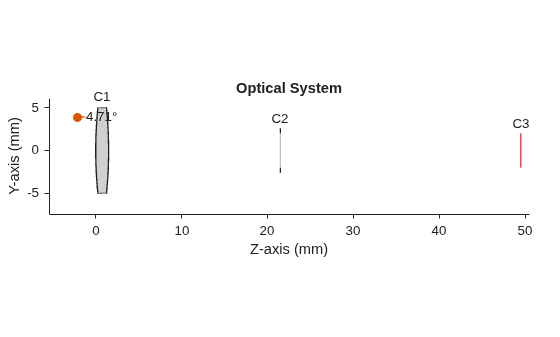
ans =
  OpticalSystemViewer2D with properties:

            Title: ""
    OpticalSystem: [1×1 opticalSystem]
           Labels: "component"
      FieldPoints: "on"
             Rays: [0×0 optics.ui.Rays2D]
           Parent: [1×1 Figure]

  Show all properties
Query the distance between the first and second components in the optical system using the distanceAfter object function. Specify the index of the second component to query the distance between it and the next component.
dAfter=distanceAfter(opsys,1)
dAfter =
20
Modify the distance between the first and second components in the optical system using the changeGap object function.
changeGap(opsys,1,5,GapLocation="after");Display a 2-D visualization of the optical system using the view2d object function.
view2d(opsys,Labels="component")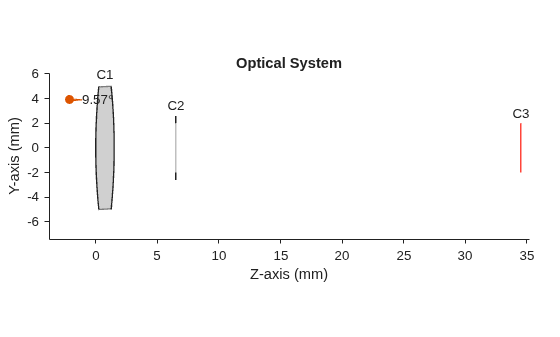
ans =
  OpticalSystemViewer2D with properties:

            Title: ""
    OpticalSystem: [1×1 opticalSystem]
           Labels: "component"
      FieldPoints: "on"
             Rays: [0×0 optics.ui.Rays2D]
           Parent: [1×1 Figure]

  Show all properties
Input Arguments
Output Arguments
Version History
Introduced in R2026a
See Also
opticalSystem | addImagePlane | addRefractiveSurface | addDiaphragm | addGap | distanceBefore | changeGap

