Assess Quality of an ECG Classification App
R2026bThis example shows how to assess and improve the quality of an electrocardiogram (ECG) classification app. In this example, you:
Assess Code Quality: Assess the current state of project metrics and identify quality metrics to improve.
Measure and Improve Code Coverage: More thoroughly test source code by increasing the amount of code coverage.
Identify and Address Gaps in Requirements Traceability: Improve the implementation and verification of the requirements by identifying unlinked requirements and creating links from source code and tests.
Verify Equivalence of MATLAB Code and Generated Code: Generate C code from MATLAB® code and test that the generated code is functionally equivalent to the MATLAB source code.
Generate Test and Coverage Reports: Document the quality of the project for certification purposes by generating test and coverage reports.
Use the ECG Classification App
You can use the ECG Classification App to select a hypothetical patient, visualize their ECG data, and run an analysis to classify the ECG signals.
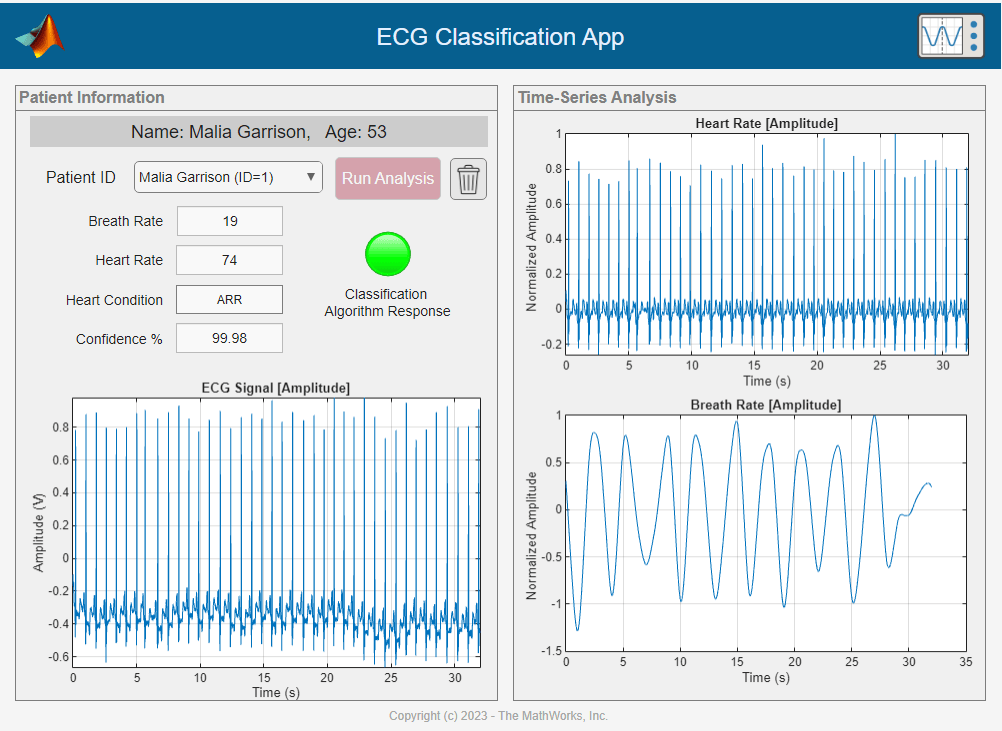
The app displays the heart rate, breath rate, the heart condition identified by the classifier, and plots the amplitude of the ECG signal, the heart rate and breath rate of the patient.
Examine Project
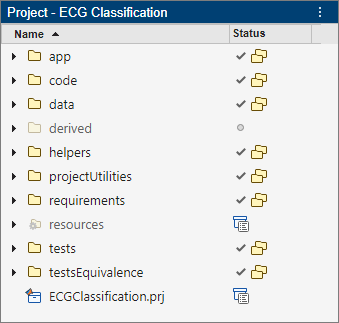
The ECGClassification project stores the code that runs, tests, and deploys the ECG Classification app:
The
appfolder stores the ECG Classification App.The
code,helpers, anddatafolders store the functions the ECG Classification App uses.The
testsfolder stores tests that verify the functions the app uses for calculations.The
testsEquivalencefolder stores tests that generate C code from MATLAB functions that compute heart and breath rate calculations, and test the generated code for equivalence with the source code.The
requirementsfolder stores requirements that specify required behavior the app needs to meet.The
projectUtilitiesfolder stores functions that set up the project and provide shortcuts to complete common project tasks.