Generate Test and Coverage Reports
R2026bThis step of the example shows how to generate test and coverage reports to document the quality of the project for certification purposes.
Create Test Report
To document the current test results, create a test report. In the MATLAB Test
Manager, create a test report for the current test results by clicking the
Report button  . Under the Test Result
Reports section, click Generate Test Result
Report.
. Under the Test Result
Reports section, click Generate Test Result
Report.
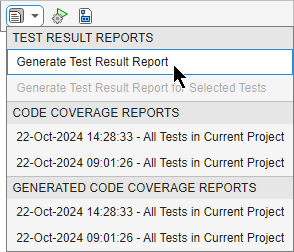
A dialog box opens. Navigate to the reports folder, name the report
myTestReport, and set the file type to HTML. Click Save. The test report opens.
Collect Coverage Results and Generate Report
To document the current coverage results, collect the coverage results, then create a coverage report. Create a test suite for the project. To run the test suite and collect coverage, create a test runner, add a coverage plugin to the runner, and specify the source code folders. Then, generate an interactive HTML report to view the results, and generate a standalone HTML report for certification purposes.
Import the CodeCoveragePlugin and CoverageResult
classes.
import matlab.unittest.plugins.CodeCoveragePlugin
import matlab.unittest.plugins.codecoverage.CoverageResult
Create a test suite that contains the tests in the project.
project = currentProject;
suite = matlab.unittest.TestSuite.fromProject(project);
Create a test runner and customize it by using a plugin that provides programmatic
access to statement, function, and decision coverage metrics for the code in the
app, code, helpers
folders.
runner = testrunner("textoutput",OutputDetail=0);
format = CoverageResult;
folders = ["app","code","helpers"];
plugin = CodeCoveragePlugin.forFolder(folders, ...
    Producing=format,Metrics="decision");
addPlugin(runner,plugin)
Run the tests.
run(runner,suite);
Assign the coverage results to a variable to use for generating coverage reports.
results = format.Result
results =
  11×1 Result array with properties:

    Filename
    CreationDate
    Filter

Coverage summary (HTML report):
   Function: (5+1)/22 (27.27%)
   Statement: (41+3)/395 (11.13%)
   Decision: (12+2)/48 (29.16%)

Use coverageSummary to retrieve information from the coverage results.
Generate Code Coverage Report
Generate a code coverage report from the coverage results. Name the report
myCoverageReport and save it as an HTML file in the
reports folder.
fp = fullfile(project.RootFolder,"reports", ...
    "myCoverageReport.html");
generateHTMLReport(results,fp);
Generate Standalone Code Coverage Report
Generate a standalone code coverage report from the coverage results. Name the
report myStandaloneCoverageReport and save it as an HTML file in
the reports folder.
fp = fullfile(project.RootFolder,"reports", ...
    "myStandaloneCoverageReport.html");
generateStandaloneReport(results,fp)
Generating standalone report. Please wait.
    Preparing content for the standalone report.
    Adding content to the standalone report.
    Writing standalone report to file.
The standalone code coverage report opens.
See Also
Apps
Functions
Classes
matlab.unittest.plugins.CodeCoveragePlugin|matlab.unittest.plugins.codecoverage.CoverageResult|matlab.unittest.TestSuite

