Measure and Improve Code Coverage
R2026bThis step of the example shows how to improve code coverage by adding tests for uncovered code and justifying missing coverage.
Assess Current Code Coverage
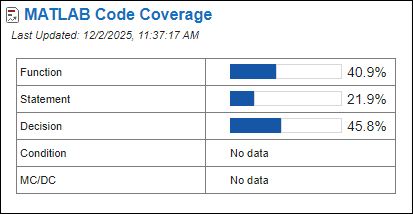
View the current code coverage for the project in the Code Quality Dashboard. The dashboard indicates that the function coverage is 40.9%, the statement coverage is 21.9%, and the decision coverage is 45.8%.
Add Tests for Uncovered Code
To improve the coverage, you can identify source code not executed by tests by viewing the Code Coverage Report. Open the report by clicking MATLAB Code Coverage in the dashboard.
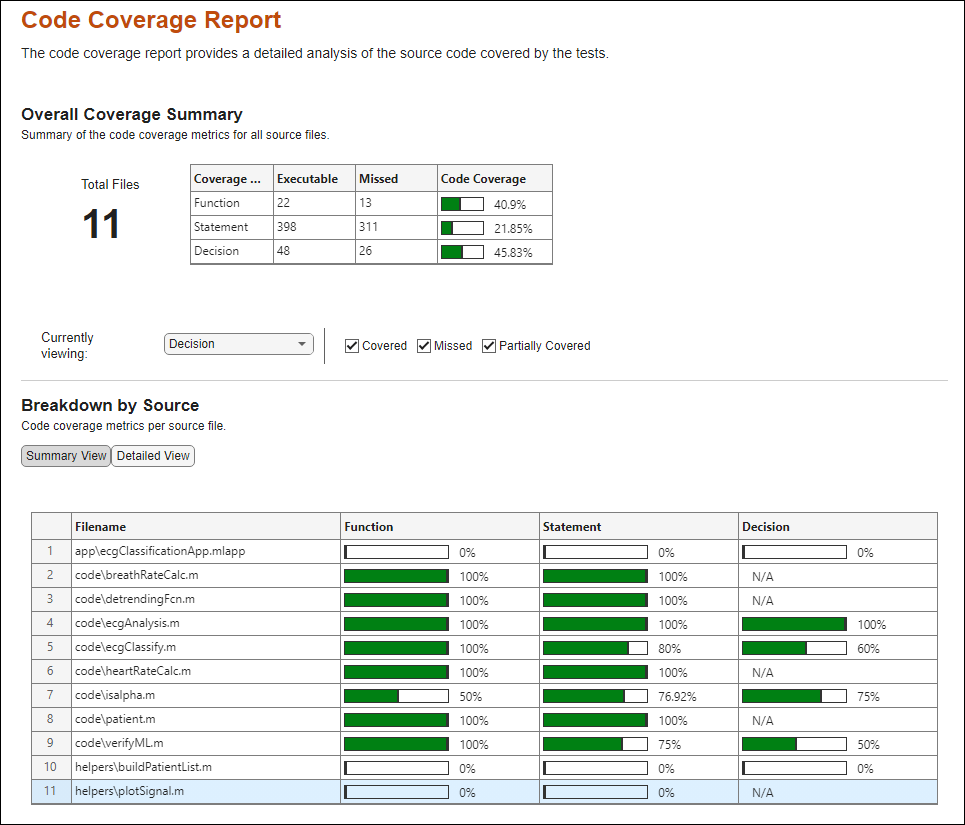
Row 11 indicates that the plotSignal.m function in the
helpers folder does not have tests that execute it. Create a test
that covers the source code in the plotSignal function:
In the project pane, right-click the
testsfolder and select New > Test Class.Name the file
testPlotSignal.m.Open the file. The file contains the default code for a test class.
Delete the code in the file and copy and paste this test code. Then, save the test. In the Editor tab, click Save.
classdef testPlotSignal < matlab.unittest.TestCase
    properties
        ECGData
        figHandle % Store the figure handle
    end

    properties (TestParameter)
        patientId = num2cell(20:2:60);
    end

    methods(TestClassSetup)
        function loadData(testCase)
            testCase.ECGData = load("ECGData.mat");
        end
    end

    methods (TestMethodTeardown)
        function closeFigure(testCase)
            % Close the figure using the stored handle
            close(testCase.figHandle);
        end
    end

    methods (Test)
        function test_plotSignal(testCase,patientId)
            data = testCase.ECGData;
            signal = data.ECGData.Data(patientId,1:4096);
            freq = data.Fs;

            % Specify the inputs of plotSignal
            patientData = struct("id",patientId,"data",struct("signal", ...
                signal,"time",(0:length(signal)-1)/freq));

            % Verify that plotSignal does not produce any warnings
            line = testCase.verifyWarningFree(@() plotSignal(patientData));

            % Get a handle to the figure created by plotSignal
            ax = line.Parent;
            testCase.figHandle = ax.Parent;
        end
    end
end
Alternatively, if you have MATLAB® Copilot, you can generate a unit test for the plotSignal.m function. For more information, see Generate Unit Tests Using MATLAB Copilot.
The project now contains a test that covers the plotSignal function. To
view the new tests, open the MATLAB Test Manager by clicking Tests in the Code Quality Dashboard. In the
Filter by text field, enter
testPlotSignal.
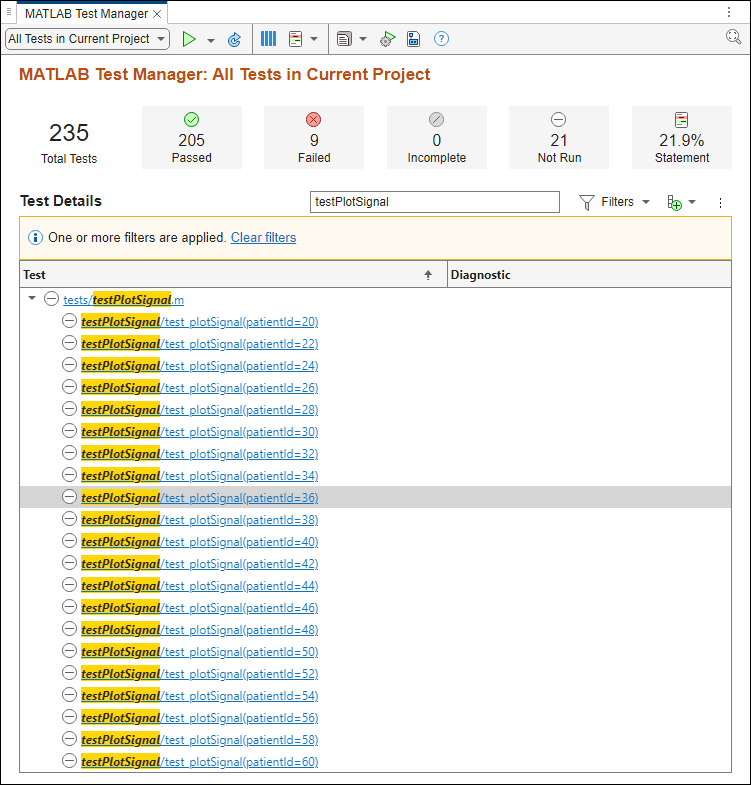
The MATLAB Test Manager lists the tests from the testPlotSignal
file and indicates that the tests have not run. Clear the filter by clicking Clear filters.
Collect Coverage Using New Tests
Measure the code coverage improvement by using the MATLAB Test Manager to run the tests in the project.
In the menu, set the drop-down list on the left to All Tests in Current
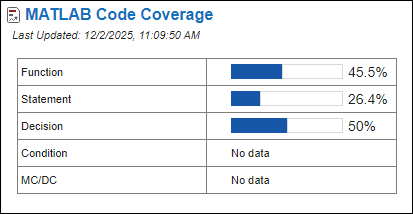
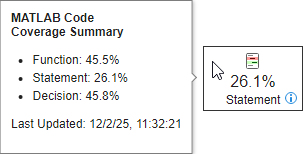
Project, then click the Run button  . Point to the Statement button to see the updated coverage. The function coverage
improved to 45.5% and the statement coverage improved to 26.1%.
. Point to the Statement button to see the updated coverage. The function coverage
improved to 45.5% and the statement coverage improved to 26.1%.
Justify Missing Coverage
Some source code functions are not used and cannot be covered by tests. You can improve the code coverage for the project by using justifications to filter the unused functions from the code coverage results.
For example, the isalpha.m file contains the isalpha and isnotalpha functions.
type isalpha.mfunction out = isalpha(s)
out = false;
if ~ischar(s)
s = char(s);
end
s = upper(s);
n = length(s);
for i = 1:n
c = s(i);
if (uint8(c) < 65) || (uint8(c) > 90)
return
end
end
out = true;
end
function out = isnotalpha(s)
if ~ischar(s)
s = char(s);
end
out = ~isalpha(s);
end
To view the detailed analysis of code coverage for the isalpha.m file, open
the Code Coverage Report. In the Code Quality Dashboard, click MATLAB Code Coverage. Under Breakdown
by Source, select code\isalpha.m in row 7. View the
detailed analysis of the decision coverage in the Source
Details section.
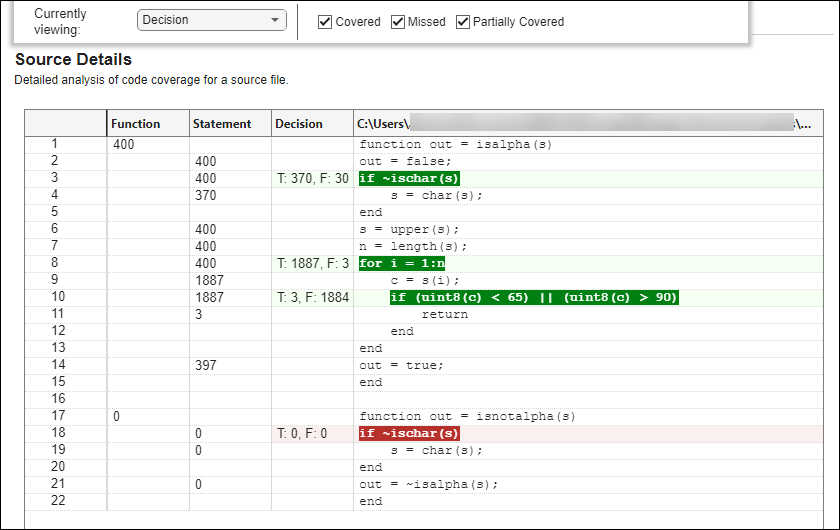
The report indicates that the tests do not execute the isnotalpha function,
nor do they execute the if ~ischar(s) statement in line 18. To check
if the function is unused, open the Code Analyzer Report. In the Code Quality
Dashboard, click Code Issues.
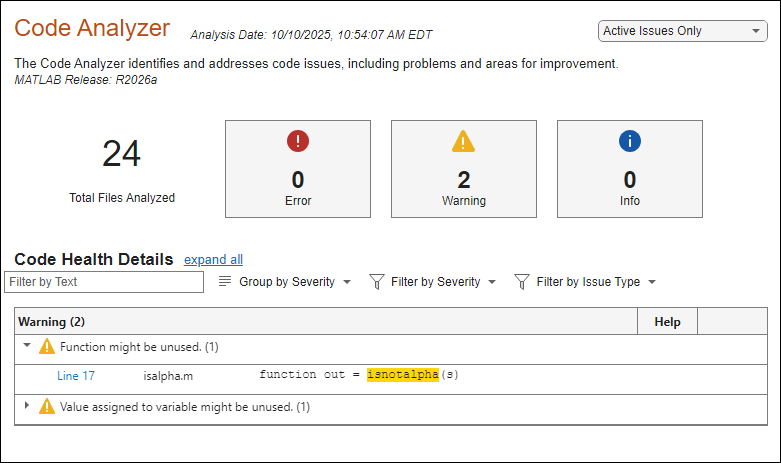
The Code Analyzer Report indicates that the isnotalpha function might be
unused, which means that the test do not execute the function. To omit the
isnotalpha function from the coverage results, filter the
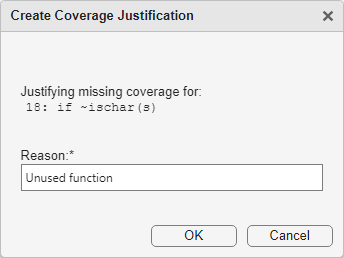
function by justifying the missing coverage. In the Code Coverage Report, click the
highlighted code if ~ischar(s) in line 18. In the Create Coverage
Justification dialog box, enter Unused function, then click OK.
In the Code Quality Dashboard, click Refresh Metrics. The MATLAB Code Coverage section indicates that the decision coverage improved to 50%.